
1. はじめに
The JDIAG JD101 is a universal On-Board Diagnostics II (OBD2) car code reader designed to diagnose engine-related issues in vehicles. It provides essential information such as Diagnostic Trouble Codes (DTCs), live data streams, and vehicle information, helping users identify and resolve common car problems. This device also includes a battery test function to assess the vehicle's battery status. It is compatible with most OBDII compliant vehicles manufactured in the USA (1996 and newer), Europe (EOBD, 2000 and newer), and Asia (2000 and newer), as well as newer OBDII and CAN protocol vehicles.

図1.1: The JDIAG JD101 scanner helps identify various vehicle issues.
2. パッケージ内容
パッケージを開封したら、すべてのアイテムが揃っていて良好な状態であることを確認してください。
- 1 x JDIAG JD101 OBD2 Scanner Unit
- 多言語ユーザーマニュアル x 1

図2.1: Contents of the JDIAG JD101 package.
3.製品オーバーview
The JDIAG JD101 features a compact design with a 2.4-inch LCD display and a user-friendly 4-button keypad for navigation. It connects directly to your vehicle's OBD2 port for power and data transfer.

図3.1: JDIAG JD101 Product Components.
主な特徴:
- ユニバーサル互換性: Supports most US OBDII (1996+), European EOBD (2000+), Asian (2000+) vehicles, and newer OBDII/CAN protocols.
- ワンクリックI/M準備: Quickly checks emission system status.
- DTC 検索: Reads generic (P0, P2, P3, U0) and manufacturer-specific (P1, P3, U1) codes, including pending, stored, and permanent codes.
- MILコントロール: Determines the reason for the Malfunction Indicator Lamp (MIL) illumination and allows for its deactivation.
- 画面: 2.4-inch LCD with DTC definitions directly on screen.
- データ表示: Shows freeze frame data and live data streams (over 130 PIDs).
- DTC ルックアップ: Built-in DTC library for quick reference.
- 車両情報: 車両識別番号 (VIN)、キャリブレーション ID (CIN)、およびキャリブレーション検証番号 (CVN) を取得します。
- バッテリーテスト機能: Assesses the vehicle's battery status.
- 多言語サポート: English, Spanish, French, Russian, German, Italian, etc.
- ファームウェアの更新: Free online firmware updates via USB cable.

図3.2: キーアドバンtages of the JDIAG JD101 scanner.
4. セットアップと接続
The JDIAG JD101 does not require batteries. It is powered directly by your vehicle's OBD2 port.
- OBD2 ポートを見つけます。 OBD2ポートは通常、運転席側のダッシュボードの下、多くの場合ステアリングコラム付近にあります。見つからない場合は、車両の取扱説明書を参照してください。
- イグニッションをオフにする: Ensure your vehicle's ignition is in the OFF position before connecting the scanner.
- スキャナーを接続します。 Plug the OBD2 connector of the JD101 scanner firmly into your vehicle's OBD2 port.
- イグニッションをオンにする: Turn the vehicle's ignition to the ON position (do not start the engine unless instructed by a specific test procedure). The scanner will automatically power on and display the main menu.
5. 操作手順
使用 Up そして 下 buttons to navigate through menu options, the 入力 button to select an option, and the 出口 前のメニューに戻るか、機能を終了するためのボタンです。
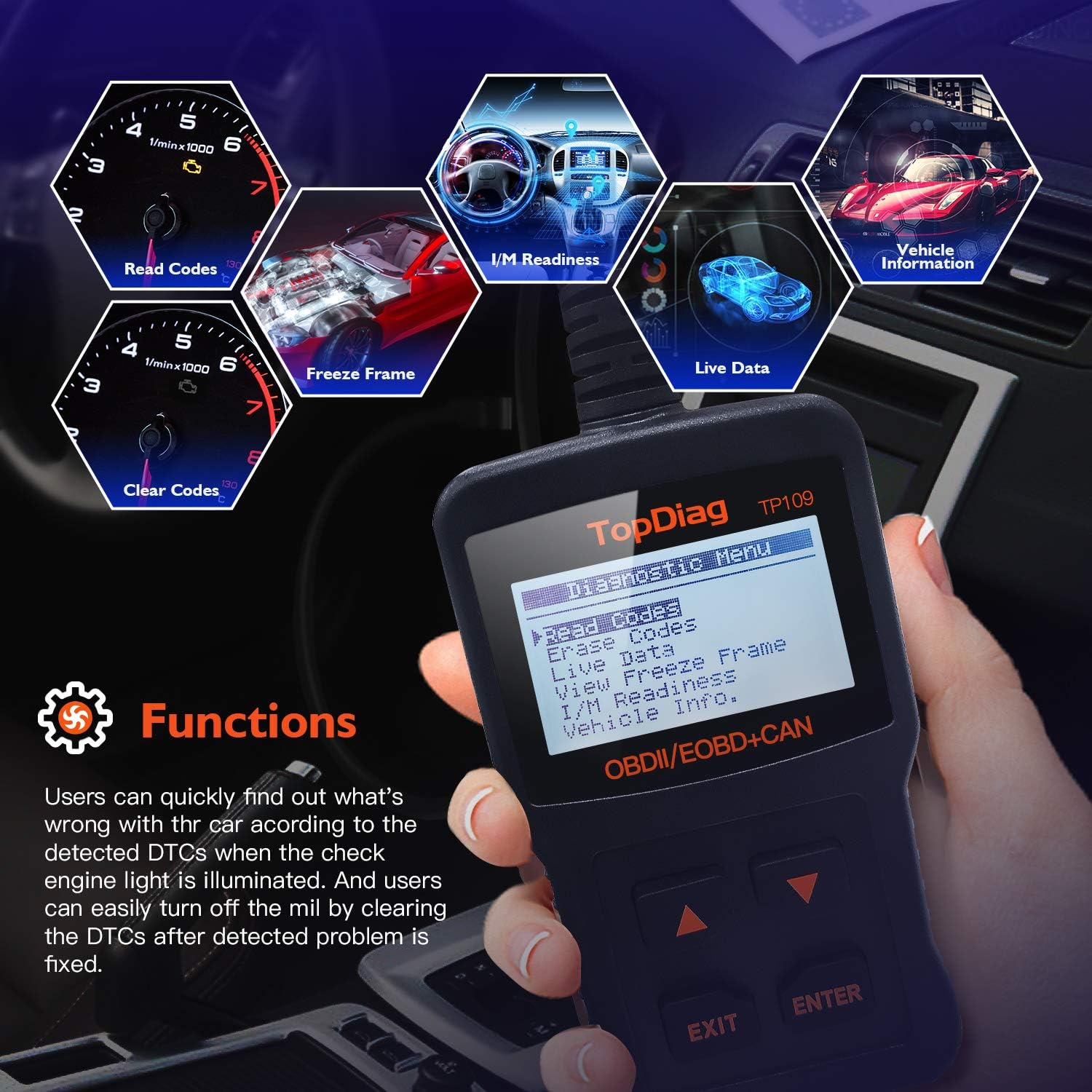
図5.1: Main functions of the JDIAG JD101 scanner.
5.1. コードを読み取る
この機能は、車両のコンピューターから診断トラブルコード(DTC)を取得します。これらのコードは、車両の自己診断システムによって検出された特定の問題を示します。
- メインメニューから、 コードを読む を押して 入力.
- The scanner will display any detected DTCs, along with their definitions on the 2.4-inch LCD.
- 使用 Up そして 下 buttons to scroll through multiple codes if present.
5.2. コードの消去
この機能は、車両のコンピュータからすべての診断トラブルコード(DTC)をクリアし、故障インジケータLをオフにします。amp (MIL). Ensure the underlying issue has been resolved before clearing codes.
- メインメニューから、 コードの消去 を押して 入力.
- プロンプトが表示されたら選択内容を確認します。
- The scanner will clear the codes and turn off the MIL.
5.3. ライブデータストリーム
This function displays real-time operational parameters from the vehicle's sensors and components, such as engine RPM, vehicle speed, oxygen sensor readings, and more. The JD101 supports over 130 PIDs (Parameter IDs).
- メインメニューから、 ライブデータ を押して 入力.
- The scanner will display a list of available PIDs. Select the desired parameters to view.
- The data will be displayed in real-time. Use the Up そして 下 データをスクロールするためのボタン。
5.4. I/M の準備
I/M Readiness (Inspection/Maintenance Readiness) indicates whether the various emissions-related systems on the vehicle are operating correctly and have completed their diagnostic tests. This is useful for emissions testing.
- メインメニューから、 I/M の準備 を押して 入力.
- The scanner will display the status of various monitors (e.g., Catalyst Monitor, O2 Sensor Monitor). A 'PASS' or 'OK' status indicates the monitor has completed its test.
5.5. フレームデータのフリーズ
When an emission-related fault occurs, the vehicle's computer stores a snapshot of operating conditions at the moment the fault was detected. This is called Freeze Frame Data and can help in diagnosing intermittent problems.
- メインメニューから、 View フリーズフレーム を押して 入力.
- スキャナーは記録されたパラメータを表示します。
5.6. Vehicle Information (VIN, CIN, CVN)
この機能を使用すると、重要な車両識別情報を取得できます。
- VIN (Vehicle Identification Number): A unique 17-character code for the vehicle.
- CIN (Calibration Identification Number): Identifies the software version of the vehicle's Engine Control Unit (ECU).
- CVN (Calibration Verification Number): A checksum value used to verify the integrity of the ECU software.
- メインメニューから、 車両情報 を押して 入力.
- スキャナーには利用可能な車両情報が表示されます。

図5.2: Retrieving vehicle identification information.
5.7. バッテリーテスト機能
The JD101 includes a function to determine the vehicle's battery status, providing a quick assessment of its health.
- メインメニューから、 バッテリーテスト (または同様のオプション)を押して 入力.
- Follow the on-screen prompts to perform the test. The scanner will display the battery voltageとステータス。
6. メンテナンス
6.1. ファームウェアのアップデート
The JDIAG JD101 supports free online firmware updates to ensure compatibility with newer vehicles and to add new features. This process requires a computer running Windows and a Mini USB cable (not included).
- ソフトウェアをダウンロード: Visit the official JDiag web地点 (www.jdiag.com) and navigate to the 'Downloads' section. Download the latest firmware update tool (e.g., 'JD setup toolkit') and the firmware file for the JD101.
- ドライバーのインストール: Install the provided USB driver (e.g., STMicroelectronics driver) on your Windows PC.
- スキャナーを接続: Connect the JD101 scanner to your PC using a Mini USB cable.
- 更新ツールを実行します: Launch the appropriate upgrade tool (e.g., 'JD Series upgrade tool', ない 'Elite II upgrade tool').
- プロンプトに従ってください: Follow the on-screen instructions to select the firmware file and initiate the update process. The update may take several minutes. Do not disconnect the device during this time.
- 検証: Once complete, the tool will display a success message, including the new firmware version and device serial number.
注記: The update software is compatible with Windows operating systems, including Windows XP as specified in product details. Ensure your PC meets the minimum system requirements for the update tool.
7。 トラブルシューティング
- デバイスの電源が入らない: Ensure the scanner is correctly plugged into the vehicle's OBD2 port and the vehicle's ignition is in the ON position. The device draws power directly from the OBD2 port.
- 車両との通信なし: Verify that your vehicle is OBDII compliant (most US vehicles 1996+, European EOBD 2000+, Asian 2000+). Check the connection to the OBD2 port. If issues persist, try the scanner on another compatible vehicle to rule out a vehicle-specific problem.
- Scanner Not Working Properly: If the device exhibits unexpected behavior, try performing a firmware update as described in Section 6.1. If the problem persists, contact JDIAG technical support.
- Cannot Read ABS/Airbag Codes: The JDIAG JD101 is designed to work exclusively with engine-related codes (OBDII/EOBD). It does not support diagnostic functions for ABS (Anti-lock Braking System) or Airbag systems.
8. 仕様
| 特徴 | 仕様 |
|---|---|
| ブランド | JDIAG |
| モデル番号 | JD101 (also referred to as 'code reader') |
| 電源 | Vehicle OBD2 Port Powered (No internal batteries required for operation) |
| 画面サイズ | 2.4インチ |
| サポートされているプロトコル | SAE J1850 PWM, SAE J1850 VPW, ISO 9141-2, ISO 14230-4 KWP, ISO 15765-4 CAN |
| オペレーティング システム (更新用) | Windows XP and newer (for firmware update software) |
| アイテム重量 | 220グラム |
| メーカー | JDiagエレクトロニクステクノロジー株式会社 |
| 欧州連合 | 780614143477、791280490895 |
9. 保証とサポート
The JDIAG JD101 OBD2 scanner comes with a 2年間の保証 購入日から、製造上の欠陥および通常使用における故障をカバーします。
For technical assistance, troubleshooting, or warranty claims, please contact JDIAG customer support or visit the official JDIAG website for further resources and contact information:
正式 Webサイト: www.jdiag.com