
導入
The MUSKY DY28 is a versatile device combining a Bluetooth speaker, smart touch lamp, alarm clock, and MP3 player into a single unit. This manual provides instructions for its setup, operation, and maintenance to ensure optimal performance.
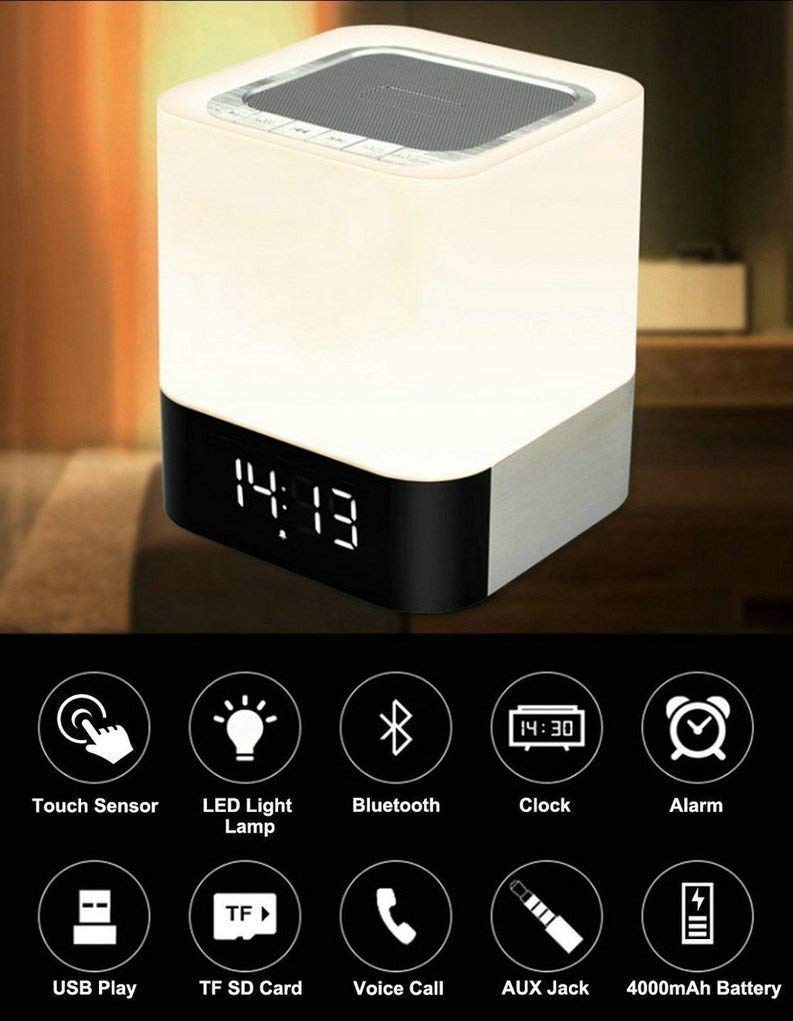
Image: The MUSKY DY28 device, showcasing its integrated clock display and touch-sensitive light panel.
箱の内容
- MUSKY DY28 Bluetoothスピーカー
- ユーザーマニュアル
- 充電ケーブル
製品の特徴
- 多機能: Bluetooth speaker, smart touch lamp, alarm clock, and MP3 player.
- Bluetooth 4.0: Easy and stable connection with Bluetooth-enabled devices.
- 調節可能なLEDライト: Warm LED light with adjustable brightness (Max 20 Lumen) via touch sensor.
- デジタル時計とアラーム: Big digit 12/24H alarm clock with calendar, alarm, and sleep mode functions.
- 複数の再生モード: Supports MP3 playback via USB, micro TF/SD Card, and 3.5mm AUX input.
- オーディオ品質: 5W single acoustic driver with enhanced passive low-frequency radiator for clear sound and solid bass.
- 長いバッテリー寿命: Built-in 4000mAh battery provides up to 15 hours of lighting or 9 hours of music playback (depending on usage).
- ハンズフリー通話: 通話応答用の内蔵マイク。
設定
1. デバイスの充電
Before first use, fully charge the speaker. Connect the provided USB charging cable to the charging port on the device and to a standard USB power adapter (not included) or a computer's USB port. The charging indicator will show the charging status.
2. 電源のオン/オフ
Locate the Power On/Off switch on the device. Slide the switch to the 'ON' position to power on the speaker. Slide it to 'OFF' to power off.
3.Bluetoothペアリング
- Ensure the speaker is powered on and in Bluetooth mode (indicated by a flashing blue light or voice prompt).
- モバイル デバイスで Bluetooth を有効にし、利用可能なデバイスを検索します。
- Select 'MUSKY DY28' from the list of devices.
- Once paired, the speaker will indicate a successful connection (e.g., solid blue light or voice prompt).
4. 時刻とアラームの設定
Refer to the detailed control diagram for button locations. Use the 'Mode' button to cycle through functions until the clock setting is displayed. Use the 'Previous' and 'Next' buttons to adjust hours and minutes, and the 'Play/Pause' button to confirm. For alarm settings, follow a similar procedure, activating the alarm function and setting the desired time.

画像: 詳細 view of the MUSKY DY28's control panel, highlighting buttons for power, charging, audio inputs, playback, volume, and the touch sensor.
操作手順
1.音楽の再生
The DY28 supports multiple music sources:
- Bluetoothモード: After successful pairing, play music from your connected device. Use the speaker's 'Play/Pause', 'Previous', and 'Next' buttons to control playback.
- USB入力: MP3が入ったUSBフラッシュドライブを挿入します fileUSBポートに差し込みます。スピーカーは自動的にUSBモードに切り替わり、再生を開始します。
- Micro TF/SD Card: Insert a micro TF/SD card with MP3 files into the Micro SD Slot. The speaker will automatically switch to TF/SD card mode and play music.
- AUX入力: Connect an external audio device using a 3.5mm AUX cable to the AUX port. The speaker will switch to AUX mode. Control playback from your external device.

Image: Visual guide demonstrating the three primary ways to play music on the DY28: via Bluetooth, Micro SD card, and USB drive.
2. 軽い操作
The top panel of the speaker features a touch sensor for controlling the LED light. Tap the touch sensor to turn the light on/off and cycle through different brightness levels. The light offers a warm glow suitable for various environments.

Image: The MUSKY DY28 speaker illuminated, serving as a night light with its digital clock display visible in a low-light environment.
3. 目覚まし時計機能
Once the alarm is set, it will sound at the designated time. To snooze, tap the touch sensor. To turn off the alarm, press the 'Mode' button or power off the device. The sleep mode feature allows the lamp and speaker to automatically turn off after a set period.
4. ハンズフリー通話
When a call comes in while connected via Bluetooth, the speaker will ring. Press the 'Play/Pause' button to answer the call. Press it again to end the call. The integrated microphone allows for hands-free conversation.
仕様
| 特徴 | 詳細 |
|---|---|
| ブランド | マスキーパイク |
| モデル番号 | DY28 |
| 接続技術 | 補助、Bluetooth、USB |
| 無線技術の種類 | ブルートゥース |
| 取り付けタイプ | 卓上マウント |
| スピーカータイプ | 本棚 |
| 製品の特徴 | Light for emergency use |
| コントローラータイプ | タッチパッド |
| 制御方法 | 触る |
| 色 | 白 |
| バッテリー容量 | 4000mAh(内蔵) |
| Battery Life (Lighting) | 最大15時間 |
| バッテリー寿命(音楽再生) | 最大9時間 |
| 充電時間 | 2~4時間 |
| Bluetooth範囲 | 33フィート/ 10メートル |
| 電源 | 電池駆動 |
| オーディオチャンネルの数 | 5ワット |
| 防水です | 真実 |
| アイテム重量 | 700グラム |
| 対応デバイス | MP3プレーヤー、スマートフォン、タブレット |
トラブルシューティング
- 電源なし: Ensure the device is fully charged. Check the power switch is in the 'ON' position.
- Bluetoothをペアリングできません: Make sure the speaker is in Bluetooth pairing mode. Ensure your device's Bluetooth is enabled and within range (10 meters). Try restarting both devices.
- 音が出ない: Check the volume level on both the speaker and your connected device. Ensure the correct input mode (Bluetooth, USB, TF/SD, AUX) is selected.
- ライトが点灯しない: Tap the touch sensor on the top of the speaker. Ensure the device has sufficient battery charge.
- アラームが鳴らない: アラーム時間が正しく設定され、アラーム機能が有効になっていることを確認します。
メンテナンス
- 柔らかく乾いた布でデバイスを拭いてください。研磨剤入りの洗剤や溶剤は使用しないでください。
- スピーカーを極端な温度、直射日光、高湿度にさらさないでください。
- 長期間使用しない場合は、デバイスを涼しく乾燥した場所に保管してください。
- 保証が無効になるため、デバイスを自分で分解または修理しないでください。
公式製品ビデオ
Video: Official product video demonstrating the key features and functions of the MUSKY DY28 Bluetooth Speaker, Smart Touch Lamp, and Alarm Clock.
保証とサポート
保証情報およびカスタマーサポートについては、ご購入時に付属の説明書をご参照いただくか、メーカーに直接お問い合わせください。保証請求の際に必要となるため、購入証明書は保管してください。