
1. はじめに
This manual provides detailed instructions for the installation, operation, maintenance, and troubleshooting of the SEAFRONT SKI780 VFD Inverter Frequency Converter. This device is designed for precise motor speed control in various industrial and commercial applications. Please read this manual thoroughly before installation and operation to ensure safe and efficient use of the product.

図1: 全般 view of the SEAFRONT SKI780 VFD Inverter Frequency Converter.
2. 安全情報
人身傷害や機器の損傷を防ぐために、常に次の安全上の注意事項を守ってください。
- 設置および配線は必ず資格のある担当者のみが行うようにしてください。
- Disconnect all power sources before performing any wiring, maintenance, or inspection.
- 入力ボリュームを確認するtagインバータの仕様と一致します。
- Do not touch electrical components immediately after power-off, as residual voltage may be present. Wait at least 5 minutes.
- Install the inverter in a clean, dry, and well-ventilated environment, away from direct sunlight, corrosive gases, and flammable materials.
- 機器が適切に接地されていることを確認してください。
3.製品オーバーview
The SEAFRONT SKI780 VFD Inverter is a versatile device offering advanced control features for various motor applications.
主な特徴:
- Integrated synchronous control and proportional timing control.
- Six speed control modes for automatic operation.
- Ability to lock all or part of the keys (analog potentiometer unlocked).
- Normally open relay and two high configuration outputs with 100 optional channels.
- Integrated user-defined counter/meter.
- 0-100% adjustable torque output at zero speed, with zero-speed brake function.
- V/F control and output torsion control.
- Integrated communication interface.
- Equipped with a speed potentiometer and an external panel.
- Five opto-isolated digital inputs, 100 optional channels.
- One analog input, two analog output channels.
- Textile pendulum frequency function, suitable for textile equipment.

図2: 前面 view of the inverter showing the control panel and terminals.
4. 仕様
| 仕様 | 価値 |
|---|---|
| モデル番号 | SKI780-0D75G-1 |
| ブランド | SEAFRONT |
| 入力ボリュームtage | 220ボルト(AC) |
| 出力巻tage | 220ボルト(AC) |
| 出力電力 | 750ワット |
| ピーク出力電力 | 1500ワット |
| Inverter Power (VA) | 2200VA |
| 出力波形 | 修正正弦波 |
| 寸法(長さ×幅×高さ) | 14.2L x 11W x 8.5H センチメートル(5.6 x 4.3 x 3.3インチ) |
| コンセントの数 | 1 |
| 電源 | Vehicle DC Power Socket (Note: Product description indicates AC input) |
| 原産国 | 中国 |
| GTIN/UPC | 736342831933 |

Figure 3: Dimensions of the SKI780 VFD Inverter.
5. セットアップ
Careful installation and wiring are crucial for the proper functioning of the VFD inverter.
5.1 取り付け
- Mount the inverter vertically on a stable, non-flammable surface.
- 適切な換気と放熱を確保するために、ユニットの周囲に十分なスペースを確保してください。
- Avoid mounting in areas with excessive vibration, dust, or moisture.
5.2配線
Refer to the wiring diagram provided with your specific unit for detailed connections. General wiring steps include:
- 電源入力(L、N): Connect the main AC power supply to the L and N terminals. Ensure correct voltage (AC220V)。
- モーター出力(U、V、W): Connect the three-phase motor leads to the U, V, and W terminals.
- 接地(PE): Connect the ground wire to the PE terminal for safety.
- Brake Resistor (P+, PB): If a brake resistor is used, connect it to the P+ and PB terminals.
- 制御端末: Connect external control signals (digital inputs, analog inputs, relay outputs) to the respective terminals as per your application requirements.

Figure 4: Close-up of the inverter's terminal block for wiring connections.
5.3 External Panel Compatibility
If using an external control panel, ensure it is compatible with the inverter. The new panel design is specifically for new inverter models.

Figure 5: Correct connection of a new external panel to the inverter.
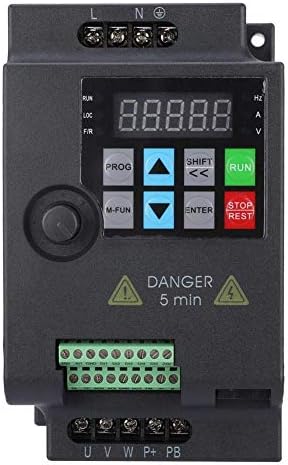
Figure 6: Incorrect connection of an old external panel to the inverter. Ensure panel compatibility.
6. 操作手順
The inverter features a control panel for setting parameters and operating the motor.
6.1コントロールパネルオーバーview
コントロール パネルには通常、次のものが含まれます。
- 画面: 周波数、音量を表示tage、current、およびその他のパラメータ。
- PROGボタン: パラメータ設定モードを開始/終了します。
- M-FUNボタン: 多機能ボタン。よく使用する機能にすばやくアクセスするためによく使用されます。
- 上/下矢印: メニューを移動してパラメータ値を調整します。
- SHIFT/Left/Right Arrows: Move cursor or change digits during parameter entry.
- ENTERボタン: Confirms selections and saves parameter changes.
- 実行ボタン: モーターを始動します。
- 停止/リセットボタン: モーターを停止するか、障害状態をリセットします。
6.2 基本操作
- 電源オン: インバータに電源を投入します。ディスプレイが点灯します。
- 周波数の設定: Use the Up/Down arrows or the external potentiometer to set the desired output frequency.
- 始動モーター: を押す 走る ボタンを押すとモーターが始動します。モーターは設定された周波数まで加速します。
- モーター停止: を押す 停止/リセット モーターを停止するにはボタンを押してください。モーターは減速して停止します。
6.3パラメータ設定
To configure advanced settings:
- を押す プログラム ボタンを押してパラメータ設定モードに入ります。
- 上/下矢印を使用して、パラメータ グループおよび個々のパラメータ間を移動します。
- プレス 入力 パラメータを選択します。
- Use the Up/Down arrows and SHIFT buttons to adjust the parameter value.
- プレス 入力 新しい値を保存します。
- プレス プログラム パラメータ設定モードを終了します。
7. メンテナンス
定期的なメンテナンスにより、VFD インバータの寿命が長くなり、信頼性の高い動作が保証されます。
- クリーニング: ほこりがたまらないように、インバーターの外装と通気口を定期的に清掃してください。柔らかく乾いた布を使用してください。液体洗剤は使用しないでください。
- 検査: 配線接続部の締め付け具合、損傷、腐食の兆候がないか定期的に点検してください。運転中に異常な音や臭いがないか確認してください。
- 冷却ファン: Ensure cooling fans are operating correctly and are free from obstructions. Replace noisy or faulty fans.
- 環境条件: 動作環境が指定された温度と湿度の範囲内であることを確認します。
- コンデンサ寿命: Electrolytic capacitors have a finite lifespan. Consider professional inspection and replacement after several years of continuous operation.
8。 トラブルシューティング
このセクションでは、発生する可能性のある一般的な問題に対する解決策を示します。
| 問題 | 考えられる原因 | 解決 |
|---|---|---|
| インバーターの電源が入らない | No input power; Blown fuse; Faulty wiring | 電源を確認し、ヒューズを交換し、配線接続を確認します。 |
| モーターが動かない | Incorrect parameters; Motor wiring error; Overload | Check frequency and control parameters; Verify motor wiring (U, V, W); Reduce motor load. |
| 過電流故障(OC) | Sudden load change; Short circuit in motor; Acceleration/deceleration time too short | Check motor and load; Increase acceleration/deceleration time parameters. |
| オーバーボルtageフォルト(OV) | 入力ボリュームtage too high; Regeneration during deceleration | 入力ボリュームを確認してくださいtage; Increase deceleration time; Install a brake resistor if necessary. |
| アンダーボルtage断層(UV) | 入力ボリュームtageが低すぎる; 電源供給が不安定 | 入力ボリュームを確認してくださいtage; 安定した電力供給を確保する。 |
| Overheat fault (OH) | 換気が悪い、周囲温度が高すぎる、ファンが故障している | Improve ventilation; Reduce ambient temperature; Check and replace cooling fan. |
For persistent issues or faults not listed, please contact technical support.
9. サポート
For technical assistance, product inquiries, or service requests, please contact SEAFRONT customer support through your purchase channel or the official SEAFRONT website. Please have your model number (SKI780-0D75G-1) and serial number ready when contacting support.