
重要な安全上の注意事項
To ensure safe operation and prolong the life of your monitor, please read and follow these instructions carefully:
- モニターを清掃する前に、必ず電源コードをコンセントから抜いてください。
- 感電を避けるため、モニターを雨や湿気にさらさないでください。
- 過熱を防ぐため、モニターの周囲を適切に換気してください。通気口を塞がないでください。
- 製造元が提供する電源アダプタとケーブルのみを使用してください。
- 電源コードやモニターの上に重い物を置かないでください。
- If the monitor is damaged or malfunctions, do not attempt to repair it yourself. Contact qualified service personnel.
パッケージ内容
Before proceeding with the setup, please check the contents of your package to ensure all items are present:
- Acer CB272U smiiprx LED Monitor
- モニタースタンド(ベースとアーム)
- 電源コード
- HDMIケーブル
- クイックスタートガイド / 保証書
設定
1. モニタースタンドの組み立て
- Carefully remove the monitor from its packaging. Place the monitor face down on a soft, clean cloth or surface to prevent scratches to the screen.
- Attach the stand arm to the back of the monitor panel. Ensure it is securely fastened, typically by sliding it into place until it clicks or by tightening screws.
- Connect the stand base to the bottom of the stand arm. Secure the base by tightening the captive screw located underneath the base.

図1:背面 view of the Acer CB272U smiiprx monitor with the stand attached, illustrating the assembly points.
2. Connecting the Monitor to Your Computer
- 付属の HDMI ケーブルの一方の端をモニターの HDMI ポートに接続します。
- Connect the other end of the HDMI cable to the HDMI output port on your computer or graphics card.
- 電源コードをモニターの電源入力に差し込み、もう一方の端をアースされた電源コンセントに差し込みます。

図2: 角度付き後部 view showing the input ports of the monitor, including HDMI and power connections.
モニターの操作
電源のオン/オフ
Locate the power button on the monitor's bezel. Press it once to turn the monitor on. The power indicator light will illuminate. Press it again to turn the monitor off.
Adjusting Display Settings (OSD Menu)
The On-Screen Display (OSD) menu allows you to customize various monitor settings. Use the control buttons (usually located on the back or bottom right of the monitor) to navigate the OSD menu. Common adjustments include:
- 輝度コントラスト: 全体的な輝度と明るい部分と暗い部分の差を調整します。
- 色の設定: 色温度、ガンマ、個々の RGB レベルを変更します。
- 入力ソース: Manually select the video input (e.g., HDMI).
- オーディオ: 内蔵スピーカーの音量を制御します。
人間工学に基づいた調整
The Acer CB272U smiiprx monitor stand offers multiple ergonomic adjustments to optimize your view快適さ:
- 高さ調整: モニターを目の高さまで上げたり下げたりします。
- Adjust the screen angle forward or backward to reduce glare.
- スイベル: Rotate the monitor horizontally to share your screen or adjust view角度。
- ピボット: Rotate the screen to a portrait orientation for document viewing またはコーディングします。
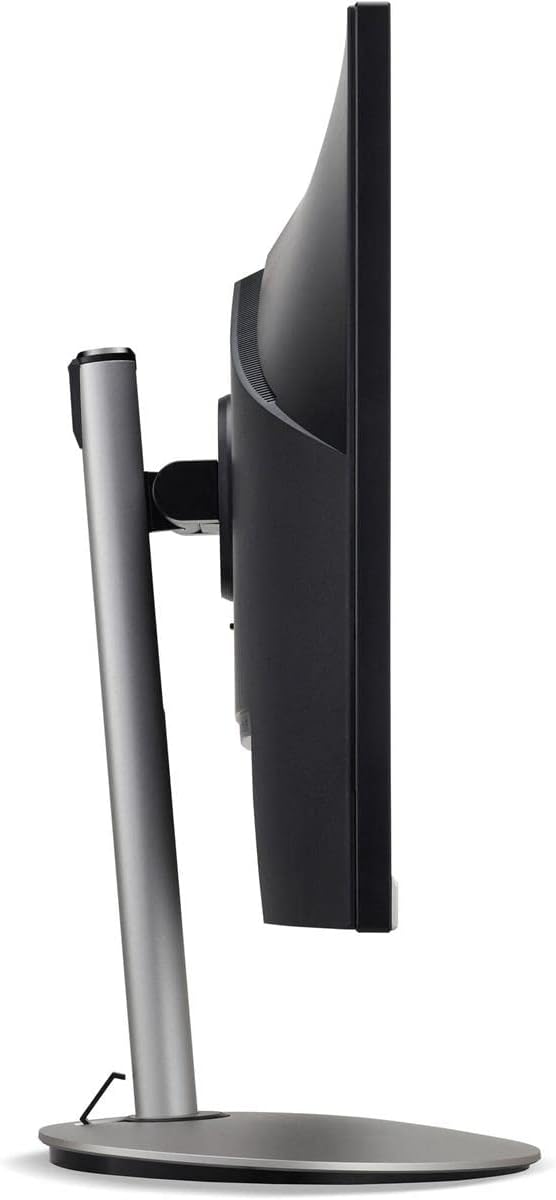
図3: サイドプロfile of the monitor, illustrating its adjustable stand for ergonomic positioning.
メンテナンス
Cleaning the Monitor Screen and Casing
To clean your monitor, first ensure it is turned off and unplugged from the power outlet. Use a soft, lint-free cloth. For stubborn marks, lightly dampen the cloth with water or a specialized non-abrasive screen cleaner. 液体をスクリーンやcに直接吹きかけないでください。asing. 強力な化学薬品、研磨剤入りの洗剤、溶剤の使用は避けてください。
保管ガイドライン
If you need to store the monitor for an extended period, it is recommended to use its original packaging to protect it from dust, moisture, and physical damage. Store in a cool, dry environment away from direct sunlight and extreme temperatures.
トラブルシューティング
一般的な問題とその解決策については、以下の表を参照してください。
| 問題 | 考えられる原因 | 解決 |
|---|---|---|
| 画面に画像がありません | 電源ケーブルが外れています。ビデオ ケーブルが外れています。入力ソースが正しく選択されていません。 | 電源とビデオ ケーブルの接続を確認します。モニターの電源がオンになっていることを確認します。OSD メニューから正しい入力ソースを選択します。 |
| 画像がぼやけたり歪んだりする | Incorrect resolution setting; Faulty video cable. | Set the display resolution to 2560 x 1440 at 75 Hz; Try a different HDMI cable. |
| スピーカーから音が出ない | Monitor volume too low or muted; Incorrect audio output selected on computer. | Adjust monitor volume via OSD; Unmute audio; Select the monitor as the audio output device in your computer's sound settings. |
| モニターのちらつき | リフレッシュ レートの不一致、干渉、ケーブルの不良。 | Ensure refresh rate is set to 75 Hz; Check for nearby electronic devices causing interference; Replace video cable. |
仕様
Key technical specifications for the Acer CB272U smiiprx LED Monitor:
| 特徴 | 詳細 |
|---|---|
| モデル名 | CB272U smiiprx |
| 画面サイズ | 24.1インチ |
| ネイティブ解像度 | 2560x1440(WQHD) |
| リフレッシュレート | 75Hz |
| 応答時間 | 1 Millisecond (VRB) |
| アスペクト比 | 16:9 |
| 表示タイプ | LED-backlit LCD / TFT active matrix (IPS) |
| 輝度 | 350 cd/m² |
| コントラスト比 | 1000:1 (静的) |
| 接続性 | HDMI |
| アダプティブ同期 | フリーシンク |
| 内蔵スピーカー | はい |
| Dimensions (WxDxH with stand) | 24.1インチ x 9.2インチ x 20.5インチ |
| 重量(スタンド付き) | 18.1 ポンド |

Figure 4: Monitor dimensions with stand, indicating width, depth, and height.
保証情報
The Acer CB272U smiiprx LED Monitor comes with a 3年間のメーカー限定保証. This warranty covers defects in materials and workmanship under normal use. For complete details regarding warranty coverage, limitations, and how to make a claim, please refer to the warranty documentation included with your product or visit the official Acer support webサイト。
Please retain your proof of purchase (receipt or invoice) as it will be required for any warranty service.
カスタマーサポート
Should you require further assistance, technical support, or wish to download the latest drivers and firmware updates for your monitor, please visit the official Acer support webサイト:
お住まいの地域のAcerカスタマーサービスの連絡先は、サポートページでもご確認いただけます。 web個人向けサポートのサイト。