
Five Star FSA-5809
Five Star Outdoor HDTV Antenna User Manual
Model: FSA-5809 / ASIN: B07P9CSWZW
Brand: Five Star
導入
The Five Star Outdoor HDTV Antenna is designed to provide high-definition digital television reception for UHF, VHF, and FM radio signals. Featuring a motorized 360-degree rotation and a remote control, it allows for optimal signal acquisition from various directions. This manual provides detailed instructions for assembly, installation, operation, and maintenance to ensure the best performance from your antenna.
パッケージ内容
以下にリストされているすべてのアイテムがパッケージに含まれていることを確認してください。
- Antenna Unit (Base Element and Director Element)
- コントロールボックス
- リモートコントロール
- UL-Listed Power Supply for Control Box
- 40ft RG6 Coaxial Cable
- 4ウェイスプリッター
- Mounting Harness
- ケーブルクリップ
- Screws for Antenna Assembly
- 取扱説明書(本書)

Image: The Five Star Outdoor HDTV Antenna with its main components including the antenna unit, control box, remote, coaxial cable, and splitter.
セットアップとインストール
The antenna is designed for outdoor use and comes with pre-assembled parts for easier setup. Follow these steps carefully for proper installation and optimal performance.
1. アンテナアセンブリ
- Open Receiving Elements: Carefully unfold the receiving elements on the base element.
- Open Director Element: Unfold the director element to its full length.
- Attach Director Element to Base Element: Align and attach the director element to the base element. Secure it with the provided screws.
- Open Reflector Panels: Unfold the reflector panels on the base unit.
- Attach 360° Motor: Securely attach the 360-degree motor to the designated slot on the antenna base using the provided screws.
- Connect Coaxial Cable to Antenna: Connect one end of the 40ft RG6 coaxial cable to the antenna's coaxial input. Slide the waterproof cover over the connection.
- Attach J Pole Mount (if applicable): If using a J-pole (not included in all kits), insert it into the antenna's mounting point and secure it.
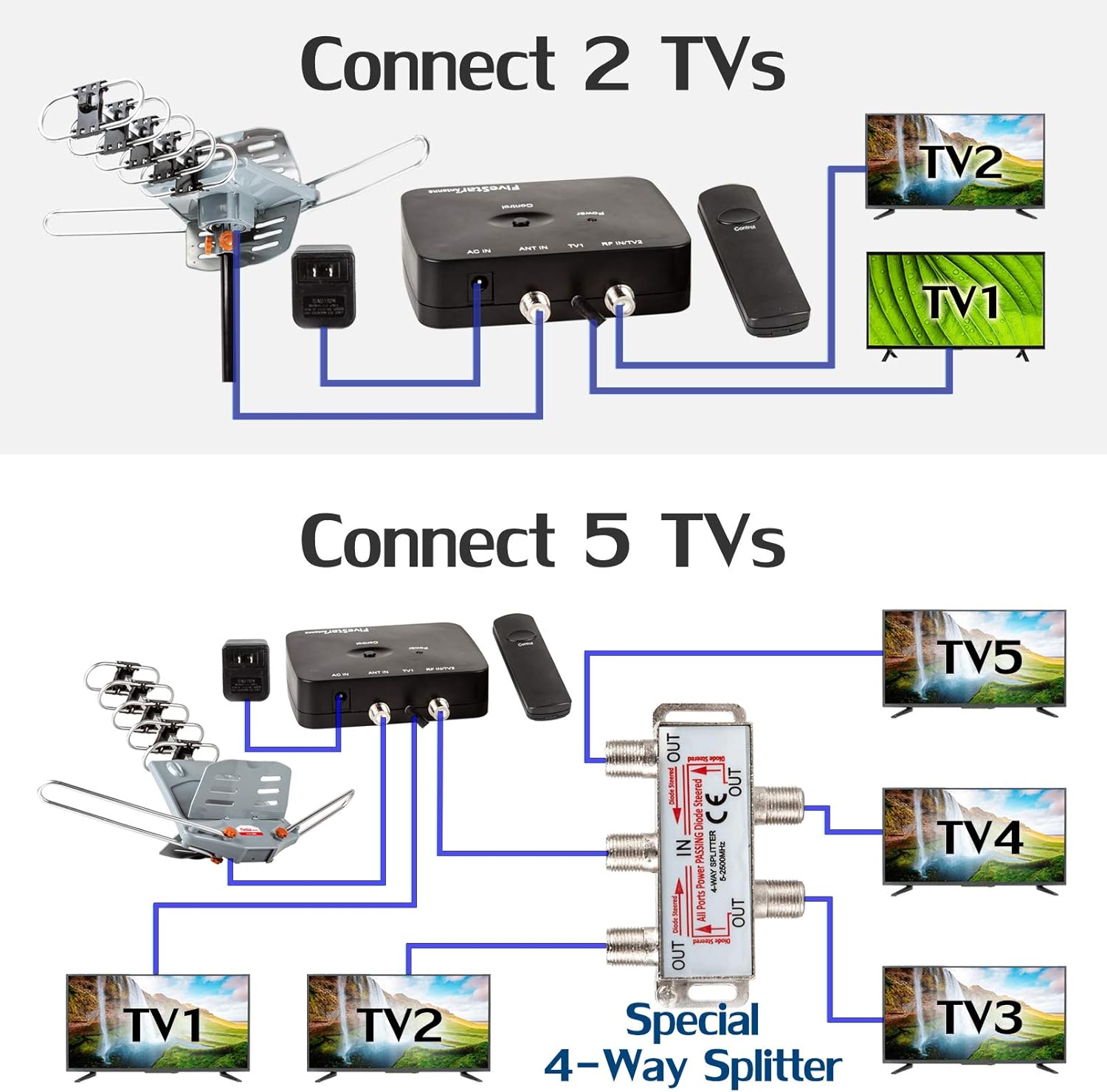
Image: The fully assembled Five Star Outdoor HDTV Antenna, ready for mounting.
2. アンテナの取り付け
Choose a suitable outdoor location for mounting, such as a roof or pole, ensuring it has a clear line of sight to broadcast towers. The antenna is weather-resistant and lightning-protected. For added safety, consider grounding the antenna as recommended by experts.

画像: 元ample of the Five Star Outdoor HDTV Antenna mounted on a residential roof.
3.テレビに接続する
- Connect Coaxial Cable to Control Box: Connect the other end of the 40ft RG6 coaxial cable from the antenna to the "ANT IN" port on the control box.
- 電源プラグイン: Connect the UL-Listed power supply to the control box and plug it into a standard electrical outlet. The power indicator light on the control box should illuminate.
- Connect Control Box to TV: Use a separate coaxial cable (not included) to connect the "TV OUT" port on the control box to the "ANT/CABLE IN" port on your television.
- Connect Multiple TVs (Optional): If connecting multiple TVs, use the included 4-way splitter. Connect the "TV OUT" from the control box to the "IN" port of the splitter. Then, connect separate coaxial cables from the "OUT" ports of the splitter to each television. The antenna supports up to 4 TVs simultaneously.


Image: Connection diagrams for connecting 2 TVs and up to 5 TVs using the included 4-way splitter.
4.チャンネルスキャン
After all connections are made, perform a channel scan on your television. This process allows your TV to find and store all available digital channels in your area.
- テレビのメニュー設定にアクセスします。
- Navigate to the "Channel Setup" or "Broadcasting" section.
- 入力ソースとして「アンテナ」または「エア」(「ケーブル」ではない)を選択します。
- Initiate an "Auto Program," "Auto Scan," or "Channel Scan." This process may take several minutes.
Refer to your TV's user manual for specific instructions on performing a channel scan.
インストールビデオガイド
For a visual guide on assembly and connection, please watch the official product video:
Video: Official Five Star HDTV Antenna Installation and Setup Guide. This video demonstrates the unboxing, assembly, and connection process for the antenna.
操作手順
Once installed and connected, operating your Five Star antenna is straightforward.
- Motorized 360° Rotation: Use the included remote control to rotate the antenna 360 degrees. This allows you to fine-tune the antenna's direction to receive signals from different broadcast towers, optimizing your channel reception. Each press of the button on the remote or control box will rotate the antenna in a different direction.
- 自動ゲイン制御(AGC): The built-in smart chip with AGC function automatically adjusts signal reception performance, ensuring optimal signal strength at various distances from the TV tower.
- Built-in LTE Filter: The antenna includes an LTE filter to remove interference caused by 4G phone signals, ensuring clear digital TV reception.
- Multi-TV Support: With the 4-way splitter, you can distribute the signal to up to 4 televisions simultaneously.


Image: The control box and remote for operating the antenna's rotation. The antenna's 360-degree rotation feature is highlighted.
メンテナンス
The Five Star Outdoor HDTV Antenna is designed for durability and weather resistance. Regular maintenance is minimal but can help prolong its lifespan and ensure consistent performance.
- 定期点検: Periodically inspect the antenna and its mounting hardware for any signs of wear, corrosion, or loosening, especially after severe weather conditions.
- ケーブルチェック: Ensure the coaxial cable connections remain tight and free from damage. Check for any kinks or fraying in the cable.
- クリーニング: 必要に応じて、アンテナ素子を柔らかくて柔らかい布で優しく拭いてください。amp cloth to remove dirt or debris that might accumulate over time. Avoid using harsh chemicals or abrasive materials.
- 接地: While the antenna is lightning protected, proper grounding is highly recommended for additional safety against power surges and lightning strikes. Consult a qualified electrician for grounding procedures if you are unsure.
トラブルシューティング
If you encounter issues with your antenna, refer to the following common troubleshooting tips:
| 問題 | 考えられる原因 | 解決 |
|---|---|---|
| No Signal / Poor Picture Quality | Incorrect antenna direction, loose connections, TV not set to "Antenna/Air", obstructions, weak signal area. | Use the remote to rotate the antenna for optimal signal. Check all coaxial cable connections. Ensure your TV input is set to "Antenna" or "Air". Perform a new channel scan. Consider relocating the antenna to a higher or less obstructed position. |
| アンテナが回転しない | Power supply issue, remote control battery dead, motor malfunction, cable issue. | Ensure the control box power supply is plugged in and the power light is on. Check remote control batteries. Verify the coaxial cable from the antenna to the control box is securely connected, as power for rotation is supplied through it. |
| Missing Channels (VHF/UHF) | Antenna not optimized for specific frequency, local interference, TV scan issue. | Perform multiple channel scans at different antenna orientations. Ensure the LTE filter is functioning correctly to reduce phone signal interference. Some older TVs might have limitations. |
| Splitter Issues (for multiple TVs) | Incorrect splitter type, faulty splitter, signal loss. | Ensure the splitter is designed for antenna signals and allows power pass-through on the input port if needed for the antenna. Verify all connections to the splitter are secure. Signal strength may decrease with more splits; consider an amplified splitter if issues persist. |
仕様
- 製品寸法: 17 x 13.9 x 3.7インチ
- 商品の重量: 4.71ポンド
- メーカー: 5つ星
- ASIN: B07P9CSWZW
- アンテナタイプ: Outdoor HDTV Antenna (Television, Satellite, Radio)
- 色: Antenna+Kit
- Number of Channels Supported: Up to 5 TVs (with splitter)
- インピーダンス: 75オーム
- 最大範囲: 最大150マイル
- 動作周波数: 45-860MHz (UHF/VHF/FM)
- 得: 25-35db (with Auto Gain Control)
- 特徴: Motorized 360 Degree Rotation, Remote Control, Built-in Super Low Noise Amplifier, Built-in LTE Filter, Supports 4K HD TV, 1080p, 1080i, 720p Broadcast.
- 国際コード: 840449112434
保証とサポート
For warranty information and customer support, please refer to the documentation included with your product or visit the official Five Star webサイト。 保証請求に備えて購入時のレシートを保管しておいてください。