
導入
This manual provides instructions for the Calvas USARMT LTV-914 Universal Remote Control, designed for use with various LG TV models, including AKB73715634, AKB73715679, and 3D Smart TV LN577S. This remote operates via infrared (IR) technology and is intended as a direct replacement, requiring no programming for most compatible LG televisions.
パッケージ内容
- 1 x USARMT LTV-914 Universal Remote Control
仕様
- モデル番号: LTV-914
- ブランド: ハゲスポット
- タイプ: テレビリモコン
- コミュニケーション: 赤外線(IR)
- 頻度: 433 MHz
- チャンネル: 1
- 電源: 単4アルカリ電池2本(別売)
- 材料: アブソリュート
- 対応デバイス: LG Televisions (e.g., AKB73715634, AKB73715679, 3D Smart TV LN577S)
- 特集: ユニバーサルな互換性
設定
バッテリーの取り付け
- リモコンの背面にある電池収納部を見つけます。
- 電池ボックスのカバーを下方向にスライドするか、ラッチを押して持ち上げて開きます。
- 単4アルカリ電池2本を挿入し、プラス(+)とマイナス(-)の端子がコンパートメント内のマークと正しく揃っていることを確認します。
- 電池ボックスのカバーを、カチッと音がするまで元の位置に戻してしっかりと閉めます。

Image: Back of the remote control with the battery compartment open, illustrating battery insertion.
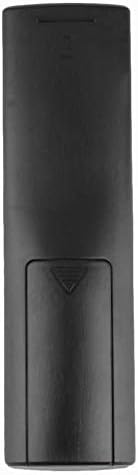
画像: 背面 view 電池カバーを閉じた状態でのリモコンの。
操作手順
初回使用
The Calvas USARMT LTV-914 remote control is designed to work directly with most compatible LG TV models without requiring any programming. Simply insert the batteries and point the remote towards your television.
Direct Use and Basic Functions
Most functions, such as power on/off, volume control, channel selection, and navigation, should operate immediately upon pointing the remote at your LG TV.

画像: 正面 view of the remote control, displaying the button layout.
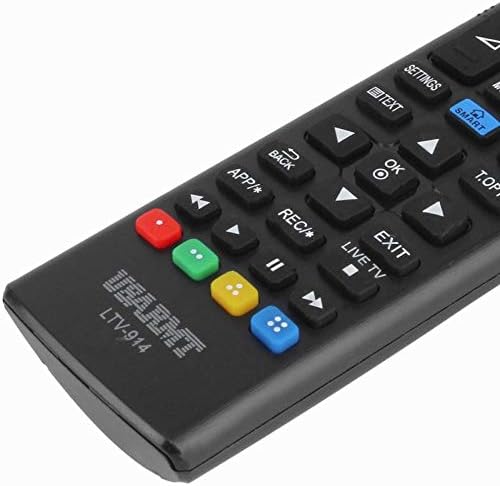
Image: Close-up of the remote's buttons, showing details of the control interface.
Factory Reset / Reconfiguration (If direct use fails)
In rare cases, if the remote does not operate your TV directly, you may need to perform a factory reset or attempt a reconfiguration.
- To reset to factory settings: Press and hold the 力 button and the number 0 ボタンを数秒間同時に押します。
- To attempt re-pairing (if applicable, though typically not required for this universal remote): Press and hold the 力 button and the number 1 ボタンを数秒間同時に押します。
After performing either of these steps, release the buttons and test the remote's functionality with your TV.
トラブルシューティング
- リモコンが応答しない:
- 電池が正しい極性で正しく挿入されているかどうかを確認してください。
- 古くなった電池や消耗した電池を新しい AAA アルカリ電池と交換してください。
- リモコンとテレビの赤外線受信機の間に障害物がないことを確認してください。
- テレビの赤外線受信機の有効範囲内にいることを確認してください。
- 一部の機能が動作しません:
- While this is a universal remote, some advanced or specific smart TV functions might not be fully supported on all LG models.
- Try the factory reset/reconfiguration steps mentioned in the "Operating Instructions" section.
- Remote LED indicator not lighting up:
- This usually indicates dead batteries or incorrect battery insertion. Replace batteries.
メンテナンス
- リモコンは乾燥した状態に保ってください。液体に濡れないようにしてください。
- リモコンを落としたり、強い衝撃を与えたりしないでください。
- リモコンは柔らかく乾いた布で拭いてください。研磨剤入りの洗剤や溶剤は使用しないでください。
- リモコンを長期間使用しない場合は、液漏れを防ぐために電池を取り外してください。
保証とサポート
Specific warranty information for this product is not provided in the available data. For support or warranty inquiries, please contact your retailer or the manufacturer, Calvas.