
1. はじめに
This manual provides detailed instructions for the setup, operation, and maintenance of your Zerone Digital Alarm Clock, Model Zeronek1gfg26oth-02. Please read this manual thoroughly before using the product to ensure proper function and longevity.
2. 安全情報と注意事項
- Use the clock in a dry environment. Avoid prolonged exposure to wet conditions, high temperatures, or areas with rapid temperature changes.
- 損傷を防ぐために時計を慎重に取り扱ってください。
- When using batteries, ensure they are high-quality AAA alkaline batteries. If the display dims or blinks, replace the batteries promptly. Prevent battery leakage by replacing old batteries.
- If the clock is not powered, verify that batteries are correctly inserted or the USB power source is connected.
- When using a USB power adapter, ensure it is a compatible DC 5V/500mA adapter.
3. パッケージ内容
Upon opening the package, please verify that all accessories are present:
- Digital Wooden Clock (1 pc)
- User's Manual (1 pc)
- USB充電ケーブル(1本)
4.製品オーバーview
The Zerone Digital Alarm Clock features a modern cube design with an LED display that shows time and temperature. It includes multiple alarm settings and adjustable brightness.

図4.1: フロント view of the Zerone Digital Alarm Clock displaying the time.

図4.2: Key features indicated by icons: Clock, Alarm, Thermometer, and Sound Control.
4.1. コンポーネントとボタン
The clock features a minimalist design with control buttons located on the back panel.
- SETボタン: 設定を入力および確認するために使用します。
- 上ボタン: 値を増やしたり、設定を移動したりするために使用されます。
- 下ボタン: Used to decrease values or navigate settings. Also controls sound control mode.
- リセットボタン: A small recessed button to reset the clock to factory defaults.
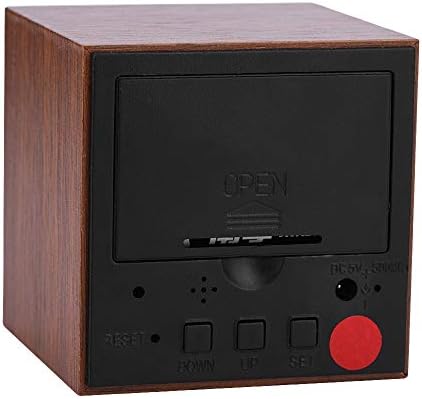
図4.3: 後方 view of the clock with the battery cover closed, showing the USB power input and control buttons.
5. セットアップ
5.1. 時計の電源供給
The clock can be powered by either 3 AAA batteries or a DC 5V/500mA USB power supply.
- バッテリー電源: Open the battery compartment cover on the back of the clock. Insert 3 AAA alkaline batteries, ensuring correct polarity (+/-). Close the cover securely.
- USB電源: Connect the provided USB charging cable to the DC 5V/500mA port on the back of the clock and plug the other end into a compatible USB power adapter (not included) or a USB port.
Note: When powered by batteries, the sound control mode is recommended to conserve power. The display will not show continuously in this mode.
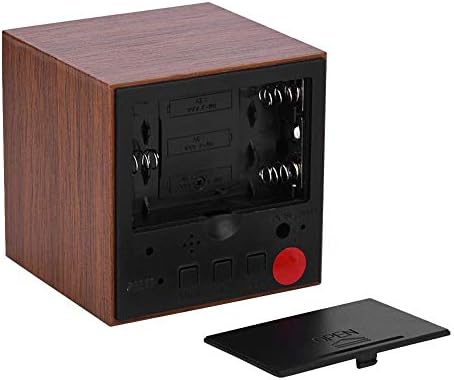
図5.1: 後方 view with the battery compartment open, showing slots for 3 AAA batteries.
6. 操作手順
6.1. 表示モード
The clock has two main display modes:
- DP-1: Displays Time, Temperature, Year, Month, and Date in a rotating sequence.
- DP-2: Displays Time continuously.
DP-1とDP-2を切り替えるには、 セット ボタンを短く押します。
6.2. 時刻と日付の設定
設定モードに入るには、 セット button for 3 seconds. The display will show the first setting item (YEAR) flashing.
- アイテムが点滅している間は、 UP or 下 ボタンで値を調整します。
- を押す セット button briefly to move to the next setting item.
- The setting sequence is: YEAR → MONTH → DATE → 12/24H Format → HOUR → MINUTE → ALARM 1 (AL1) → ALARM 2 (AL2) → ALARM 3 (AL3).
- After setting the last item (AL3), the clock will exit the setting mode automatically.
6.3.アラームの設定
The clock supports three independent alarms (AL1, AL2, AL3). Each alarm sounds for 1 minute.
- Enter the setting mode by pressing and holding the セット ボタンを3秒間押し続けます。
- プレス セット repeatedly until you reach the AL1, AL2, or AL3 setting.
- When the alarm hour or minute is flashing, use the UP or 下 ボタンを押して希望のアラーム時間を設定します。
- プレス セット 確認して次のアラーム設定に移動するか、終了します。
6.4.明るさの調整
The clock offers three levels of brightness (L1, L2, L3), with L3 being the brightest and L1 the dimmest. Additionally, the display automatically reduces brightness by half between 18:00 (6 PM) and 07:00 (7 AM).
- を押し続けます UP button for 3 seconds to enter brightness adjustment mode. The current brightness level (e.g., "L3") will be displayed.
- 使用 UP or 下 buttons to cycle through the brightness levels (L1, L2, L3).
- Once the desired brightness is set, press and hold the UP button for 3 seconds again to exit brightness adjustment mode.
6.5. Activating Sound Control Mode
Sound control mode (power-saving mode) is recommended when the clock is powered by batteries. In this mode, the display turns off and activates when a sound is detected (e.g., a clap or tap).
To toggle sound control mode:
- を押す 下 ボタンを短く押します。
- "ON:SD" indicates sound control is active.
- "--:SD" indicates sound control is off, and the display will remain continuously on (if in DP-2 mode).
6.6. Switching Temperature Unit (Celsius/Fahrenheit)
The clock supports both Celsius (C) and Fahrenheit (F) temperature displays.
To switch the temperature unit:
- を押す UP button briefly. The display will toggle between "--:C" (Celsius) and "--:F" (Fahrenheit).
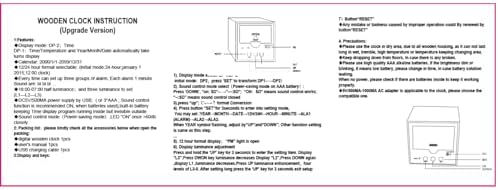
図6.1: Reference image of the original instruction sheet.
7. メンテナンス
- 時計は柔らかく乾いた布で拭いてください。研磨剤入りの洗剤や溶剤は使用しないでください。
- Avoid exposing the clock to water or excessive moisture, as this can damage the internal circuitry.
- 時計を長期間使用しない場合は、液漏れを防ぐために電池を取り外してください。
8。 トラブルシューティング
| 問題 | 考えられる原因 | 解決 |
|---|---|---|
| Display is dim or blinking. | バッテリー残量が少なくなっています。 | Replace AAA batteries or connect to USB power. |
| Display is off, no time shown. | Sound control mode is active and no sound detected; no power. | Tap the clock or make a sound to activate display. Check battery installation or USB power connection. Disable sound control mode by pressing 下 button until "--:SD" is shown. |
| Clock not responding to button presses. | Temporary software glitch or improper operation. | Use a thin object (like a paperclip) to press the recessed リセット button on the back of the clock. This will restore default settings. |
| Time or date is incorrect after power loss. | Batteries removed or depleted while USB power was disconnected. | セクション 6.2 の指示に従って、時刻と日付を再設定します。 |
9. 仕様
| 特徴 | 仕様 |
|---|---|
| ブランド | ゼロネ |
| モデル番号 | Zeronek1gfg26oth-02 |
| 材料 | MDF, PVC |
| 色 | 茶色 |
| 表示タイプ | デジタルLED |
| 製品寸法 | 6 x 6 x 6 cm (2.36"W x 2.36"H) |
| アイテム重量 | 3.87オンス |
| 電源 | 3 x AAA Batteries (not included) OR DC 5V/500mA USB |
| 明るさレベル | 3(L1、L2、L3) |
| アラーム機能 | Yes, 3 groups of alarms |
| 温度表示 | Yes (Celsius/Fahrenheit) |
| 時刻形式 | 12-hour or 24-hour mode |
| 特集 | Voice Control Mode, Automatic Half Luminance (18:00-07:00) |

図9.1: Dimensions of the Zerone Digital Alarm Clock.
10. 保証とサポート
For warranty information or technical support, please refer to the product packaging or contact the retailer where the product was purchased. Keep your purchase receipt as proof of purchase.