
導入
Welcome to the Ipega PG-9033 Bluetooth Gamepad user manual. This guide provides detailed instructions for setting up, operating, maintaining, and troubleshooting your new wireless controller. Please read this manual carefully before use to ensure optimal performance and longevity of your device.
製品終了view
The Ipega PG-9033 is a versatile Bluetooth gamepad designed for an enhanced gaming experience across multiple platforms, including Android, iOS, and PC. It features an adjustable phone holder, dual analog sticks, a D-pad, and action buttons.

Figure 1: The Ipega PG-9033 Bluetooth Gamepad with a smartphone securely mounted in its adjustable holder, actively displaying a racing game. This illustrates the controller's primary use for mobile gaming.
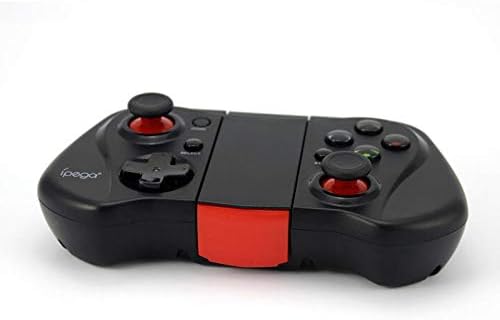
図2: A面 view of the Ipega PG-9033 Bluetooth Gamepad, showcasing its ergonomic design and compact form factor when not in use. The red accent on the central hinge is visible.
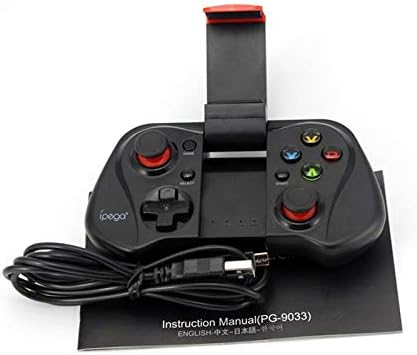
Figure 3: The Ipega PG-9033 Bluetooth Gamepad displayed alongside its USB charging cable and the included instruction manual, which clearly indicates the model number PG-9033.

図4: 背面 view of the Ipega PG-9033 Bluetooth Gamepad, featuring a label with technical details such as "BLUETOOTH CONTROLLER," working voltage, working current, and input specifications.
設定
ゲームパッドの充電
Before first use, fully charge the gamepad using the provided USB cable.
- Connect the micro-USB end of the charging cable to the gamepad's charging port.
- Connect the USB-A end to a USB power source (e.g., computer, USB wall adapter).
- The charging indicator light will illuminate. It will typically turn off or change color when fully charged.
デバイスとのペアリング
The PG-9033 supports different pairing modes for various operating systems.
Android ペアリング
- ゲームパッドがオフになっていることを確認します。
- を押し続けます 家 ボタンと X button simultaneously until the indicator light flashes rapidly. This puts the gamepad into Android pairing mode.
- Android デバイスで Bluetooth 設定に移動し、利用可能なデバイスを検索します。
- Select "PG-9033" from the list to pair. The indicator light will become solid when connected.
iOS Pairing (iCade Mode)
- ゲームパッドがオフになっていることを確認します。
- を押し続けます 家 ボタンと B button simultaneously until the indicator light flashes rapidly. This puts the gamepad into iOS iCade pairing mode.
- On your iOS device, go to Bluetooth settings and search for available devices.
- Select "PG-9033" from the list to pair. The indicator light will become solid when connected.
Note: iCade mode has limited game compatibility. For broader iOS compatibility, check specific game requirements.
PCペアリング
- ゲームパッドがオフになっていることを確認します。
- を押し続けます 家 ボタンと A button simultaneously until the indicator light flashes rapidly. This puts the gamepad into PC pairing mode.
- On your PC, go to Bluetooth settings and search for available devices.
- Select "PG-9033" from the list to pair. The indicator light will become solid when connected.
Note: A Bluetooth adapter may be required for PCs without built-in Bluetooth.
操作手順
スマートフォンを取り付ける
- Gently extend the adjustable phone holder located on the top of the gamepad.
- Carefully place your smartphone into the holder, ensuring it is securely gripped and centered.
- 最適な角度に調整する viewing。
Game Mode Selection
The gamepad automatically enters the last used mode upon reconnection. To switch modes, disconnect the gamepad and re-pair using the desired mode's button combination (HOME + X for Android, HOME + B for iOS, HOME + A for PC).
電源オン/オフ
電源を入れるには、 家 電源を切るには、 家 button for approximately 5 seconds until the indicator light turns off. The gamepad will automatically power off after a period of inactivity.
メンテナンス
To ensure the longevity and proper functioning of your Ipega PG-9033 gamepad, follow these maintenance guidelines:
- デバイスを乾燥した状態に保ってください。湿気や液体にさらさないでください。
- Clean the gamepad with a soft, dry cloth. Do not use harsh chemicals or abrasive cleaners.
- ゲームパッドは、直射日光や極端な温度を避け、涼しく乾燥した場所に保管してください。
- ゲームパッドを落としたり、強い衝撃を与えたりしないでください。
- バッテリーの状態を維持するために、使用していない場合でも定期的にバッテリーを充電してください。
Do not attempt to disassemble the gamepad. This will void the warranty and may cause damage.
トラブルシューティング
Gamepad not connecting or pairing:
- ゲームパッドが完全に充電されていることを確認してください。
- デバイスで Bluetooth が有効になっていることを確認します。
- Make sure the gamepad is in the correct pairing mode for your device (Android, iOS, or PC).
- Bluetooth 設定でデバイスを削除して再度ペアリングしてみてください。
- ゲームパッドとデバイスの両方を再起動します。
ボタンまたはジョイスティックが反応しない:
- ゲームパッドが正しく接続されているかどうかを確認してください。
- プレイしているゲームが外部コントローラーをサポートしていることを確認してください。
- Some games may require specific controller mapping or settings adjustments within the game.
- If the issue persists, try resetting the gamepad (if a reset button is available, typically a small pinhole).
ラグまたは入力遅延:
- Ensure your device is not too far from the gamepad. Maintain a clear line of sight.
- 他のワイヤレス デバイスからの干渉を軽減します。
- デバイス上の不要なバックグラウンド アプリケーションを閉じます。
電話がホルダーに収まらない:
- The holder is designed for most smartphones. Ensure your phone's dimensions are within the supported range.
- しっかりとフィットしない可能性があるかさばる携帯電話ケースを取り外します。
仕様
| 特徴 | 詳細 |
|---|---|
| モデル | PG-9033 |
| ブランド | イペガ |
| 接続性 | ブルートゥース |
| 互換性 | Android, iOS (iCade), PC |
| ワーキングVoltage | DC3.7V |
| 動作電流 | 30mA |
| 入力ボリュームtage | DC 5V 500mA |
| ASIN | B07P52YH7M |
保証とサポート
保証情報と技術サポートについては、Ipegaの公式ウェブサイトをご覧ください。 webご購入の際は、サイトをご覧いただくか、販売店にお問い合わせください。購入証明書としてレシートを保管してください。
このマニュアルは情報提供のみを目的としています。仕様は予告なく変更される場合があります。