
1. はじめに
The GameMax Mirage 120mm PC Cooling Fan is designed to provide efficient cooling for computer components while offering customizable RGB lighting. This fan features a dual-ring Rainbow LED design, a hydraulic bearing for quiet operation, and a 7-blade fan structure. It is compatible with 5V addressable 3-pin Aura Sync systems, allowing for synchronized lighting effects with compatible motherboards or controllers.

画像1.1:正面 view of the GameMax Mirage fan with active Rainbow LED lighting.
2. 安全情報
- インストールまたはメンテナンスを行う前に、コンピュータ システムの電源がオフになっており、壁のコンセントからプラグが抜かれていることを確認してください。
- Handle components with care to avoid damage from static electricity. Consider using an anti-static wrist strap.
- コネクタを無理に差し込まないでください。ケーブルを差し込む前に、正しい向きを確認してください。
- ファンを液体や過度の湿気から遠ざけてください。
- このマニュアルに記載されている範囲を超えてファンユニットを分解しないでください。
3. パッケージ内容
パッケージにすべてのアイテムが含まれていることを確認します。
- 1 x GameMax Mirage 120mm PC Cooling Fan
- 取り付けネジ4本
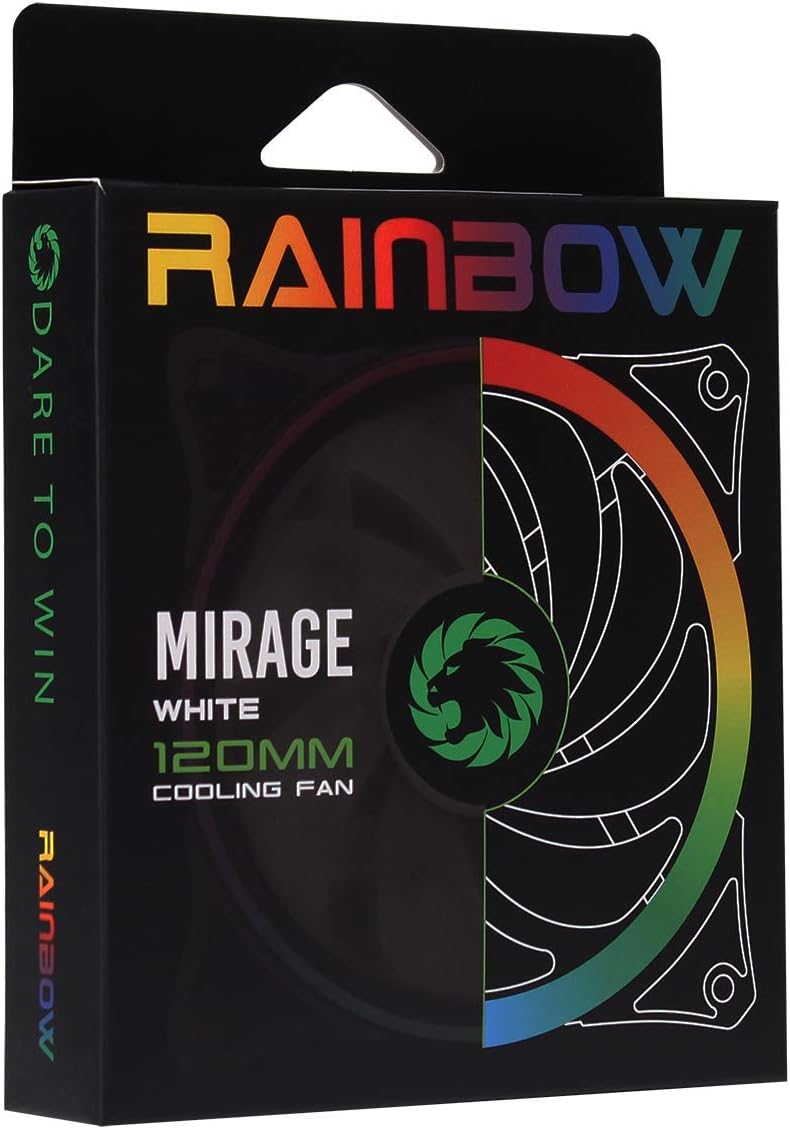
Image 3.1: Retail packaging for the GameMax Mirage fan.
4. セットアップとインストール
Follow these steps to install your GameMax Mirage 120mm PC Cooling Fan:
- システムを準備する: Power off your computer and unplug it from the power outlet. Open your computer case to access the fan mounting locations.
- ファンを取り付ける: Position the fan in your desired location (e.g., case front, rear, top, or radiator). Ensure the airflow direction is correct for your cooling setup. Use the four included mounting screws to secure the fan to the chassis or radiator. The fan features rubber pads on the corners to help reduce vibration.
- ファン電源を接続: Locate the 3-pin power connector on the fan cable. Connect this cable to an available 3-pin fan header on your motherboard or a fan controller.
- RGB照明を接続する: Locate the 5V addressable 3-pin Aura connector on the fan cable. Connect this to a compatible 5V ARGB header on your motherboard (often labeled 'VDG' or 'ARGB') or an external RGB controller/hub. Warning: Do not connect this to a 12V RGB header, as it will damage the LEDs.

Image 4.1: The 3-pin power connector (top) and 5V addressable 3-pin Aura connector (bottom).
The fan cables are braided for improved aesthetics and durability, helping to keep your build neat and tidy.
5. 操作手順
Once installed, the GameMax Mirage fan operates as follows:
- ファン速度制御: The fan speed is controlled via the 3-pin power connector. If connected to a motherboard fan header, the speed can typically be adjusted through your motherboard's BIOS/UEFI settings or dedicated software.
- RGB照明コントロール: The Rainbow LED lighting is controlled via the 5V addressable 3-pin Aura connector.
- If connected to a compatible motherboard (e.g., ASUS Aura Sync, MSI Mystic Light, Gigabyte RGB Fusion, ASRock Polychrome Sync), you can use the motherboard's software to customize lighting effects, colors, and synchronization with other ARGB components.
- If connected to an external RGB hub/controller, refer to the instructions provided with your specific hub/controller for lighting customization options.

画像5.1: 角度付き view of the GameMax Mirage fan showcasing its dual-ring Rainbow LED lighting.
6. メンテナンス
定期的なメンテナンスは、冷却ファンの最適なパフォーマンスと寿命の延長に役立ちます。
- ダストクリーニング: ファンの羽根とフレームに埃がたまっていないか定期的に点検してください。圧縮空気または柔らかいブラシを使用して、埃を優しく取り除いてください。清掃する前に、ファンの電源を切り、プラグを抜いてください。
- ケーブル検査: Occasionally check the power and RGB cables for any signs of wear or damage.
7。 トラブルシューティング
- ファンが回転しない:
- Ensure the 3-pin power connector is securely plugged into a functional fan header on the motherboard or controller.
- マザーボードの BIOS/UEFI 設定をチェックして、ファン ヘッダーが有効になっていて、正しく構成されていることを確認します。
- LEDs Not Lighting Up or Incorrect Colors:
- Verify the 5V addressable 3-pin Aura connector is securely connected to a compatible 5V ARGB header (not 12V RGB).
- Ensure your motherboard's RGB software or external controller is properly installed and configured.
- If using a splitter or hub, ensure it is powered and functioning correctly.
- 過度の騒音:
- ファンブレードに干渉するケーブルや障害物がないか確認します。
- Ensure the fan is securely mounted and the rubber pads are properly seated to absorb vibrations.
- Dust accumulation can cause imbalance and noise; clean the fan as described in the Maintenance section.
8. 仕様
| 特徴 | 仕様 |
|---|---|
| モデル | MIRAGEWHITE FINS |
| ファンサイズ | 120mm x 120mm x 25mm(0.98 x 4.72 x 4.72インチ) |
| ベアリングタイプ | 油圧ベアリング |
| ファンブレード | 7 ブレード |
| LEDタイプ | Addressable Rainbow LED (Dual-Ring) |
| ファン電源コネクタ | 3ピン |
| RGB コネクタ | 5V Addressable 3-Pin Aura Connector |
| 営業巻tage | 5 Volts (for RGB) / 12 Volts (for fan motor, typical for 3-pin) |
| 定格ワットtage | 3ワット |
| 最高回転数 | 1800 回転 |
| 騒音レベル | 約25dB(A) |
| 材料 | Rubber (for vibration dampening) |

画像8.1: 背面 view of the GameMax Mirage fan, displaying the product label with model and electrical specifications.
9. 保証とサポート
保証情報およびテクニカルサポートについては、公式GAMEMAXをご覧ください。 webご購入いただいたサイトをご覧いただくか、販売店にお問い合わせください。保証請求の際に購入証明書を保管してください。