
1. はじめに
This manual provides instructions for the installation, operation, and maintenance of the Cisco CP-68KEM-3PCC Expansion Module. This module is designed to enhance the functionality of your Cisco IP Phone 6851 by providing additional programmable keys.
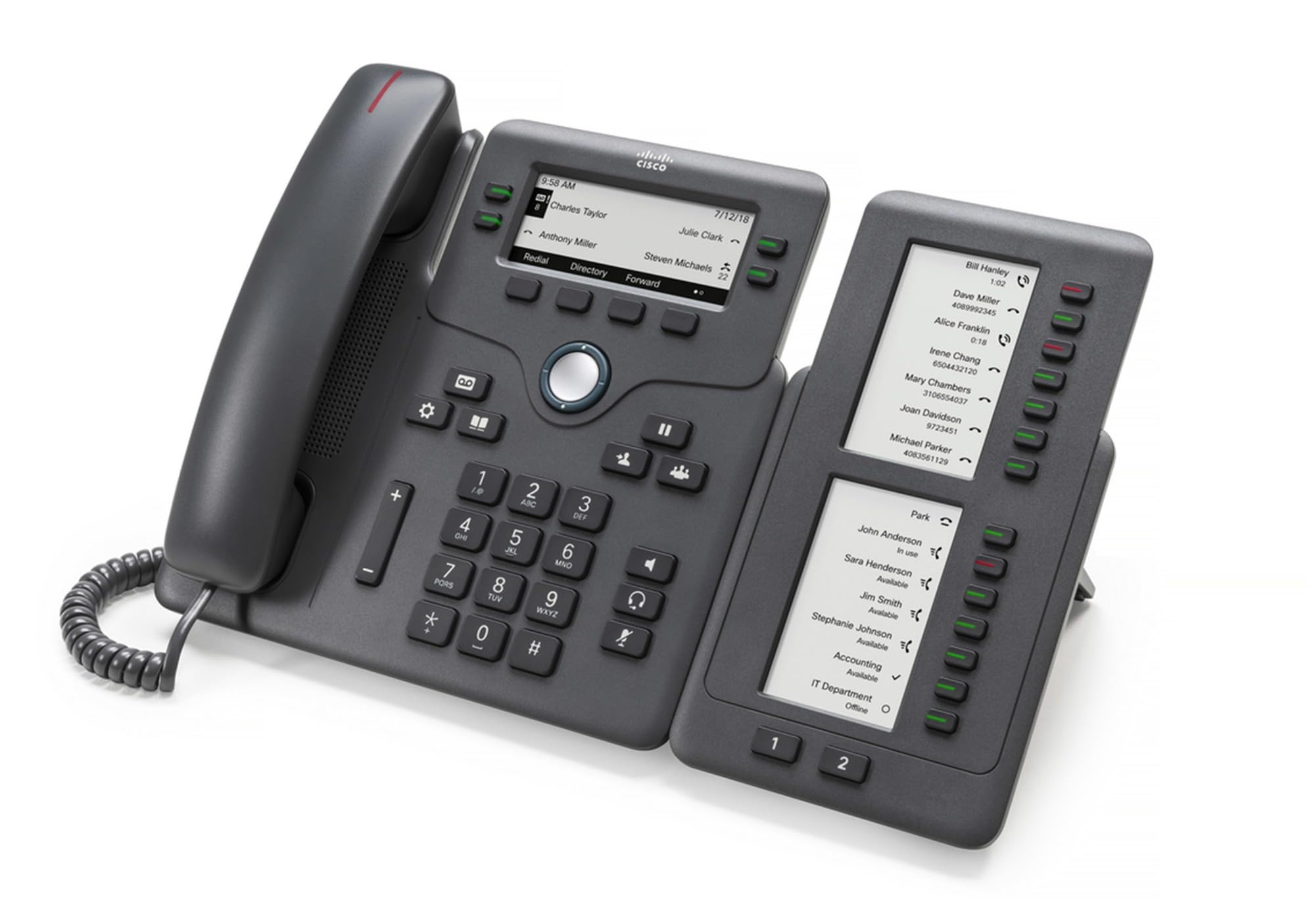
Figure 1: Cisco CP-68KEM-3PCC Expansion Module. This image shows the front view of the expansion module with its grayscale LCD screen and programmable keys.
The Cisco CP-68KEM-3PCC Expansion Module adds 14-line keys and 2-page keys, totaling 28 additional keys, with an easy-to-read grayscale LCD screen. It is ideal for monitoring and managing call status, directory numbers, and speed dial functions.
2. 箱の中身
箱を慎重に開梱し、すべてのアイテムが揃っていることを確認します。
- Cisco CP-68KEM-3PCC Phone Expansion Module
- Connecting Cable (typically included for linking to the phone)
- ドキュメント(このユーザーマニュアル、安全情報)
不足または破損している品目がある場合は、直ちにベンダーまたは Cisco サポートにご連絡ください。
3. セットアップ手順
Follow these steps to connect your Cisco CP-68KEM-3PCC Expansion Module to your Cisco IP Phone 6851.
- IP 電話を準備します。 Ensure your Cisco IP Phone 6851 is powered off and disconnected from the network.
- Connect the Expansion Module: Locate the expansion port on the back or side of your Cisco IP Phone 6851. Connect the provided connecting cable from the expansion module to this port.
- 接続を保護する: Ensure the cable is securely fastened to prevent accidental disconnection.
- 電源オン: Reconnect your Cisco IP Phone 6851 to the network and power it on. The expansion module should be detected automatically.
- 機能の確認: Once the phone has booted, check the expansion module's display and keys to ensure they are responsive.
For detailed visual instructions, refer to the official Cisco documentation or support webサイト。
4. Operating the Expansion Module
The expansion module provides additional keys for various functions, enhancing your call management capabilities.
4.1 プログラム可能なキー
The 28 programmable keys (14 keys across 2 pages) can be configured for:
- Directory Numbers (DNs): Assign specific phone lines or extensions.
- 短縮ダイヤル: 頻繁に呼び出す番号をプログラムして、すぐにアクセスできるようにします。
- 機能キー: Assign functions like call transfer, conference, or call park.
- Call Status Monitoring: Monitor the status of other lines (e.g., busy, ringing).
4.2 Page Navigation
Use the dedicated page keys (usually located near the display) to switch between the two pages of programmable keys. The grayscale LCD screen will update to show the labels for the currently active page.
4.3 構成
Configuration of the programmable keys is typically managed through your organization's phone system administrator or via the web interface of the Cisco IP Phone 6851. Consult your IT department for specific configuration instructions.
5. メンテナンス
To ensure the longevity and optimal performance of your Cisco CP-68KEM-3PCC Expansion Module, follow these maintenance guidelines:
- クリーニング: 外側の表面を拭く際は、柔らかく乾いた糸くずの出ない布を使用してください。頑固な汚れには、軽く拭き取ってください。amp布に水を含ませて拭いてください。表面の仕上げや電子部品にダメージを与える可能性があるため、刺激の強い化学薬品、研磨剤入りの洗剤、溶剤の使用は避けてください。
- 環境: モジュールは、直射日光、過度の熱、湿気を避け、清潔で乾燥した環境に保管してください。
- 取り扱い: モジュールは丁寧に取り扱ってください。落としたり、強い衝撃を与えたりしないでください。
- ケーブル管理 Ensure connecting cables are not kinked, pinched, or under strain.
There are no user-serviceable parts inside the expansion module. Do not attempt to open or repair the device yourself.
6。 トラブルシューティング
If you encounter issues with your expansion module, try the following troubleshooting steps:
| 問題 | 考えられる原因 | 解決 |
|---|---|---|
| モジュールが電話で認識されません | Loose cable connection, phone not restarted, incompatible phone model. |
|
| キーが反応しない | Software glitch, configuration issue. |
|
| ディスプレイが空白またはちらつく | 電源の問題、内部障害。 |
|
If these steps do not resolve the issue, please contact Cisco technical support or your authorized reseller.
7. 仕様
| 特徴 | 詳細 |
|---|---|
| モデル番号 | CP-68KEM-3PCC |
| ブランド | シスコ |
| 対応デバイス | Cisco IP 電話 6851 |
| 色 | 黒 |
| 材料 | 金属 |
| アイテムの寸法(LxWxH) | 5.1 x 10.2 x 20.3 cm |
| 電源 | Corded (powered via host IP Phone) |
| キーの数 | 28 (14 keys across 2 pages) |
| 画面 | Grayscale LCD |
| GTIN/UPC | 889728068383 |
8. 保証情報
The Cisco CP-68KEM-3PCC Expansion Module comes with a 2年間の製品保証 ご購入日から1年間有効です。本保証は、通常の使用における材料および製造上の欠陥を対象とします。誤用、事故、不正な改造、または外的要因による損傷は保証の対象外となります。
For warranty claims or detailed terms and conditions, please refer to the official Cisco warranty policy available on their webサイトをご覧いただくか、ご購入店にお問い合わせください。
9. サポート
For technical assistance, product information, or to report issues, please contact Cisco support:
- シスコサポート Webサイト: 公式サイトをご覧ください シスコサポート webサイト for documentation, downloads, and contact options.
- Authorized Reseller: Contact the reseller from whom you purchased the product.
When contacting support, please have your product model (CP-68KEM-3PCC) and serial number ready.