
HANWHA HCV-6070R
Hanwha Techwin HCV-6070R 2MP Outdoor Vandal-Resistant Dome Camera User Manual
Model: HCV-6070R
導入
This manual provides detailed instructions for the installation, operation, and maintenance of the Hanwha Techwin HCV-6070R 2MP Outdoor Vandal-Resistant Dome Camera. This camera is designed for outdoor security surveillance, offering 2-megapixel resolution, a 2.8-12mm manual varifocal lens, and night vision capabilities with a BNC connection.
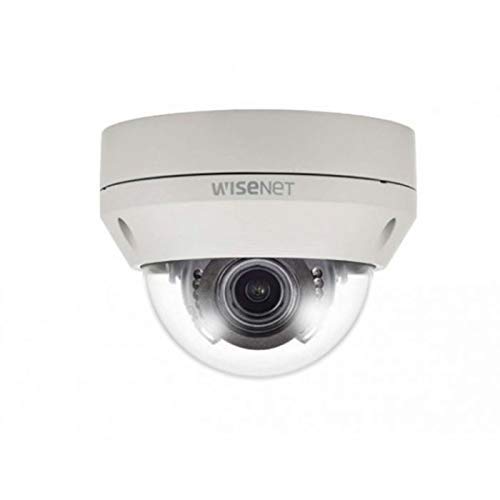
Figure 1: Hanwha Techwin HCV-6070R 2MP Outdoor Vandal-Resistant Dome Camera.
安全情報
Please read all safety instructions carefully before installing or operating the camera. Keep this manual for future reference.
- Ensure the power supply matches the camera's requirements to prevent electrical shock or fire.
- カメラを極端な温度、湿度、腐食性の環境にさらさないでください。
- 設置は地域の電気規則に従って資格のある人が行う必要があります。
- レンズを長時間強い光源に直接さらさないでください。
- カメラを分解したり改造したりしないでください。保証が無効になります。
パッケージ内容
パッケージにすべてのアイテムが揃っていることを確認します。
- Hanwha Techwin HCV-6070R Dome Camera (1 unit)
- 取り付けネジとアンカー
- インストールテンプレート
- クイックスタートガイド
- Waterproof Cap (if applicable)
設定
1.カメラの取り付け
The HCV-6070R is designed for wall mounting. Choose a suitable outdoor location that provides the desired surveillance coverage and is protected from direct impact.
- Use the provided installation template to mark the drilling holes on the wall.
- Drill holes according to the template and insert the wall anchors.
- 取り付けネジを使用してカメラベースを壁に固定します。
- カメラの viewing angle as needed before tightening all screws.
2. 配線と接続
The camera utilizes a BNC connection for video output and requires a separate power supply. Ensure all connections are secure and weatherproof for outdoor use.
- ビデオ接続: Connect a BNC cable from the camera's BNC port to the video input of your DVR (Digital Video Recorder).
- 電源接続: Connect a 12V DC power adapter (not included) to the camera's power input. The camera operates at 8 watts.
- ワイヤレス接続: The camera supports Wi-Fi for remote control and monitoring. Refer to the operating section for initial Wi-Fi setup.

図2:例ample of a BNC coaxial cable for video connection. Ensure a secure connection to the camera and DVR.
3. 初期設定
After physical installation and power-up, access the camera settings via your connected DVR or a compatible mobile application (Android controller type specified).
- 日付と時刻を設定します。
- Configure network settings for Wi-Fi connectivity.
- Adjust video quality and recording preferences.
カメラの操作
1. ビデオ監視と録画
The camera provides 2MP effective video resolution, capturing video at 1080p and a frame rate of 30 fps. Video is typically recorded in MPEG-4 format.
- ライブアクセス view そして記録されたfootage through your connected DVR or the remote control application.
- Ensure your DVR is configured to record from the correct channel.
2. Adjusting Focus and Zoom
The HCV-6070R features a 2.8-12mm manual varifocal lens with optical zoom. Adjustments are made manually on the camera body.
- Loosen the focus and zoom locking screws on the camera lens assembly.
- Adjust the zoom ring to achieve the desired field of view.
- Adjust the focus ring until the image is clear and sharp.
- Tighten the locking screws to secure the settings.
3. Night Vision and Low Light Performance
Equipped with night vision and "Night Color" low light technology, the camera automatically switches to infrared mode in low light conditions to provide clear surveillance footage. The light source type is LED.
- Ensure no obstructions block the infrared LEDs on the camera.
- The camera will automatically activate its infrared illuminators when ambient light levels drop.
4. モーション検出
The camera supports motion-only alerts. Configure motion detection zones and sensitivity settings through your DVR or the remote control application.
- カメラ内の特定の領域を定義する view 動き検出用。
- 誤報を最小限に抑えるために感度レベルを設定します。
- Configure alert notifications (e.g., email, push notifications) via your DVR or application.
5. リモートコントロール
The camera can be controlled remotely using a compatible Android application. Ensure the camera is connected to your Wi-Fi network.
- Download and install the Hanwha Techwin mobile application on your Android device.
- Follow the in-app instructions to add and connect to your HCV-6070R camera.
- アプリを通じて、 view ライブfootage, access recordings, and adjust certain camera settings.
メンテナンス
定期的なメンテナンスにより、カメラの最適なパフォーマンスと寿命が確保されます。
- レンズの掃除: Gently wipe the camera lens with a soft, clean, lint-free cloth. For stubborn dirt, use a lens cleaning solution specifically designed for optical surfaces.
- ハウジングの清掃: カメラの外装をクリーニングするamp 布で拭いてください。強力な化学薬品や研磨剤入りの洗剤は使用しないでください。
- ケーブル検査: Periodically check all cables and connections for signs of wear, damage, or corrosion, especially for outdoor installations.
- ファームウェアの更新: Check the Hanwha Techwin website for any available firmware updates to ensure your camera has the latest features and security patches.
トラブルシューティング
| 問題 | 考えられる原因 | 解決 |
|---|---|---|
| ビデオ出力なし | No power; Loose BNC connection; Incorrect DVR input selected. | Check power supply; Secure BNC cable; Select correct channel on DVR. |
| ぼやけた画像 | Lens out of focus; Dirty lens. | Manually adjust focus (refer to Operating section); Clean the lens. |
| 夜間視力が機能しない | IR LEDs blocked; Insufficient power; Camera stuck in day mode. | Clear obstructions; Verify power supply; Restart camera. |
| モーション検出が作動しない | Incorrect sensitivity settings; Motion detection zone not configured. | Adjust sensitivity; Configure motion detection zones in DVR/app. |
| Wi-Fi経由で接続できません | Incorrect Wi-Fi password; Camera out of range; Network issues. | Verify Wi-Fi credentials; Move camera closer to router; Check network status. |
仕様
| モデル | HCV-6070R |
| ブランド | HANWHA Techwin |
| 有効なビデオ解像度 | 2 MP (1080p) |
| フレームレート | 30fps |
| レンズタイプ | 2.8-12mmマニュアルバリフォーカルレンズ |
| フォーカスタイプ | マニュアルフォーカス |
| ズームタイプ | 光学ズーム |
| 接続技術 | Wireless (Wi-Fi), BNC Connection |
| 電源 | Manual (requires external 12V DC power adapter) |
| ワットtage | 8ワット |
| 屋内/屋外での使用 | 屋外 |
| 特集 | Night Vision (Night Color low light technology) |
| フォームファクター | ドーム |
| 取り付けタイプ | 壁掛け |
| 対応デバイス | ビデオ |
| 制御方法 | Remote (Android Controller Type) |
| 国際保護格付け | IP54 |
| フォトセンサー技術 | シーモス |
| ビデオキャプチャフォーマット | MPEG-4 |
| アラートの種類 | モーションのみ |
保証とサポート
For warranty information and technical support, please refer to the official Hanwha Techwin web公式サイトをご覧いただくか、カスタマーサービスに直接お問い合わせください。保証請求の際は、購入証明としてレシートを保管してください。
メーカー: ハンファ
発売日: 19年2019月XNUMX日