
AuKing M8-F
AuKingプロジェクターユーザーマニュアル
Model: M8-F
導入
This manual provides essential information for the safe and efficient operation of your AuKing Mini Projector. Please read it thoroughly before use and retain it for future reference.
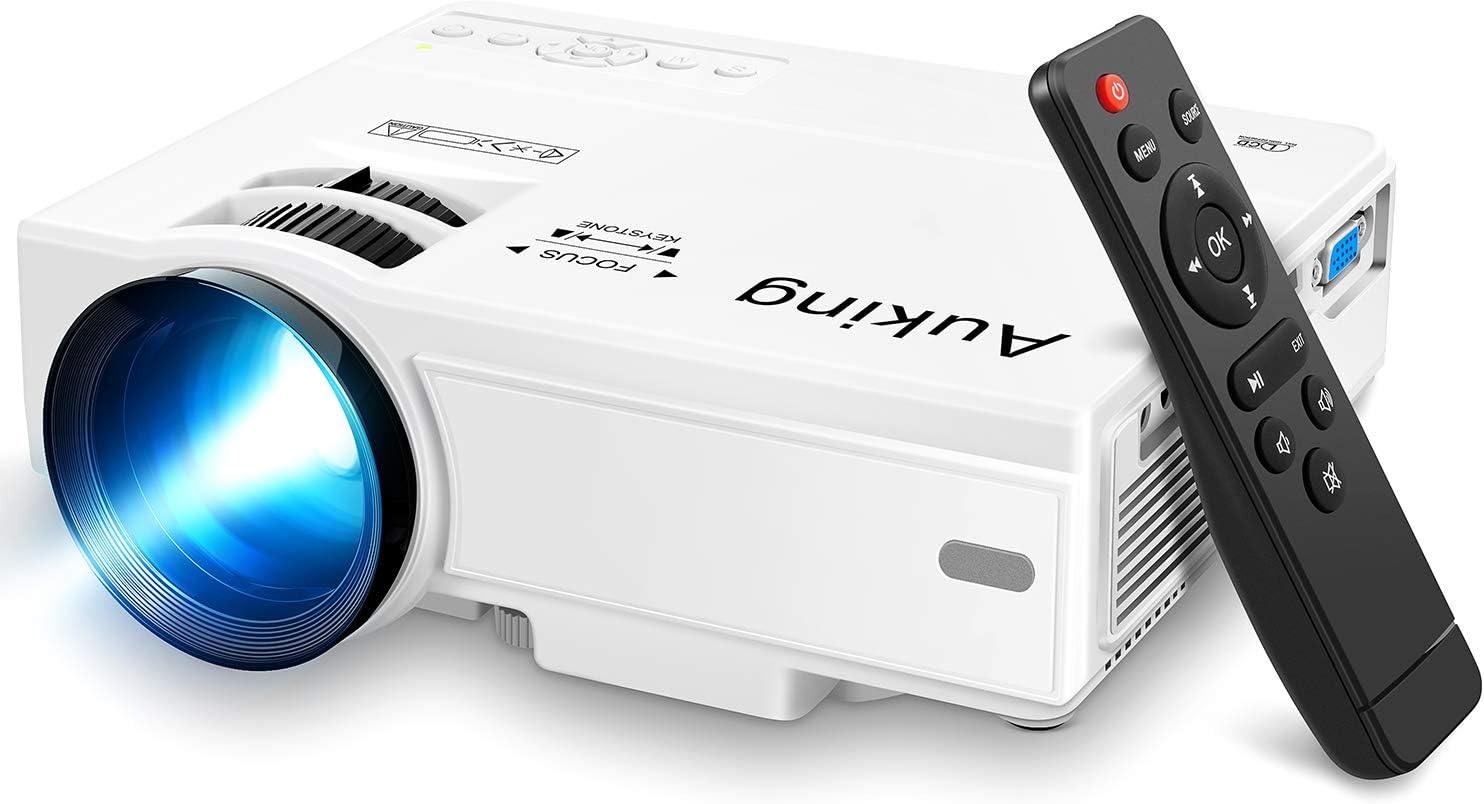
Image: The AuKing Mini Projector, a compact white device, is shown alongside its black remote control. The projector features a prominent lens and control buttons on its top surface.
製品の特徴
- フルHD 1080Pサポート: Experience clear and sharp detailed images with the latest color reproduction technology for a vibrant view効果。
- Large Projection Screen: 没入感を味わう viewing experience with a projection size ranging from 35 to 200 inches, suitable for distances between 3.6ft and 16.4ft.
- 長い電球寿命: The powerful cooling system effectively dissipates heat, extending the lamp's life up to 55,000 hours for over 15 years of use.
- Low Noise & Dual Stereo Speakers: Advanced noise reduction technology reduces fan noise by 80%. Built-in dual stereo speakers provide clear sound quality. External speakers can be connected for enhanced audio.
- 複数のデバイスの接続: Equipped with HDMI, VGA, AV, and USB interfaces, compatible with smartphones, laptops, pads, USB drives, and TV boxes. (Note: An extra HDMI adapter may be needed for phone connection, and copyrighted apps like Netflix, Prime Video, Hulu require a TV Stick or Roku.)

Image: A split image demonstrating the AuKing projector's superior color reproduction and 1080P support compared to a generic projector.
箱の中身
Your AuKing Projector package includes:
- AuKing Mini Projector
- リモートコントロール
- 電源ケーブル
- AVケーブル
- HDMIケーブル
- ユーザーマニュアル
セットアップガイド
1.配置
Choose a suitable location for your projector. It can be placed on a table, mounted on a tripod, or ceiling-mounted. Ensure the projection surface is flat and clear.

Image: Demonstrates various placement options for the AuKing projector, including tripod installation, ceiling mount, and simple table placement.
2. 電源接続
電源ケーブルをプロジェクターに接続し、次に電源コンセントに接続します。
3. デバイス接続
Connect your desired input device (e.g., laptop, USB drive, smartphone) to the projector using the appropriate cable (HDMI, USB, AV, VGA). For smartphone connections, an additional HDMI adapter may be required (sold separately).

Image: Illustrates the projector's compatibility with multiple devices, showing connections for smartphones, laptops/PCs, PS4, DVD players, memory cards, and USB drives.
4. フォーカスとキーストーン調整
Use the FOCUS and KEYSTONE rings on the projector to adjust the image clarity and shape until it appears rectangular and sharp on your screen.
操作手順
1. 電源のオン/オフ
プロジェクターまたはリモコンの電源ボタンを押して、デバイスの電源をオンまたはオフにします。
2. 入力ソースの選択
Use the "Source" button on the remote or projector to select the correct input source (HDMI, USB, AV, VGA) corresponding to your connected device.
3. メディアの再生
メディアをナビゲートする files using the remote control. For streaming services like Netflix, Prime Video, or Hulu, ensure you are using a compatible TV Stick or Roku device connected to the projector due to copyright restrictions.

画像: リビングルームのセットアップショーasing the projector's ability to create a large 200-inch projection, providing an immersive home theater experience.
4。 音声出力
The projector has built-in dual stereo speakers. For a higher sound quality, connect external speakers via the audio output port.
メンテナンス
To ensure optimal performance and longevity of your AuKing projector:
- ダストクリーニング: Regularly clean the lens with a soft, lint-free cloth. Avoid abrasive cleaners.
- 換気: Ensure the projector's ventilation ports are not blocked to allow proper airflow and prevent overheating. The advanced cooling system is designed to manage heat effectively.
- ストレージ: 長期間使用しない場合は、プロジェクターを直射日光や極端な温度を避け、涼しく乾燥した場所に保管してください。

Image: An illustration highlighting the projector's advanced cooling system, showing arrows indicating airflow to prevent overheating and extend lamp 人生。
トラブルシューティング
| 問題 | 考えられる原因 | 解決 |
|---|---|---|
| 画像が表示されない、または「信号なし」 | 間違った入力ソースが選択されています。ケーブルの接続が緩んでいます。デバイスの電源がオンになっていません。 | Select the correct input source. Check all cable connections. Ensure the input device is powered on. |
| ぼやけた画像 | 焦点が合っていない。キーストーン調整が正しくない。 | Adjust the FOCUS ring until the image is clear. Adjust the KEYSTONE ring to correct image distortion. |
| 音が出ない | 音量が低すぎます。ミュートされています。外部スピーカーが正しく接続されていません。 | Increase volume. Unmute the projector. Check external speaker connections. |
| プロジェクターの過熱 | 換気が妨げられる、高温環境での長時間の使用。 | Ensure vents are clear. Turn off and allow to cool. Use in a well-ventilated area. |
仕様
| 特徴 | 詳細 |
|---|---|
| ブランド | オーキング |
| モデル番号 | M8-F |
| ディスプレイ解像度 | 1920 x 1080(フルHD対応) |
| 投影サイズ | 35~200インチ |
| 投影距離 | 3.6フィートから16.4フィート |
| Lamp 人生 | 最大55,000時間 |
| 接続技術 | VGA、USB、HDMI、AV |
| スピーカータイプ | 内蔵デュアルステレオスピーカー |
| アイテム重量 | 2.87ポンド |
| 製品寸法 | 7.95 x 6.3 x 2.91インチ |
保証とサポート
AuKing offers a 2年間の製品交換保証 and lifetime after-sales service for your projector. If you encounter any issues or have questions, please do not hesitate to contact our support team. We are committed to providing 100% customer satisfaction.
サポートについては、 AmazonのAuKingストア または、製品パッケージに記載されている連絡先情報を参照してください。
Ask a question about this manual
Ask about setup, troubleshooting, compatibility, parts, safety, or missing instructions. Manuals+ will review the question and use this page’s manual context to help answer it.