
導入
This manual provides essential information for the safe and efficient operation, maintenance, and troubleshooting of your XPOWER X-35AR Pro Industrial Axial Fan. Please read all instructions carefully before use and retain this manual for future reference.
安全情報
- ファンは常に安定した水平な面に設置してください。
- コードやプラグが損傷した状態でファンを操作しないでください。
- ファンの動作中は子供やペットをファンから遠ざけてください。
- Avoid placing objects through the fan grilles.
- 清掃やメンテナンスを行う前に、ファンを電源コンセントから抜いてください。
- This fan is designed for indoor use in high-temperature environments up to 180°F (82°C). It does not produce heat.
設定
Follow these steps to set up your XPOWER X-35AR Pro Axial Fan:
- 開梱: ファンをパッケージから慎重に取り出し、輸送中に損傷がないか確認してください。
- 配置: Position the fan on a firm, flat surface. Ensure there is adequate clearance around the intake and exhaust grilles for optimal airflow.
- Rack/Stand Adjustment: The fan includes a rack/stand that allows for 360-degree rotation. Loosen the adjustment knobs on the sides of the stand to tilt the fan to your desired angle. Tighten the knobs securely to lock the position.

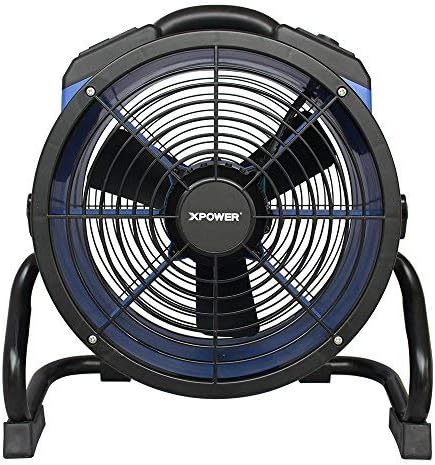
操作手順
To operate your XPOWER X-35AR Pro Axial Fan:
- 電源接続: Plug the fan's power cord into a standard electrical outlet.
- 電源オン/オフ: Locate the power switch or button on the control panel. Press to turn the fan ON. Press again to turn it OFF.
- 可変速度制御: The fan features variable speed control. Use the designated knob or buttons to adjust the airflow intensity from low to high, according to your requirements.
- 内蔵電源コンセント: The fan is equipped with built-in power outlets. These allow you to daisy-chain multiple XPOWER fans for extended coverage or to power other compatible devices (e.g., power tools, mobile phone chargers). Ensure the total current draw does not exceed the fan's rated capacity.
- 気流方向の調整: Loosen the side knobs on the stand, adjust the fan to the desired angle (up to 360 degrees), and then re-tighten the knobs to secure its position.
メンテナンス
定期的なメンテナンスにより、ファンの最適なパフォーマンスと寿命が確保されます。
- クリーニング: 清掃する前にファンを電源から外してください。柔らかくて汚れやすい布を使用してください。amp cloth to wipe down the exterior surfaces. For the grilles and blades, use a vacuum cleaner with a brush attachment or compressed air to remove dust and debris. Do not use harsh chemicals or abrasive cleaners.
- ストレージ: When not in use, store the fan in a clean, dry place. The fan can be stacked up to 5 units high for efficient storage or transportation. Wrap the 20 ft. power cord around the integrated cord wrap for neat storage.
トラブルシューティング
| 問題 | 考えられる原因 | 解決 |
|---|---|---|
| ファンが作動しません。 | No power supply; power cord not fully plugged in; circuit breaker tripped. | 電源コンセントを確認し、コードが確実に差し込まれていることを確認し、回路ブレーカーをリセットします。 |
| 気流の減少。 | Grilles or blades are obstructed by dust/debris. | Unplug fan and clean grilles and blades as per maintenance instructions. |
| 動作中に異常な音がする。 | Loose components; debris inside the fan. | Unplug fan and inspect for loose parts or foreign objects. If noise persists, contact customer support. |
仕様
| 特徴 | 詳細 |
|---|---|
| モデル番号 | X-35AR Pro |
| ブランド | エクスパワー |
| モーター | 1/4 HP Sealed Induction Motor |
| 風量(最大) | 1720 CFM(XNUMX分あたりの立方フィート) |
| Amperage(最大) | 1.6 Amps |
| 電源 | コード式電気 |
| 巻tage | 12ボルト |
| ワットtage | 184ワット |
| 製品寸法(奥行き×幅×高さ) | 9.2インチ x 18.6インチ x 19.4インチ |
| 重さ | 17.6ポンド |
| 材料 | Polycarbonate Housing, Plastic Blades |
| コードの長さ | 20フィート |
| 特集 | Variable Speed, Built-in Power Outlets, 360-degree Rotation, Stackable |
| 屋内/屋外での使用 | 屋内 |
保証とサポート
The XPOWER X-35AR Pro Industrial Axial Fan is backed by a 1年間のメーカー限定保証この保証は、通常の使用における材料および製造上の欠陥をカバーします。
For warranty claims, technical support, or service inquiries, please contact XPOWER customer support. Refer to the official XPOWER web最新の連絡先情報については、サイトまたは製品パッケージをご覧ください。