
導入
This user manual provides comprehensive instructions for the setup, operation, maintenance, and troubleshooting of your Alienware M15 Gaming Laptop. Please read this manual thoroughly to ensure optimal performance and longevity of your device. For additional support, refer to the official Alienware support resources.
製品終了view
主な特徴
- 8th Generation Intel Core i7-8750H (6-Core, 9MB Cache, up to 4.1GHz w/ Turbo Boost)
- 15.6" FHD (1920 x 1080) 60Hz Anti-glare IPS, 300-nits 72% Color gamut, narrow-border Display
- 16GB, 2x8GB, DDR4, 2666MHz RAM
- 128GB PCIe M.2 SSD + 1TB (+8GB SSHD) Hybrid Drive
- Nvidia GeForce GTX 1060 with 6GB GDDR5 Graphics Card
- Windows 10 Home オペレーティング システム
物理コンポーネント

図1: フロント view of the Alienware M15 laptop, showcasing the display with the Alienware logo.

図2: トップダウン view of the open Alienware M15 laptop, highlighting the keyboard layout and touchpad.

図3: 左側 view of the Alienware M15 laptop, showing various ports such as USB 3.0.
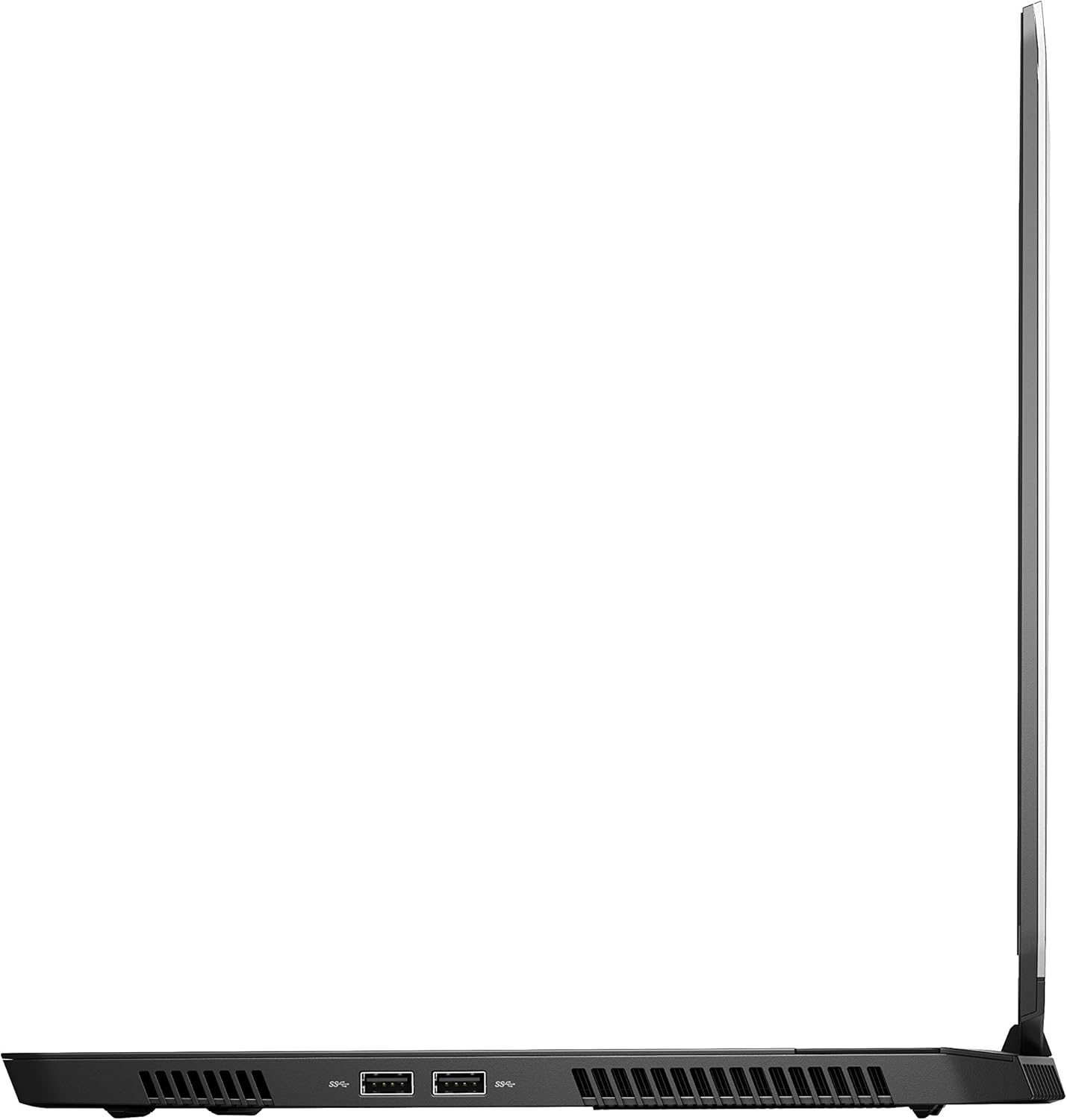
図4: 右側 view of the Alienware M15 laptop, displaying additional ports and ventilation.

図5: 爆発した view illustrating the internal cooling system of the Alienware M15 laptop, including fans and heat sinks.
設定
開梱
すべての部品をパッケージから慎重に取り出します。以下のものがすべて揃っていることを確認してください。
- Alienware M15 Gaming Laptop
- 電源コード
- 180W電源アダプター
初回電源投入
- 電源アダプタをノートパソコンの電源入力ポートに接続します。
- 電源コードを壁のコンセントに差し込みます。
- Open the laptop lid and press the power button, typically located on the top right of the keyboard deck or a dedicated button on the chassis.
- 画面上の指示に従って、言語の選択、ネットワーク接続、ユーザー アカウントの作成などの Windows 10 Home セットアップ プロセスを完了します。
操作手順
基本操作
Your Alienware M15 laptop runs on Windows 10 Home. Familiarize yourself with the operating system's interface. The keyboard features customizable backlighting via Alienware's software. The touchpad supports multi-touch gestures for navigation.
ゲームパフォーマンス
The Alienware M15 is designed for high-performance gaming. For optimal gaming experience, ensure the laptop is connected to the power adapter. This allows the system to utilize its full power capabilities for the CPU and GPU. While gaming, the laptop may generate significant heat; this is normal for high-performance hardware. Consider using a cooling pad for extended gaming sessions to enhance thermal management.
メンテナンス
クリーニング
- 画面: 柔らかく糸くずの出ない布で軽く拭き取ってください。amp水またはスクリーンクリーナーで拭いてください。刺激の強い化学薬品は使用しないでください。
- キーボードとシャーシ: Use a soft brush or compressed air to remove dust from keys and vents. Wipe surfaces with a microfiber cloth.
- ポート: Use compressed air to clear dust from USB, HDMI, and other ports.
ソフトウェアアップデート
Regularly update your Windows operating system, graphics drivers (NVIDIA GeForce), and Alienware software. Updates often include performance improvements, security patches, and bug fixes. Access Windows updates through Settings > Update & Security. Graphics drivers can be updated via the NVIDIA GeForce Experience application.
バッテリーケア
To maximize battery lifespan, avoid consistently discharging the battery completely. For prolonged use while plugged in, consider using battery management features (if available in Alienware Command Center) to limit charging to 80-90% capacity.
トラブルシューティング
This section addresses common issues you might encounter with your Alienware M15 laptop.
| 問題 | 考えられる原因 / 解決策 |
|---|---|
| Laptop gets excessively hot during use. | High-performance components generate heat. Ensure ventilation vents are clear. Use a cooling pad. Update graphics drivers. |
| "No media present" error or SSD/HDD not detected. | This can sometimes be a temporary software glitch. Try restarting the laptop. If persistent, ensure the power cable is securely connected and try a hard reboot (unplug power, hold power button for 15 seconds, then reconnect and power on). If the issue persists, contact support. |
| Wi-Fi connection drops frequently. | Ensure Wi-Fi drivers are up to date. Check for interference from other devices. Restart your router and the laptop. If the issue persists, consider reinstalling Wi-Fi drivers or contacting support. |
| System performance is slow or lagging. | Ensure the laptop is plugged into power for full performance. Close unnecessary background applications. Check for malware. Ensure sufficient free space on the SSD/HDD. |
仕様
Detailed technical specifications for the Alienware M15 Gaming Laptop (Model: AWM15-7830SLV-PUS).
| 特徴 | 詳細 |
|---|---|
| スタンディングスクリーンの表示サイズ | 15.6インチ |
| 画面解像度 | 1920 x 1080 ピクセル |
| 最大画面解像度 | 1920x1080ピクセル |
| プロセッサ | 4.1 GHz core_i7_8750h |
| ラム | 16GB DDR4 |
| メモリ速度 | 2666 MHz |
| ハードドライブ | 1000 GB 128GB PCIe M.2 SSD + 1TB (+8GB SSHD) Hybrid Drive |
| グラフィックスコプロセッサ | NVIDIA GeForce GTX 1060 |
| チップセットブランド | NVIDIA |
| カードの説明 | ひたむきな |
| グラフィックカードのRAMサイズ | 6ギガバイト |
| ワイヤレスタイプ | 802.11a/b/g/n |
| USB 3.0 ポートの数 | 3 |
| ブランド | エイリアンウェア |
| シリーズ | AWm15-7830SLV-PUS |
| 商品型番 | AWM15-7830SLV-PUS |
| オペレーティング·システム | Windows 10 ホーム |
| アイテム重量 | 4.8ポンド |
| 製品寸法 | 10.8 x 14.3 x 0.8インチ |
| 色 | 黒 |
| プロセッサブランド | インテル |
| プロセッサ数 | 6 |
| コンピュータのメモリタイプ | DDR4 メモリ |
| フラッシュメモリサイズ | 16 |
| ハードドライブインターフェース | ソリッドステート |
| ハードドライブの回転速度 | 5400 回転 |
| 光学ドライブタイプ | 光学ドライブなし |
| 巻tage | 240ボルト |
| バッテリー | リチウム金属電池1個が必要です。(付属) |
| 初回利用可能日 | 5年2019月XNUMX日 |
| モデル名 | AWm15-7830SLV-PUS |
| 画面サイズ | 15.6インチ |
| ハードディスクサイズ | 1000ギガバイト |
| CPUモデル | コアi7 8750H |
| インストールされた RAM メモリのサイズ | 16ギガバイト |
| 特集 | アンチグレアコーティング |
保証とサポート
For detailed warranty information, please refer to the documentation included with your purchase or visit the official Alienware support website. For technical assistance, driver downloads, and further resources, please visit the Alienware support portal.
公式ユーザーマニュアル (PDF) もダウンロード可能です。 ユーザーマニュアル(PDF)をダウンロード