
1. はじめに
This manual provides instructions for the setup, operation, and maintenance of the Aastra 6731i IP Phone. The 6731i is designed for business communication, featuring essential functions for daily productivity, including programmable buttons, a multi-line LCD display, and Power over Ethernet (PoE) capability.
2. パッケージ内容
パッケージにすべてのアイテムが含まれていることを確認します。
- Aastra 6731i IP Phone Unit
- ハンドセット
- ハンドセットコード
- イーサネットケーブル
- Power Supply (if not using Power over Ethernet)
3.製品オーバーview
The Aastra 6731i IP Phone (A6731-0131-10-01) is equipped with various features to enhance your communication experience.
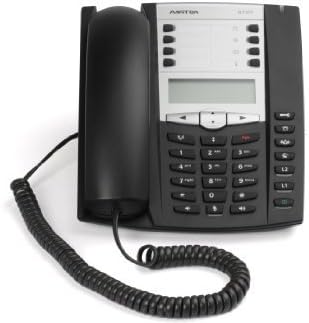
An image showing the Aastra 6731i IP Phone. The phone is black with a silver-grey control panel. The handset rests on the left side, connected by a coiled cord. The main unit features a multi-line LCD display, a numeric keypad, and various function buttons.
3.1 フロントパネルの機能
- Multi-line LCD Display: 通話情報、メニュー オプション、ステータスを表示します。
- Programmable Buttons (8): Customizable for speed dial, line appearances, or feature access.
- Fixed Feature Keys (10): Dedicated buttons for common functions like Hold, Transfer, Speaker, Mute, Volume.
- Navigational Keys (4): Used to scroll through menus and options on the display.
- テンキー: 番号をダイヤルしたり、テキストを入力したりします。
- 全二重スピーカーフォン: ハンズフリー通信が可能になります。
3.2 リアパネルの接続
- LANポート: Connects to your network switch or router (supports Power over Ethernet).
- PC ポート: Connects to a computer, allowing the phone to act as a network pass-through.
- ハンドセットポート: コイル状の受話器コードを接続します。
- 電源ポート: Connects the external power supply (if PoE is not used).
4. セットアップ
4.1 電話の接続
- Connect one end of the handset cord to the handset and the other end to the handset port on the rear of the phone.
- Connect one end of the Ethernet cable to the LAN port on the rear of the phone and the other end to a network switch or router. If your network provides Power over Ethernet (PoE), no separate power supply is needed.
- If PoE is not available, connect the power supply to the power port on the rear of the phone and plug it into a power outlet.
- The phone will power on and begin its boot sequence. Follow any on-screen prompts for initial configuration, which may be handled automatically by your network administrator.
5. 操作手順
5.1電話をかける
- 受話器をあげるか、 スピーカー ボタン。
- 数字キーパッドを使用して希望の電話番号をダイヤルします。
- を押す ダイヤル softkey (if available) or wait for the call to connect automatically.
5.2 電話に出る
- When the phone rings, lift the handset, or press the flashing line button, or press the スピーカー button to answer hands-free.
5.3 Using Speakerphone
スピーカーフォンを使用するには、 スピーカー button. The speakerphone indicator will illuminate. To switch back to the handset, simply lift the handset. To end a speakerphone call, press the スピーカー もう一度ボタンまたは 通話終了 ソフトキー。
5.4 ホールド機能
通話中に、 所有 button. The call will be placed on hold, and the line button may flash. To retrieve the call, press the flashing line button again.
5.5 通話の転送
通話中に、 移行 button. Dial the number of the party you wish to transfer the call to. You can either perform a blind transfer (hang up before the other party answers) or an attended transfer (wait for the other party to answer, announce the call, then press 移行 また)。
5.6 電話会議
The Aastra 6731i supports 3-way conference calls. During an active call, press the 会議 button. Dial the number of the third party. Once connected, press the 会議 もう一度ボタンをクリックすると、すべてのパーティーに参加できます。
5.7つのプログラム可能なボタン
The eight programmable buttons can be configured by your system administrator for various functions such as speed dials, line appearances, or access to specific features. Consult your administrator for details on their specific assignments.
6. メンテナンス
To ensure the longevity and proper functioning of your Aastra 6731i IP Phone, follow these maintenance guidelines:
- クリーニング: 柔らかく乾いた糸くずの出ない布で携帯電話の外装を拭いてください。頑固な汚れには、軽く拭き取ってください。amp布に水を含ませて拭いてください。刺激の強い化学薬品、研磨剤入りの洗剤、溶剤の使用は避けてください。携帯電話の表面を傷める可能性があります。
- 環境: 携帯電話は、直射日光、過度の熱、湿気を避け、清潔で乾燥した環境に保管してください。
- コード: Periodically check all cords for any signs of damage or fraying. Replace damaged cords immediately.
7。 トラブルシューティング
If you encounter issues with your Aastra 6731i IP Phone, refer to the following common problems and solutions:
7.1 ダイヤルトーンなし
- イーサネット ケーブルが電話機の LAN ポートとネットワーク スイッチ/ルーターの両方にしっかりと接続されていることを確認します。
- If not using PoE, verify that the power supply is correctly connected and plugged into a working power outlet.
- Check your network connection and ensure the network is operational.
- Restart the phone by disconnecting and reconnecting the power/Ethernet cable.
7.2 電話をかけたり受けたりできない
- Verify that the phone is registered with your VoIP system (check the display for registration status).
- Ensure your network connection is active and stable.
- Confirm that your account is active and not experiencing service interruptions.
- Contact your network administrator or VoIP service provider for assistance.
7.3 表示の問題
- If the display is blank, check power and network connections.
- If the display is frozen, restart the phone.
- Adjust display contrast or brightness settings if available in the phone's menu.
8. 仕様
| モデル | Aastra 6731i (A6731-0131-10-01) |
| 電話の種類 | 有線IP電話 |
| 電源 | Power over Ethernet (PoE) or Corded Electric |
| 複数行操作 | 複数回線操作 |
| 電話会議機能 | 3ウェイ |
| 留守番電話システムの種類 | デジタル(システム依存) |
| 製品寸法(長さ x 幅 x 高さ) | 13 x 12 x 3 インチ (33 x 30.5 x 7.6 cm) |
| アイテム重量 | 2.95ポンド(1.34kg) |
| 欧州連合 | 034722774796 |
9. 保証とサポート
This Aastra 6731i IP Phone is sold in an as-is condition. All units have been tested and are confirmed to be fully functional prior to sale. For any operational issues or technical support, please contact your vendor or the system administrator who provided the phone. Specific warranty terms, if any, are provided by the seller at the time of purchase.