
1. はじめに
This manual provides instructions for the SAFFUN 2.4 GHz Wireless USB Controller, designed for a retro gaming experience. This controller is compatible with various platforms including Windows PC, Mac, Linux, and Raspberry Pi systems. Please read this manual thoroughly before use to ensure proper setup and operation.
2.製品オーバーview
The SAFFUN Wireless USB Controller offers a classic SNES-style design with modern wireless connectivity. It features a 2.4 GHz wireless RF connection, providing a range of up to 10 meters for flexible gameplay.
主な特徴:
- 2.4 GHz ワイヤレス接続: Offers a stable connection with up to 10 meters range.
- プラグアンドプレイ: Generic USB controller that requires no additional setup for most compatible systems.
- 敏感なボタン: Designed for precision control.
- バッテリー寿命の延長: Up to 3 years battery life with a 240mA capacity.
- 急速充電: フル充電で約1時間。
コントローラーコンポーネント:
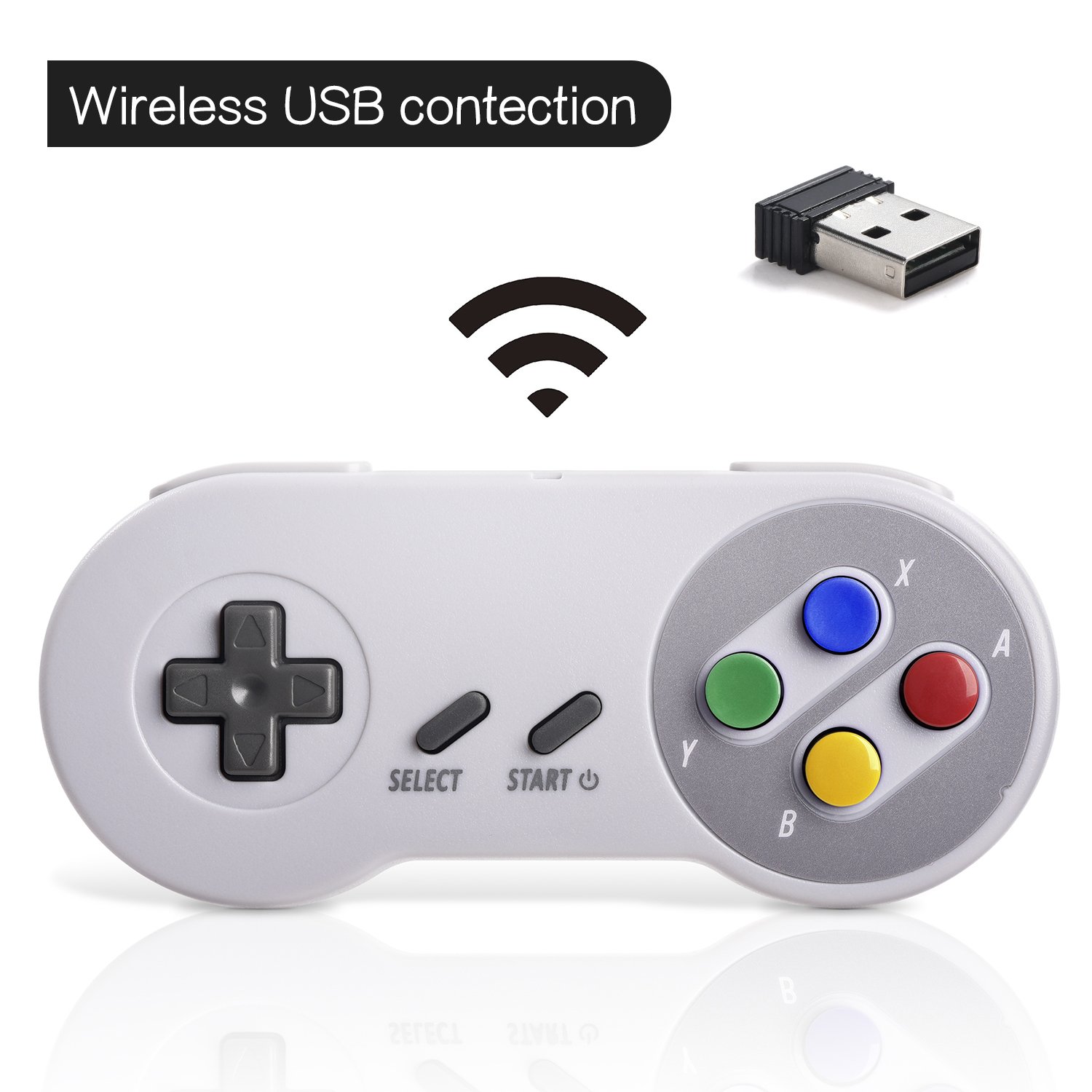

3. セットアップ
初期接続:
- Insert the 2.4 GHz USB receiver into an available USB port on your PC, Mac, Linux device, or Raspberry Pi.
- Press the 'START' button on the controller to power it on. The controller should automatically connect to the USB receiver. A red indicator light on the controller will confirm connection status.
- If your program or application accepts USB controller input, the controller should be ready for use.
Pairing and Resetting:
If the controller does not pair automatically or experiences connection issues, you may need to reset it:
- USB レシーバーがデバイスにしっかりと接続されていることを確認してください。
- を押し続けます 選択, 始める、 そして D-PAD DOWN buttons simultaneously on the controller to initiate a reset and re-pairing sequence.
- The controller should then attempt to re-establish a connection with the USB receiver.

4. 操作手順
The controller functions similarly to a classic SNES controller. The buttons are mapped as follows:
- 十字キー: 方向制御(上、下、左、右)。
- 選択ボタン: Typically used for menu selections or secondary functions.
- スタートボタン: Used to pause games, confirm selections, or power on/off the controller.
- Action Buttons (Y, X, A, B): ゲームプレイ用の主要なアクション ボタン。
- ショルダーボタン(L、R): Located on the top edge of the controller for additional in-game actions.
For specific button assignments within games or emulators, refer to the in-game settings or emulator configuration options.
5. 互換性
サポートされているオペレーティングシステム:
- Windows (98, ME, 2000, 2003, XP, Vista, 7, 8, 8.1, 10)
- Linux (Ubuntu, Linux Mint, Android Linux via USB OTG cable)
- Mac OS X and beyond
- Retrogaming operating systems (RetroPie, Recalbox, Happi Game Center, Lakka, ChameleonPi, Piplay)
サポートされているデバイス:
- PC, Notebook Computer, Laptop Computer
- Android Smartphone (via USB OTG cable)
- Raspberry Pi (RPI, Raspberry pie): Raspberry Pi 1 Model B, Model A, Raspberry Pi 1 Model B+, Raspberry Pi Zero, Raspberry Pi 2, Raspberry Pi 3 Model B, Raspberry Pi 3, Retro Pie

サポートされていないデバイス:
- Android TV ボックス
- C64 (Commodore 64)
- Google Chromebook
- ファイアテレビ
- スチーム
- テスラ
- Nintendo NES Classic Edition Console, NES Mini Console, Nintendo SNES Classic Edition Console, SNES Mini Console

サポートされているゲームエミュレーター:
- NES, SNES, Snes9x, ZSNES, Higan
- Handheld GBA emulator
- Sega Genesis emulator
- Sega OpenEmu (Only supports OS X)
- RetroArch (Works well on Android)
- BSNES (Ideal for two-player action)
6. 充電とバッテリー寿命
The controller is equipped with a rechargeable battery. To charge the controller:
- Connect the provided charging cable to the micro USB port on the top edge of the controller.
- ケーブルのもう一方の端を標準の USB 電源 (コンピューターの USB ポート、USB 壁アダプターなど) に接続します。
- The red indicator light on the controller will flash while charging and remain solid when fully charged.
バッテリー仕様:
- バッテリー容量: 240mA
- 充電時間:約1時間
- 充電voltage:3.7V
- Usage time: Up to 3 hours on a full charge
- バッテリー残量インジケーター: あり
7。 トラブルシューティング
接続の問題:
- コントローラーが応答しません: Ensure the USB receiver is properly inserted into a working USB port. Verify the controller is powered on by pressing the 'START' button.
- 断続的な接続: Move closer to the USB receiver to ensure you are within the 10-meter range. Check for potential interference from other 2.4 GHz wireless devices.
- 修理: If connection is lost or unstable, perform the reset procedure by holding SELECT + START + D-PAD DOWN simultaneously.
Input/Button Mapping Problems:
- Incorrect button functions: Check the in-game or emulator settings to ensure the controller buttons are correctly mapped. Some emulators may require manual configuration.
- Controller not recognized as SNES type: Some systems or games might incorrectly identify the controller. If possible, manually select a generic USB gamepad or SNES controller profile ソフトウェア設定内。
充電の問題:
- コントローラーが充電されない: Ensure the charging cable is securely connected to both the controller and the power source. Try a different USB port or charging adapter. Check if the red indicator light flashes during charging.
8. 仕様
| 特徴 | 詳細 |
|---|---|
| モデル番号 | 8541667389 |
| 接続性 | 2.4 GHz Wireless RF |
| ワイヤレス範囲 | 最大10メートル |
| 製品寸法 | 5.51 x 2.36 x 0.79インチ |
| アイテム重量 | 8.1オンス |
| 電池のタイプ | 充電式(1A電池付属) |
| バッテリー容量 | 240mA |
| 充電時間 | 1時間 |
| 充電Voltage | 3.7V |
| 使用時間 | 3時間 |
| メーカー | サファン |
| 初回利用可能日 | 8年2018月XNUMX日 |
9. 保証とサポート
SAFFUN is registered with the United States Patent and Trademark Office. We are committed to 100% customer satisfaction.
- 保証: We provide a hassle-free 12-month replacement warranty.
- 顧客サービス: ご質問やサポートがございましたら、お気軽にお問い合わせください。
