
1.製品オーバーview
The Itek SIISBE 3.0 is a gaming middle tower PC case designed to combine high-level features with a modern aesthetic. It features a fully perforated front panel for optimal airflow and a tempered glass side panel with a convenient hinged closure, allowing for easy access and showcasing your internal components.
The case comes equipped with three 12 cm ARGB fans: two located at the front and one at the rear. These fans can be controlled via a dedicated button on the front panel or through your motherboard's ARGB software, providing customizable lighting effects and efficient cooling.
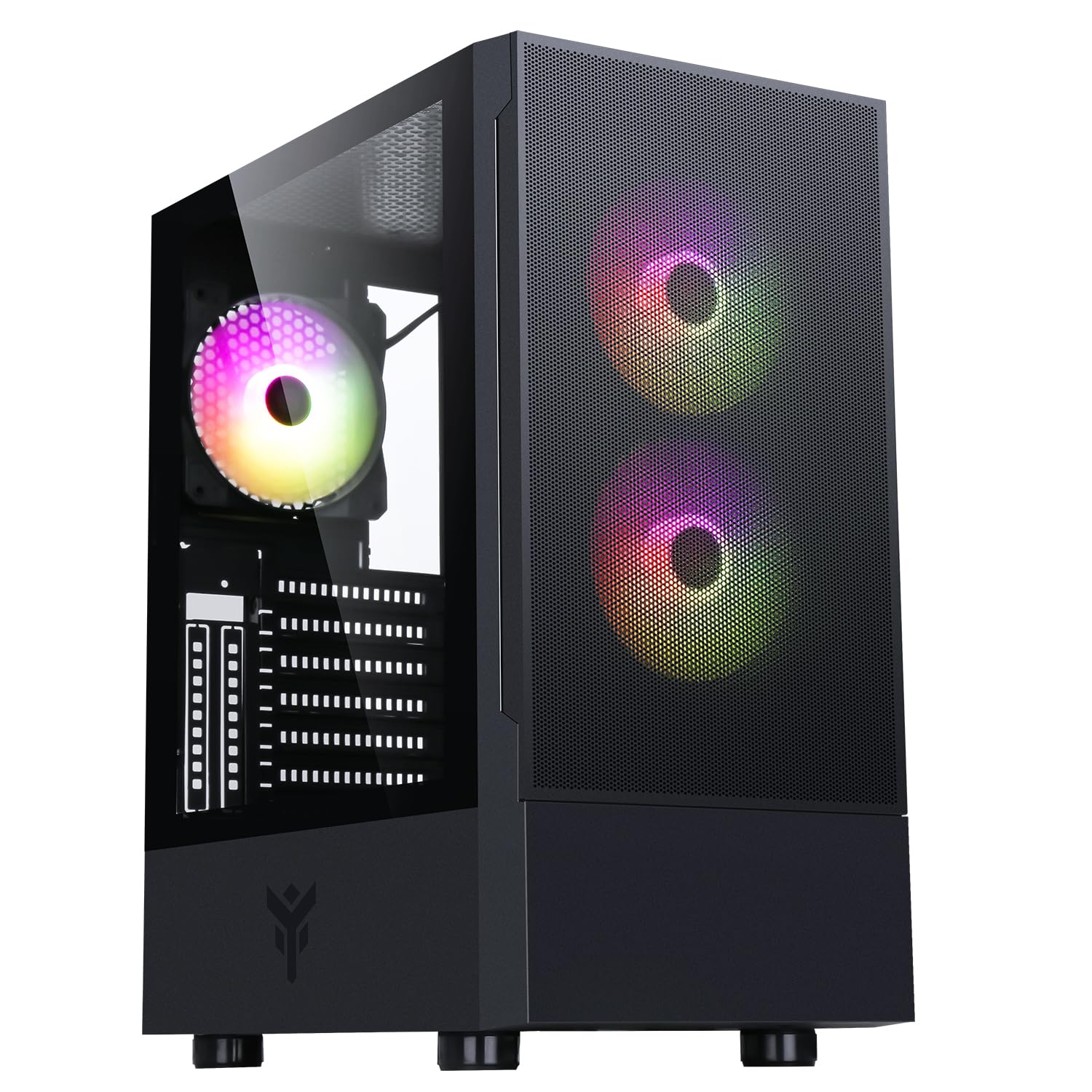
図1: 前面 view of the Itek SIISBE 3.0 Gaming PC Case, showcasing the perforated front panel and tempered glass side panel.
The SIISBE 3.0 supports a wide range of hardware, including ATX, Micro-ATX, and Mini-ITX motherboards. It accommodates graphics cards up to 315 mm in length, CPU coolers up to 160 mm in height, and liquid cooling radiators up to 280 mm. The case also offers 28 mm of space for efficient cable management, ensuring a clean and organized build.
2. セットアップとインストール
2.1 ケースの準備
- ケースを開梱し、梱包材をすべて取り除きます。
- Open the tempered glass side panel by gently pulling it open from the hinge.
- Locate the accessory box inside the case, which contains screws and other mounting hardware.
2.2マザーボードの取り付け
- Install the necessary standoffs for your motherboard form factor (ATX, Micro-ATX, or Mini-ITX) onto the motherboard tray.
- ネジ穴を合わせながら、マザーボードをスタンドオフの上に慎重に置きます。
- 付属のネジでマザーボードを固定します。

図2:内部 view of the Itek SIISBE 3.0, highlighting the motherboard mounting area and cable routing options.
2.3電源ユニット(PSU)の設置
- Mount the PSU in the dedicated bottom compartment of the case.
- ケースの背面からネジを使用して PSU を固定します。
2.4 ストレージドライブのインストール
- Install 2.5-inch SSDs or 3.5-inch HDDs into the designated internal bays. Refer to the case's internal layout for specific mounting points.
- 適切なネジでドライブを固定します。

図3: 背面内部 view of the Itek SIISBE 3.0, showing the motherboard tray, SSD mounting points, and ampケーブル管理のためのスペースが十分にあります。
2.5 グラフィックカードと拡張カードのインストール
- ケースの背面から必要な拡張スロット カバーを取り外します。
- グラフィック カードまたはその他の拡張カードをマザーボードの PCIe スロットに挿入します。
- Secure the cards with screws. The case supports graphics cards up to 315 mm in length.
2.6 冷却システムの設置
- The case includes three 12 cm ARGB fans (two front, one rear). Connect their power and ARGB cables to the motherboard or the integrated fan controller.
- For additional cooling, install extra fans or a liquid cooling radiator (up to 280 mm) in the designated mounting points.
- Install your CPU cooler. The case supports CPU coolers up to 160 mm in height.
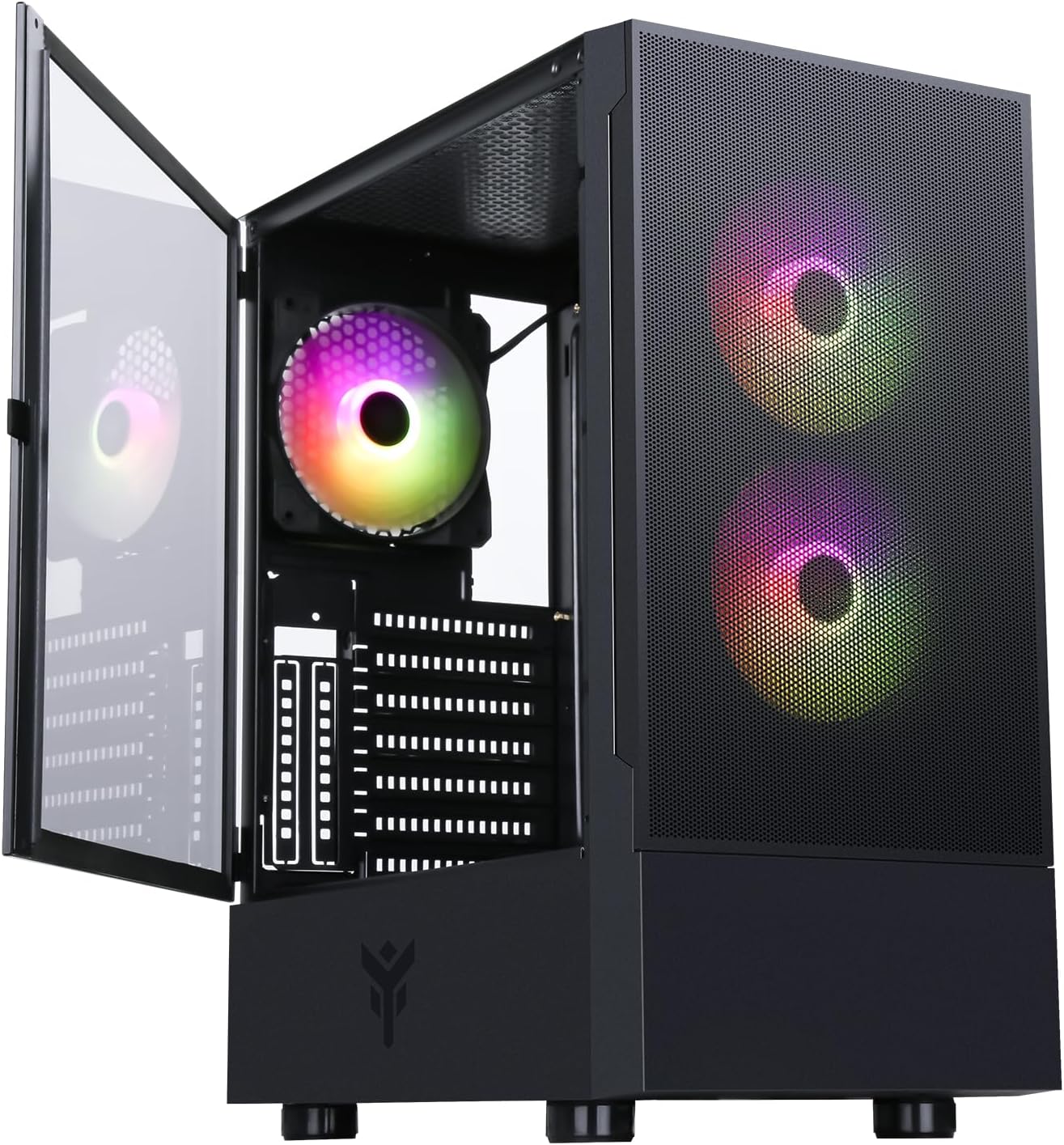
Figure 4: The Itek SIISBE 3.0 with its hinged tempered glass panel open, revealing the pre-installed ARGB fans and internal layout.
2.7 ケーブル管理
- Utilize the 28 mm cable management space behind the motherboard tray to route and organize all power and data cables.
- Use cable ties (not included) to secure cables and maintain optimal airflow.
3. 操作手順
3.1電源オン
- Ensure all components are correctly installed and connected.
- 電源ケーブルを PSU と壁のコンセントに接続します。
- Press the power button located on the top I/O panel of the case to start your system.
3.2 ARGBファンコントロール
- The pre-installed ARGB fans can be controlled via the dedicated LED control button on the front panel. Press the button to cycle through various lighting modes and colors.
- Alternatively, if the fans are connected to an ARGB header on your motherboard, you can use the motherboard's proprietary software (e.g., ASUS Aura Sync, MSI Mystic Light, Gigabyte RGB Fusion) to synchronize and customize the lighting effects.
3.3 フロントI/Oポート
- The front I/O panel includes USB 3.0 and USB 2.0 ports for connecting peripherals and external storage devices.
- Audio jacks are also available for headphones and microphones.
4. メンテナンス
4.1 ダストフィルターのクリーニング
- The SIISBE 3.0 case is equipped with dust filters to prevent dust buildup inside. Regularly check and clean these filters.
- Gently remove the dust filters (typically located on the top, front, and/or bottom) and clean them with compressed air or by rinsing them with water. Ensure they are completely dry before re-installing.
4.2一般的なクリーニング
- 柔らかくてamp 強化ガラスパネルを含むケースの外側の表面を布で拭いてください。研磨剤入りの洗剤は使用しないでください。
- For internal cleaning, use compressed air to remove dust from fans, heatsinks, and other components. Ensure the system is powered off and unplugged before cleaning.
5。 トラブルシューティング
This section provides general troubleshooting tips for common issues. For more specific problems, consult the manuals for your individual PC components (motherboard, PSU, GPU, etc.) or contact Itek support.
5.1 システムが電源を入れない
- 電源接続を確認してください: Ensure the PSU is properly connected to the wall outlet and the power switch on the PSU is in the 'ON' position. Verify all internal power cables (24-pin ATX, 8-pin CPU, PCIe, SATA) are securely connected to the motherboard and components.
- フロントパネルコネクタ: Confirm that the front panel power switch cable is correctly connected to the motherboard's front panel header.
5.2 Fans Not Spinning / ARGB Not Working
- ファン接続: Verify that the fan power cables are securely connected to the motherboard fan headers or the integrated fan controller.
- ARGB接続: Ensure ARGB cables are correctly connected to the motherboard's ARGB header or the case's ARGB controller.
- ソフトウェア/ボタンコントロール: If using the case's LED button, try pressing it to cycle modes. If using motherboard software, ensure it is installed and configured correctly.
5.3 過熱の問題
- 気流: Ensure fans are installed in the correct orientation for optimal airflow (front fans typically intake, rear/top fans exhaust).
- ほこりの蓄積: 「メンテナンス」セクションの説明に従って、ダスト フィルターと内部コンポーネントをクリーニングします。
- ケーブル管理 ケーブル配線を改善して、空気の流れを妨げるものを減らします。
6. 仕様
| 特徴 | 仕様 |
|---|---|
| メーカー | アイテック |
| 商品型番 | ITGCASIB30 |
| ブランド | イテック |
| マザーボードの互換性 | ATX、Micro-ATX、Mini-ITX |
| ケースタイプ | ミドルタワー |
| 推奨製品用途 | Gaming, Professional |
| 色 | 黒 |
| 材料 | 強化ガラス |
| 電源取付タイプ | ボトムマウント |
| 冷却方法 | 空気 |
| モデル名 | Case SIISBE 3.0 |
| ファンサイズ | 120ミリメートル |
| Total Expansion Slots | 7 |
| Total USB 2.0 Ports | 2 |
| Total USB 3.0 Ports | 1 |
| USBポート合計 | 4 |
| 製品の特徴 | LED Control Button, Dust Filter, Integrated Fan |
| CPUクーラーの最大高さ | 160ミリメートル |
| Number of Internal Bays | 7 |
| 対応デバイス | ATX Motherboards, Full-size Graphics Cards, Standard Cooling Solutions |
| ファン数 | 3 |
| ライトカラー | RGB |
| 商品の寸法(奥行き x 幅 x 高さ) | 37.6D x 37.6W x 44.6H センチメートル |
7. 保証情報
Specific warranty details for the Itek SIISBE 3.0 PC Case may vary by region and retailer. Please refer to the warranty card included with your product or visit the official Itek web最も正確で最新の保証情報については、当社のサイトをご覧ください。
保証請求の際に必要となるため、購入証明(領収書または請求書)を保管してください。
8. カスタマーサポート
For technical assistance, product inquiries, or support regarding your Itek SIISBE 3.0 PC Case, please contact Itek customer support through their official channels.
- 正式 Webサイト: Visit the Itek official webサポート リソース、FAQ、および連絡先情報に関するサイト。
- メールサポート: Look for a support email address on the Itek webサイト。
- 電話サポート: Check the Itek web地域の電話サポート番号のサイト。
When contacting support, please have your product model (SIISBE 3.0) and item model number (ITGCASIB30) ready to help expedite the process.