
1.製品オーバーview
The Sato One-Touch Timer TM-22 is a versatile digital timer designed for various timing needs, from kitchen use to laboratory applications. It combines ease of use with practical features to enhance your daily tasks.
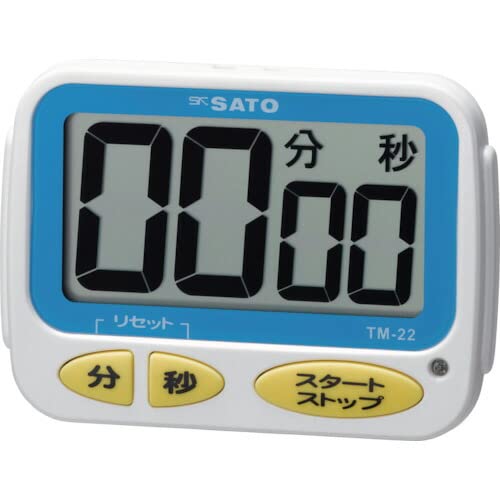
画像1:正面 view of the Sato One-Touch Timer TM-22. The timer features a clear digital display and control buttons.
主な特徴:
- Automatic Reset Alarm: The alarm sounds for 5 seconds at the set time and automatically resets to the initial set time.
- 簡単な操作: The primary key is for starting; no complex operations are required to stop the timer's alarm cycle.
- Dual Notification: Alerts users with both sound (70dB) and light.
- Drip-Proof Construction: Designed to resist splashes, making it suitable for kitchen environments.
- 複数の取り付けオプション: Equipped with a magnet on the back for attachment to metal surfaces and a strap for hanging.
- カウントダウンとカウントアップ機能: Supports both decreasingと増加asing time measurements.
2. セットアップ
バッテリーの取り付け:
The TM-22 timer requires one AAA battery for operation. A battery is included with the unit.
- タイマーの背面にある電池ボックスのカバーを見つけます。
- カバーをスライドさせるかクリップを外してコンパートメントを開きます。
- 単 4 電池 1 本を挿入し、プラス (+) 端子とマイナス (-) 端子がコンパートメント内のマークと正しく揃っていることを確認します。
- 電池収納部のカバーをしっかりと取り付けてください。
The timer should power on, and the display will show '00:00' or the last set time.
3. 操作手順
The TM-22 timer features both countdown and count-up functionalities.
3.1. カウントダウンタイマー
This function allows you to set a specific duration, and the timer will count down to zero.
- 時間設定: Use the 'M' (Minute) button and 'S' (Second) button to adjust the desired countdown duration. The timer can be set from 1 second up to 99 minutes and 59 seconds.
- カウントダウン開始: Press the 'START' button to begin the countdown.
- アラーム通知: When the time reaches zero, an alarm will sound for 5 seconds, accompanied by a flashing light.
- 自動リセット: After the 5-second alarm, the timer automatically resets to the initial set time, ready for the next countdown without manual intervention.
- 一時停止/停止: To pause the countdown, press the 'START' button again. To resume, press 'START' once more. To clear the set time, press the 'RESET' button (if available) or hold the 'START' button for a few seconds.
3.2. Count-up Timer
This function measures elapsed time from zero.
- カウントアップ開始: Ensure the timer display shows '00:00'. If not, press the 'RESET' button to clear any previous settings. Press the 'START' button to begin counting upwards from zero.
- 一時停止/再開: To pause the count-up, press the 'START' button. To resume, press 'START' again.
- リセット: To reset the count-up timer to '00:00', press the 'RESET' button (if available) or hold the 'START' button for a few seconds while paused.
4. メンテナンス
クリーニング:
タイマーの外観と機能を維持するには:
- Wipe the exterior of the timer with a soft, dry cloth.
- Do not use abrasive cleaners, solvents, or chemical agents, as these may damage the casing またはディスプレイ。
- The timer is drip-proof, but do not immerse it in water or expose it to heavy splashing.
バッテリー交換:
Replace the battery when the display becomes dim or the timer's functions become erratic.
- Follow the battery installation steps outlined in the "2. Setup" section.
- 常に新しい AAA 電池を使用してください。
- 使用済みバッテリーは、地域の規制に従って廃棄してください。
5。 トラブルシューティング
If you encounter issues with your TM-22 timer, refer to the following common problems and solutions:
| 問題 | 考えられる原因 | 解決 |
|---|---|---|
| タイマーがオンになりません。 | バッテリーが切れているか、正しく取り付けられていません。 | 電池の極性を確認してください。新しい単4電池と交換してください。 |
| Display is faint or flickering. | バッテリー残量が少なくなっています。 | 単 XNUMX 電池を交換してください。 |
| アラームが鳴っていません。 | Volume obstruction or internal issue. | Ensure the speaker is not covered. Check battery level. If problem persists, contact support. |
| Timer does not reset automatically after alarm. | This feature is specific to the countdown function. | Ensure you are using the countdown function. For count-up, manual reset is required. |
6. 仕様
| 特徴 | 詳細 |
|---|---|
| モデル番号 | TM-22 |
| 最大タイミング | 99分59秒 |
| Minimum Timing | 1秒 |
| 寸法(高さ×幅×奥行き) | 67mm×93mm×20mm |
| 重さ | 96グラム |
| 電源 | 単1電池×XNUMX(付属) |
| アラーム音量 | 70デシベル |
| 機能 | Countdown, Count-up |
| 特集 | Drip-proof construction, Magnet on back, Hanging strap, Sound and light notification |
7. 保証とサポート
For warranty information, technical assistance, or customer support regarding your Sato One-Touch Timer TM-22, please contact your authorized retailer or the manufacturer, Sato Corporation. Keep your purchase receipt as proof of purchase.
Please visit the official Sato web最新のサポート情報と連絡先の詳細については、こちらのサイトをご覧ください。