
導入
Thank you for choosing the SIMOLIO Kids Wireless Headphones Model JH-711. This manual provides essential information for the proper setup, operation, and maintenance of your headphones. Please read it carefully to ensure safe and optimal use.
製品の特徴
- 3段階の音量制限: Protects children's hearing with switchable volume limits (75dB for toddlers, 85dB for kids, 94dB for adults). This feature is active in both wired and wireless modes.
- ノイズアイソレーション: Over-ear design provides passive noise reduction, helping to block external sounds for improved listening focus.
- Wireless & Wired Modes: Offers Bluetooth connectivity for wireless use and includes a 3.5mm audio cable for wired connection when the battery is depleted or for non-Bluetooth devices.
- 内蔵マイク: Enables hands-free calling and voice chat.
- オーディオ共有ポート: Allows another headphone to connect and share audio from the same device.
- Durable & Flexible Design: Constructed with memory stainless steel strips in the headband for impressive durability and flexibility, designed to withstand active use. Earmuffs feature an anti-shedding design.
- 折りたたみ式でコンパクト: Easy to fold and store in the included EVA carrying case, ideal for travel and school.
- 長いバッテリー寿命: 15回の充電で最大XNUMX時間の再生が可能です。

The headphones feature a 3-level volume limiter to protect hearing, adjustable for toddlers, kids, and adults.
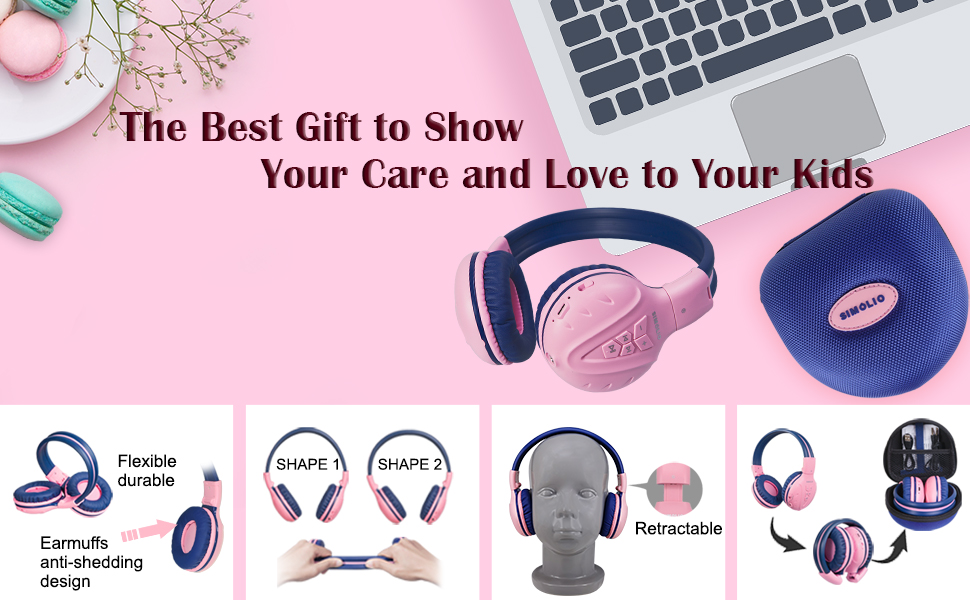
The flexible and durable design allows the headphones to withstand bending and twisting.
箱の中身
パッケージには以下のアイテムが含まれています:
- SIMOLIO Kids Wireless Headphones JH-711
- 充電ケーブル(USB)
- AUXケーブル(3.5mmオーディオケーブル)
- ユーザーマニュアル
- キャリングEVAケース
設定
1. ヘッドフォンを充電する
Before first use, fully charge the headphones. Connect the provided USB charging cable to the charging port on the headphones and to a USB power source (e.g., computer, wall adapter). The LED indicator will show charging status and turn off when fully charged.
2.Bluetoothペアリング
- ヘッドホンがオフになっていることを確認します。
- Press and hold the Multi-Function Button (MFB) until the LED indicator flashes blue and red alternately, indicating pairing mode.
- デバイス(スマートフォン、タブレットなど)で Bluetooth を有効にし、利用可能なデバイスを検索します。
- デバイスのリストから「SIMOLIO JH-711」を選択します。
- 接続すると、LEDインジケーターがゆっくりと青色に点滅します。
3. 有線モード接続
To use the headphones in wired mode, connect one end of the 3.5mm AUX cable to the audio jack on the headphones and the other end to the audio output of your device. The headphones will automatically switch to wired mode, even if the battery is dead.

The headphones support both wireless Bluetooth mode and wired mode via the included AUX cable.
4. Volume Limiter Adjustment
Locate the 3-level volume limiter switch on the headphones. Adjust the switch to the desired maximum volume level:
- 75dB (S): Recommended for toddlers or very quiet environments.
- 85dB (M): Recommended for children in general listening environments.
- 94dB (L): Recommended for adults or noisy environments.

Adjust the physical switch to select the appropriate volume limit.
5. Using the Sharing Port
The headphones feature an additional sharing jack on the right side. To share audio, plug another headphone into this port. This allows two users to listen to the same audio source simultaneously.

Connect another headphone to the sharing port to share audio with a friend.
操作手順
1. 電源のオン/オフ
- 電源オン: LED インジケーターが点灯するまで、MFB を約 3 秒間押し続けます。
- 電源を切る: LED インジケーターが消えるまで、MFB を約 3 秒間押し続けます。
2.音楽の再生
- 再生/一時停止: MFBを短く押します。
- 次のトラック: 「+」ボタンを短く押します。
- 前のトラック: 「-」ボタンを短く押します。
- ボリュームアップ: 「+」ボタンを長押しします。
- ボリュームダウン: 「-」ボタンを長押しします。
3.通話管理
Bluetooth経由で接続する場合:
- 通話の応答/終了: MFBを短く押します。
- 通話を拒否: MFBを長押しします。

内蔵マイクによりハンズフリー通話が可能です。
メンテナンス
- ヘッドホンは柔らかく乾いた布で拭いてください。研磨剤入りの洗剤や溶剤は使用しないでください。
- ヘッドフォンを極端な温度、湿度、直射日光にさらさないでください。
- 使用していないときは、ほこりや損傷からヘッドフォンを保護するために、付属の EVA キャリング ケースに保管してください。
- ヘッドフォンを分解または改造しないでください。保証が無効になり、損傷の原因となる可能性があります。

The headphones fold compactly and fit into the included EVA case for easy storage and transport.
トラブルシューティング
| 問題 | 考えられる原因 | 解決 |
|---|---|---|
| ヘッドホンの電源が入りません。 | バッテリー残量が少なくなりました。 | ヘッドホンを完全に充電してください。 |
| Bluetooth経由でペアリングできません。 | ヘッドフォンがペアリングモードになっていない、デバイスの Bluetooth がオフになっている、デバイスから遠すぎる。 | ヘッドホンがペアリングモード(赤/青点滅)になっていることを確認してください。デバイスのBluetoothをオンにしてください。ヘッドホンをデバイスに近づけてください(9メートル以内)。 |
| ワイヤレスモードでは音が出ません。 | 音量が低すぎる、接続されていない、デバイスで間違ったオーディオ出力が選択されている。 | ヘッドホンとデバイスの音量を上げてください。ヘッドホンを再ペアリングしてください。デバイスのオーディオ設定を確認してください。 |
| 有線モードでは音が出ません。 | AUX ケーブルが完全に挿入されていない、ケーブルが破損している、デバイスの音量が低すぎる。 | Ensure AUX cable is securely connected at both ends. Try a different AUX cable. Increase device volume. |
仕様
| 特徴 | 詳細 |
|---|---|
| モデル名 | Kids Bluetooth Headphones JH-711 |
| 接続技術 | ワイヤレス(Bluetooth)、有線(3.5 mmジャック) |
| Bluetoothバージョン | 4.0 |
| Bluetooth範囲 | 9メートル |
| 騒音制御 | 遮音性 |
| 感度 | 94 dB (最大) |
| バッテリー寿命 | 15時間 |
| 充電時間 | 3時間 |
| アイテム重量 | 187グラム(6.6オンス) |
| 製品寸法 | 5.51 x 3.15 x 5.31インチ |
| 材料 | Nylon, Stainless Steel (headband) |
| キャリングケースの素材 | エヴァ |
| 特集 | 3 Adjustable Volume Limited, Microphone, Durable, Flexible, Foldable, Wired & Wireless, Share Port, EVA Case |
公式製品ビデオ
このビデオでは、view of the SIMOLIO Bluetooth Headphones for Kids with Case JH-711, demonstrating its features and functionality.
保証とサポート
SIMOLIO products are designed for quality and reliability. For specific warranty information, please refer to the warranty card included with your product or visit the official SIMOLIO website. If you encounter any issues or require technical assistance, please contact SIMOLIO customer support through their official channels.