
1. はじめに
Thank you for choosing the Setty Power Bank with Solar Panels. This portable power bank is designed to provide convenient charging for your electronic devices on the go, featuring a 5000 mAh battery capacity and an integrated solar panel for supplementary charging. Please read this manual carefully before using the product to ensure safe and optimal performance.
2. 安全情報
- Do not expose the power bank to extreme temperatures, direct sunlight for prolonged periods (beyond charging), or fire.
- Avoid contact with water or other liquids. This device is not fully waterproof.
- ご自身で本製品を分解、改造、修理しないでください。資格のあるサービス担当者にご相談ください。
- お子様の手の届かない場所に保管してください。
- 互換性のある充電ケーブルとアダプターのみを使用してください。
- パワーバンクは地域の規制に従って責任を持って廃棄してください。
3. パッケージ内容
- Setty Power Bank with Solar Panels (5000 mAh)
- USB充電ケーブル(マイクロUSB)
- ユーザーマニュアル
4.製品オーバーview
Familiarize yourself with the components of your Setty Power Bank.
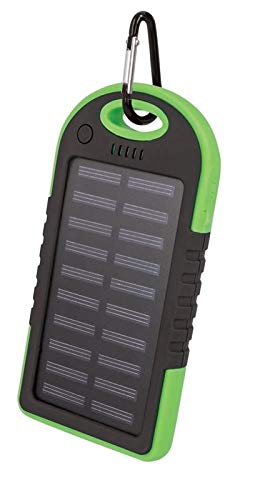
画像1: Setty Power Bank with Solar Panels. The image displays the power bank in its packaging, highlighting its green and black design, solar panel, and a carabiner clip for portability. The packaging also indicates "SOLAR TRAVEL BATTERY 5000 mAh".
- ソーラーパネル: Converts sunlight into electrical energy to slowly charge the internal battery.
- USB Output Ports (2): 外部機器の充電に。
- マイクロUSB入力ポート: パワーバンク本体の充電用。
- LEDインジケーター: バッテリーレベルと充電状態を表示します。
- 電源ボタン: To turn on/off the device and activate the flashlight.
- 懐中電灯: 照明用のLEDライトを内蔵。
- カラビナクリップ: For attaching the power bank to bags or gear.
5. セットアップ
5.1 パワーバンクの初期充電
Before first use, it is recommended to fully charge the power bank via a USB power source.
- Connect the provided Micro-USB cable to the power bank's input port.
- Connect the other end of the USB cable to a USB wall adapter (not included), computer USB port, or other compatible USB power source.
- LEDインジケーターが点灯して充電の進行状況を示します。すべてのLEDが点灯したら、パワーバンクは完全に充電されています。
- 充電が完了したらケーブルを外してください。
注記: Solar charging is a supplementary feature and is significantly slower than wall charging. For optimal performance, always fully charge the power bank via USB before extended use.
6. 操作手順
6.1 外部デバイスの充電
- デバイスの充電ケーブルをパワーバンクの USB 出力ポートの 1 つに接続します。
- Connect the other end of the cable to your electronic device (e.g., smartphone, tablet).
- パワーバンクは自動的にデバイスの充電を開始します。充電が開始されない場合は、電源ボタンを1回押して充電を開始してください。
- LED インジケーターは、パワーバンクの残りのバッテリーレベルを表示します。
- 完全に充電されたら、または充電する必要がなくなったら、デバイスを取り外します。
6.2ソーラー充電
The integrated solar panel allows for emergency or supplementary charging when no other power source is available.
- パワーバンクをソーラーパネルが直射日光に面するように設置します。
- A dedicated LED indicator (if present) or the main battery indicators may show that solar charging is active.
- Solar charging is slow and dependent on sunlight intensity. It is not intended as the primary charging method.
6.3 LEDインジケータの機能
The LED lights indicate the power bank's status:
- 点灯LED: Indicate remaining battery capacity. (e.g., 4 LEDs = 75-100%, 3 LEDs = 50-75%, etc.)
- 点滅するLED: Indicate the power bank is currently being charged.
6.4 懐中電灯機能
To use the integrated flashlight:
- オンにする: 電源ボタンを約2~3秒間押し続けます。
- 消す: もう一度電源ボタンを約2〜3秒間押し続けます。
7. メンテナンス
- パワーバンクは柔らかく乾いた布で拭いてください。刺激の強い化学薬品や研磨剤入りの洗剤は使用しないでください。
- Keep the solar panel clean and free of dust or debris for optimal solar charging efficiency.
- モバイルバッテリーを使用しないときは、涼しく乾燥した場所に保管してください。
- If storing for extended periods, charge the power bank to at least 50% every 3 months to prolong battery life.
8。 トラブルシューティング
| 問題 | 考えられる原因 | 解決 |
|---|---|---|
| パワーバンクが充電されません。 |
|
|
| デバイスがパワーバンクから充電されません。 |
|
|
| ソーラー充電は非常に遅いです。 |
|
|
9. 仕様
- ブランド: Setty
- モデル番号: 5900495682062
- バッテリー容量: 5000 mAh (ミリamp正時間前)
- 入力: USB(マイクロUSB)
- 出力: 2 x USBポート
- 出力電流: 1A
- 電源: Solar Powered, USB
- 対応デバイス: Computer (and other USB-chargeable devices)
10. 保証情報
Setty products are manufactured to high-quality standards. For specific warranty terms and conditions, please refer to the warranty card included with your purchase or contact your retailer. Keep your proof of purchase for any warranty claims.
11. サポート
If you encounter any issues or have questions regarding your Setty Power Bank that are not covered in this manual, please contact the retailer where you purchased the product or visit the official Setty webさらにサポートが必要な場合は、サイトをご覧ください。