
1. はじめに
The T'nB FM Bluetooth Transmitter (Model FMCT05B) allows you to stream audio from your smartphone or other compatible devices to your car's FM radio. This device features Bluetooth connectivity, a USB port, an SD card slot, and an LCD screen for displaying essential information. Enjoy hands-free calling and versatile music playback directly through your vehicle's sound system.
2. 安全情報
警告: Use only the power adapter provided with this device. To prevent interference, avoid operating the transmitter in close proximity to other electronic devices.
3.製品オーバーview
Familiarize yourself with the components of your T'nB FM Bluetooth Transmitter.
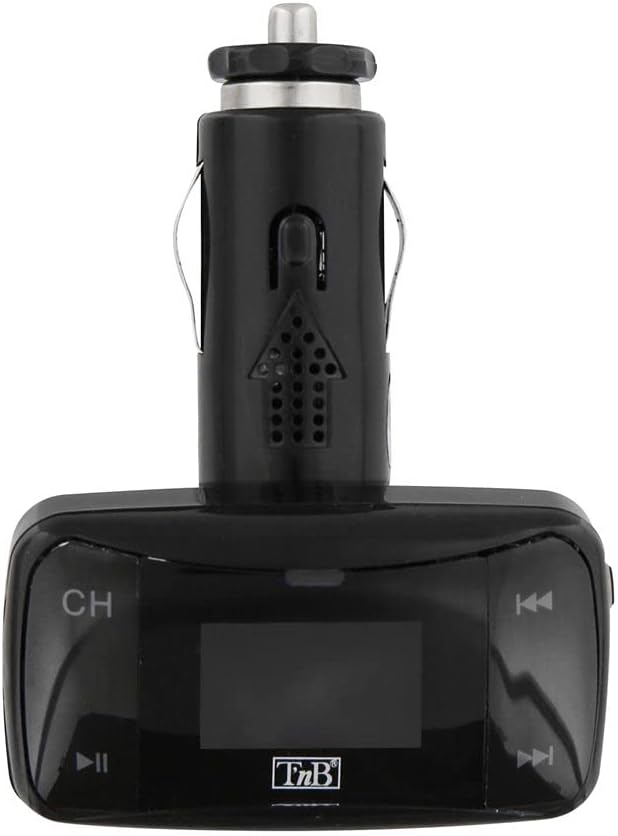
図1: フロント view of the T'nB FM Bluetooth Transmitter. This image displays the device's LCD screen, 'CH' button for frequency adjustment, and track navigation buttons.

図2: 角度付き view of the T'nB FM Bluetooth Transmitter. This perspective shows the device's overall shape, the 12V car socket connector, and the side profile コントロールボタンの。

図3: 3.5mm AUX Audio Cable. This cable can be used to connect external audio sources to the transmitter's AUX input.
4. セットアップ手順
- 送信機を挿入します: Plug the T'nB FM Bluetooth Transmitter firmly into your vehicle's 12V power socket (cigarette lighter port). The device's LCD screen should illuminate.
- カーラジオのチューニング: Turn on your car's FM radio and tune it to an unused FM frequency. Choose a frequency that has no strong broadcast signal to minimize interference.
- 送信機周波数の一致: On the T'nB transmitter, use the 'CH' button or frequency adjustment controls to set the transmitter's FM frequency to match the frequency selected on your car radio. Ensure both frequencies are identical for optimal audio transmission.
- Bluetooth経由でペアリング:
- スマートフォンまたはオーディオ デバイスで Bluetooth を有効にします。
- 検索する available Bluetooth devices. The transmitter should appear as "FMCT05B" or a similar name.
- Select the transmitter to pair. Once paired, the device will confirm the connection, and you can begin streaming audio.
5. 操作手順
5.1音楽の再生
- Bluetooth ストリーミング: Once paired, play music on your smartphone. The audio will be transmitted to your car's FM radio. Use the transmitter's track navigation buttons (◀◀ / ▶▶) to skip tracks and the play/pause button (▶▌▌) to control playback.
- USB/SD カード再生: Insert a USB flash drive or an SD card containing MP3/MP4 audio files into the respective slot on the transmitter. The device will automatically detect and begin playing the audio files. Use the track navigation and play/pause buttons to control playback.
- AUX入力: Connect an external audio device (e.g., MP3 player) to the transmitter's 3.5mm AUX input using the provided cable. Select the AUX input mode on the transmitter if available, or ensure no other media is playing.
5.2 ハンズフリー通話
- 通話への応答/終了: When a call comes in, the music will pause. Press the play/pause button (▶▌▌) to answer the call. Press it again to end the call.
- リダイヤル: Double-press the play/pause button (▶▌▌) to redial the last number called.
- 音量調整: Adjust the call volume using the volume controls on the transmitter or your car's radio.
5.3 LCDディスプレイ
The LCD screen displays the current FM frequency, volume level, track number, and song titles (when available from the source).
6. メンテナンス
- デバイスを清潔で乾燥した状態に保ちましょう。表面を拭く際は、柔らかく乾いた布を使用してください。
- 送信機を極端な温度、直射日光、高湿度にさらさないでください。
- デバイスを分解または改造しないでください。保証が無効になり、損傷が発生する可能性があります。
7。 トラブルシューティング
- 電源なし: Ensure the transmitter is securely plugged into the 12V power socket and that the car's ignition is on. Check the car's fuse for the 12V socket if necessary.
- 音質が悪い/雑音:
- Adjust the FM frequency on both the transmitter and your car radio to a different, clear frequency with no strong broadcast signals.
- Ensure the volume on your audio source (smartphone, USB, SD card) is set to an appropriate level.
- 無線干渉が強い場所から離れてください。
- Bluetoothが接続されない:
- Ensure Bluetooth is enabled on your smartphone and the transmitter is powered on.
- Delete the transmitter from your phone's Bluetooth device list and attempt to pair again.
- Restart both your phone and the transmitter.
- USB/SD カードが再生されない: Ensure the media is inserted correctly and contains compatible audio files (MP3/MP4 format). Try a different USB drive or SD card.
8. 仕様
| 特徴 | 仕様 |
|---|---|
| モデル名 | FMCT05B |
| ブランド | T'nB |
| 接続技術 | ブルートゥース、USB |
| 電源 | USB (12V DC Car Socket) |
| 無線通信規格 | ブルートゥース |
| 対応デバイス | Speaker, MP3 Player, Car Stereo System, Smartphone, Headset |
| メディアタイプ | SDカード、USBドライブ |
| ハードウェアインターフェイス | USBタイプA |
| 制御方法 | 触覚(ボタン) |
| オーディオ出力タイプ | FM Radio, Speaker |
| オーディオ入力 | 3.5mm補助 |
| 巻tage | 12 ボルト (DC) |
9. 保証とサポート
For warranty information or technical support, please refer to the documentation included with your purchase or contact T'nB customer service directly. Contact details can typically be found on the manufacturer's official webサイト。