
導入
This manual provides detailed instructions for the setup, operation, and maintenance of your TFA Dostmann Digital Radio-Controlled Alarm Clock, model 60.2547.54. Please read this manual thoroughly before using the device to ensure proper function and to understand all features.
製品終了view コンポーネント
The TFA Dostmann Digital Radio-Controlled Alarm Clock is designed to provide accurate time, date, and indoor climate information. It features a highly precise radio-controlled clock, two independent alarm times, and an automatic night light function.
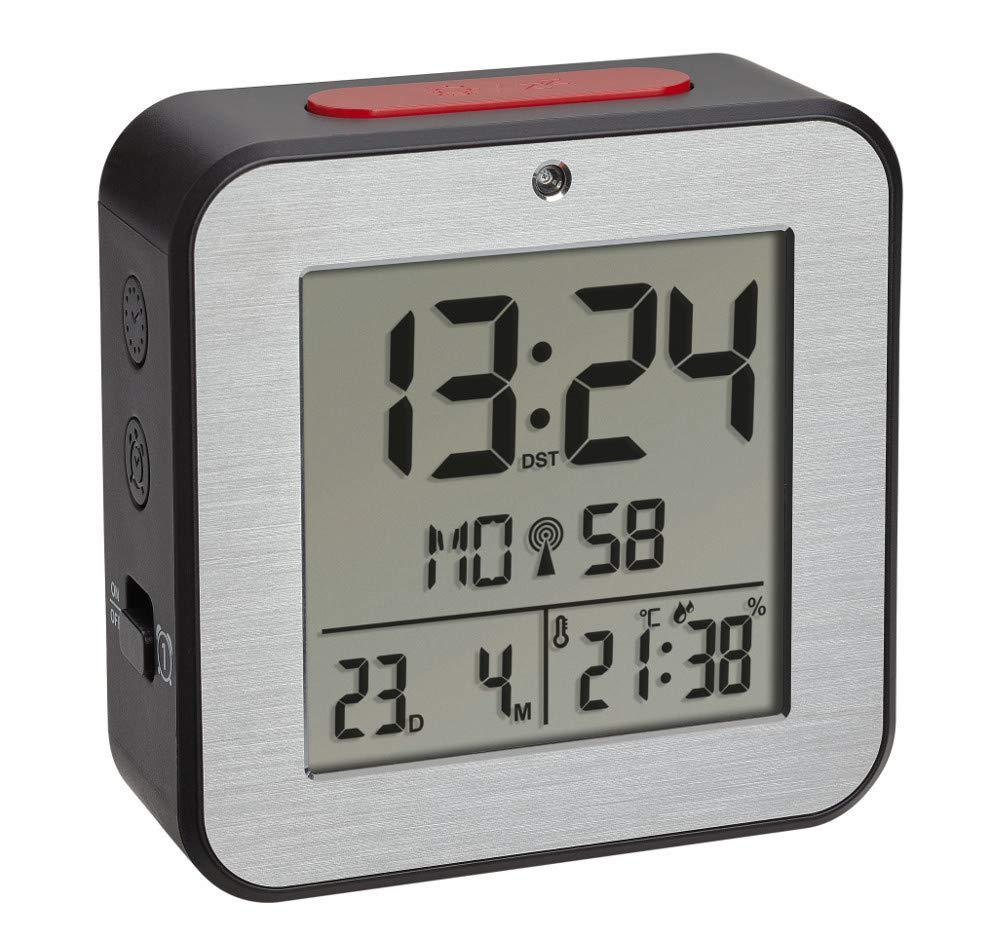


バッテリーの取り付け
- 目覚まし時計の背面にある電池ケースのカバーを見つけます。
- カバーをスライドまたは持ち上げて取り外します。
- Insert two (2) 1.5 V AA batteries, ensuring correct polarity (+/-). Batteries are not included and must be purchased separately.
- 電池収納部のカバーをしっかりと取り付けてください。
- The device will power on and begin searching for the radio-controlled time signal.
初期設定
Upon battery installation, the clock will automatically attempt to receive the radio-controlled time signal. This process may take several minutes. If the signal is not received or for manual adjustments, follow these steps:
手動の時刻と日付の設定
- Press and hold the 'SET' button (location may vary, refer to device diagram if available) to enter setup mode.
- 「+」または「-」ボタンを使用して、点滅している値(時間、分、年、月、日など)を調整します。
- Press 'SET' again to confirm the setting and move to the next parameter.
- Repeat until all desired settings (time, date, year) are configured.
言語の選択
The display supports 7 languages for the day of the week: French, Spanish, Italian, Dutch, Danish, and English. During initial setup or in settings mode, select your preferred language using the '+' or '-' buttons.
タイムゾーン調整
If you are in a region where the radio signal's standard time differs from your local time, you can adjust the time zone by +/- 12 hours. Access this setting in the setup mode and use the '+' or '-' buttons to set the offset.
操作手順
アラームの設定(アラーム1とアラーム2)
- Press the 'ALARM 1' or 'ALARM 2' button to display the current alarm time.
- Press and hold the respective 'ALARM' button until the alarm time flashes.
- Use the '+' or '-' buttons to adjust the hour, then press the 'ALARM' button to confirm and move to minutes.
- Adjust minutes with '+' or '-' and press 'ALARM' to confirm.
- To activate or deactivate an alarm, press the 'ALARM 1 ON/OFF' or 'ALARM 2 ON/OFF' switch (typically located on the side or back). An alarm icon will appear on the display when active.
スヌーズ機能
When an alarm sounds, press the 'SNOOZE/LIGHT' button (usually a large button on top) to temporarily silence the alarm. The alarm will sound again after a few minutes (default snooze duration). To stop the alarm completely, press any other button or switch the alarm off using its dedicated ON/OFF switch.
Automatic Backlight and Light Sensor
The alarm clock features an automatic backlight that activates in low-light conditions. This function is controlled by a light sensor. To enable or disable the automatic backlight, locate the 'AUTO LIGHT' switch or setting (refer to your device's specific button layout).
Indoor Climate Display
The display continuously shows the indoor temperature in Celsius (°C) or Fahrenheit (°F) and the relative humidity (%). To switch between °C and °F, press the '°C/°F' button (if available) or cycle through display modes in the setup menu.
メンテナンス
- クリーニング: 柔らかく乾いた布でデバイスを拭いてください。研磨剤入りの洗剤や溶剤は使用しないでください。
- バッテリー交換: Replace batteries when the display dims or the device stops functioning. Always replace both batteries simultaneously with new ones of the same type. Dispose of used batteries responsibly.
- ストレージ: デバイスを長期間保管する場合は、液漏れを防ぐために電池を取り外してください。
トラブルシューティング
| 問題 | 考えられる原因 | 解決 |
|---|---|---|
| ディスプレイが空白または暗い。 | 電池残量が少ないか、正しく挿入されていません。 | Replace batteries with new 1.5 V AA batteries, ensuring correct polarity. |
| 時刻が正しくないか、自動的に設定されません。 | Poor radio signal reception; device is out of range or obstructed. | Move the alarm clock to a location with better signal reception, away from electronic devices or metal objects. Perform manual time setting if necessary. |
| アラームは鳴りません。 | アラームが作動していないか、音量が低すぎます。 | Ensure the alarm's ON/OFF switch is in the 'ON' position. Check alarm time settings. |
| 温度/湿度の測定値が不正確なようです。 | Device is exposed to direct sunlight, heat sources, or drafts. | Place the alarm clock in a stable indoor environment, away from extreme temperature fluctuations. |
仕様
- モデル: 60.2547.54
- ブランド: TFAドストマン
- 表示タイプ: デジタル
- 電源: 2 x 1.5 V単三電池(含まれていません)
- 寸法(長さ×幅×高さ): 82 x 33 x 82 ミリメートル
- 重さ: 110グラム
- 材料: アルミニウム、プラスチック
- 温度測定範囲: -9°C ~ +50°C (+14°F ~ +122°F)
- 湿度測定範囲: 20%~95% RH
- 特別な機能: Radio-controlled time, Dual alarms, Snooze function, Automatic backlight, Indoor temperature and humidity display, 7-language weekday display, Time zone adjustment.
保証情報
TFA Dostmann products are manufactured with quality and care. For specific warranty terms and conditions, please refer to the warranty card included in your product packaging or visit the official TFA Dostmann webサイトでご確認ください。保証請求に備えて購入証明書を保管してください。
サポート
If you encounter any issues not covered in this manual or require further assistance, please contact TFA Dostmann customer support. Contact details can typically be found on the official TFA Dostmann webサイトまたは製品パッケージに記載されています。