導入
The Xfinity HD 720p Wireless Indoor/Outdoor Home Security Camera allows you to monitor your home environment with live video accessible from anywhere. Designed for both indoor and outdoor use, this camera provides essential security features to keep you informed.
箱の中身
- Xfinity HD 720p Wireless Security Camera (Model: SCHC2AEW)
- 電源アダプター
- USBケーブル
- 取り付け金具(ネジとアンカー)

Image: Xfinity Home Security Camera and accessories neatly packaged in its box.
セットアップガイド
- 電源接続: Connect the camera to the power adapter using the provided USB cable, then plug the adapter into a standard electrical outlet.
- アプリのダウンロード: Download the official Xfinity Home app from your smartphone's app store (iOS App Store or Android Google Play).
- デバイスのペアリング: Open the Xfinity Home app and follow the on-screen instructions to add a new device. You will typically need to scan a QR code on the camera or manually enter its details to pair it with your home Wi-Fi network. Ensure your Wi-Fi network is 2.4 GHz for compatibility.

Image: The Xfinity Home Security Camera placed on a surface, ready for setup.
操作手順
ライブ View 基本的な操作
Once paired, access the live video feed through the Xfinity Home app. The app provides controls for:
- ライブストリーミング: View リアルタイムフーtagカメラからの映像です。
- 録音: ビデオクリップを手動で録画します。
- スクリーンショット: ライブフィードから静止画像をキャプチャします。
- 双方向オーディオ: Speak through the camera's speaker and hear audio from its microphone.
ナイトビジョン
The camera features night vision capabilities for clear monitoring in low-light conditions. This feature automatically activates when ambient light is insufficient, providing a black-and-white image. Some models may offer color night vision depending on ambient light and settings.
動きの検出とアラート
Configure motion detection settings within the Xfinity Home app to receive alerts on your smartphone when activity is detected. You can customize sensitivity levels and notification preferences.
ストレージオプション
The camera supports local storage via a MicroSD card (not included). Insert a compatible MicroSD card into the designated slot to store recorded video clips directly on the device. Cloud storage options may also be available through your Xfinity Home service subscription.
設置と取り付け
The Xfinity Home Security Camera can be placed on a flat surface or mounted to a wall. Use the included mounting hardware for secure wall installation. Ensure the camera is positioned to cover the desired monitoring area.
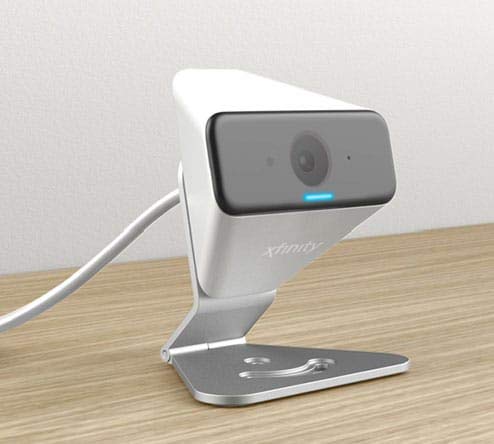
Image: The Xfinity Home Security Camera positioned on a desk, demonstrating its compact design.
製品仕様
| 特徴 | 詳細 |
|---|---|
| モデル番号 | SCHC2AEW |
| ビデオキャプチャ解像度 | 720p |
| 接続技術 | ワイヤレス(Wi-Fi) |
| 接続プロトコル | Wi-Fi (2.4 GHz compatible) |
| 屋内/屋外での使用 | 屋内、屋外 |
| 特集 | モーションセンサー、ナイトビジョン |
| 電源 | DC (12 Volts, 1 Watt) |
| 寸法(長さ×幅×高さ) | 3 x 3 x 2インチ |
| アイテム重量 | 1.57ポンド |
| 国際保護格付け | IP65 |
トラブルシューティング
- 電源なし: 電源アダプターがカメラと電源コンセントの両方にしっかりと接続されていることを確認してください。
- 接続の問題: Verify your Wi-Fi network is 2.4 GHz. Restart your router and the camera. Ensure the camera is within range of your Wi-Fi signal.
- アプリが応答しない: Close and reopen the Xfinity Home app. If the issue persists, try reinstalling the app.
- ビデオ品質が悪い: Wi-Fiの信号強度を確認してください。カメラのレンズが汚れておらず、障害物がないことを確認してください。
保証とカスタマーサポート
For warranty information, please refer to the documentation included with your purchase or visit the official Xfinity support website. For technical assistance or customer service, please contact Xfinity customer support directly.