
ライツ 80060000
Leitz IQ Office Pro シュレッダー ユーザーマニュアル
Model: 80060000 | Brand: Leitz
導入
This manual provides comprehensive instructions for the safe and efficient operation, maintenance, and troubleshooting of your Leitz IQ Office Pro Shredder. Please read this manual thoroughly before using the device to ensure optimal performance and longevity.
The Leitz IQ Office Pro Shredder is a high-quality, powerful shredder designed for daily use in larger offices, retail, and commercial environments. It features particle cut security level P4, capable of shredding up to 20 sheets (80 g/m²) or 22 sheets (70 g/m²) in one pass, creating approximately 400 pieces per A4 sheet (4 x 40 mm). It is TÜV SÜD & GS certified, ensuring secure and efficient destruction of confidential documents in compliance with GDPR. The shredder operates very quietly (55 dB) and supports up to 4 hours of continuous operation, making it ideal for a quiet working environment. It includes Touch-Control and Anti-Paper Jam technology, a pull-out 30L waste bin (capacity for 275 A4 pages), and an ECO sleep mode. Its four high-quality wheels allow for easy movement.
箱の中身
- 1x Leitz IQ Office Pro P4 Shredder
- ユーザーマニュアル
- ゴミ袋(初期供給)

Figure 1: Contents of the box, including the shredder, user manual, and waste bags.
設定
- 開梱: Carefully remove the shredder and all accessories from the packaging. Retain packaging for future transport or storage.
- 配置: Position the shredder on a flat, stable surface. Ensure adequate ventilation around the unit. The shredder is equipped with four high-quality wheels for easy movement.
- 電源接続: 電源コードをアース付きコンセントに接続します。電圧がtage matches the specifications of the shredder.
- Waste Bin Installation: Ensure the 30L pull-out waste bin is correctly inserted into the shredder. The shredder will not operate if the bin is not properly seated.

Figure 2: The Leitz IQ Office Pro Shredder ready for setup.
操作手順
基本操作
- 電源オン: Press the power button on the control panel to turn on the shredder. The shredder will enter standby mode.
- フィードドキュメント: Insert paper into the shredding slot. The shredder will automatically start when paper is detected.
- 容量: The shredder can process up to 20 sheets (80 g/m²) or 22 sheets (70 g/m²) simultaneously. Do not exceed this capacity to prevent jams.
- Accepted Materials: Paper (including folded, glossy), office staples, and paper clips.
- セキュリティレベル: The shredder produces 4 x 40 mm particle cut pieces, meeting security level P4 for confidential documents.
- 連続運転: The Leitz IQ Office Pro is designed for 4 hours of continuous operation, suitable for high-volume shredding tasks.
- 静かな動作: The shredder operates at a very low noise level of 55 dB, ensuring a quiet working environment.
- リバース機能: If a paper jam occurs, use the reverse button (R) on the Touch-Control panel to clear the jam.
- ECO Sleep Mode: The shredder features an ECO sleep mode to conserve energy when not in use.

Figure 3: Key specifications: 20 sheets capacity, P4 security level, and 30-liter bin.

Figure 4: The shredder supports up to 4 hours of continuous operation.
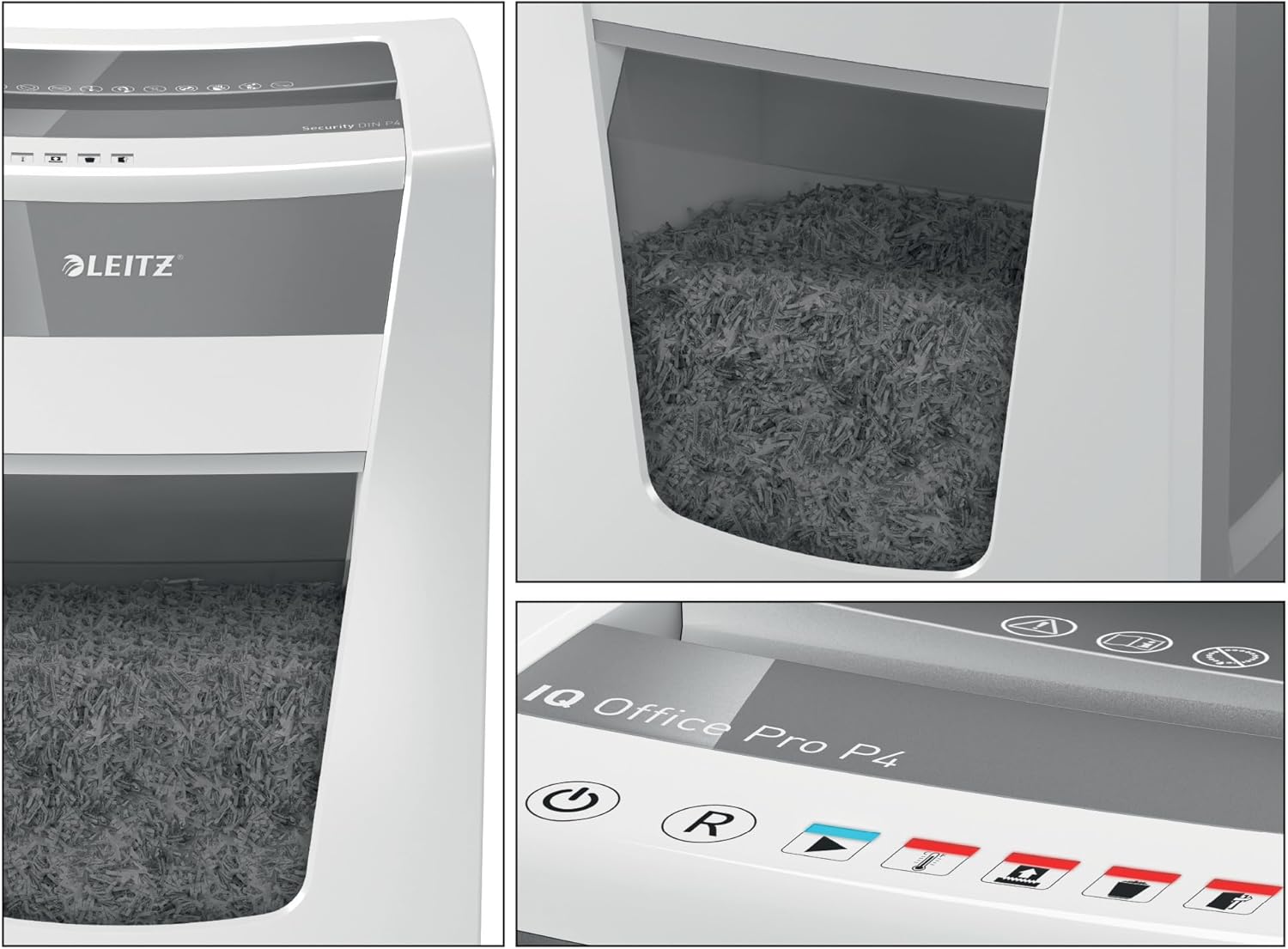
Figure 5: Detail of the Touch-Control panel and the transparent waste bin window.
メンテナンス
ごみ箱を空にする
When the waste bin is full, the shredder will stop operating. Pull out the 30L waste bin from the front of the unit. Dispose of the shredded material responsibly. Reinsert the bin firmly until it clicks into place.
シュレッダーにオイルを差す
Regular use of Leitz oil paper (model 80070000) is recommended to maintain optimal performance and extend the lifespan of the shredder's cutting mechanism. Follow the instructions provided with the oil paper.
トラブルシューティング
| 問題 | 考えられる原因 | 解決 |
|---|---|---|
| シュレッダーがオンになりません。 | No power, waste bin not properly inserted, or shredder overheated. | Check power connection. Ensure waste bin is fully inserted. Allow shredder to cool down if it has been in continuous operation. |
| 紙詰まり。 | Too many sheets inserted, or material not suitable for shredding. | Use the reverse function (R button) to clear the jam. Reduce the number of sheets for future shredding. Do not shred items not listed as acceptable. |
| シュレッダーが動作中に停止します。 | Waste bin full, shredder overheated, or safety mechanism activated. | Empty the waste bin. Allow the shredder to cool down. Check for any obstructions. |
| Increased noise or reduced performance. | Cutting mechanism requires lubrication. | Use Leitz oil paper (80070000) to lubricate the cutting blades. |
If problems persist after attempting these solutions, please contact Leitz customer support.
仕様
| 特徴 | 詳細 |
|---|---|
| ブランド | Leitz |
| モデル番号 | 80060000 |
| 製品寸法(長さx幅x高さ) | 32 x 40.6 x 60.5 cm |
| アイテム重量 | 17.1キログラム |
| 色 | Shredder (White/Grey) |
| 材料 | プラスチックと金属 |
| シュレッドタイプ | Particle Cut (Cross-cut) |
| セキュリティレベル | P4(4 x 40 mm粒子) |
| Sheet Capacity (80 g/m²) | 最大20枚 |
| Sheet Capacity (70 g/m²) | 最大22枚 |
| ビン容量 | 30 Liters (approx. 275 A4 pages) |
| 連続実行時間 | 4時間 |
| 騒音レベル | 55デシベル |
| 特徴 | Touch-Control, Anti-Paper Jam Technology, ECO Sleep Mode, Wheels |
| 認定資格 | TÜV SÜD & GS certified |

図 6: 適切な配置のための製品寸法。

Figure 7: Visual representation of different security levels, highlighting P4 particle size.
保証とサポート
The Leitz IQ Office Pro Shredder comes with a standard warranty. You can extend the warranty from 2 to 3 years by registering your product. Please refer to the product registration instructions provided with your purchase or visit the official Leitz web詳細はサイト。
For technical support, spare parts, or further assistance, please contact Leitz customer service. Contact information can typically be found on the Leitz official webサイトまたは製品パッケージに記載されています。

Figure 8: Information on extended warranty and Anti-Jam technology.
Ask a question about this manual
Ask about setup, troubleshooting, compatibility, parts, safety, or missing instructions. Manuals+ will review the question and use this page’s manual context to help answer it.