
Octagon OCT-SF-8008-COMBO
Octagon SF8008 4K HDR UHD Satellite Receiver User Manual
Model: OCT-SF-8008-COMBO
導入
O.ctagon SF8008 4K UHD receiver is a high-performance device designed for satellite and terrestrial/cable television reception. It features dual tuning options, supporting DVB-S2X, DVB-C, and DVB-T2 HD standards. Equipped with a powerful Quad Core 64Bit processor, Gigabit LAN, built-in Dual WiFi, USB 3.0, and MicroSD slot, this receiver delivers a comprehensive 4K entertainment experience with support for HDR, HLG, and H.265 decoding.

図1: 前面と背面 view of the Octagon SF8008 4K UHD Receiver, showing connectivity ports and dual antennas.
パッケージ内容
セットアップを続行する前に、以下にリストされているすべてのアイテムがパッケージに含まれていることを確認してください。
- Octagon SF8008 4K UHD Receiver
- リモートコントロール
- 電源ユニット
- HDMIケーブル
- 単4電池2本(リモコン用)
- クイックスタートガイド/ユーザーマニュアル

Figure 2: All components included in the Octagon SF8008 package: receiver, power supply, remote control, HDMI cable, batteries, and documentation.
設定
1. 受信機の接続
Follow these steps to connect your Octagon SF8008 receiver to your television and antenna/cable sources.
- 電源接続: Connect the provided power supply unit to the DC-12V input on the rear of the receiver and then plug it into a wall outlet.
- HDMI接続: Use the supplied HDMI cable to connect the HD-OUT port on the receiver to an HDMI input on your television.
- アンテナ/ケーブル接続:
- For Satellite reception: Connect your satellite dish cable to the DVB-S2 input (ANT1) on the rear of the receiver.
- For Terrestrial/Cable reception: Connect your terrestrial antenna or cable TV signal to the DVB-C/T2 input (ANT2) on the rear of the receiver.
- ネットワーク接続(オプション): For internet connectivity, connect an Ethernet cable from your router to the ETHERNET port on the receiver, or ensure the built-in WiFi antennas are properly positioned for wireless connection.
- 外部ストレージ(オプション): Connect USB storage devices to the USB 2.0 or USB 3.0 ports, or insert a MicroSD card into the SD CARD slot for recording or media playback.

図3:詳細 view of the rear panel of the receiver, highlighting the DVB-S2, DVB-C/T2, SPDIF, AV, RS-232, HD-OUT (HDMI), Ethernet, USB, SD Card, Recovery, and DC-12V ports.
2. Initial Power On and First-Time Setup Wizard
After connecting all necessary cables, press the POWER ON/OFF switch on the rear panel or the power button on the front of the receiver. The receiver will boot up, and you will typically be guided through a first-time setup wizard to configure language, network settings, and perform a channel scan.
操作手順
リモートコントロール機能
Familiarize yourself with the remote control to navigate the receiver's menus and functions.

図4: 前面、側面、背面 views of the Octagon SF8008 remote control, showing button layout and learning procedure instructions.
- 電源ボタン: 受信機の電源をオン/オフにしたり、スタンバイ モードにしたりします。
- 数字ボタン (0-9): ダイレクトチャンネル入力用。
- VOL + / VOL-: 音量を調整します。
- CH + / CH-: チャンネルを変更します。
- OKボタン: Confirms selections or displays channel list.
- 矢印ボタン: メニューとオプションをナビゲートします。
- メニュー: メインメニューにアクセスします。
- EXIT: 現在のメニューまたは画面を終了します。
- 情報: プログラム情報を表示します。
- 番組表: 電子番組ガイドにアクセスします。
- カラーボタン(赤、緑、黄、青): Context-sensitive functions within menus.
- メディア再生コントロール: Play, Pause, Stop, Rewind, Fast Forward for media files.
Channel Management and Media Playback
O.ctagon SF8008 allows for extensive channel management, including scanning, organizing, and creating favorite lists. It also supports playback of various media formats from connected USB drives or MicroSD cards.
The receiver supports a dual OS environment, allowing users to switch between different Linux-based operating systems like E2 Linux OS and Define Linux OS. This flexibility enables customization and access to a wide range of plugins および機能。
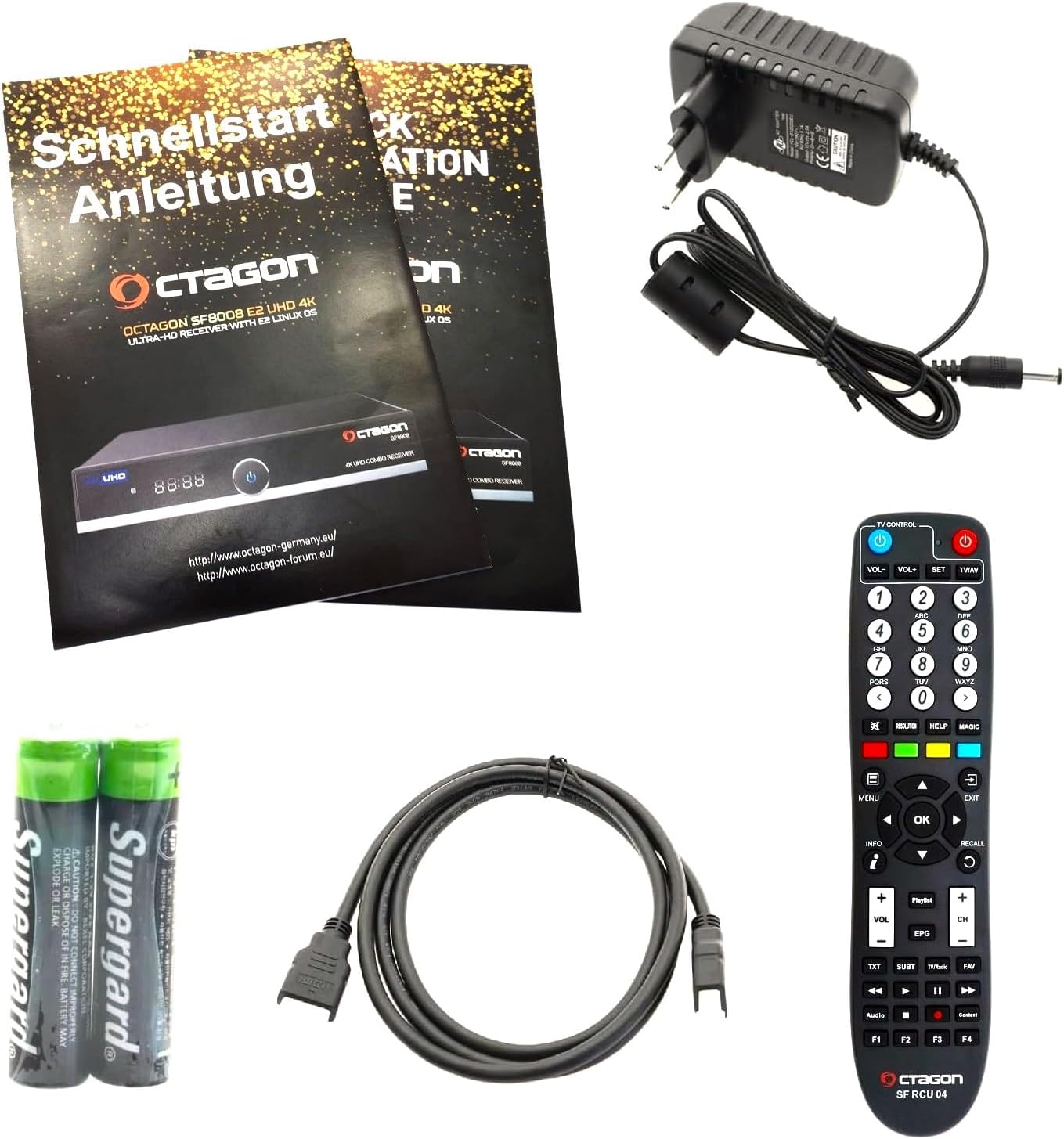
Figure 5: Diagram illustrating the dual OS capability of the Octagon SF8008, allowing seamless switching between E2 Linux OS and Define Linux OS.
The receiver also provides access to various online media libraries and services, enhancing your entertainment options.

Figure 6: Screenshot of the Octagon SF8008 user interface displaying options for various media libraries and applications.
メンテナンス
To ensure the longevity and optimal performance of your Octagon SF8008 receiver, follow these maintenance guidelines:
- クリーニング: レシーバーの外装を清掃する際は、柔らかく乾いた布をご使用ください。液体クリーナーや研磨剤は使用しないでください。
- 換気: Ensure that the ventilation openings on the receiver are not blocked. Proper airflow is crucial to prevent overheating.
- ファームウェアの更新: Regularly check for and install firmware updates to ensure the receiver has the latest features and bug fixes. Refer to the manufacturer's website or the receiver's system settings for update procedures.
- 使用しないときは電源を切ります: For extended periods of inactivity, it is recommended to power off the receiver completely using the rear power switch.
トラブルシューティング
This section addresses common issues you might encounter with your Octagon SF8008 receiver.
| 問題 | 考えられる原因 | 解決 |
|---|---|---|
| 画像も音声も出ない | HDMI ケーブルが緩んでいる、テレビ入力が間違っている、レシーバーの電源がオンになっていない。 | Check HDMI connections, select correct TV input (e.g., HDMI1, HDMI2), ensure receiver is powered on. |
| No signal on channels | Antenna/cable not connected, incorrect tuner configuration, weak signal. | Verify antenna/cable connections, check tuner settings in the menu, perform a channel scan. Ensure antennas are properly aligned. |
| リモコンが動作しない | 電池切れ、赤外線センサーが遮られている、リモコンがペアリングされていない (該当する場合)。 | Replace batteries, ensure no obstructions between remote and receiver, refer to remote control section for pairing instructions if it's a learning remote. |
| ネットワーク接続の問題 | Incorrect network settings, router issues, weak WiFi signal. | Check network cable, verify WiFi password, restart router, ensure receiver is within WiFi range. |
仕様
Detailed technical specifications for the Octagon SF8008 4K UHD Receiver.
- プロセッサ: Hisilicon Hi3798MV200 Huawei - Quad Core 64Bit (4x 1.6GHz) 15000 DMIPS
- チューナー構成: 2x Tuners (DVB-S2X & DVB-C/T2 Combo)
- ビデオデコード: H.265 HEVC 4K UHD, HDR 10bit & HLG
- メモリ: 8 GB (Flash), RAM (not specified in detail, but implied by performance)
- 接続性:
- Gigabit LAN Ethernet (1000Mbps)
- Built-in WiFi (300Mbit, 2x WLAN antennas)
- HDMI 2.0a出力
- USB 3.0 ポート
- USB 2.0 ポート
- MicroSDスロット
- カードリーダー
- AV (Audio/Video) output
- S/PDIF (Digital Audio) output
- RS-232ポート
- オペレーティング·システム: E2 Linux (supports multiple images/OS)
- 特徴: PIP HD & UHD (Picture in Picture), less than 0.5 watts standby power consumption
- 寸法: 22 x 12.5 x 4 cm
- 重さ: 950グラム
- 巻tage: 12ボルト
保証とサポート
For warranty information and technical support, please refer to the documentation included with your product or visit the official Octagon webサイト。
- メーカー: Octagon
- モデル: OCT-SF-8008-COMBO
- 発売日: 27年2021月XNUMX日
保証請求のために購入証明書を保管してください。
関連文書 - OCT-SF-8008-COMBO
 |
OCTAGON SF8008 V3 4K SUPREME COMBO - User Manual, Installation Guide, and Technical Specifications OCの包括的なユーザーマニュアルと技術仕様TAGON SF8008 V3 4K SUPREME COMBO digital receiver, IPTV, and OTT media player. Includes installation, features, and safety information. |
 |
OCTAGON SF8008 V3 4K SUPREME TWIN ユーザーマニュアルと技術仕様 OCの包括的なユーザーマニュアルと技術仕様TAGON SF8008 V3 4K SUPREME TWIN デジタルレシーバー、IPTV、OTTメディアプレーヤー。インストールガイド、同梱物、安全上の注意、デバイスの使用期限が含まれています。view、M.2 SSD のインストール、リモート コントロール機能、主な機能、技術仕様、WiFi モジュールの詳細、およびサービス情報について説明します。 |
 |
Octagon SF8008 V3 4K SUPREME TWIN UHDTV Receiver User Manual and Technical Specifications Comprehensive guide for the Octagon SF8008 V3 4K SUPREME TWIN digital satellite receiver, IPTV, and OTT media player. Includes installation, features, technical specifications, and safety information. |
 |
Octagon Spirit 4K UHD Android TV Box User Manual Comprehensive user manual for the Octagon Spirit 4K UHD Android TV Box, covering setup, features, specifications, remote control functions, firmware updates, and app management. |
 |
Octagon SX988 Remote Control User Manual & Safety Guide Official instruction manual for the Octagon SX988 remote control. Covers essential safety warnings, setup instructions, usage guidelines, and environmental precautions for optimal operation. |
 |
OCTAGON SPIRIT V2 4K Android TV Box User Manual and Setup Guide Comprehensive user manual and installation guide for the OCTAGON SPIRIT V2 4K Android UHD TV Box, covering setup, features, remote control, specifications, and troubleshooting. |