
1. はじめに
This manual provides essential information for the safe and efficient operation of your Zerone 10.8V-12V Lithium Battery Charger. This charger is designed for use with 10.8V to 12V Lithium-Ion batteries, offering quick and reliable charging. Please read this manual thoroughly before first use and retain it for future reference.

Image 1: The Zerone 10.8V-12V Lithium Battery Charger, showing its compact design and universal compatibility label.
2. 安全に関する注意事項
Always observe the following safety precautions to reduce the risk of electric shock, fire, or serious injury:
- すべての指示をお読みください: 充電器を使用する前に、充電器、バッテリー、およびバッテリーを使用する製品に記載されているすべての指示と注意書きをお読みください。
- 屋内使用のみ: 充電器を雨や濡れた状態にさらさないでください。
- 適切な巻tage: 電源のボリュームを確認してくださいtageはvolに一致するtag充電器の定格プレートに指定されています。
- 損傷を避ける: 充電器が強い衝撃を受けたり、落としたり、その他の損傷を受けた場合は、使用しないでください。資格のあるサービス担当者にご相談ください。
- 換気: Do not block any ventilation openings. Ensure adequate airflow around the charger during operation.
- 使用しないときはプラグを抜きます: メンテナンスや清掃を行う前、および使用していないときは、必ず充電器を電源コンセントから抜いてください。
- Use specified batteries: Only charge batteries specifically designed for this charger. Charging other battery types may cause them to burst, leading to personal injury and damage.
- ショートさせないでください: バッテリー端子を絶対にショートさせないでください。
- 子どもの手の届かない所において下さい: この機器は、安全に責任を負う人物による機器の使用に関する監督または指示がない限り、身体的、感覚的、または精神的能力が低下している人、あるいは経験と知識が不足している人(子供を含む)による使用を想定していません。
3. パッケージ内容
すべてのアイテムが揃っていて良好な状態であることを確認します。
- 1 x Zerone 10.8V-12V Lithium Battery Charger
- ユーザーマニュアル x 1
4 製品の特徴
The Zerone 10.8V-12V Lithium Battery Charger offers the following key features:
- ユニバーサル互換性: Specifically designed for 10.8V to 12V Lithium-Ion batteries.
- LEDインジケーター: Built-in LED display provides intuitive monitoring of battery status.
- スマート充電管理: Utilizes a 'first in, first charged' system and protects against overload.
- 急速充電: Capable of charging a 12V Lithium-Ion 1.5Ah battery in approximately 50 minutes.
- 幅広いモデル互換性: Compatible with models such as DC10WD, DC10SB, DC10WC, BL1015, BL1016, BL1021B, and BL1041B.

Image 2: The charger displaying its compatibility with various battery models, including DC10WD, DC10SB, DC10WC, BL1015, BL1016, BL1021B, and BL1041B.
5. セットアップ
バッテリー充電器をセットアップするには、次の手順に従ってください。
- 充電器を開梱します。 充電器とすべてのコンポーネントをパッケージから慎重に取り出します。
- 電源に接続: Plug the charger's power cord into a standard 100V-260V AC electrical outlet. The charger's LED indicator will flash green once to confirm power connection.
- バッテリーの準備: Ensure the battery to be charged is clean and free from debris.
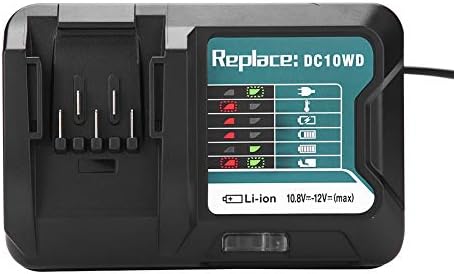
Image 3: The Zerone charger with its integrated power cord, ready for connection to an electrical outlet.
6. 操作手順
バッテリーを充電するには:
- 電池を挿入します: バッテリーを充電器のスロットに合わせて、カチッと音がしてしっかりと固定されるまでスライドさせます。
- モニター充電: The LED indicator will show the charging status. Refer to the "LED Indicator Guide" section for detailed explanations of the light patterns.
- 充電完了: Once the battery is fully charged, the LED indicator will show a solid green light.
- バッテリーを取り外します: Press the release button on the battery (if applicable) and slide it out of the charger.
- 充電器を抜く: 使用しないときは充電器を電源コンセントから外してください。

Image 4: The Zerone charger with a compatible lithium-ion battery inserted, ready for charging.
7. LEDインジケータガイド
The charger features an LED display to communicate the battery's status:
| インジケーターライト | 状態 |
|---|---|
| 緑の点滅 | 充電器が接続され、準備完了です。 |
| 赤色点滅 | Battery is in cooling mode. Charging will begin once the battery temperature is within the optimal range. |
| Red Sustained Light | Battery is currently charging (0-100%). |
| Green Sustained Light | Charging is completed. The battery is fully charged. |
| Red and Green Flashing | Indicates a defective battery pack or charger. |

画像5: クローズアップ view of the charger's LED indicator panel, detailing the meaning of each light pattern for battery status.
8. メンテナンス
適切なメンテナンスを行うことで、充電器の寿命とパフォーマンスが向上します。
- クリーニング: 清掃する前に、充電器を電源から外してください。乾いた柔らかい布で充電器の外側を拭いてください。水や化学洗剤は使用しないでください。
- ストレージ: Store the charger in a dry, cool place, away from direct sunlight and moisture.
- 定期的に点検する: Periodically inspect the charger and its cord for any signs of damage. If damage is found, discontinue use and seek professional repair.
9。 トラブルシューティング
充電器で問題が発生した場合は、次の一般的な問題と解決策を参照してください。
- 充電器の電源が入らない:
- 電源コードが充電器と電源コンセントの両方にしっかりと差し込まれていることを確認してください。
- 別のデバイスで電源コンセントをチェックして、機能していることを確認します。
- Battery not charging (Red Flashing LED):
- The battery may be too hot or too cold. Allow the battery to reach room temperature before attempting to charge again. Charging will automatically resume once the temperature is optimal.
- Battery not charging (Red and Green Flashing LED):
- This indicates a defective battery or charger. Try charging a different, known-good battery. If the issue persists, the charger may be faulty. If only the original battery causes this, the battery is likely defective.
- 充電が遅い:
- Ensure the battery is fully seated in the charger.
- Verify that the battery is compatible with this charger.
これらの手順で問題が解決しない場合は、カスタマー サポートにお問い合わせください。
10. 仕様
| 仕様 | 詳細 |
|---|---|
| モデル番号 | Zeronegfvetp6dn8-01 |
| 入力ボリュームtage | 100V-260V AC、50-60Hz |
| 出力巻tage | 10.8V~12V(DC) |
| 製品寸法 | 4.72 x 1.97 x 5.91インチ |
| アイテム重量 | 11.6 オンス (0.33 キログラム) |
| メーカー | ゼロネ |
| 互換性のあるバッテリータイプ | 10.8V-12V Lithium-Ion (e.g., BL1015, BL1016, BL1021B, BL1041B) |
| Compatible Charger Models | DC10WD, DC10SB, DC10WC |

Image 6: The bottom view of the Zerone charger, showing its input/output specifications and model number.
11. 保証とサポート
For warranty information or technical support, please refer to the documentation provided with your purchase or contact Zerone customer service through the retailer where the product was purchased. Keep your purchase receipt as proof of purchase.