
1. はじめに
The Denon DCD-800NE is a single-disk CD player designed for high-resolution audio playback. It features an integrated USB port for playing various digital file formats. The player incorporates Advanced AL32 Processing Plus and an innovative circuitry structure to ensure accurate and interference-free sound reproduction, faithful to the original recording. It supports hi-res playback up to PCM192/24 and DSD 2.8 MHz/5.6 MHz via its USB port. The Pure Direct Mode allows for direct sound output to amplifiers, bypassing additional processing for clean and detailed audio. Its vibration-resistant design minimizes adverse audio effects, maintaining Denon's sound quality standards.

図1: フロント view of the Denon DCD-800NE CD Player with its remote control. The display shows track information and playback status.
2. セットアップ
2.1 開梱
すべての部品をパッケージから慎重に取り出します。以下のものがすべて揃っていることを確認してください。
- デノン DCD-800NE CDプレーヤー
- リモコン(RC-1223)
- Two "AAA" batteries for the remote
- 47インチステレオRCAケーブル
- Owner's Manual on CD-ROM (for detailed instructions)
- クイックスタートガイド
- 保証情報
- 安全に関する注意事項
2.2 配置
DCD-800NEは、直射日光、熱源、過度の振動を避け、安定した水平な場所に設置してください。また、機器の周囲に十分な換気を確保してください。
2.3 接続
Connect the DCD-800NE to your amplifier or receiver using the provided RCA cable or a digital audio cable (optical or coaxial, not included). For optimal sound quality, ensure all connections are secure.
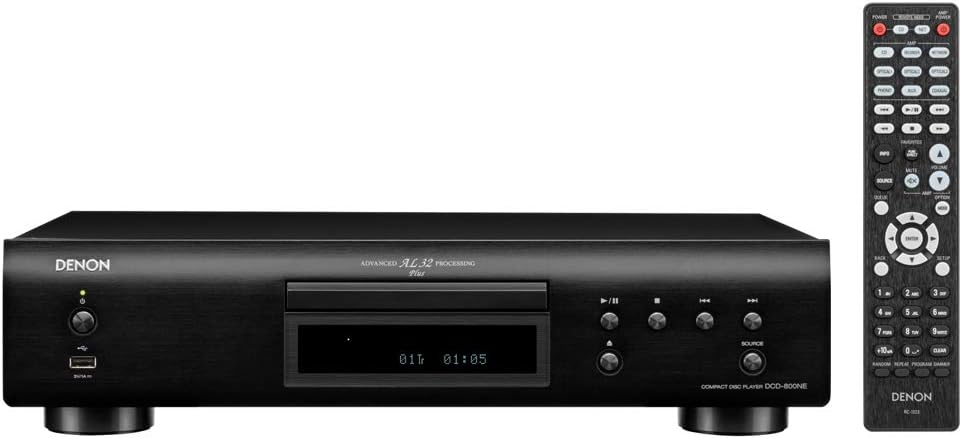
図2: Rear panel connections of the DCD-800NE, including analog audio out (RCA), digital audio out (optical and coaxial), and IR control ports.
- アナログ音声出力: Connect the RCA cables from the "AUDIO OUT" jacks on the DCD-800NE to the corresponding analog input jacks on your amplifier (e.g., "CD IN").
- デジタルオーディオ出力: For digital connection, use an optical or coaxial digital cable (not supplied) to connect the "DIGITAL AUDIO OUT" (OPTICAL or COAXIAL) jack on the DCD-800NE to a digital input on your ampリファイアーまたはDAC。
- 電源接続: Once all audio connections are made, connect the power cord to the DCD-800NE and then to an AC power outlet.
2.4 リモコン電池の取り付け
Open the battery compartment on the back of the remote control and insert the two "AAA" batteries, ensuring correct polarity (+/-). Close the compartment.
3. 操作
3.1 電源オン/オフ
ユニットの電源をオンまたはオフにするには、前面パネルまたはリモコンの電源ボタンを押します。
3.2 CD再生
- を押す 開く/閉じる ボタンをクリックしてディスクトレイを開きます。
- ラベル面を上にして CD をディスク トレイに置きます。
- を押す 開く/閉じる もう一度ボタンを押してトレイを閉じます。プレーヤーがディスクを読み取ります。
- を押す 遊ぶ ボタンをクリックして再生を開始します。
- 使用 スキップ buttons to navigate between tracks and the 一時停止 or 停止 再生を制御するボタン。
3.3 USB再生
The DCD-800NE features a front USB-A port for playing audio files from USB storage devices (e.g., USB flash drives, external hard drives).
- フロントパネルの USB ポートに USB ストレージ デバイスを挿入します。
- を押す USB button on the front panel or remote to select the USB input.
- Use the navigation buttons on the remote to browse folders and select desired audio files.
- プレス 遊ぶ to begin playback. The player supports hi-res formats like PCM192/24 and DSD 2.8 MHz/5.6 MHz, as well as MP3, WMA, and FLAC.
3.4 ピュアダイレクトモード
Activate Pure Direct Mode to bypass digital processing circuits that can color the audio signal. This provides a cleaner, more direct sound path, ideal for critical listening. Refer to the full Owner's Manual for instructions on enabling this mode.
3.5 Integration with Denon 800NE Series
The DCD-800NE is designed to integrate seamlessly with other Denon 800NE series components, such as the PMA-800NE Integrated Amplifier and DNP-800NE Network Audio Player, for a complete high-fidelity system. A single remote control can operate the entire 800NE series.
ビデオ1: オーバーview of the Denon 800NE series, demonstrating the DCD-800NE CD player's features, including its integration with the PMA-800NE amplifier and DNP-800NE network player, advanced processing, and vibration-resistant design. It highlights CD and USB playback capabilities.
4. メンテナンス
4.1 ユニットのクリーニング
本体の外側は、柔らかく乾いた布で拭いてください。研磨剤入りの洗剤、ワックス、溶剤は塗装を傷める可能性があるため、使用しないでください。また、液体を直接本体に吹き付けないでください。
4.2 ディスクのクリーニング
Handle CDs by their edges. If a disc is dirty, wipe it gently from the center outwards with a soft, lint-free cloth. Do not use harsh chemicals or abrasive materials, as these can scratch the disc surface and affect playback quality.
4.3換気
Ensure that the ventilation openings on the unit are not blocked. Proper airflow is essential to prevent overheating and maintain optimal performance.
5。 トラブルシューティング
If you experience issues with your DCD-800NE, consult the following common troubleshooting steps before seeking professional service.
- 電源なし:
- Check if the power cord is securely plugged into the unit and the AC outlet.
- 電源コンセントが機能していることを確認してください。
- 音が出ない:
- Verify that the audio cables are correctly connected between the DCD-800NE and your ampリファイア/レシーバー。
- 正しい入力ソースが選択されていることを確認してください ampリファイア/レシーバー。
- Check the volume level on both the DCD-800NE and your ampリファイア/レシーバー。
- Disc Does Not Play / Disc Error:
- ディスクがきれいで、傷や汚れがないことを確認してください。
- Make sure the disc is inserted correctly with the label side up.
- Try playing a different disc to determine if the issue is with the player or the disc.
- Some discs may not be compatible (e.g., certain recordable CD-R/RW formats).
- USB Device Not Recognized / Fileプレイしていない:
- Ensure the USB device is formatted correctly (FAT16/FAT32).
- 音声を確認してください files are in a supported format (MP3, WMA, FLAC, WAV, DSD).
- The player supports up to 255 folders on a USB drive.
- Some USB devices may require external power or may not be compatible.
- リモコンが動作しない:
- Check if the batteries are inserted correctly and are not depleted.
- リモコンとユニットの IR センサーの間に障害物がないことを確認してください。
- リモコンを直接本体に向けてください。
For more detailed troubleshooting, refer to the Owner's Manual on CD-ROM.
6. 仕様
| 特徴 | 詳細 |
|---|---|
| 製品寸法 | 10.5 x 17.12 x 4.5インチ |
| アイテム重量 | 9.48ポンド |
| モデル番号 | DCD-800NE |
| 接続技術 | USB |
| 含まれるコンポーネント | CD player, Remote control (RC-1223), Two "AAA" batteries, 47" Stereo RCA cable, Owner's Manual on CD-ROM, Quick Start Guide, Warranty Information, Safety Instructions |
| 初回利用可能日 | 13年2018月XNUMX日 |
注:仕様は予告なく変更される場合があります。
7. 保証情報
Denon products are manufactured to the highest quality standards. This product is covered by a limited warranty. Please refer to the "Warranty Information" document included in your product packaging or on the Owner's Manual CD-ROM for specific terms, conditions, and duration of the warranty applicable to your region. Keep your proof of purchase for warranty service.
8. カスタマーサポート
For technical assistance, product inquiries, or service requests, please contact Denon customer support. You can find contact information on the official Denon website or in the "Quick Start Guide" included with your product.
オンラインリソース: Visit the official Denon webFAQ、ソフトウェア アップデート、追加のサポート マテリアルについては、こちらのサイトをご覧ください。


