
PowMr SL03-30A
PowMr SL03-30A Solar Charge Controller User Manual
Model: SL03-30A
1. はじめに
The PowMr SL03-30A Solar Charge Controller is designed to manage the power flow from your solar panels to your battery bank, ensuring efficient charging and protecting your batteries from overcharge and over-discharge. This controller is suitable for 12V/24V systems and supports various battery types including Lithium and Lead-Acid batteries. It features an LCD display for monitoring system parameters and offers multiple protection functions to enhance system safety and longevity.
2. 主な特徴

画像: 上view of the PowMr SL03-30A Solar Charge Controller's main features, including 12V/24V auto-detection, energy recording, temperature compensation, aluminum heat sink, eight electronic protections, compatibility with Lithium/Lead-acid batteries, and light & timer control.
- 12V/24V Auto-detection: Automatically identifies system voltage.
- Energy Recording/Current Display: Provides real-time monitoring of energy and current.
- 温度補正: 周囲温度に基づいて充電パラメータを調整します。
- アルミニウムヒートシンク: 効率的な放熱を実現し、安定した動作を実現します。
- Eight Electronic Protections: Comprehensive safety features including overcharge, over-discharge, short-circuit, and reverse current protection.
- バッテリー互換性: Supports Lithium and Lead-Acid battery types (Flooded, GEL, AGM, LiFePO4).
- Light & Timer Control: Programmable load control functions.
- LCDディスプレイ: Clear interface for parameter viewing と調整。

画像: 内部 view of the controller highlighting key components such as the copper coil for stable charge/discharge, a fuse for double protection, and MOSFETs made from good raw materials for current sensing.
3. 安全に関する注意事項
Please read all instructions carefully before installation and operation. Failure to follow these instructions may result in damage to the controller, battery, or solar panels, and may void the warranty.
- Ensure the battery is connected first to allow the controller to recognize the system voltage.
- Always connect the solar panels and load after the battery.
- Disconnect the solar panels and load before disconnecting the battery.
- Install the controller in a well-ventilated, dry, and cool environment, away from flammable materials.
- Avoid touching or short-circuiting wires or terminals.
- 過熱を防ぐために、すべての接続に適切なワイヤゲージを使用してください。
- This device is for indoor use only. Avoid exposure to water or excessive humidity.
- お子様の手の届かない場所に保管してください。
4. インストール
4.1 配線手順
- Connect the battery to the charge controller. Ensure correct polarity (+ to + and - to -). The controller will display the battery voltage.
- Connect the solar panel to the charge controller. Ensure correct polarity. The controller will begin charging the battery.
- Connect the load to the charge controller. Ensure correct polarity.
重要: Always connect the battery first and disconnect it last. This sequence prevents damage to the controller from voltageサージ。
4.2 取り付け
Mount the controller vertically on a wall or flat surface in a well-ventilated area, away from direct sunlight, high temperatures, and water. Ensure there is sufficient air circulation around the heat sink.

Image: The PowMr SL03-30A Solar Charge Controller showing its mounting holes on the sides, indicating how it can be affixed to a surface.
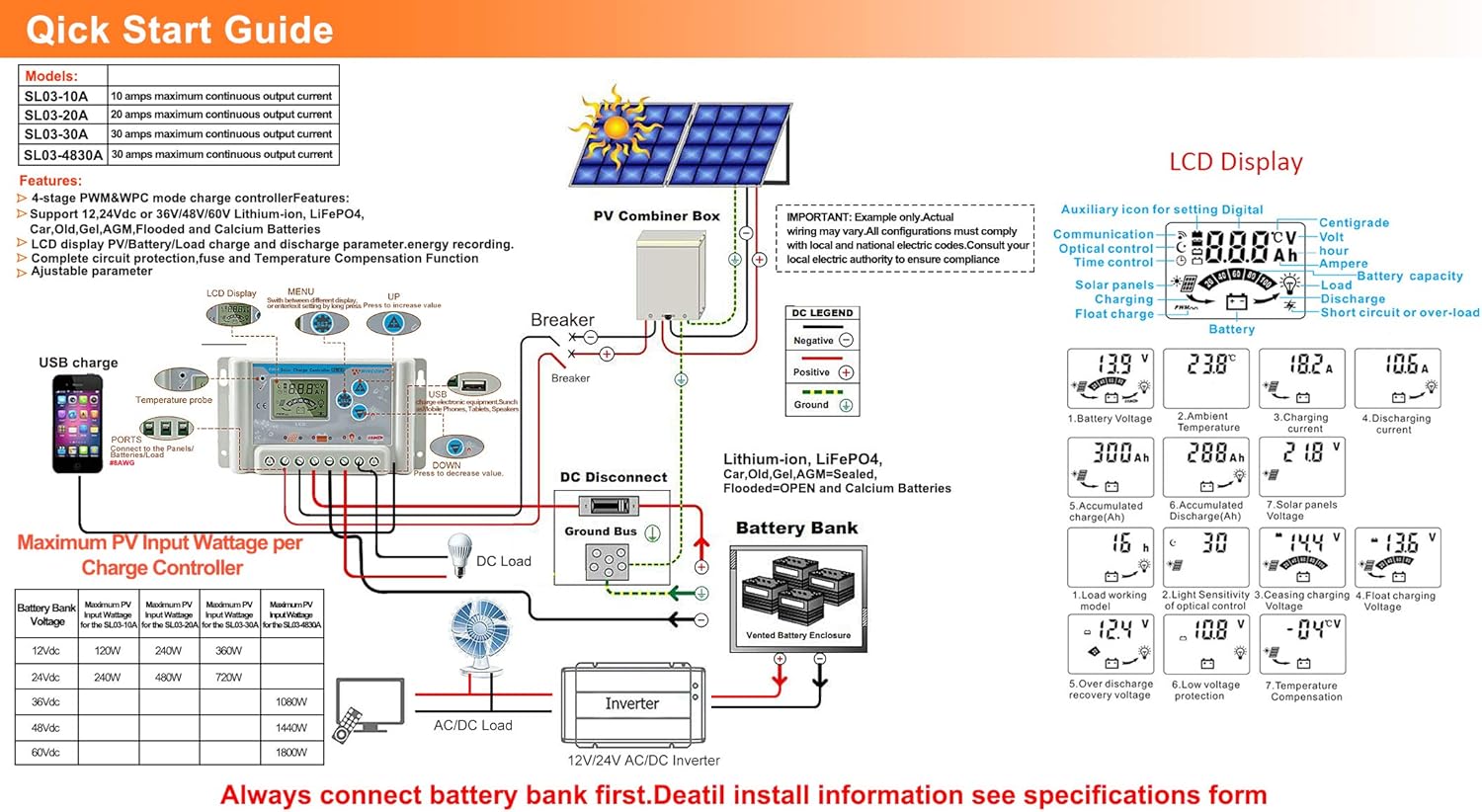
Image: A detailed wiring diagram for the solar charge controller, showing connections for PV combiner box, battery bank, DC load, and inverter. It also illustrates the LCD display and various parameters.
4.3 Video Guide: How to Connect the Controller
Video: This video demonstrates the correct wiring procedure for the PowMr SL03-30A Solar Charge Controller, showing how to connect the battery and solar panels. It also shows how to browse the interface and adjust settings.
5. 操作
5.1 LCDディスプレイとボタン
The controller features an LCD display and three buttons for operation: UP, DOWN, and SET.
- 上ボタン: Navigates through display interfaces, increases parameter values.
- 下ボタン: Navigates through display interfaces, decreases parameter values.
- SETボタン: Enters/exits setting mode, confirms parameter changes.
5.2 Browsing Display Interfaces
Press the UP or DOWN button to cycle through various display interfaces, including battery voltage, charging current, accumulated discharge, and load status.
5.3パラメータ設定
To enter the setting interface, long-press the SET button for 5 seconds. Use the UP and DOWN buttons to adjust values and the SET button to confirm and move to the next parameter. Long-press SET again to save changes and exit.
調整可能なパラメータは次のとおりです。
- 電池のタイプ: Select the correct battery type (e.g., Lead-Acid, Lithium).
- 負荷制御モード: Set timer for load operation (e.g., 24H for continuous, 16H for dusk-to-dawn).
- チャージVoltage: Adjust maximum charge voltage.
- 放電カットオフVoltage: 最小音量を設定するtage before load disconnection.
- 放電再接続ボリュームtage: ボリュームを設定するtage at which the load reconnects.
Refer to the "Specifications" section for default and adjustable ranges for each parameter.
6. 保護機能

Image: A circular diagram illustrating the eight electronic protection features of the PowMr SL03-30A Solar Charge Controller, including power off memory, short-circuit, over-charging, open-circuit, over-load, under-voltage discharge, over-heat, and dual MOSFET reverse current protection.
The PowMr SL03-30A controller incorporates multiple protection mechanisms to ensure the safety and longevity of your solar system:
- 過充電保護: 過充電によるバッテリーの損傷を防ぎます。
- 過放電保護: バッテリー電圧がtag安全レベル以下に低下します。
- 短絡保護: ショートが発生した場合には自動的にシャットダウンします。
- Open-circuit Protection: Protects the system if the solar panel circuit is open.
- 逆極性保護: Prevents damage from incorrect battery or solar panel connections.
- 過負荷保護: Disconnects the load if current exceeds the rated limit.
- 過熱保護: Reduces power or shuts down if the controller's internal temperature is too high.
- 電源オフメモリ: 電源が切れても設定は保持されます。
7. 仕様

Image: A comprehensive table detailing the specifications for PowMr SL03-10A, SL03-20A, SL03-30A, and SL03-40A models, including normal battery voltage, charge/discharge current, battery type, system recognize range, charging regulation, maximum PV open circuit voltage, and various protection parameters.
| パラメータ | Value (SL03-30A) |
|---|---|
| 通常のバッテリーVoltage | 12V / 24V自動 |
| 充電電流 | 30A |
| 放電電流 | 30A |
| 電池のタイプ | Lead-Acid Battery (Flooded, AGM, Gel, Calcium), LiFePO4 (Lithium) |
| System Recognize Range | Lead-Acid Battery: 8V-15V(12V System), 18V-30V(24V System) LiFePO4: 8V-15V(12V), 18V-30V(24V) |
| Charging Regulation | Bulk, Absorption, Float, Equalization |
| 最大。 PV開回路Voltage(Voc) | <= 50V |
| Max. PV Input Wattage(12V/24V) | 360W/720W |
| Stop-charge Voltage | Default 14.4V (12V), 28.8V (24V) (adjustable) |
| Float-charge Voltage | Default 13.6V (12V), 27.2V (24V) (adjustable) |
| 低ボリュームtage Reconnected | Default 12.4V (12V), 24.8V (24V) (adjustable) |
| 低ボリュームtage 断線 | Default 10.8V (12V), 21.6V (24V) (adjustable) |
| No Load Losses | <10mA |
| バッテリー温度補正 | Automatic with optional NTC thermal probe (adjustable) |
| 動作温度 | -20°C ~ +60°C |
| Outline Size (L*W*H) | 143*77*40mm |
| 取付穴間隔 | 134×55mm |
| 重さ | 260グラム |
8。 トラブルシューティング
This section provides solutions to common issues you might encounter with your PowMr SL03-30A Solar Charge Controller.
| 問題 | 考えられる原因 | 解決 |
|---|---|---|
| コントローラーのディスプレイがオフになっています。 | バッテリーが接続されていないか、バッテリーの容量が不足していますtag低すぎます。 | Connect the battery correctly. Ensure battery voltageは8Vを超えています。 |
| "LLL" or "HHH" displayed on screen. | No PV input or PV voltag低すぎる/高すぎる。 | Ensure solar panels are connected and receiving sunlight. Check PV voltage. |
| バッテリーが充電されていません。 | ソーラーパネルが接続されていない、日光が不十分、または配線が間違っている。 | Check solar panel connections and ensure adequate sunlight. Verify wiring polarity. |
| ロードが機能していません。 | Load disconnected, battery voltage too low (over-discharge protection), or load control settings. | Check load connections. Charge battery. Adjust load control timer (e.g., set to 24H for continuous). |
| コントローラーが過熱しています。 | Poor ventilation or excessive load/charging current. | Ensure proper ventilation around the controller. Reduce load or charging current if consistently overheating. |
9. メンテナンス
定期的なメンテナンスにより、最適なパフォーマンスが確保され、ソーラー充電コントローラーの寿命が延びます。
- 清潔さ: コントローラーは清潔に保ち、ほこりやゴミが付かないようにしてください。清掃には乾いた布をご使用ください。
- 接続: すべての配線接続部の締め付け具合や腐食がないか、定期的に点検してください。接続が緩んでいると、過熱や性能低下の原因となる可能性があります。
- 換気: 適切な熱放散を可能にするために、通気口が塞がれていないことを確認してください。
- バッテリーの状態: バッテリー容量を監視するtage and health regularly. Replace batteries as needed.
- 環境条件: コントローラーが指定された温度と湿度の範囲内で動作していることを確認します。
10. 保証とサポート
For warranty information, technical support, or service inquiries, please contact PowMr customer service through the retailer where the product was purchased or visit the official PowMr website. Please have your model number (SL03-30A) and purchase date available when contacting support.
詳細については、 PowMr Store.
Ask a question about this manual
Ask about setup, troubleshooting, compatibility, parts, safety, or missing instructions. Manuals+ will review the question and use this page’s manual context to help answer it.