
導入
Thank you for choosing the Peakeep S8 Digital Alarm Clock. This manual provides detailed instructions for setting up, operating, and maintaining your new alarm clock. Please read this manual thoroughly before use to ensure proper function and to maximize your product experience.
製品の特徴
- 大型液晶画面: Features a clear, boldface number display for easy readability.
- スマート光センサー: Built-in sensor automatically activates a soft backlight in dark environments, ensuring visibility without disturbing sleep.
- Gradually Strengthening Alarm: The alarm sound increases in volume gradually to gently wake you up.
- スヌーズ機能: Provides an additional 5 minutes of sleep after the alarm sounds.
- Adjustable Time and Date Format: Customize time display (12/24 hour) and date format.
- 温度監視: Displays ambient temperature in Celsius or Fahrenheit.
- 電池駆動: Operates on 3 x AAA batteries (not included).
パッケージ内容
- 1 x Peakeep S8 Digital Alarm Clock
- ユーザーマニュアル x 1
コントロールと表示
フロントディスプレイ
The large LCD screen displays time, date, day of the week, alarm status, and temperature. The backlight activates automatically in low light conditions when the sensor is enabled.
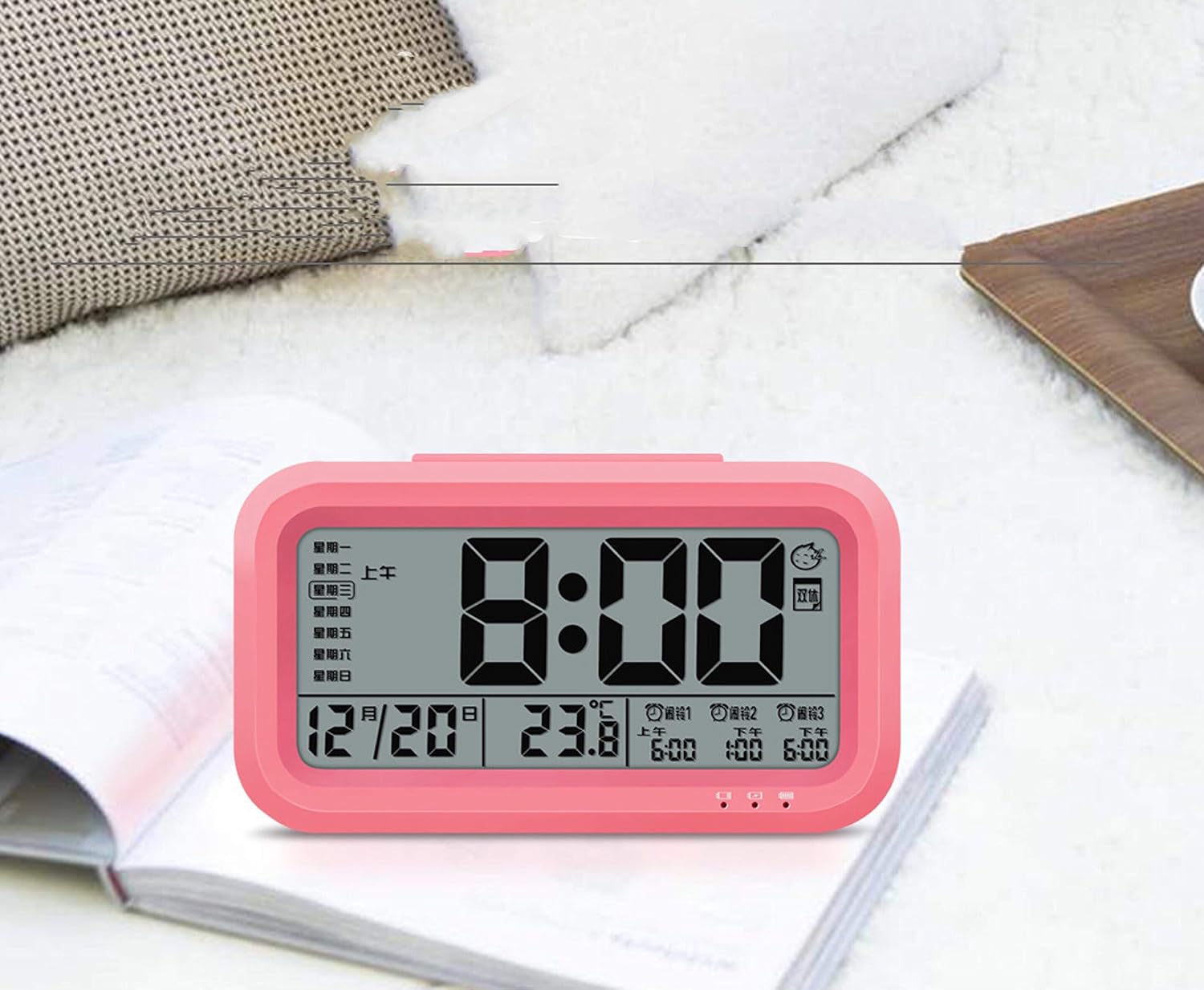
画像: 正面 view of the Peakeep S8 Digital Alarm Clock. This image shows the large digital display with the time (8:00), date (12/20), and temperature (23.8°C). It also indicates alarm settings and day of the week.
リアコントロール
The back of the clock features several buttons and switches for setting time, date, alarm, and other functions.
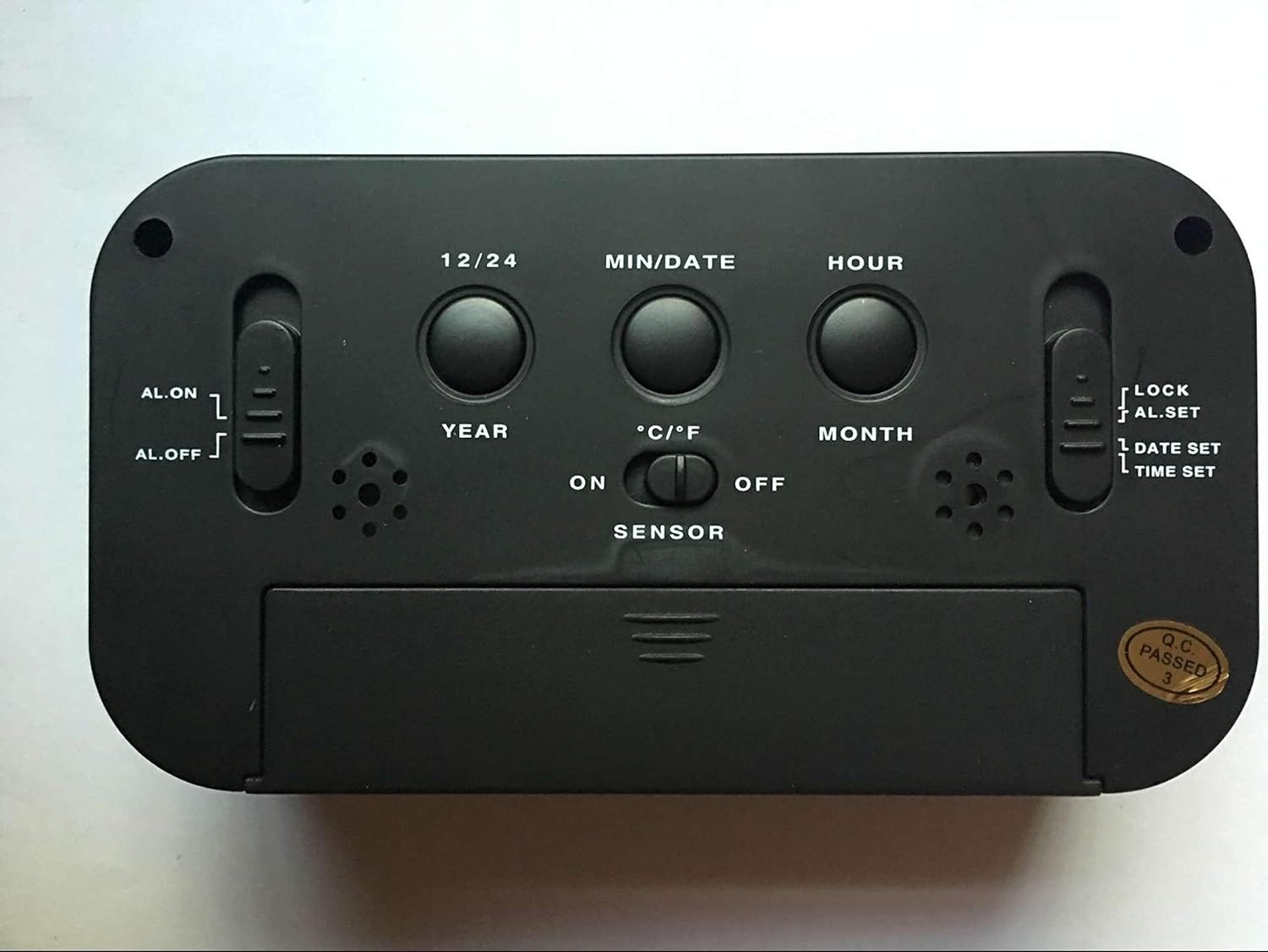
画像: 背面 view of the Peakeep S8 Digital Alarm Clock. This image highlights the control panel on the back, including buttons for 12/24 hour format, MIN/DATE, HOUR, YEAR, MONTH, °C/°F, and switches for AL.ON/AL.OFF, LOCK/AL.SET/DATE SET/TIME SET, and SENSOR ON/OFF.
- 12/24 ボタン: 12 時間表示と 24 時間表示を切り替えます。
- MIN/DATEボタン: Used to adjust minutes during time/alarm setting, and to view 日付。
- 時間ボタン: 時刻/アラーム設定時に時間を調整するために使用されます。
- 年ボタン: Used to set the year.
- 月ボタン: 月を設定するために使用します。
- °C/°F ボタン: Switches temperature display between Celsius and Fahrenheit.
- AL.ON/AL.OFF Switch: Turns the alarm function on or off.
- MODE Switch (LOCK/AL.SET/DATE SET/TIME SET):
- ロック: 誤って変更されないように現在の設定をロックします。
- AL.SET: アラーム設定モードに入ります。
- DATE SET: 日付設定モードに入ります。
- 時間設定: 時刻設定モードに入ります。
- SENSOR ON/OFF Switch: Activates or deactivates the smart light sensor for automatic backlight.
- スヌーズ/ライトボタン(上部): Activates snooze when alarm sounds, or temporarily illuminates the display.
設定
1. バッテリーの取り付け
- 時計の背面にある電池ケースのカバーを開きます。
- Insert 3 new 1.5V AAA batteries, ensuring correct polarity (+ and -).
- 電池カバーをしっかりと閉じてください。
- 注意: 電池は付属しておりません。
2. 初期時間設定
- Slide the MODE switch to 時間設定.
- を押す 時間 時間を調整するボタン。
- を押す 最小/日付 議事録を調整するボタン。
- Once the correct time is set, slide the MODE switch back to ロック.
3. Initial Date Setting
- Slide the MODE switch to 日付設定.
- を押す 年 年を調整するボタン。
- を押す 月 ボタンを押して月を調整します。
- を押す 最小/日付 日付を調整するボタン。
- Once the correct date is set, slide the MODE switch back to ロック.
操作手順
アラームを設定する
- Slide the MODE switch to AL.SET.
- を押す 時間 目覚まし時間を調整するボタン。
- を押す 最小/日付 アラームの分数を調整するボタン。
- Once the desired alarm time is set, slide the MODE switch back to ロック.
- アラームを鳴らすには、 AL.ON/AL.OFF 切り替える アルオン. An alarm icon will appear on the display.
スヌーズ機能を使う
アラームが鳴ったら、大きな スヌーズ/ライト button on top of the clock. The alarm will pause for approximately 5 minutes and then sound again. This can be repeated.
アラームをオフにする
アラームを完全にオフにするには、 AL.ON/AL.OFF 切り替える AL.OFF. The alarm icon will disappear from the display.
Activating the Smart Light Sensor
To enable the automatic backlight feature, slide the センサー 切り替える ON. The display will automatically illuminate with a soft glow in dark environments. Slide the switch to オフ この機能を無効にします。
温度単位の変更
を押す °C /°F button on the back of the clock to switch the temperature display between Celsius and Fahrenheit.
Changing Time Format (12/24 Hour)
を押す 12/24 button on the back of the clock to toggle between 12-hour (with AM/PM indicator) and 24-hour time formats.
メンテナンス
クリーニング
時計は柔らかく乾いた布で拭いてください。研磨剤入りの洗剤や溶剤は表面を傷つける恐れがあるため、使用しないでください。
バッテリー交換
When the display becomes dim or the clock functions erratically, it is time to replace the batteries. Follow the battery installation steps in the "Setup" section. Always replace all three AAA batteries at the same time with new ones.
トラブルシューティング
| 問題 | 考えられる原因 / 解決策 |
|---|---|
| ディスプレイが空白または暗い。 |
|
| アラームは鳴りません。 |
|
| 時計は時間を遅らせたり進めたりしています。 |
|
| ボタンが反応しません。 |
|
仕様
- ブランド: ピーキープ
- モデル番号: S8 (Item Model Number: Crazy Curry-030)
- 表示タイプ: デジタルLCD
- 材料: プラスチック
- 色: Black (Black-a)
- 電源: 1.5V AAA電池3本(別売)
- 特別な機能: Alarm, Snooze, Smart Light Sensor, Temperature Display (°C/°F), 12/24 Hour Format
- 寸法: (Approximate, based on typical alarm clock size and weight)
- 商品の重量: 178グラム
- 発送重量: 0.18キログラム
- 国際コード: 734602860235
保証とサポート
This product is designed for reliability and ease of use. For specific warranty information, please refer to the documentation provided at the time of purchase or contact your retailer.
If you encounter any issues not covered in this manual, please contact the retailer or manufacturer for assistance. Keep your purchase receipt as proof of purchase for any warranty claims.