
UMLIFE W3001
UMLIFE XH-W3001 Digital LED Temperature Controller Module User Manual
モデル: XH-W3001
Brand: UMLIFE
製品終了view
The UMLIFE XH-W3001 Digital LED Temperature Controller Module is a versatile thermostat switch designed for precise temperature control in various applications. It features a clear digital display and a waterproof NTC10K probe, making it suitable for both heating and cooling modes. Its robust ABS flame retardant housing ensures safety and durability.

Figure 1: UMLIFE XH-W3001 Digital LED Temperature Controller Module with probe and wiring.
主な特徴
- LEDインジケータライト: Displays the current output status for easy monitoring.
- デジタル表示管: Shows measuring temperature with high accuracy.
- 2つの作業モード: Supports both heating (start temperature < stop temperature) and cooling (start temperature > stop temperature) operations.
- 広い温度範囲: Operates from -50℃ to 110℃ with a control precision of 0.1℃.
- 耐久性のあるハウジング: Constructed with ABS flame retardant material for high safety, aging resistance, and durability.
- 防水プローブ: Equipped with a 1-meter NTC10K stainless steel probe that is waterproof and rust-resistant.
セットアップと配線
Proper wiring is crucial for the safe and correct operation of the XH-W3001 module. Ensure all connections are secure before applying power.

Figure 2: Wiring diagram for the 12V XH-W3001 model. Connect the 12V input (red/black wires) to your power source. The output (yellow/black wires) connects to your load (e.g., a light bulb or fan). The sensor probe connects to the designated port.
配線手順:
- 電源入力: Connect the red wire to the positive (+) terminal of your 12V DC power supply and the black wire to the negative (-) terminal.
- 負荷出力: Connect the yellow wire to the positive (+) terminal of your heating or cooling device (load) and the black wire to the negative (-) terminal of the load. Ensure the load's voltageはコントローラーの入力ボリュームに一致するtage(12V)。
- 温度プローブ: Insert the NTC10K waterproof probe into the designated two-pin connector on the module.
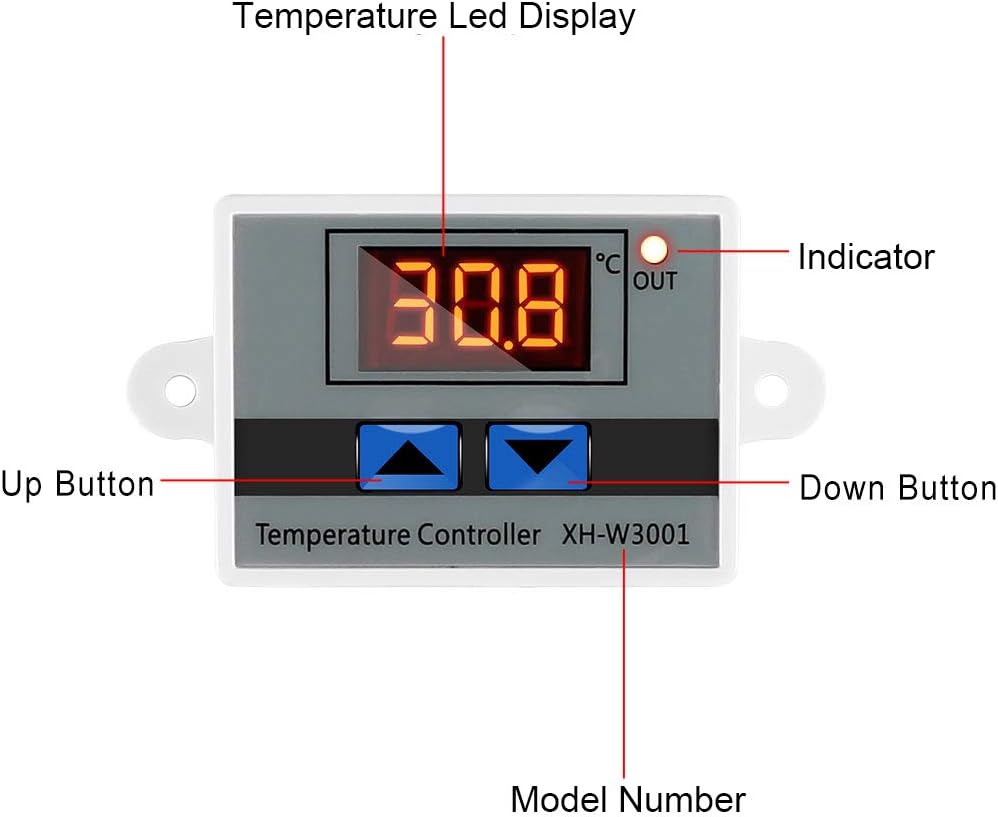
Figure 3: Labeled components of the XH-W3001 module, showing the temperature LED display, indicator light, up button, down button, and model number.
操作手順
The XH-W3001 has two main parameters to set: the start temperature and the stop temperature.
開始温度の設定:
- を押し続けます 上ボタン (left button) for approximately 3 seconds. The display will start flashing, indicating it's in setting mode.
- 使用 Up そして 下ボタン to adjust the desired start temperature.
- を押す 上ボタン again or wait for 3 seconds for the setting to be saved automatically.
停止温度の設定:
- を押し続けます 下ボタン (right button) for approximately 3 seconds. The display will start flashing.
- 使用 Up そして 下ボタン to adjust the desired stop temperature.
- を押す 下ボタン again or wait for 3 seconds for the setting to be saved automatically.
動作モード:
- 暖房モード: If the Start Temperature is set より低い than the Stop Temperature, the module will operate in heating mode. The output will turn ON when the temperature drops below the Start Temperature and turn OFF when it reaches the Stop Temperature.
- 冷却モード: If the Start Temperature is set より高い than the Stop Temperature, the module will operate in cooling mode. The output will turn ON when the temperature rises above the Start Temperature and turn OFF when it drops to the Stop Temperature.
Note: The display shows temperature in Celsius only. There is no option to change to Fahrenheit.
メンテナンス
The XH-W3001 module is designed for low maintenance. Regular checks can ensure its longevity and accurate performance.
- クリーニング: Keep the module and probe clean. Use a soft, dry cloth to wipe the display and housing. For the probe, ensure it is free from debris that might affect temperature readings.
- 接続: すべての配線接続が確実に固定され、腐食していないことを定期的に確認してください。接続が緩んでいると、断続的な動作や損傷につながる可能性があります。
- プローブ条件: Inspect the temperature probe for any signs of damage to the cable or the sensor tip. Replace if damaged to maintain accuracy.
- 環境: Ensure the module is installed in an environment within its specified operating temperature and humidity ranges to prevent premature failure.
トラブルシューティング
If you encounter issues with your XH-W3001 module, refer to the following common problems and solutions:
| 問題 | 考えられる原因 | 解決 |
|---|---|---|
| ディスプレイが点灯しません。 | No power, incorrect wiring, or faulty unit. | Check power supply connections. Ensure correct polarity. Verify power source is active. |
| 温度の読み取りが不正確です。 | Damaged probe, probe not properly connected, or environmental interference. | Ensure probe is securely connected. Inspect probe for physical damage. Test with another known accurate thermometer if possible. |
| Output not switching ON/OFF as expected. | Incorrect start/stop temperature settings, load not connected, or faulty relay. | Review and re-set start/stop temperatures. Verify load connections. Ensure the load's power requirements are within the module's specifications (10A 120W for 12V model). |
| Display shows "LLL" or "HHH". | "LLL" indicates open circuit or probe not connected. "HHH" indicates short circuit or temperature exceeding range. | Check probe connection. Replace probe if damaged. Ensure temperature is within -50℃ to 110℃ range. |
仕様
| 特徴 | 仕様 |
|---|---|
| モデル番号 | XH-W3001 |
| 巻tage | 12 Volts (for this specific model) |
| 出力電流 | 最大10A |
| 出力電力 | Max 120W (for 12V model) |
| 温度制御範囲 | -50℃~110℃ |
| 温度測定精度 | ±0.2℃ |
| 温度制御精度 | ±0.1℃ |
| プローブの種類 | NTC10K (Waterproof) |
| 表示タイプ | LEDデジタルディスプレイ |
| ハウジング材質 | ABS難燃剤 |
| 製品寸法 | 3.3 x 1.8 x 1.1インチ |
| アイテム重量 | 1.76オンス(50グラム) |
保証とサポート
For warranty information or technical support regarding your UMLIFE XH-W3001 Digital LED Temperature Controller Module, please refer to the product packaging or contact UMLIFE customer service directly. Contact details are typically provided with your purchase or can be found on the manufacturer's official webサイト。
Ask a question about this manual
Ask about setup, troubleshooting, compatibility, parts, safety, or missing instructions. Manuals+ will review the question and use this page’s manual context to help answer it.