
導入
This manual provides instructions for the installation, operation, and maintenance of your Audiovox ELEAUDAX80EXT Wireless Extension. This device is designed to expand the functionality of compatible Audiovox phone models, specifically the AX8001, AX8001E, and AX8101AM, by providing an additional wireless handset.
パッケージ内容
セットアップを続行する前に、パッケージにすべてのアイテムが揃っていることを確認してください。
- Audiovox ELEAUDAX80EXT Wireless Extension Unit
- 電源アダプタ(該当する場合)
- 充電式バッテリー(プリインストールまたは別売)
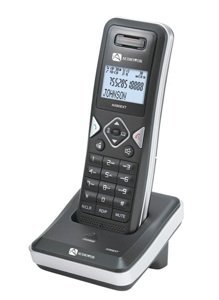
Image: The Audiovox ELEAUDAX80EXT Wireless Extension Unit. This image displays the compact design of the extension handset.
設定
- バッテリーを充電する: If the battery is not pre-installed, insert it into the extension unit according to the markings. Place the extension unit on its charging cradle (if included) or connect the power adapter directly to the unit and a power outlet. Allow the unit to charge for at least 12-16 hours before initial use.
- Register the Extension:
- Ensure your main Audiovox phone base (AX8001, AX8001E, or AX8101AM) is powered on.
- On the main phone base, locate and press the "Register" or "Page" button. Hold it until the indicator light on the base begins to flash (refer to your main phone's manual for exact instructions).
- While the base is in registration mode, on the ELEAUDAX80EXT extension unit, navigate to the "Menu" and select "Register Handset" or a similar option. Follow the on-screen prompts.
- Once registration is successful, the extension unit will display a confirmation message, and the indicator light on the base will stop flashing.
- テスト接続: Make a test call from the extension unit to ensure proper functionality.
操作手順
電話をかける
- 受話器を持ち上げるか、を押します 話す ボタン。
- 希望の電話番号をダイヤルします。
- を押す 話す 通話を終了するには、もう一度ボタンをクリックするか、受話器を受話器台に戻します。
電話に出る
- 電話が鳴ったら、受話器を取るか、 話す ボタン。
- 通話を終了するには、 終わり ボタンを押すか、受話器を受話器台に戻します。
Intercom Function (if supported by base unit)
- を押す インターコム ボタン。
- Dial the number of the extension you wish to call (e.g., "2" for the second handset).
- プレス 話す インターホン通話を開始します。
メンテナンス
- クリーニング: ユニットを柔らかいdで拭きますamp 布で拭いてください。強力な化学薬品や研磨剤入りの洗剤は使用しないでください。
- バッテリーのケア: For optimal battery life, avoid fully discharging the battery frequently. Keep the unit on its charger when not in use.
- ストレージ: ユニットを長期間保管する場合は、バッテリーを取り外して涼しく乾燥した場所に保管してください。
トラブルシューティング
| 問題 | 解決 |
|---|---|
| 発信音が聞こえない / 電話をかけられない |
|
| 端末が充電されない |
|
| 通話品質が悪い / 雑音 |
|
仕様
- モデル番号: ELEAUDAX80EXT
- Compatible Base Units: Audiovox AX8001, AX8001E, AX8101AM
- 寸法(長さ×幅×高さ): 20 x 40 x 30 ミリメートル
- 重さ: 20グラム
- 国際コード: 044476082719
保証とサポート
For specific warranty information and technical support, please refer to the documentation included with your original Audiovox phone system or visit the official Audiovox webサイトでご確認ください。保証請求の際は購入証明として領収書を保管してください。
For further assistance, please contact Audiovox customer service.