
導入
This manual provides detailed instructions for the setup, operation, and maintenance of your Zerone BN59-01179A Replacement Remote Control. Please read this manual carefully before using the product to ensure proper functionality and longevity.
製品終了view
The Zerone BN59-01179A is a universal replacement remote control designed for compatible Smart TVs. It offers a compact design and a comprehensive set of buttons for various functions.
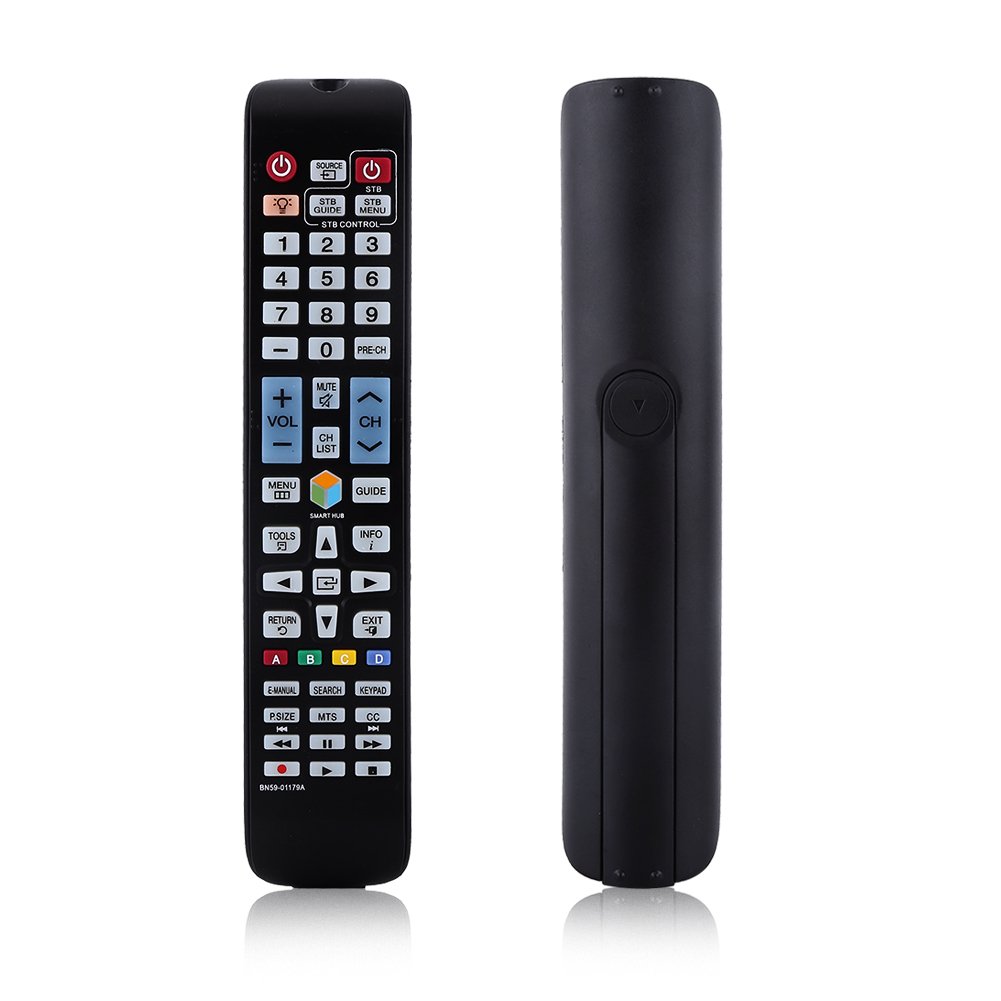
画像: 正面 view of the Zerone BN59-01179A remote control, showing its full layout and approximate dimensions (23cm length, 4.7cm width, 2cm thickness).
設定
バッテリーの取り付け
- リモコンの背面にある電池収納部を見つけます。
- バッテリーカバーを下方向にスライドするか、ラッチを押して持ち上げて開きます。
- 単4電池2本を挿入し、プラス(+)とマイナス(-)の端子がコンパートメント内のマークと正しく揃っていることを確認します。
- 電池カバーをカチッと音がするまで元の位置に戻して、しっかりと固定します。
注記: Batteries are not included with the remote control. Please use new AAA batteries for optimal performance.

Image: The back of the remote control with the battery cover removed, showing the empty battery compartment ready for two AAA batteries.
操作手順
This remote control is designed for immediate use with compatible TVs without requiring programming. Simply insert batteries and point the remote towards your television.
主な機能

Image: A hand holding the Zerone remote control, with inset close-ups highlighting the power/source buttons and the navigation/Smart Hub buttons.
- 電源(赤いボタン): テレビの電源をオンまたはオフにします。
- ソース: 入力ソース(HDMI、AVなど)を選択します。
- STB/DTV: Switches between Set-Top Box and Digital TV modes.
- 数字ボタン(0-9): 直接チャンネル選択。
- プレチャンネル: 前のチャンネルに戻ります。
- ボリューム(+/-): 音量レベルを調整します。
- ミュート: テレビの音声をミュートまたはミュート解除します。
- チャンネル(CHアップ/ダウン): テレビのチャンネルを順番に変更します。
- CHリスト: チャンネルリストを表示します。
- メニュー: テレビのメインメニューにアクセスします。
- スマートハブ: Opens the Smart Hub interface for apps and streaming services.
- ガイド: 電子番組ガイドを表示します。
- 情報: Shows information about the current program.
- ツール: クイック設定またはコンテキスト オプションにアクセスします。
- ナビゲーション ボタン (上/下/左/右/Enter): メニューを移動してオプションを選択します。
- 戻る: 前の画面またはメニューに戻ります。
- EXIT: 現在のメニューまたはアプリケーションを終了します。
- カラーボタン(A、B、C、D): 機能はテレビのモデルやアプリケーションによって異なります。
- 電子マニュアル: テレビの電子マニュアルにアクセスします。
- 検索: 検索機能を開きます。
- キーパッド: Displays an on-screen keypad.
- P.SIZE: 画像サイズ/アスペクト比を調整します。
- MTS: Multi-channel Television Sound (SAP).
- CC: クローズドキャプション。
- メディア コントロール ボタン (再生、一時停止、停止、巻き戻し、早送り): メディアの再生を制御します。
メンテナンス
- クリーニング: リモコンのお手入れには、柔らかく乾いた布をご使用ください。液体クリーナーや研磨剤は使用しないでください。
- バッテリー交換: リモコンの反応が鈍くなったり、動作しなくなった場合は、電池を交換してください。必ず2つの電池を同時に新しいものに交換してください。
- ストレージ: リモコンを長期間使用しない場合は、液漏れや損傷を防ぐために電池を取り外してください。
- 曝露を避ける: リモコンは直射日光、熱源、湿気から遠ざけてください。
トラブルシューティング
- リモコンが応答しない:
- 電池が正しい極性で正しく挿入されていることを確認してください。
- 古い電池を新しい単4電池と交換してください。
- リモコンとテレビの赤外線センサーの間に障害物がないか確認してください。
- リモコンがテレビに直接向けられていることを確認してください。
- 限定範囲:
- 電池を交換してください。
- Ensure there are no strong light sources or electronic devices interfering with the signal.
- 特定のボタンが機能しない:
- リモコン、特に反応しないボタンの周りを清掃して、汚れやゴミを取り除いてください。
- If the issue persists after battery replacement and cleaning, the remote may be faulty.
仕様
| 特徴 | 説明 |
|---|---|
| ブランド | ゼロネ |
| モデル名 | Zerone32687x9gqs (BN59-01179A compatible) |
| 接続技術 | 赤外線 |
| 対応デバイス | Television (specifically for Samsung BN59-01179A compatible models) |
| サポートされるデバイスの最大数 | 8 (Universal functionality) |
| ボタンの数量 | 12 (referring to main function groups, actual count is higher) |
| コントローラータイプ | ボタンコントロール |
| 最大範囲 | 8メートル |
| 電池のタイプ | AAA |
| 電池の数 | 単2電池XNUMX本が必要です(別売り) |
| 特集 | Universal replacement, no programming required |
保証とサポート
Zerone provides a service guarantee for this product. If you encounter any questions or issues regarding your remote control, please contact the seller or manufacturer for assistance. They will provide follow-up services to address your concerns.
For specific warranty details and support contact information, please refer to your purchase documentation or the retailer's webサイト。