
1. はじめに
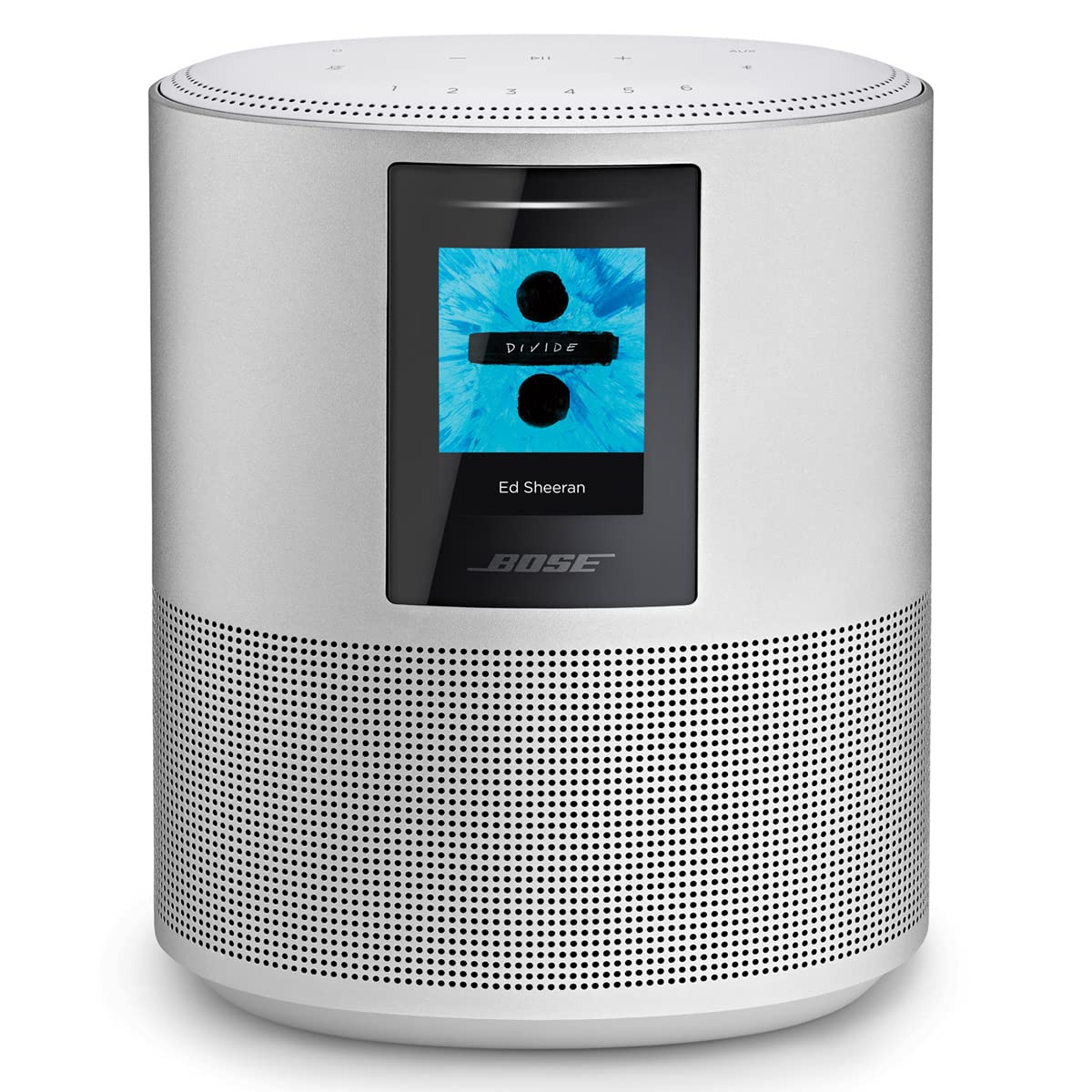
The Bose Home Speaker 500 is designed to deliver powerful, room-filling sound. It features two custom drivers positioned to project sound off walls, creating a wide soundstage. Integrated voice assistants, such as Amazon Alexa and Google Assistant, allow for hands-free control of music playback, internet radio, and playlists. The speaker includes a custom-designed eight-microphone array for superior voice pickup, even during loud music playback. Control options extend beyond voice, with top-panel controls and management through the Bose Music app. The speaker supports Wi-Fi, Bluetooth, and Apple AirPlay 2, enabling playback from various music services like Spotify and Apple Music, or directly from a phone or tablet. Users can set up to six presets for quick access to favorite content. A color LCD display provides visual information, including current song, station, playlist details, and album art.
2. セットアップ
Bose Home Speaker 500 をセットアップするには、次の手順に従ってください。
- 電源接続: Connect the power cord to the speaker and then to a wall outlet. The speaker will automatically power on.
- Bose Musicアプリをダウンロードしてください: Download the Bose Music app on your mobile device from the App Store (iOS) or Google Play Store (Android). This app is essential for initial setup and managing your speaker.
- アプリ経由の初期設定: Open the Bose Music app and follow the on-screen instructions to connect your speaker to your Wi-Fi network. The app will guide you through setting up your voice assistant (Alexa or Google Assistant) and linking your music services.
- Bluetooth ペアリング (オプション): To pair a Bluetooth device, press and hold the Bluetooth button on the top of the speaker until the light ring pulses blue. Then, select the Bose Home Speaker 500 from your device's Bluetooth settings.
- 補助入力: For wired connections, locate the AUX input port on the back of the speaker. Connect your audio source using a 3.5mm audio cable (not included).


3. 操作
Your Bose Home Speaker 500 offers multiple ways to control your audio experience:
3.1 トップパネルのコントロール
The top surface of the speaker features touch-sensitive controls:
- 音量アップ/ダウン(+/-): スピーカーの音量を調整します。
- 再生/一時停止 (►▮▮): オーディオの再生を開始または一時停止します。
- マイクミュート: Disable the built-in microphones for privacy. The light ring will glow red when muted.
- Bluetooth ボタン: Press to switch to Bluetooth mode or initiate pairing.
- AUXボタン: Select the auxiliary input source.
- プリセット(1~6): Customize these buttons in the Bose Music app to quickly access favorite playlists, radio stations, or albums.

3.2 音声制御
With Amazon Alexa or Google Assistant built-in, you can control your speaker using voice commands. Simply say the wake word ("Alexa" or "Hey Google") followed by your command, such as "Play jazz music" or "What's the weather?"
3.3 Boseミュージックアプリ
Bose Music アプリでは、次のようなスピーカーの包括的なコントロールが可能です。
- Managing connected music services.
- Adjusting equalizer settings (bass and treble).
- Creating and managing speaker groups for multi-room audio.
- Accessing software updates.
3.4 LCDディスプレイ
The front LCD display shows useful information such as:
- 現在の時刻。
- Album art for playing music.
- Song title and artist information.
- Active source (Wi-Fi, Bluetooth, AUX).

4. メンテナンス
Bose Home Speaker 500 の寿命を延ばし、最適なパフォーマンスを確保するには、次のメンテナンス ガイドラインに従ってください。
- クリーニング: Use a soft, dry cloth to clean the exterior surfaces of the speaker. Avoid using liquid cleaners, solvents, or sprays, as these can damage the finish or internal components.
- ソフトウェアアップデート: Regularly check for and install software updates through the Bose Music app. Updates often include performance improvements, new features, and bug fixes.
- 配置: Place the speaker on a stable, flat surface. Ensure adequate ventilation around the speaker to prevent overheating.
- 環境条件: The speaker is not waterproof. Avoid exposing it to water, excessive moisture, or extreme temperatures.
5。 トラブルシューティング
If you encounter issues with your Bose Home Speaker 500, try the following solutions:
| 問題 | 考えられる解決策 |
|---|---|
| スピーカーの電源が入りません。 | Ensure the power cord is securely connected to both the speaker and a working wall outlet. Try a different outlet. |
| 音が出ない、または音質が悪い。 | Check the volume level on both the speaker and your connected device. Ensure the correct source (Wi-Fi, Bluetooth, AUX) is selected. Verify audio cables are properly connected for AUX input. |
| Wi-Fi 接続の問題。 | Ensure your Wi-Fi router is on and within range. Restart your speaker and router. Use the Bose Music app to reconfigure Wi-Fi settings if necessary. Ensure your Wi-Fi network is stable. |
| Bluetoothのペアリングに失敗しました。 | Ensure the speaker is in Bluetooth pairing mode (pulsing blue light). Turn off and on Bluetooth on your device. Remove the speaker from your device's paired list and try pairing again. |
| 音声アシスタントが応答しません。 | Ensure the microphone is not muted (microphone mute button not illuminated red). Check your internet connection. Verify voice assistant settings in the Bose Music app. Speak clearly and be within range of the speaker. |
| Bose Music app is buggy or unresponsive. | Close and reopen the app. Ensure your app is updated to the latest version. Restart your mobile device. Check for speaker software updates. |
If problems persist, visit the official Bose support website or contact Bose customer service for further assistance.
6. 仕様
| 特徴 | 詳細 |
|---|---|
| ブランド | ボーズ |
| モデル名 | ホームスピーカー500 |
| モデル番号 | 795345-1300 |
| 接続技術 | Bluetooth wifi |
| オーディオ出力モード | ステレオ |
| 制御方法 | Voice, App, Touch Controls |
| コントローラータイプ | Amazon Alexa、Google アシスタント |
| 材料 | アルミニウム |
| 商品の寸法(奥行き x 幅 x 高さ) | 奥行き4.31インチ x 幅6.68インチ x 高さ8.01インチ |
| アイテム重量 | 4.7ポンド |
| Bluetooth範囲 | 9メートル |
| 電源 | 統合電源 |
| 防水です | いいえ |
| 箱の中身 | ボーズホームスピーカー500 |
7. 保証とサポート
The Bose Home Speaker 500 comes with a Limited Warranty. For detailed information regarding the warranty period, coverage, and terms and conditions, please refer to the warranty card included with your product or visit the official Bose webサイト。
For technical support, product registration, or to access additional resources such as FAQs and software downloads, please visit the Bose support webサイト:
個別のサポートが必要な場合は、Bose カスタマー サービスに直接お問い合わせいただくこともできます。