
1. はじめに
This manual provides detailed instructions for the installation, operation, and maintenance of your Akozon Digital Programmable Timer. Please read this manual carefully before use to ensure proper function and safety.

Figure 1: Akozon Digital Programmable Timer 12V
2.製品オーバーview および機能
The Akozon Digital Programmable Timer is a weekly programmable electronic timer designed for precise control of various electrical equipment. Its robust design and advanced features ensure reliable operation.
- 自動制御: Automatically turns electrical equipment on and off according to preset schedules.
- 高精度: Equipped with a high-precision chip for accurate timing.
- 毎週のプログラミング: Supports advanced programming for up to one week in advance.
- 複数のプログラム: Features 16 ON/OFF settings (programs) for daily or weekly scheduling.
- バックアップ電源: Integrated high-performance rechargeable battery maintains time display and stores data for over 12 months during power outages。
- 耐久性のある構造: Housing made of hard, durable plastic for extended lifespan.
- LCDディスプレイ: Clear LCD for easy view時間とプログラムのステータスを表示します。
- DINレールの取り付け: DIN レールに簡単に取り付けられるように設計されています。
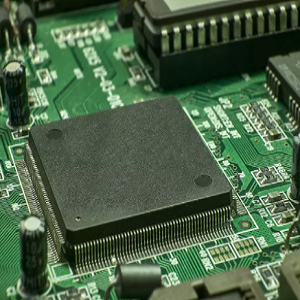
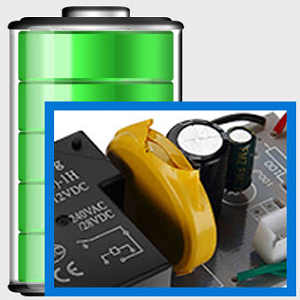
Figure 2: Internal components showing the high-precision chip and rechargeable backup battery.
3. 仕様
| モデル番号 | Akozonqegcgmk04u-01 |
| 入力ボリュームtage | 12V DC / AC |
| 出力容量 | 25(16)A、240VAC |
| 消費電力 | <1W |
| タイミング範囲 | 1分~168時間 |
| プログラム | 16 ON/OFF settings (daily/weekly) |
| タイミングエラー | <±2 seconds/day |
| 停電メモリ | >12 months (with internal rechargeable battery) |
| 動作温度 | -20°C ~ 55°C |
| インストール方法 | DINレール |
| 寸法(約) | 36mm(W)x 86mm(H)x 65mm(D) |
| 重量(約) | 120グラム |
| 画面 | 液晶 |

Figure 3: Detailed product dimensions and key specifications.
4. 安全情報
- 設置またはメンテナンスの前に必ず電源を切ってください。
- 感電やデバイスの損傷を防ぐため、設置は資格のある電気技師が行う必要があります。
- 入力ボリュームを確認するtage matches the timer's specifications (12V DC/AC). Connecting to incorrect voltag本体が破損する恐れがあります。
- Do not expose the device to excessive moisture or extreme temperatures outside the specified operating range.
- Do not disassemble the timer; refer servicing to qualified personnel.
5. セットアップとインストール
5.1 DINレールの取り付け
The timer is designed for easy installation on a standard 35mm DIN rail. Simply clip the timer onto the rail in your distribution box.

図4:例ample of the timer installed on a DIN rail within a distribution box.
5.2配線手順
Refer to the wiring diagram below for correct connection. Ensure all connections are secure and comply with local electrical codes.
- ターミナル1と2: Power input (12V DC/AC).
- ターミナル3、4、5: Output contacts.
- 3: 通常閉(NC)
- 4: コモン(COM)
- 5: 通常開(NO)

Figure 5: Detailed wiring diagram showing connections for power input and output contacts.

図6:例amples of wiring methods, including direct load connection and connection via a contactor.
6. 操作手順
6.1 Initial Setup and Unlocking
- Upon first use, connect the timer to power (12V DC/AC).
- を押す リセット button to clear all previous settings and initialize the timer.
- The timer display may be locked. To unlock, press the 問い合わせ button four times. The lock icon will disappear from the display. If no operation occurs for 15 seconds, the timer will automatically lock again.
6.2 現在の時刻と日付の設定
After unlocking, set the current time and day:
- を押す P button (Program button) once.
- を押す D+ 現在の曜日 (MO、TU、WE、TH、FR、SA、SU) を設定するボタン。
- を押す H+ 現在の時間を設定するボタン。
- を押す M+ 現在の分を設定するボタン。
- を押す P もう一度ボタンを押すと、時間設定モードが終了します。

図 7: 拡大図 view of the timer's control buttons.

Figure 8: Explanation of button functions and display elements, including day, hour, minute, and reset.
6.3手動制御
を押す マニュアルC/R button to cycle through manual control modes:
- に: 出力は連続ONです。
- 自動: Timer operates according to programmed schedules.
- OFF: 出力は継続的にOFFになります。
選択 オート for the timer to follow your programmed settings.
7. オン/オフスケジュールのプログラミング
The timer supports up to 16 ON/OFF programs. Follow these steps to set your desired schedules:
- を押す P button to enter programming mode. The display will show "1 ON".
- プレス D+ このプログラムを実施する曜日を選択します。1日、平日、週末、または全日を選択できます。
- プレス H+ オンの時間を設定します。
- プレス M+ ONの分を設定します。
- プレス P もう一度押してください。ディスプレイに「1 OFF」と表示されます。
- プレス D+ to select the day(s) for this OFF program (usually the same as ON, but can be different).
- プレス H+ OFF時間を設定します。
- プレス M+ OFF 分を設定します。
- 追加のオン/オフプログラム(最大16個)を設定するには、手順1~8を繰り返します。 P to advance to the next program number.
- プログラミングモードを終了するには、 マニュアルC/R button. Ensure the timer is set to オート プログラムを実行するモード。
Note: If you need to cancel a program, press the 問い合わせ ボタンながら viewing the specific ON or OFF program. This will clear the settings for that program.
8. アプリケーション
The Akozon Digital Programmable Timer is versatile and can be used in various applications, including:
- Controlling lamps and lighting systems (e.g., streetlights, garden lights, neon signs).
- Managing water heaters and preheaters.
- Automating agricultural facilities (e.g., irrigation systems).
- Controlling broadcasting equipment.
- Scheduling household appliances.
- Operating sprayers and bottling equipment.

図9:例amples of environments where the timer can be used, such as controlling outdoor lighting and industrial equipment.
9. メンテナンス
- タイマーは清潔に保ち、ほこりが付かないようにしてください。お手入れには柔らかく乾いた布をご使用ください。
- 研磨剤や溶剤は使用しないでください。
- 過熱を防ぐために、デバイスの周囲に適切な換気を確保してください。
- The internal battery is designed for long-term backup. If the timer consistently loses time or program settings after a power outage, the internal battery may need professional inspection.
10。 トラブルシューティング
| 問題 | 考えられる原因 | 解決 |
|---|---|---|
| 表示が空白です。 | 電源が供給されていないか、内部バッテリーが消耗しています。 | Check power connections. Allow time for the internal battery to charge (connect to power for several hours). |
| タイマーはボタンを押しても反応しません。 | Timer is locked. | を押す 問い合わせ button four times to unlock. |
| プログラムが実行されていません。 | タイマーがAUTOモードではありません。プログラム設定が正しくありません。 | プレス マニュアルC/R 「AUTO」が表示されるまで。view プログラム設定を修正します。 |
| 電源を切ると時間や設定が失われるtage. | Internal backup battery is not charging or is depleted. | Ensure the timer is connected to power for sufficient time to charge the internal battery. If the issue persists, contact customer support. |
| Output is always ON or OFF, ignoring programs. | タイマーは手動でオンまたはオフにするモードです。 | プレス マニュアルC/R 「AUTO」が表示されるまで押します。 |
11. 保証とサポート
Akozon products are manufactured to high-quality standards. For warranty information or technical support, please refer to the contact details provided with your purchase or visit the official Akozon webサイト。
保証請求のために購入証明書を保管してください。