
1. はじめに
This manual provides essential information for the safe and efficient operation of your FLUKE 124B/JP/S ScopeMeter. Please read this manual thoroughly before using the device and keep it for future reference.
The Fluke 124B/JP/S is a compact ScopeMeter designed for industrial applications, combining the functions of a dual-input digital oscilloscope and a multimeter. It features advanced capabilities like Connect-and-View triggering and IntellaSet technology for simplified measurements.
2. 安全情報
火災、感電、および人身傷害のリスクを軽減するため、本製品を使用する際は必ず基本的な安全上の注意事項に従ってください。このマニュアルは、今後の参考のために保管してください。
- 使用前にすべての指示をよくお読みください。
- デバイスが破損しているように見える場合、または正常に機能していない場合は、デバイスを操作しないでください。
- 過熱を防ぐために適切な換気を確保してください。
- 指定されたアクセサリおよびアタッチメントのみを使用してください。
- すべてのメンテナンスは資格のあるサービス担当者に依頼してください。
- 地域および国の安全規則をすべて遵守してください。
3.製品オーバーview
The FLUKE 124B/JP/S ScopeMeter is a robust and versatile tool for electrical and electronic measurements. It integrates a dual-input digital oscilloscope and a true-RMS digital multimeter into a single handheld device.
主な特徴:
- Dual-input digital oscilloscope and multimeter.
- Oscilloscope bandwidth: 40 MHz or 20 MHz.
- 2-channel, 5,000 count true-RMS digital multimeter.
- Connect-and-View™ trigger function for simple, hands-free operation.
- IntellaSet™ technology for intelligent automatic adjustment of measurement values based on the measured signal.
- Long-term recorder function with up to 400M samples and 15G points of data directly recordable to SD card (for 124B and 125B models), allowing up to 14 days of event saving.
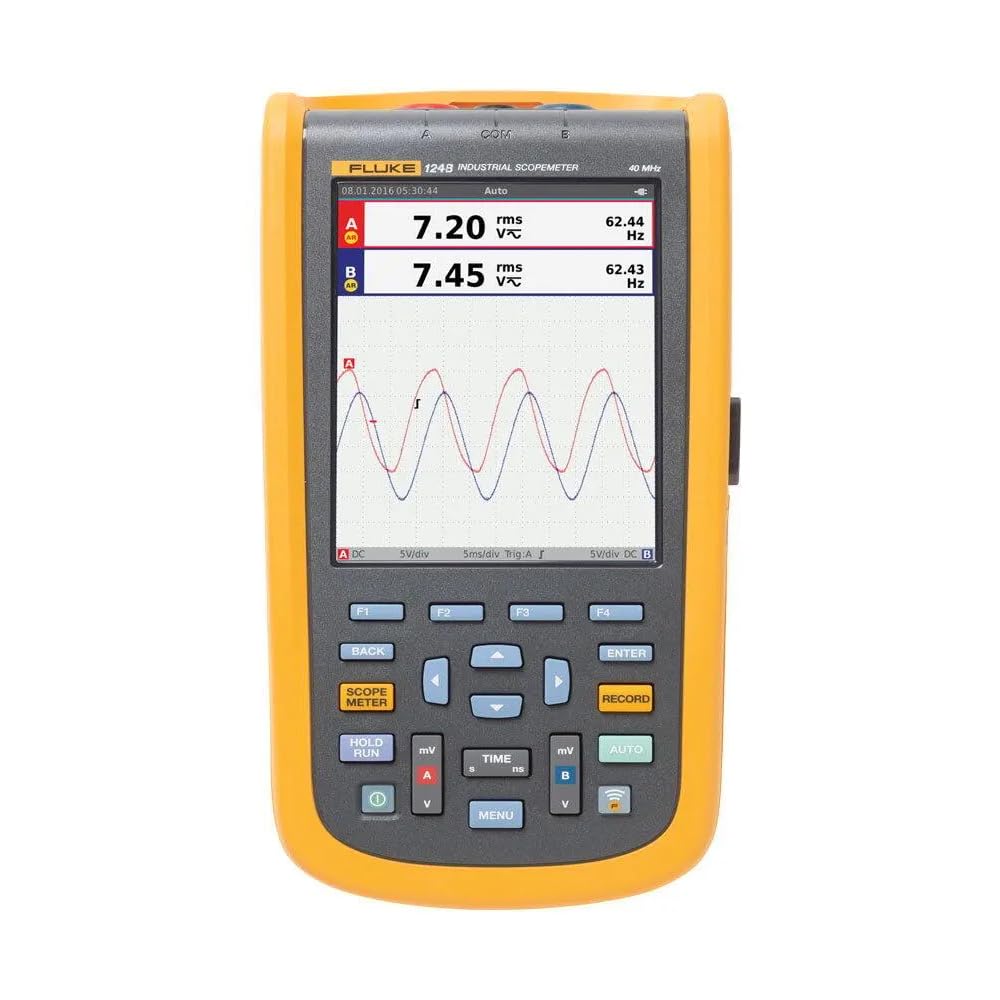
Figure 1: FLUKE 124B/JP/S ScopeMeter with included accessories, including probes, power adapter, and carrying case.
4. セットアップ
4.1 開梱と検査
Carefully unpack the ScopeMeter and all accessories. Inspect for any signs of damage. If any items are missing or damaged, contact your supplier immediately.
4.2 バッテリーの取り付けと充電
The device uses a Lithium-Ion battery. Ensure the battery is properly installed. Connect the power adapter to charge the device before first use. A full charge is recommended for optimal battery life.
4.3初期電源オン
Press and hold the power button until the display illuminates. The device will perform a self-test. Follow any on-screen prompts for initial setup, such as language selection.
5. 操作手順
5.1 基本測定モード
The ScopeMeter offers both oscilloscope and multimeter functionalities. Use the dedicated buttons to switch between modes.

図2: 前面 view of the FLUKE 124B/JP/S ScopeMeter, showing the display and control buttons.
5.2 Connect-and-View™ Triggering
This feature automatically identifies signal patterns and sets the correct trigger conditions. Simply connect the probes to the circuit, and the device will optimize the display. In Auto mode, it continuously tracks signal changes, providing a stable waveform display without manual adjustments.

Figure 3: The ScopeMeter displaying a complex waveform, demonstrating its measurement capabilities.
5.3 IntellaSet™ Technology
IntellaSet analyzes measured waveforms using a unique algorithm and automatically displays the most appropriate measurement values on the screen. This simplifies waveform analysis and ensures reliable verification of readings.
5.4 Long-Term Recorder Function
The recorder function allows high-speed and long-term waveform capture. It can capture up to 400M samples and record up to 15G points of data directly to an SD card (for 124B and 125B models). This enables saving up to 14 days of event data for later analysis.
5.5 Using the Multimeter
Switch to multimeter mode to perform standard electrical measurements such as voltage, current, resistance, and capacitance. Refer to the on-screen interface for specific measurement selections and ranges.

Figure 4: A technician using the FLUKE 124B/JP/S ScopeMeter to perform measurements on a circuit board.
6. メンテナンス
6.1 クリーニング
ソフトでデバイスを拭いてください、damp 布で拭いてください。研磨剤入りの洗剤や溶剤は使用しないでください。清掃する前に、必ずデバイスの電源を切り、すべての電源から取り外してください。
6.2バッテリーケア
To prolong battery life, avoid extreme temperatures and store the device with a partial charge if not used for extended periods. Replace the battery when its capacity significantly diminishes.
6.3 ストレージ
Store the ScopeMeter and its accessories in a clean, dry environment, away from direct sunlight and extreme temperatures. Use the provided carrying case for protection during transport.
7。 トラブルシューティング
| 問題 | 考えられる原因 | 解決 |
|---|---|---|
| デバイスの電源が入りません。 | バッテリー残量が少ないか消耗しています。電源ボタンが正しく押されていません。 | Charge the battery; ensure the power button is pressed firmly for a few seconds. |
| Unstable waveform display. | Incorrect trigger settings; poor probe connection. | Ensure Connect-and-View is active or adjust trigger levels manually; check probe connections. |
| マルチメーターの読み取り値が不正確。 | Incorrect measurement mode; faulty probes. | Verify the selected measurement mode; test probes for continuity or replace if damaged. |
| SD card recording issues. | SD card full or corrupted; incorrect file 形式。 | Check SD card capacity; format the SD card (this will erase data); try a different SD card. |
これらの解決策を試しても問題が解決しない場合は、カスタマー サポートにお問い合わせください。
8. 仕様
| 特徴 | 詳細 |
|---|---|
| メーカー | フルーク |
| 部品番号 | 124B/JP/S |
| アイテム重量 | 1.4キログラム |
| 製品寸法(長さx幅x高さ) | 32 x 25 x 47 cm |
| バッテリー | リチウムイオン電池 1 個 (付属) |
| 測定精度 | Refer to catalog values |
| 含まれるコンポーネント | Standard accessories included |
| 電池のタイプ | リチウムイオン |
| ASIN | B07DRL9T2M |
| 初回利用可能日 | 25年2019月XNUMX日 |
9.保証とサポート
9.1 保証情報
This FLUKE product is covered by a standard manufacturer's warranty. Please refer to the warranty card included with your product or visit the official FLUKE web詳細な保証条件については、サイトをご覧ください。
9.2 カスタマーサポート
For technical assistance, troubleshooting, or service inquiries, please contact FLUKE customer support. Contact details can typically be found on the official FLUKE webサイトまたは製品のパッケージ内。
Online resources and FAQs may also be available on the FLUKE support portal.