
1.製品オーバーview
The Zerone Multi-Language Translator Bluetooth Earphone is a portable wireless device designed for real-time language translation and audio playback. It features Bluetooth 4.1 connectivity, high-fidelity audio output, and a compact in-ear design for comfortable use during various activities.

画像1.1: メイン view of the Zerone Multi-Language Translator Bluetooth Earphone.
2. パッケージ内容
以下にリストされているすべてのアイテムがパッケージに含まれていることを確認してください。
- Zerone Multi-Language Translator Bluetooth Earphone
- USB充電ケーブル
- 追加のイヤーチップ(各種サイズ)
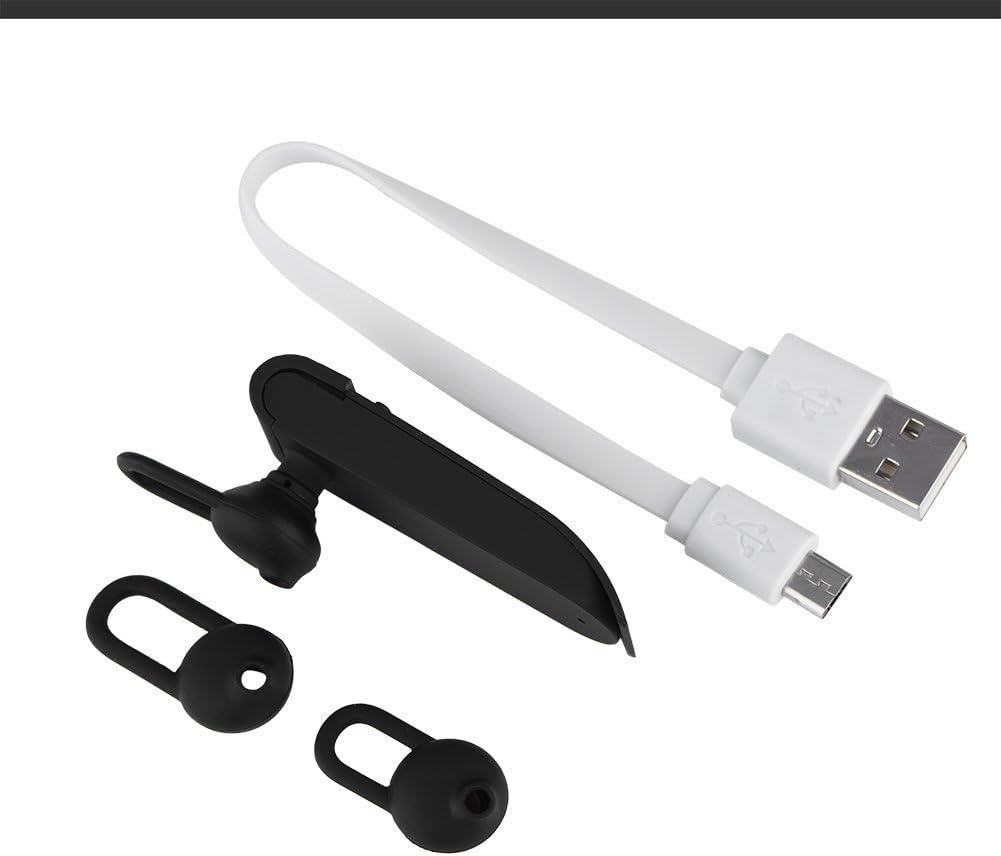
Image 2.1: The earphone with its charging cable and two additional ear tips.
3 製品の特徴
- 多言語翻訳: Supports up to 16 languages for real-time translation. Speak into the earphone, and it will translate into the desired language.
- 高忠実度オーディオ出力: Equipped with an 8mm moving coil speaker for clear, smooth audio and enhanced bass.
- True Wireless In-Ear Design: Mini and compact, offering a stable and comfortable fit without tangled wires, suitable for various activities.
- Bluetooth 4.1接続: Optimized Bluetooth 4.1 version ensures a stable and fast wireless connection with a range of up to 10 meters.
- バッテリー寿命の延長: Built-in 90mAh rechargeable lithium battery provides approximately 5-8 hours of playback time and up to 13 hours of talk time.

Image 3.1: Visual representation of the 16 languages translation feature.

Image 3.2: Illustration of the high fidelity audio output with an 8mm moving coil speaker.

Image 3.3: Visual representation of the Bluetooth true wireless connection with a 10-meter transmission range.

Image 3.4: Details on the earphone's 90mAh rechargeable lithium battery and extended usage times.
4. セットアップ
4.1 イヤホンの充電
Before initial use, fully charge the earphone. Connect the provided USB charging cable to the earphone's charging port and the other end to a USB power source (e.g., computer, wall adapter). The charging time is approximately 2 hours.
4.2Bluetoothペアリング
- Ensure the earphone is fully charged and powered off.
- Press and hold the multi-function button on the earphone until the indicator light flashes red and blue alternately, indicating pairing mode.
- スマートフォンまたは Bluetooth 対応デバイスで、Bluetooth 設定に移動します。
- 検索する available devices and select "Zerone Translator Earphone" (or similar name) from the list.
- 接続されると、通常はインジケーター ライトが青色に点灯するか、青色でゆっくり点滅します。
4.3 Companion Application (for Translation)
To utilize the multi-language translation feature, you will need to download and install a compatible companion application on your smartphone. Refer to the packaging or product documentation for the specific app name and download instructions. Ensure your phone is connected to the internet for translation services.
5. 操作手順
5.1 電源オン/オフ
- 電源オン: Press and hold the multi-function button for approximately 3 seconds until the indicator light turns blue.
- 電源を切る: インジケーターライトが赤くなるまで、マルチファンクションボタンを約 5 秒間押し続けます。
5.2音楽の再生
- 再生/一時停止: 多機能ボタンを短く押します。
- 次のトラック: マルチファンクションボタンを2回押します。
- 前のトラック: マルチファンクションボタンを3回押します。
5.3 通話管理
- 通話の応答/終了: 多機能ボタンを短く押します。
- 通話を拒否: 多機能ボタンを2秒間押し続けます。
5.4 Using the Translation Function
After successfully pairing the earphone with your device and setting up the companion application:
- Open the translation application on your smartphone.
- アプリ内でソース言語とターゲット言語を選択します。
- Activate the translation mode as instructed by the application (this may involve pressing a button on the earphone or within the app).
- Speak clearly into the earphone's microphone. Your speech will be translated and played back through the earphone or your phone's speaker, depending on the app's settings.

Image 5.1: A conceptual image demonstrating the earphone's translation capability between two languages.
6. メンテナンス
- クリーニング: Use a soft, dry cloth to clean the earphone. Do not use abrasive cleaners or immerse the device in water.
- ストレージ: イヤホンは直射日光や極端な温度を避け、涼しく乾燥した場所に保管してください。
- バッテリーのケア: バッテリー寿命を延ばすには、イヤホンを頻繁に完全に放電させないでください。長期間使用しない場合でも、定期的に充電してください。
7。 トラブルシューティング
| 問題 | 考えられる原因 | 解決 |
|---|---|---|
| イヤホンの電源が入らない | バッテリー残量が少ない | Charge the earphone for at least 30 minutes. |
| デバイスとペアリングできません | Earphone not in pairing mode; Bluetooth off on device; device too far | Ensure earphone is in pairing mode (flashing red/blue). Turn on Bluetooth on your device. Move device closer to earphone (within 10m). |
| No sound during playback/calls | Volume too low; earphone not connected; media output not selected | Increase volume on both earphone and connected device. Re-pair the earphone. Check device's audio output settings. |
| 翻訳機能が動作しない | Companion app not open/configured; no internet connection; microphone blocked | Ensure the companion app is open and correctly configured. Verify internet connectivity. Check if the earphone's microphone is clear. |
8. 仕様
| 特徴 | 詳細 |
|---|---|
| モデル番号 | 4351510494 |
| 接続技術 | ワイヤレス(Bluetooth) |
| Bluetoothバージョン | 4.1 |
| Bluetooth範囲 | 最大10メートル |
| バッテリー容量 | 90mAhリチウム電池 |
| プレイ時間 | 5~8時間 |
| トークタイム | 最大13時間 |
| 充電時間 | 約2時間 |
| ヘッドフォンジャック | USB(充電用) |
| 材料 | プラスチック |
| 耳の位置 | 耳に装着 |
| フォームファクター | 耳に装着 |
| コントロールタイプ | メディアコントロール、タッチ |
| 騒音制御 | アクティブノイズキャンセリング |
| アイテム重量 | 2.39オンス |
9. 保証とサポート
For warranty information and technical support, please refer to the documentation included with your purchase or visit the official Zerone webサイトでご確認ください。保証請求に備えて購入証明書を保管してください。