
導入
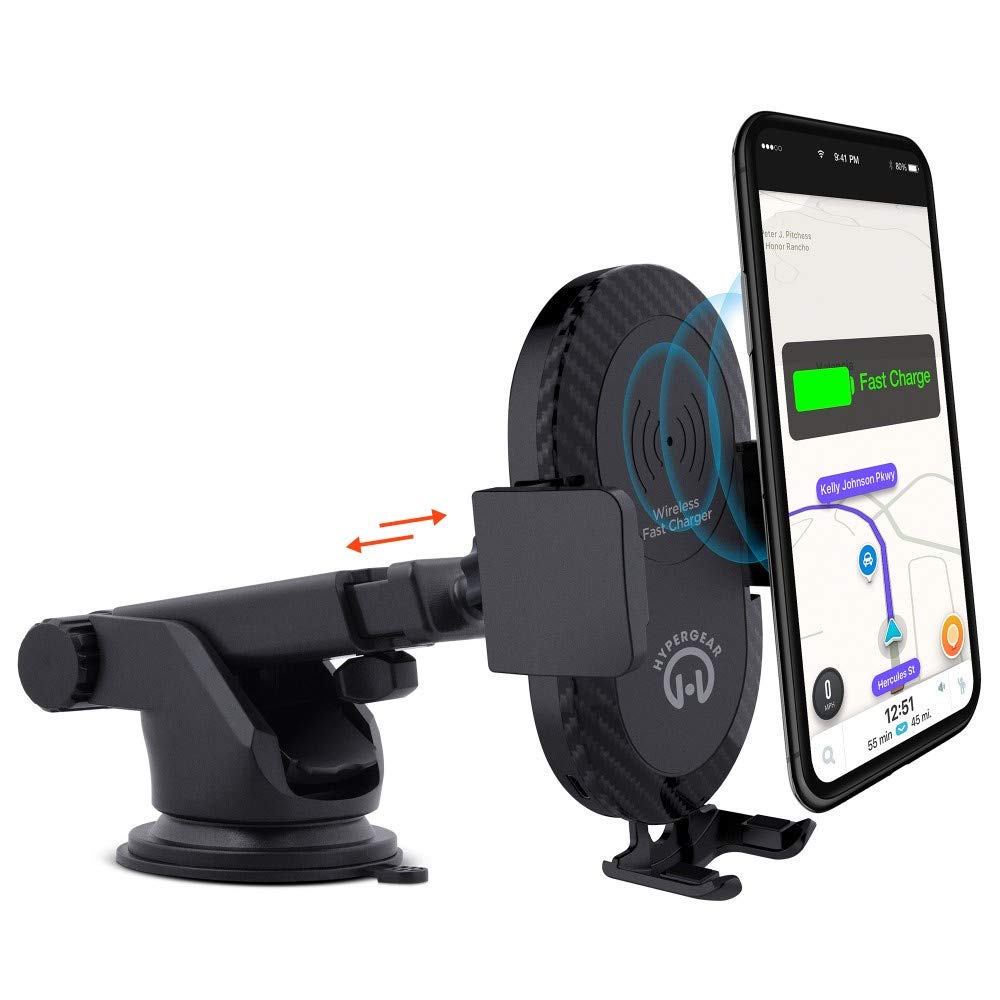
This manual provides instructions for the HyperGear HYG-14590 Wireless Fast Charging Car Dash Mount. This device is designed to securely hold and wirelessly charge Qi-enabled smartphones in your vehicle, offering hands-free navigation and communication.
パッケージ内容
パッケージにすべてのアイテムが揃っていることを確認します。
- Telescopic Mount
- Fast Charge Car Adapter
- マイクロUSBケーブル
- ユーザーマニュアル(このドキュメント)
セットアップ手順
- 取り付け場所を選択: Select a clean, flat surface on your dashboard or windshield. Ensure the location does not obstruct your view または車両の制御を妨害します。
- マウントを取り付けます。
- Clean the chosen surface thoroughly.
- Remove the protective film from the sticky gel suction cup.
- Press the suction cup firmly onto the surface.
- Engage the 2-step locking lever to secure the mount in place.
- 接続電源:
- Insert the Micro USB cable into the charging port on the mount.
- Plug the other end of the Micro USB cable into the Fast Charge Car Adapter.
- Insert the Fast Charge Car Adapter into your vehicle's 12V power outlet (cigarette lighter socket).
- Adjust the Mount:
- Extend the telescopic arm up to 8 inches as needed.
- Pivot the arm up to 230° to achieve the desired angle.
- Rotate the cradle head 360° to switch between portrait and landscape orientation.
操作手順
- デバイスの配置: Gently open the adjustable padded cradle grips and place your Qi-enabled smartphone into the mount. The grips will automatically secure the device.
- ワイヤレス充電: Once your device is placed in the mount and the mount is powered, wireless charging will begin automatically. Ensure your device is centered on the charging pad for optimal performance.
- デバイスの削除: To remove your device, gently open the cradle grips and lift your smartphone out.
- ハンズフリー使用: The mount allows for hands-free use of navigation, calls, and other applications while driving. Always ensure your device is positioned safely and does not obstruct your view 道路の。
メンテナンス
- クリーニング: マウントの清掃には、柔らかく乾いた布をご使用ください。研磨剤入りの洗剤や溶剤は使用しないでください。
- 吸盤のお手入れ: If the sticky gel suction cup loses adhesion, rinse it with warm water and let it air dry. This can help restore its stickiness.
- ストレージ: 長期間使用しない場合は、直射日光を避けて涼しく乾燥した場所にマウントを保管してください。
トラブルシューティング
- デバイスがワイヤレスで充電されない:
- Ensure your smartphone is Qi-enabled or has a Qi-enabled receiver.
- Verify the Micro USB cable is securely connected to both the mount and the car adapter.
- Check that the car adapter is firmly seated in the vehicle's 12V power outlet.
- Ensure your phone is centered on the charging pad of the mount.
- ワイヤレス充電の妨げになる可能性のある厚い携帯電話ケースを取り外します。
- Mount not sticking to surface:
- Clean the dashboard or windshield surface thoroughly before attachment.
- Ensure the 2-step locking lever is fully engaged.
- Rinse the sticky gel suction cup with warm water and air dry to restore adhesion.
- Avoid mounting on textured or porous surfaces.
- Phone not held securely:
- Ensure the adjustable padded cradle grips are properly closed around your device.
- Verify that your phone's size is compatible with the mount's adjustable range.
仕様
| モデル番号 | HYG-14590 |
| ブランド | ハイパーギア |
| 接続技術 | 無線 |
| コネクタタイプ | USB、ワイヤレス |
| 対応デバイス | 携帯電話(Qi対応) |
| 互換性のある電話モデル | iPhone X/8/8 Plus, Samsung Galaxy S9/S9+, S8/S8+, Note 8, and other Qi-enabled devices |
| 特集 | 急速充電、ワイヤレス充電 |
| ワットtage | 10ワット |
| 電源 | Vehicle 12V Power Outlet |
| 主電源コネクタのタイプ | USB Type C (for car adapter) |
| アイテム重量 | 11.84オンス |
| エンクロージャ材質 | Gel (suction cup) |
| 色 | 黒 |
| 欧州連合 | 633755145902 |
保証情報
This HyperGear product comes with a 30日間の保証 from the date of purchase. This warranty covers manufacturing defects. Please retain your proof of purchase for warranty claims. For further details or to initiate a claim, please refer to the HyperGear official webサイトにアクセスするか、カスタマー サポートにお問い合わせください。
カスタマーサポート
For technical assistance, product inquiries, or warranty support, please visit the official HyperGear web公式サイトをご覧いただくか、カスタマーサービス部門にお問い合わせください。連絡先は通常、製品パッケージまたはブランドの公式ウェブサイトに記載されています。