
1. はじめに
Thank you for choosing the ROMOSS 10000mAh 2-in-1 Power Bank and Wall Charger. This device combines the functionality of a portable power bank with a wall charger, offering a versatile solution for charging your electronic devices. With a 10000mAh capacity and dual USB outputs, it is designed for convenience and efficiency, especially for travel.
2.製品オーバーview および機能
The ROMOSS G-USA-UP10 is engineered to provide reliable power on the go or from a wall outlet. Key features include:
- 2-in-1 機能: Operates as both a 10000mAh portable power bank and a direct AC wall charger.
- 大容量: 10000mAh internal battery provides multiple charges for smartphones and other USB-powered devices.
- デュアルUSB出力: 2 台のデバイスを同時に充電します。
- 折りたたみ式ACプラグ: Integrated, foldable wall plug for direct charging from an electrical outlet and compact storage.
- スマートチャージテクノロジー: Prioritizes charging connected devices first when plugged into a wall outlet, then recharges the power bank.
- 旅行準備: Supports 100-240V input, making it suitable for international travel with appropriate plug adapters (not included).

Image: The ROMOSS UP10 device demonstrating its dual functionality as a power bank and a wall charger with a foldable plug. The image shows the device in both its compact form and plugged into a wall outlet.

Image: An illustration highlighting the 10000mAh high capacity, showing the approximate number of times it can charge an iPhone 7 (3.9 times), Galaxy S7 (2.6 times), and iPad mini 4 (1.5 times).

Image: The ROMOSS UP10 device superimposed over images of global travel landmarks, emphasizing its design for travelers with 100-240V input compatibility.
3. パッケージ内容
パッケージに以下の項目が含まれているか確認してください。
- ROMOSS UP10 Product (10000mAh 2-in-1 Power Bank and Wall Charger)
- USB充電ケーブル
- 取扱説明書(本書)
- 保証書

Image: A visual representation of the package contents, including the ROMOSS UP10 device, a USB cable, a manual, and a warranty card, alongside the product packaging.
4. セットアップ
Before first use, it is recommended to fully charge your ROMOSS UP10 power bank.
- Unfold the AC Plug: Gently slide or pull the foldable AC plug out from the device until it locks into position.
- 電源に接続: Plug the device directly into a standard wall outlet (100-240V).
- 充電表示: The LED indicators on the device will illuminate to show the charging status. Allow the device to charge until all indicators are solid, indicating a full charge.
- Fold the AC Plug: Once fully charged or when not in use as a wall charger, gently push the AC plug back into the device for compact storage.
5. 操作手順
5.1. Charging External Devices (Power Bank Mode)
- Ensure the ROMOSS UP10 is sufficiently charged.
- Connect your device (e.g., smartphone, tablet) to one of the USB output ports on the ROMOSS UP10 using a compatible USB charging cable.
- The ROMOSS UP10 will automatically begin charging your device. The LED indicators will show the remaining power level of the power bank.
- 充電が完了したら、デバイスを取り外します。
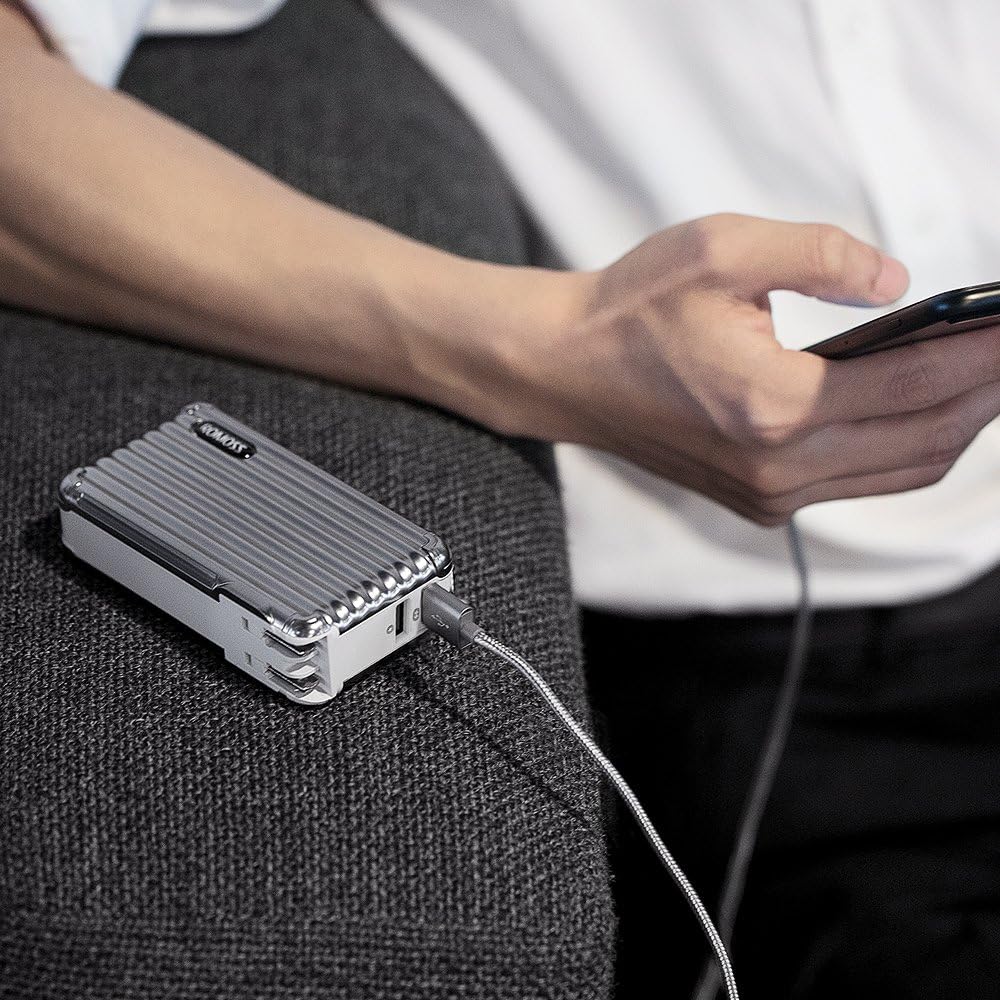
Image: A person using the ROMOSS UP10 power bank to charge a smartphone, demonstrating its portable charging function.
5.2. Recharging the Power Bank (Wall Charger Mode)
- Unfold the AC plug and insert the ROMOSS UP10 directly into a wall outlet.
- The LED indicators will flash to show the charging progress.
- Once fully charged, all LED indicators will remain solid. Remove the device from the wall outlet and fold the AC plug for storage.
5.3. Simultaneous Charging (Smart Charge Technology)
When the ROMOSS UP10 is plugged into a wall outlet and has devices connected to its USB output ports, it will utilize its Smart Charge Technology:
- The device will prioritize charging the connected external devices first.
- Once the external devices are fully charged, the ROMOSS UP10 will then begin recharging its internal 10000mAh battery.
- This allows for efficient charging of both your devices and the power bank with a single wall outlet connection.

Image: The ROMOSS UP10 plugged into a wall outlet, simultaneously charging two smartphones via its dual USB ports, illustrating the Smart Charge Technology.
6. 安全情報
安全な操作を確保し、デバイスの寿命を延ばすために、次の安全ガイドラインを守ってください。
- デバイスを極端な温度(高温または低温)、直射日光、高湿度にさらさないでください。
- デバイスを落としたり、分解したり、自分で修理しようとしたりしないでください。
- デバイスを水やその他の液体から遠ざけてください。
- Use only original or certified charging cables for your devices.
- デバイスが破損している場合や過熱の兆候が見られる場合は使用しないでください。
- お子様の手の届かない場所に保管してください。
7. メンテナンス
Proper care will help maintain the performance and longevity of your ROMOSS UP10:
- クリーニング: 柔らかく乾いた布で拭いてください。研磨剤入りの洗剤や溶剤は使用しないでください。
- ストレージ: Store the device in a cool, dry place when not in use. Avoid storing it in areas with extreme temperatures or high humidity.
- バッテリーのケア: For optimal battery health, fully charge and discharge the power bank at least once every three months if it is not used regularly.
8。 トラブルシューティング
If you encounter issues with your ROMOSS UP10, please refer to the following common solutions:
- デバイスがパワーバンクから充電されない:
- パワーバンクに十分な充電があることを確認します(LED インジケーターを確認してください)。
- Verify that the USB cable is securely connected to both the power bank and your device.
- Try a different USB cable or a different USB port on the power bank.
- Power bank not recharging from wall outlet:
- Ensure the foldable AC plug is fully extended and securely inserted into a working wall outlet.
- 別のデバイスを接続して、壁のコンセントが機能するかどうかを確認します。
- 充電が遅い:
- 高品質の USB ケーブルを使用していることを確認してください。
- Charging multiple devices simultaneously may result in slower charging speeds for each device.
9. 仕様
| モデル番号 | G-USA-UP10 |
| バッテリー容量 | 10000ミリamp 時間 (mAh) |
| 入力(AC) | 100-240V |
| 出力(USB) | Dual USB Ports (specific current output not provided, refer to product labeling for details) |
| 寸法 | 4.41 x 2.4 x 1.18インチ |
| アイテム重量 | 8.5オンス |
| 電池のタイプ | リチウムイオン |
| コネクタタイプ | Micro USB (for power bank charging if not using AC plug) |
10. 保証とサポート
Your ROMOSS UP10 Power Bank and Wall Charger comes with a limited warranty. Please refer to the included warranty card for specific terms and conditions. For technical support, troubleshooting assistance, or warranty claims, please contact ROMOSS customer service through the contact information provided on the warranty card or the official ROMOSS webサイト。