導入
This manual provides detailed instructions for the installation, operation, and maintenance of your LogiLink E20270 Adjustable Under-Desk and Wall PC Mount. Please read this manual thoroughly before installation and use to ensure proper function and safety.

Image: LogiLink E20270 PC mount installed under a wooden desk, holding a black desktop computer tower. This mount helps elevate your PC, protecting it from dust and accidental damage.
安全情報
- Ensure the mounting surface (desk or wall) can safely support the weight of the mount and the PC (up to 10 kg).
- Use appropriate tools and follow all installation steps carefully to prevent injury or damage.
- 最大重量容量 10 kg (22 ポンド) を超えないでください。
- 設置場所から子供やペットを遠ざけてください。
- すべてのネジと接続部がしっかりと固定されているか定期的に確認してください。
パッケージ内容
インストールを開始する前に、すべてのコンポーネントが揃っていることを確認してください。
- LogiLink E20270 PC Mount Assembly
- Mounting Hardware (screws, anchors, washers, drill attachment if applicable)
- ユーザーマニュアル(このドキュメント)
Note: Specific mounting hardware may vary. Ensure you have the correct tools for your chosen installation surface.
仕様
| 特徴 | 仕様 |
|---|---|
| ブランド | ロジリンク |
| モデル名 | E20270 |
| 材料 | 金属 |
| 色 | 黒 |
| インストールタイプ | Under-desk, Wall Mount |
| 最大重量容量 | 10 kg (22 ポンド) |
| 高さ調節範囲 | 300~533mm |
| 調整可能な幅の範囲 | 88~203mm |
| 回転 | 360度 |
| Sliding Mechanism | Up to 325 mm for accessibility |
| 製品寸法(約) | 17.5 x 10.5 x 59.2 cm (長さ x 幅 x 高さ) |
注記: The product weight listed in some specifications (9.07g) appears to be a typographical error. The mount is constructed from metal and designed to hold up to 10 kg, indicating a substantial build.
セットアップとインストール
The LogiLink E20270 PC mount offers versatile installation options: under a desk or on a wall. Choose the method that best suits your workspace.
1. Prepare the Mount
- すべてのコンポーネントを開梱し、パッケージの内容リストと照合します。
- Adjust the mount's width to fit your PC tower. Loosen the adjustment screws, slide the sides to the desired width (88-203 mm), and tighten securely.
- Adjust the mount's height to fit your PC tower. Loosen the adjustment screws, slide the bottom support to the desired height (300-533 mm), and tighten securely.

Image: Close-up of the mount's adjustable components. Ensure all adjustments are securely fastened before mounting.
2. インストール方法を選択する
Refer to the diagram below for visual guidance on under-desk and wall mounting options, including key dimensions.
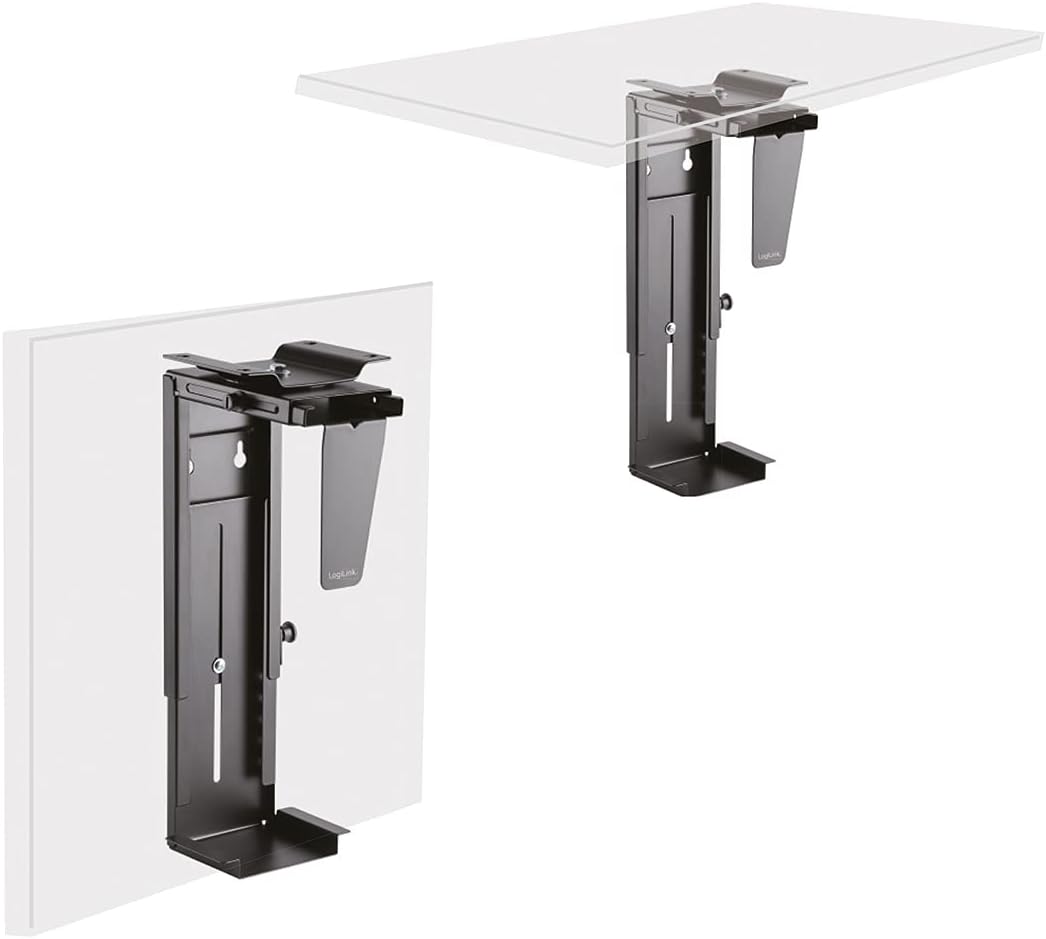
Image: Illustration of the LogiLink E20270 mount configured for under-desk and wall installation.
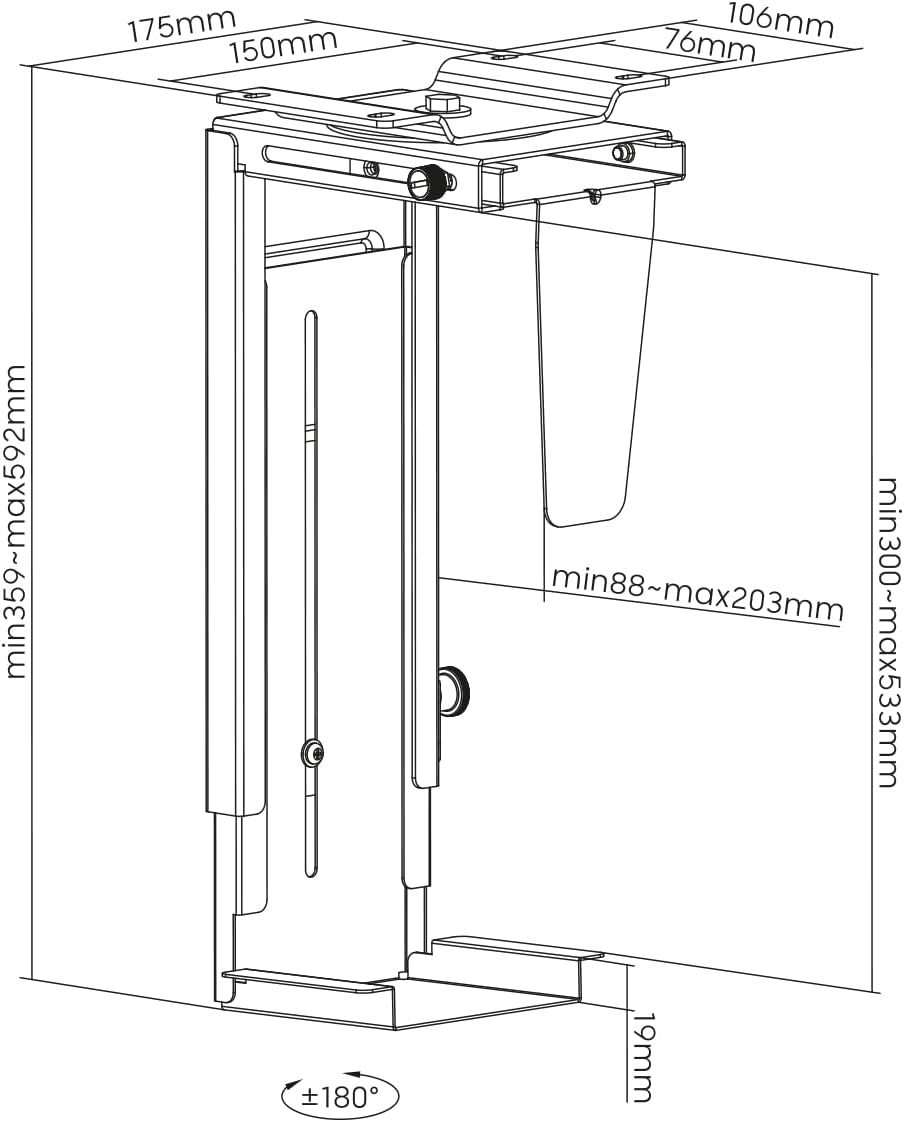
Image: Dimensional diagram of the LogiLink E20270 PC mount, showing adjustable ranges and mounting points.
Under-Desk Installation:
- Position the mount under your desk in the desired location. Ensure there is enough clearance for PC ventilation and rotation.
- Mark the drilling points through the mounting holes on the top plate of the mount.
- Drill pilot holes into the underside of the desk using an appropriate drill bit (refer to the drill attachment if provided, or use a bit suitable for your screws and desk material).
- Secure the mount to the desk using the provided screws. Ensure all screws are tightened firmly.
ウォールマウントの取り付け:
- Select a sturdy wall location that can support the weight of the mount and your PC. Avoid areas with electrical wires or plumbing.
- Hold the mount against the wall in the desired position and mark the drilling points. Use a level to ensure it is straight.
- Drill holes at the marked points. Insert wall anchors if necessary (for drywall or masonry).
- Secure the mount to the wall using the provided screws. Ensure all screws are tightened firmly.
3. Install Your PC
- Carefully slide your PC tower into the adjusted mount.
- Ensure the PC is seated firmly and evenly within the mount.
- Connect all necessary cables (power, display, USB, etc.) to your PC. The sliding mechanism allows for easier access to ports.
手術
The LogiLink E20270 PC mount is designed for ease of use and accessibility.
- 360度回転: The mount allows your PC to rotate 360 degrees, providing easy access to the front and rear ports without needing to remove the PC from the mount. Gently rotate the PC to the desired position.
- スライド機構: For enhanced accessibility, the mount features a sliding mechanism that allows the PC to extend up to 325 mm from its mounted position. This is particularly useful for connecting cables or performing maintenance.
メンテナンス
To ensure the longevity and proper function of your PC mount, follow these simple maintenance guidelines:
- クリーニング: マウントを柔らかくてdで拭きますamp 布で埃や汚れを拭き取ってください。仕上げを傷める可能性のある研磨剤入りの洗剤や溶剤は使用しないでください。
- ファスナーチェック: Periodically check all mounting screws and adjustment screws to ensure they are tight and secure. Re-tighten if necessary.
- 重量制限: Do not overload the mount beyond its 10 kg (22 lbs) capacity.
トラブルシューティング
If you encounter any issues with your LogiLink E20270 PC mount, refer to the following common solutions:
- マウントが不安定に感じる:
- Ensure all mounting screws are securely tightened to the desk or wall.
- Verify that the adjustment screws for height and width are firmly tightened around your PC.
- Check that the mounting surface is sturdy enough to support the weight.
- PC does not fit:
- Re-check the adjustable height (300-533 mm) and width (88-203 mm) ranges against your PC's dimensions.
- Ensure the adjustment screws are fully loosened before attempting to adjust.
- Difficulty rotating or sliding:
- Ensure no cables are snagged or obstructing the movement.
- Check for any debris in the sliding mechanism.
If problems persist, please contact LogiLink customer support for further assistance.
保証とサポート
保証範囲、技術サポート、交換部品に関する情報については、公式LogiLinkを参照してください。 web購入サイトをご覧いただくか、カスタマーサービスに直接お問い合わせください。購入証明書としてレシートを保管してください。
Official LogiLink Webサイト: www.logilink.eu