
導入
This manual provides essential instructions for the safe operation, maintenance, and troubleshooting of your Best Choice Products 3-in-1 Robot Vacuum Cleaner, Model SKY4719. This device is designed to vacuum, sweep, and mop various floor types, offering automated cleaning with smart features.
製品を使用する前にこのマニュアルをよくお読みになり、今後の参考のために保管してください。
パッケージ内容
箱を丁寧に開梱し、下記のすべての付属品が揃っていること、また良好な状態であることをご確認ください。欠品や破損がある場合は、カスタマーサポートまでご連絡ください。

This image displays the complete package contents, including the robot vacuum, remote control, mop pads, HEPA filters, water tank, dust bin, power adapter, cleaning brush, and charging dock station.
- 1 x BCP Cleaning Robot
- リモコン x 1
- モップパッド2枚
- 1 xウォータータンク
- HEPAフィルター3個
- 1xゴミ箱
- 6 xサイドブラシ
- 電源アダプター x 1
- 取扱説明書 x 1
- 1 x Charging Dock Station
- クリーニングブラシ x 1
製品終了view
The Best Choice Products SKY4719 robot vacuum is a versatile cleaning device designed for efficiency and convenience. It integrates vacuuming, sweeping, and mopping functionalities into one compact unit.
The robot vacuum cleaner features a sleek black design with a central control panel and a lift-up cover for the dustbin.
主な特徴:
- 3in1クリーニング: Sweeps, vacuums, and mops for comprehensive floor care.
- 自己充電: バッテリー残量が少なくなると自動的に充電ベースに戻ります。
- 複数のクリーニングモード: Includes Spot, Zig-Zag, Auto, and Edge cleaning.
- スマートセンサー: Equipped with anti-collision and fall prevention technology.
- 低騒音動作: Designed for quiet cleaning.
- リモート&音声コントロール: Convenient control options for ease of use.

A view of the robot's underside reveals the main brush, side brushes for sweeping, and the removable mop pad, designed for effective cleaning on various surfaces.
設定
1. 充電ベースの設置
充電ベースを、壁際など、開けた場所に設置してください。充電ベースの前面には少なくとも1メートル(3フィート)、左右には0.5メートル(1.5フィート)のスペースを確保してください。電源アダプターを充電ベースに差し込み、壁のコンセントに差し込んでください。
2. 初期充電
Before first use, fully charge the robot vacuum. Place the robot onto the charging base, ensuring the charging contacts align. The indicator lights on the robot will show charging status. A full charge typically takes 4-5 hours.
3. Attaching Side Brushes
Snap the two side brushes onto the posts on the bottom of the robot. Ensure they are securely attached.
4. Filling Water Tank (for Mopping)
If using the mopping function, remove the water tank from the robot. Open the water tank cap, fill it with clean water (do not use cleaning solutions that may clog the nozzle), and securely close the cap. Reinsert the water tank into the robot until it clicks into place. Attach a clean mop pad to the bottom of the water tank.
操作手順
電源のオン/オフ
Press and hold the power button on the robot or the remote control to turn the device on or off.
クリーニングモード
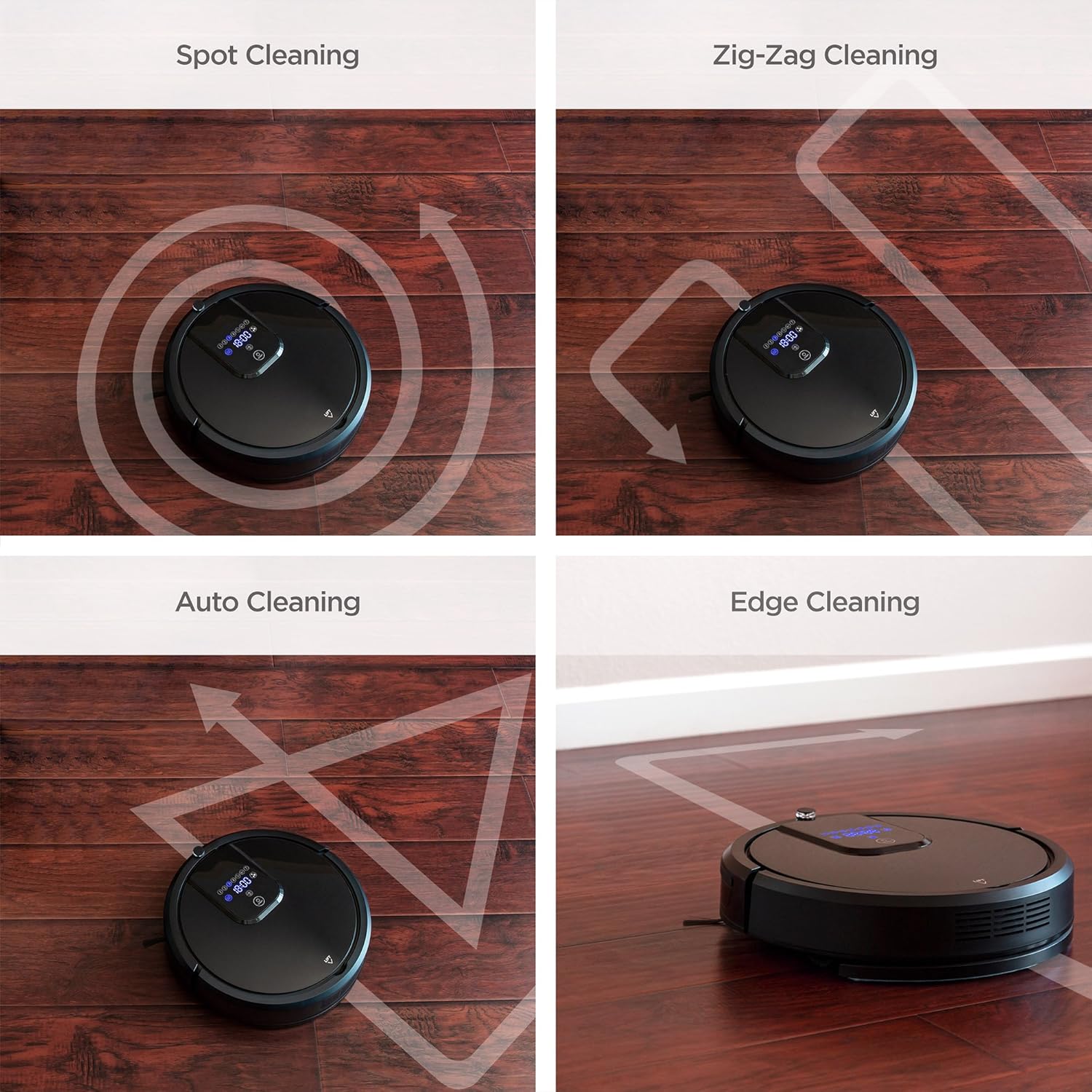
The robot vacuum offers several cleaning modes to suit different needs. These can be selected via the remote control or the control panel on the robot.

Four distinct cleaning patterns are illustrated: Spot cleaning for concentrated areas, Zig-Zag for systematic coverage, Auto cleaning for general use, and Edge cleaning for walls and corners.
- 自動クリーニング: ロボットは自動的に移動し、床全体を掃除します。
- スポットクリーニング: Concentrates cleaning on a specific dirty area. The robot will clean in a spiral pattern.
- エッジクリーニング: ロボットは壁や家具の端に沿って掃除します。
- ジグザグクリーニング: The robot cleans in a systematic back-and-forth pattern, ideal for large, open spaces.

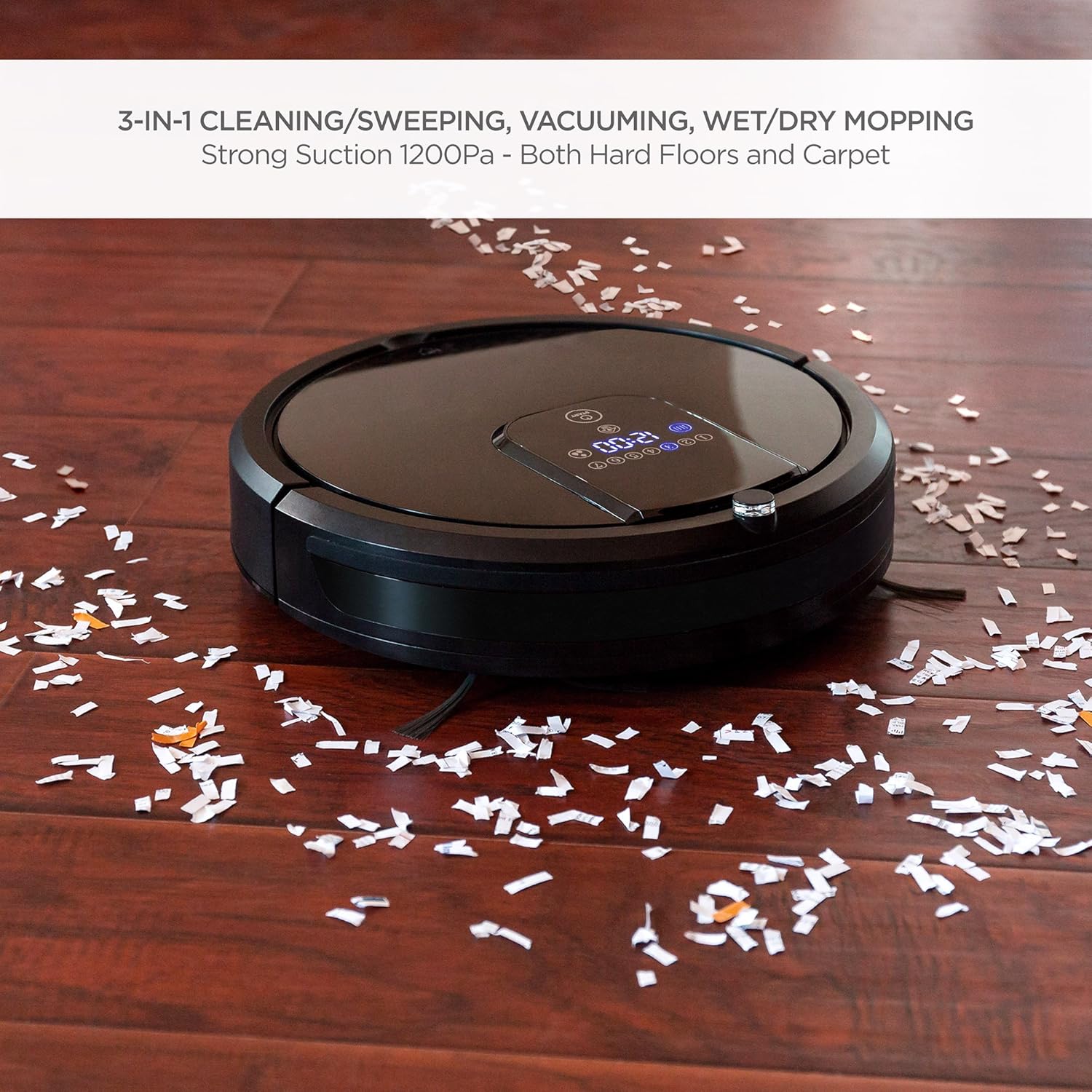
The robot vacuum is shown effectively collecting small debris from a hardwood floor, demonstrating its powerful vacuuming capability.
The robot vacuum is shown actively mopping a hardwood floor, highlighting its wet/dry mopping capability.
リモートコントロール
Use the included remote control to start/stop cleaning, select cleaning modes, direct the robot manually, set cleaning schedules, and send the robot back to its charging base.
音声コントロール
The robot vacuum is compatible with Amazon Echo devices. Follow the instructions in your Amazon Echo app to connect and enable voice commands for your robot vacuum.
自己充電
When the battery level is low, the robot will automatically return to its charging base to recharge. Ensure the charging base is accessible and unobstructed.
安全機能

This image illustrates the robot vacuum's intelligent features: automatic return to charging base, obstacle avoidance, ability to climb over small thresholds, and sensors to prevent falls down stairs.
- 衝突防止: Built-in sensors detect obstacles and allow the robot to navigate around them, preventing damage to furniture and the robot itself.
- クライミング: The robot can climb over small thresholds and carpets up to a certain height.
- 転倒防止: Cliff sensors prevent the robot from falling down stairs or off elevated surfaces.
This video provides a visual guide to the robot vacuum's capabilities, including its 3-in-1 cleaning functions, self-charging, remote control, and voice control integration.
メンテナンス
定期的なメンテナンスにより、最適なパフォーマンスが確保され、ロボット掃除機の寿命が延びます。
1. ゴミ箱を空にする
After each cleaning cycle, or when the dust bin is full, remove it from the robot and empty its contents into a trash receptacle. Clean the dust bin with a dry cloth.
2. フィルターの清掃
The HEPA filters should be cleaned regularly. Tap them gently to remove dust. Replace filters every 1-3 months depending on usage. Do not wash HEPA filters with water.
3. サイドブラシの掃除
Periodically check the side brushes for tangled hair or debris. Use the included cleaning brush or scissors to remove any obstructions. Replace worn brushes as needed.
4. Cleaning Mop Cloths
After each mopping session, remove the mop cloth and wash it with water. Allow it to air dry completely before reattaching or storing.
5. センサーと充電接点のクリーニング
正常に機能することを確認するために、ロボット本体と充電ベースの両方の崖センサー、衝突防止センサー、充電接点を清潔で乾いた布で拭いてください。
トラブルシューティング
ロボット掃除機で問題が発生した場合は、次の一般的な問題と解決策を参照してください。
| 問題 | 考えられる原因 | 解決 |
|---|---|---|
| ロボットが起動しません。 | 電池残量が少ないため、電源スイッチがオフになっています。 | Charge the robot; ensure the main power switch is in the 'ON' position. |
| ロボットが頻繁に動けなくなります。 | 障害物(ケーブル、敷物); 狭いスペース。 | Clear the cleaning area of small obstacles; use boundary strips if available. |
| 洗浄性能が悪い。 | Full dust bin; dirty filters/brushes. | Empty dust bin; clean or replace filters and brushes. |
| ロボットが充電ベースに戻りません。 | Charging base obstructed; base not powered. | Ensure clear path to base; check power connection to base. |
| リモコンが機能しない。 | 電池切れ、範囲外。 | Replace remote batteries; operate within range of the robot. |
If the problem persists after trying these solutions, please contact Best Choice Products customer support.
仕様
| 特徴 | 詳細 |
|---|---|
| ブランド | ベストチョイス製品 |
| モデル番号 | スカイ4719 |
| 表面の推奨事項 | Hardwood, Tile, Laminate, Carpet |
| 特集 | Programmable, Self-Charging, Anti-Collision, Fall Prevention |
| 色 | 黒 |
| コントローラータイプ | リモートコントロール、ボイスコントロール |
| フィルタータイプ | Cartridge (HEPA Type) |
| バッテリー寿命 | 最大1.5時間 |
| 電池のタイプ | リチウムイオン |
| ごみ箱の容量 | 0.9リットル |
| 電源 | Corded Electric (Charging Base) |
| アイテム重量 | 10.8 ポンド |
| 騒音レベル | 60デシベル |
| 対応デバイス | アマゾンエコー |
| フォームファクター | ロボット |
保証とサポート
For warranty information or technical support, please refer to the warranty card included in your package or visit the official Best Choice Products website. Please have your model number (SKY4719) and purchase details ready when contacting support.