
1. はじめに
This manual provides comprehensive instructions for the M-Wave Bicycle Computer, model Cicli Bonin_CVC911. It covers installation, operation, maintenance, and troubleshooting to ensure optimal performance and longevity of your device. Please read this manual thoroughly before using the product.

Image 1: M-Wave Bicycle Computer head unit, yellow model.
2. 安全情報
Always prioritize safety when cycling. Ensure the computer is securely mounted and does not obstruct your view or control of the bicycle. Do not attempt to operate the computer while riding in traffic or hazardous conditions. Keep batteries out of reach of children. Dispose of batteries responsibly according to local regulations.
3. パッケージ内容
パッケージにすべてのコンポーネントが含まれていることを確認します。
- M-Wave Bicycle Computer Head Unit
- ワイヤレス速度センサー
- ホイールマグネット
- Mounting Bracket for Handlebar/Stem
- Zip Ties for Sensor and Bracket
- バッテリー(プリインストールまたは別売)
- 取扱説明書
4. セットアップ
4.1 バッテリーの取り付け
The M-Wave Bicycle Computer uses alkaline batteries. If not pre-installed, open the battery compartment on the back of the head unit and the speed sensor. Insert the batteries with correct polarity, observing the '+' and '-' markings, and securely close the compartments.
4.2 Sensor and Magnet Mounting
Attach the wireless speed sensor to the front fork using the provided zip ties. Position the wheel magnet on a spoke so that it passes within 2mm of the sensor when the wheel rotates. Ensure the magnet and sensor are aligned for reliable signal transmission.
4.3 Computer Mounting
Mount the computer head unit to your handlebar or stem using the provided bracket and zip ties. Ensure it is firmly secured and visible without obstructing your view またはコントロール。
画像2: 側面 view of the M-Wave Bicycle Computer, illustrating its compact design and potential mounting points.
4.4 初期設定
Upon first use or after battery replacement, you will need to set up the computer. This typically involves:
- ホイール直径: Refer to your bicycle tire's sidewall for the circumference or use a measurement chart. Input this value into the computer for accurate speed and distance readings.
- 単位: Select your preferred units for speed (km/h or mph) and temperature (C° or F°).
- 時間: 現在の時刻を設定します。
Consult the on-screen prompts and use the 'SET' and 'MODE' buttons for navigation and selection.
5. 操作手順
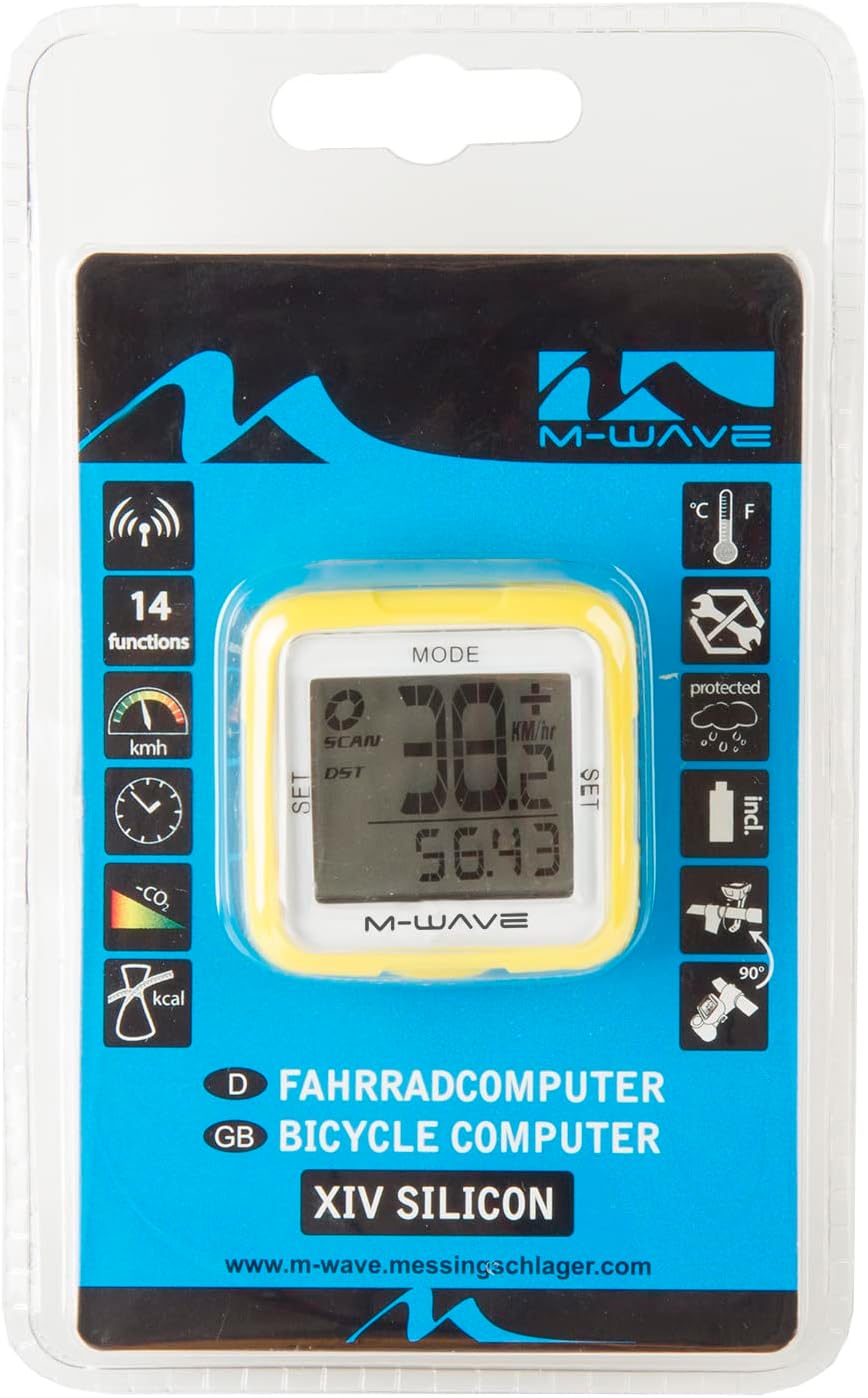
The M-Wave Bicycle Computer features 14 functions. Use the 'MODE' button to cycle through different display modes and the 'SET' button for adjustments within a mode.

Image 3: Product packaging showing the 14 functions of the M-Wave Bicycle Computer.
- 現在の速度: Displays your real-time cycling speed.
- 平均速度: Shows the average speed for your current ride.
- 最高速度: Records the highest speed achieved during your ride.
- 距離 (夏時間): 現在の走行中に走行した距離を表示します。
- Total Distance (ODO): Shows the accumulated total distance.
- 乗車時間: 現在の乗車の継続時間を追跡します。
- クロック: 現在の時刻を表示します。
- 温度: 周囲の温度を摂氏または華氏で表示します。
- カロリーカウンター: 乗車中に消費されるカロリーを推定します。
- CO2 Savings: Calculates estimated CO2 savings compared to driving.
- 自動スタート/ストップ: The computer automatically starts recording when you begin cycling and pauses when you stop.
- Speed Tendency/Comparison: Indicates if your current speed is higher or lower than your average speed.
6. メンテナンス
6.1 クリーニング
コンピューターとセンサーを柔らかくて乾いた布で拭いてください。amp cloth. Do not use abrasive cleaners or solvents. The unit is waterproof, but avoid submerging it for extended periods.
6.2 電池の交換
When the display becomes dim or functions become erratic, it's time to replace the batteries. Follow the battery installation steps outlined in Section 4.1, ensuring correct polarity. Resetting initial settings may be required after battery replacement.
7。 トラブルシューティング
If your M-Wave Bicycle Computer is not functioning as expected, consider the following:
- 速度表示なし:
- Check the distance between the sensor and magnet. It should be no more than 2mm.
- センサーと磁石が正しく位置合わせされていることを確認します。
- Verify that the sensor battery is not depleted.
- Confirm the computer head unit battery is not depleted.
- 不正確な読み取り:
- Re-check the wheel diameter setting.
- Ensure the sensor and magnet are securely mounted and not shifting.
- ディスプレイが空白です:
- Replace the computer head unit battery.
- 電池が正しい極性で挿入されていることを確認してください。
- ボタンが反応しない:
- バッテリーを取り外して再度挿入し、ソフト リセットを実行してみてください。
8. 仕様
| 特徴 | 詳細 |
| ブランド | M-Wave |
| モデル番号 | Cicli Bonin_CVC911 |
| 接続技術 | Wireless (Funk) |
| 表示タイプ | 導かれた |
| センサータイプ | Speed Sensor (Geschwindigkeitssensor) |
| 電池のタイプ | アルカリ |
| 取り付けタイプ | Stem mount or Handlebar mount |
| アイテム重量 | 0.1キログラム |
| 寸法(長さ×幅×高さ) | 30L x 30W x 30H センチメートル |
| 機能 | 14 functions (Digital radio transmission, speed: actual/diameter/max., speed tendency/comparison, total/daily kilometres, automatic display change, time, CO2 savings, calorie counter, temperature display (C°/F° selectable), auto start/stop, mileage/mile selection) |
| 防水 | はい |
9. 保証とサポート
For warranty information and technical support, please refer to the M-Wave official webご購入の際は、サイトをご覧いただくか、販売店にお問い合わせください。購入証明書としてレシートを保管してください。