
1.製品オーバーview
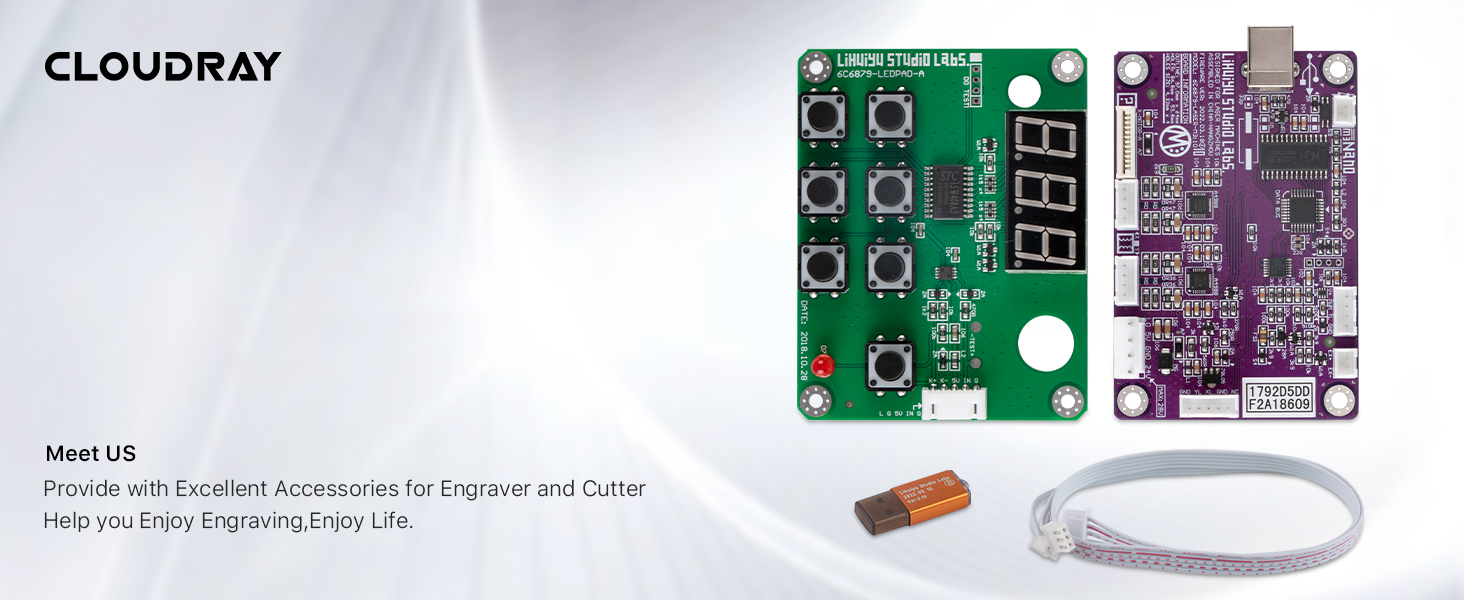
This manual provides instructions for the Cloudray LIHUIYU M2 Nano CO2 Laser Controller Kit. This kit is designed as a replacement or upgrade part for DIY 3020, 3040, and K40 laser engraver and cutter machines.
Package Contents (Set A)
- 1 x M2 Nano Controller Mainboard
- 1 x M2 Controller Panel
- 接続ケーブル1本
- 1 x USB Dongle B
2. セットアップとインストール
Careful installation is crucial for proper function. Ensure all power is disconnected from your laser machine before proceeding with any connections.
2.1 M2 Nano Mainboard Layout
Familiarize yourself with the mainboard's various ports and components before installation.

2.2 コントロールパネルのレイアウト
Understand the functions of the control panel buttons and display.

2.3配線接続
Connect the mainboard, control panel, and power supply according to the following diagrams. Ensure all connections are secure to prevent damage.


2.4 USBドングル接続
The USB Dongle B is required for software authorization and operation. Connect it to an available USB port on your computer.

3. 操作手順
After successful installation and power-up, the laser controller is ready for operation. This system typically uses specific laser control software (e.g., LaserDRW, CorelDRAW with a plugin) for design and machine control.
3.1 ソフトウェアのインストールとセットアップ
- Install the laser control software provided with your laser machine or recommended by the manufacturer.
- Ensure the USB Dongle B is connected to your computer before launching the software.
- Follow the software's instructions for driver installation and machine configuration.
3.2 Basic Control Panel Functions
- デジタルディスプレイ: Shows operational status, current settings, or error codes.
- 方向ボタン: Used for manual movement of the laser head (X and Y axes).
- 開始/一時停止ボタン: Initiates or temporarily stops a laser job.
- Stop/Emergency Stop Button: Immediately halts all laser operations.
- Power Adjustment Buttons: Allows for fine-tuning of laser power during operation (if supported by software/firmware).
- レーザーステータスインジケーター: Provides visual feedback on the laser's operational state (e.g., ready, firing, error).
Refer to your laser machine's specific software manual for detailed instructions on creating and executing laser jobs.
4. メンテナンス
To ensure the longevity and reliable performance of your LIHUIYU M2 Nano controller kit, follow these general maintenance guidelines:
- 清潔に保ちます: Regularly clean the mainboard and control panel surfaces with a soft, dry cloth. Avoid using liquids or abrasive cleaners.
- 防塵: Operate the laser machine in a clean, dust-free environment as much as possible. Dust accumulation on electronic components can lead to overheating or short circuits.
- 接続を検査する: Periodically check all wiring connections for looseness or signs of wear. Secure any loose connections.
- 環境条件: Ensure the controller is operated within its specified temperature and humidity ranges. Avoid extreme temperatures or high humidity.
- ソフトウェアアップデート: Keep your laser control software updated to the latest version to benefit from performance improvements and bug fixes.
5。 トラブルシューティング
This section addresses common issues you might encounter with your laser controller kit.
| 問題 | 考えられる原因 | 解決 |
|---|---|---|
| コントローラーの電源が入らない | Loose power connection; Faulty power supply; Incorrect wiring. | Check all power connections. Verify power supply output. Review wiring diagrams (Figure 2.3, 2.4). |
| Laser machine not responding to software commands | USB Dongle not recognized; Incorrect software settings; USB cable issue. | Ensure USB Dongle B is properly inserted. Reinstall software drivers. Try a different USB port or cable. |
| Motor movement issues (X/Y axis) | Loose motor wiring; Motor driver fault; Mechanical obstruction. | Check X and Y axis motor connections on the mainboard (Figure 2.1). Inspect for any physical obstructions in the laser head's path. |
| レーザーが発射されない | Water protection triggered; Laser power supply issue; Laser tube fault; Incorrect software settings. | Verify water flow and protection sensor status (if applicable, Figure 2.4). Check laser power supply connections and status indicators. Consult laser tube manual. |
| Incompatibility with existing laser machine | Controller model mismatch (e.g., M2 vs M3). | Verify that your laser machine is compatible with the M2 Nano controller. Some machines may require an M3 or other specific controller version. |
6. 仕様
| 特徴 | 詳細 |
|---|---|
| ブランド | クラウドレイ |
| モデル | LIHUIYU M2 Nano |
| 材料 | アルミニウム、金属 |
| 色 | Purple (Mainboard) |
| アイテム重量 | 0.15キログラム |
| 操作モード | 自動 |
| 欧州連合 | 661021766933 |
| ASIN | B07BFSVS2V |
7. 保証情報
For specific warranty details regarding your Cloudray LIHUIYU M2 Nano CO2 Laser Controller Kit, please refer to the warranty documentation provided at the time of purchase or contact Cloudray customer support directly. Warranty terms typically cover manufacturing defects under normal use conditions.
8. カスタマーサポート
If you encounter any issues not covered in this manual or require further assistance, please contact Cloudray customer support. Provide your product model number (M2 Nano) and ASIN (B07BFSVS2V) for faster service.
- クラウドレイ Webサイト: Visit the official Cloudray webサポート リソース、FAQ、および連絡先情報に関するサイト。
- 販売者連絡先: If purchased through a marketplace, you may also contact the seller directly for product-specific inquiries.