
1. はじめに
This manual provides detailed instructions for the operation and maintenance of your FEELWORLD T7PLUS 7-inch DSLR Camera Monitor. Please read this manual thoroughly before using the product to ensure proper function and to prevent damage. Keep this manual for future reference.
2.製品オーバーview
The FEELWORLD T7PLUS is a high-resolution 7-inch camera monitor designed for professional photography and video production. It features a 1920x1200 display, 4K HDMI input/output, and advanced monitoring tools.
2.1 主な特徴
- 高解像度ディスプレイ: 7-inch screen with 1920 x 1200 resolution, 1200:1 contrast ratio, and Rec.709 color standard for vivid and accurate image reproduction.
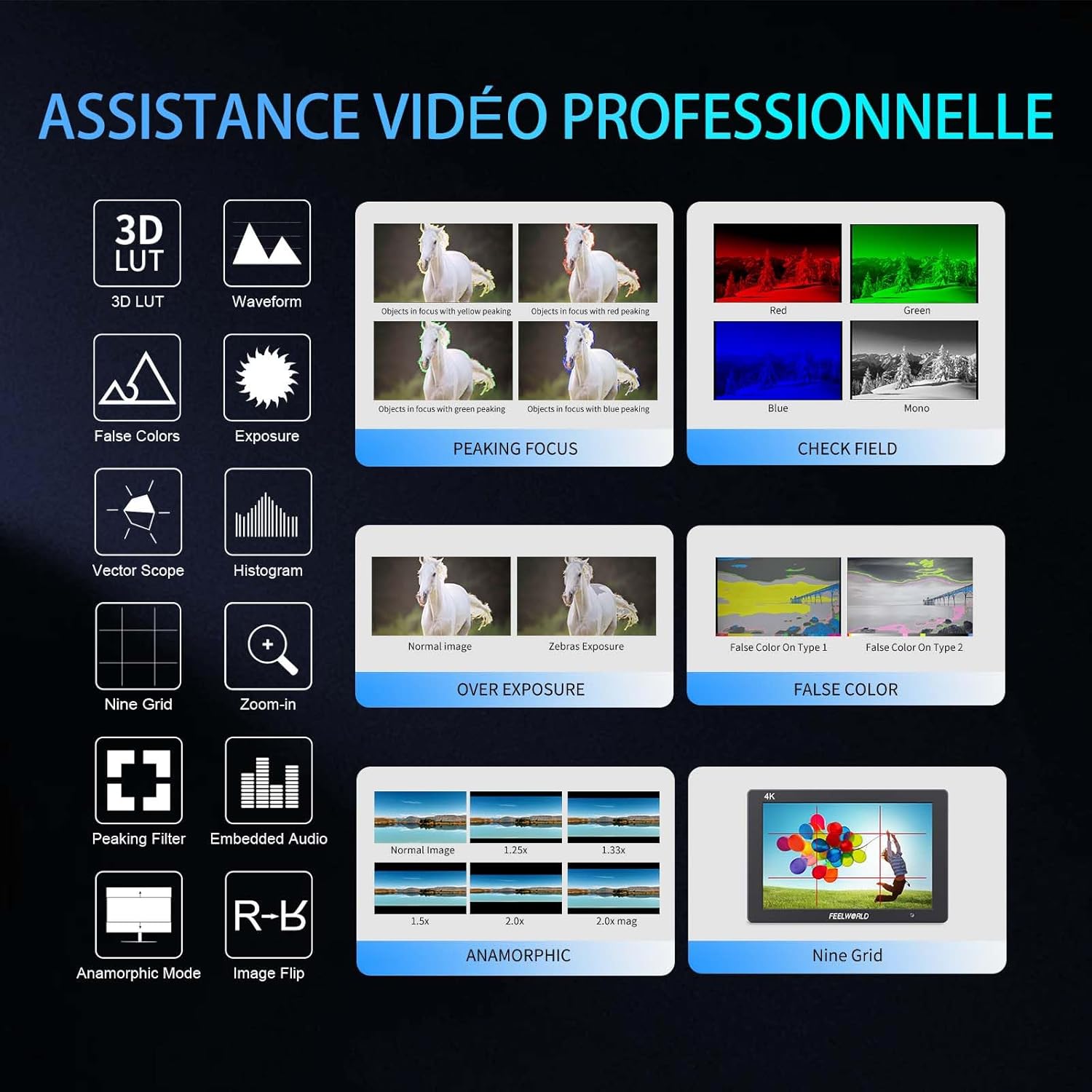
- Advanced Customization Functions: Supports 32 custom 3D LUTs and professional tools including waveform, vector scope, RGB histogram, peaking focus, false color, and more for precise control during shooting.
- 多彩な接続性: Equipped with 4K HDMI input and output, allowing simultaneous display and transmission of live signals to other monitors without compromising video quality.
- 軽量で耐久性のあるデザイン: Slim 18mm aluminum casing, weighing only 320g.
- 柔軟な電源オプション: Compatible with F550/F970 series batteries and DC 12V power input.
2.2 コンポーネント
パッケージには以下のアイテムが含まれています:
- 1 x FEELWORLD T7PLUS Monitor
- ミニHDMIケーブル1本
- 1×サンシェード
- 1 x Warming Boot Holder
- 1 x F970 Battery Plate
- 1 x F550 Battery
- ユーザーマニュアル x 1
- USBアダプタケーブル1本
- バッグ x 1

画像: 正面 view of the FEELWORLD T7PLUS monitor, showcasin7インチのディスプレイを搭載。

Image: A visual representation of all items included in the FEELWORLD T7PLUS package, including the monitor, cables, battery, and accessories.
3. セットアップ
3.1 モニターの取り付け
The T7PLUS monitor can be mounted using the included warming boot holder or other compatible mounting solutions. Ensure the monitor is securely attached to your camera rig or stand.

Image: The FEELWORLD T7PLUS monitor shown mounted on top of a DSLR camera, ready for use.
3.2電源接続
The monitor supports two power input methods:
- バッテリー電源: Attach a compatible F550 or F970 series battery to the F970 battery plate on the back of the monitor.
- DC 12V電源: Connect a 12V/1.5A DC power adapter to the DC 12V input port on the side of the monitor.

画像: クローズアップ view of the rear of the FEELWORLD T7PLUS monitor, highlighting the battery plate and DC 12V power input port.
3.3HDMI接続
Connect your camera or video source to the HDMI-IN port using the provided Mini HDMI cable. If you need to output the signal to another monitor, use the HDMI-OUT port.
画像: サイド view of the FEELWORLD T7PLUS monitor, showing the HDMI-IN and HDMI-OUT ports, along with the DC 12V input and headphone jack.
4. 操作手順
4.1 基本的な制御
The monitor features several buttons for navigation and function control:
- 電源ボタン: Press and hold to turn the monitor on/off.
- メニューボタン: メインメニューにアクセスします。
- 矢印ボタン(上/下/左/右): メニュー オプションを移動して設定を調整します。
- F1~F4 機能ボタン: Customizable shortcut buttons for quick access to frequently used features.

Image: Close-up of the control buttons on the top edge of the FEELWORLD T7PLUS monitor, including power, menu, navigation, and customizable function buttons (F1-F4).
4.2メニューナビゲーション
Press the MENU button to open the main menu. Use the arrow buttons to navigate through categories and options. Press the MENU button again or the right arrow to confirm selections. To exit the menu, press the left arrow button repeatedly until the menu closes.
5. 高度な機能
5.1 3D LUT (Look Up Table)
The T7PLUS supports loading up to 32 custom 3D LUTs via a USB drive. This allows you to preview あなたのfootage with specific color grades in real-time.
- .cube LUTを保存する files to the root directory of a USB drive.
- Connect the USB drive to the monitor's USB port.
- Navigate to the "LUT" menu option.
- Select "Load LUT" and choose your desired LUT file.
- You can switch between loaded LUTs for quick comparison.

Image: The FEELWORLD T7PLUS monitor displaying the 3D LUT menu, showing options for loading and managing custom LUT file■USBドライブから。
5.2 Waveform, Vector Scope, and Histogram
These tools provide detailed analysis of your video signal, helping you achieve accurate exposure and color balance.
- 波形: ビデオ信号の輝度と色度レベルを表示します。
- ベクトルスコープ: Shows the color hue and saturation.
- RGBヒストグラム: Illustrates the distribution of red, green, and blue color channels.
These functions can be activated individually or simultaneously via the menu or assigned to a function button.
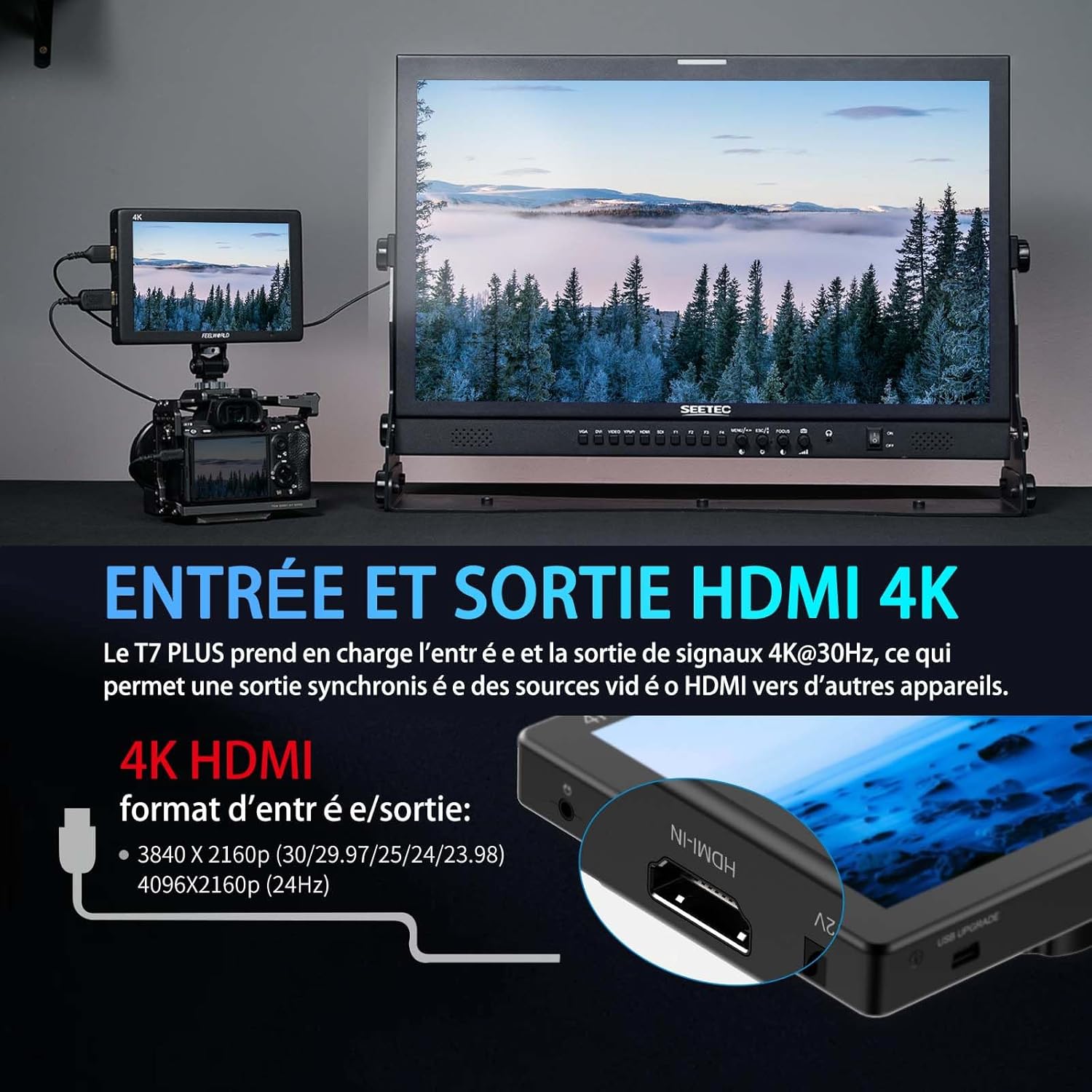
Image: The FEELWORLD T7PLUS monitor displaying a waveform monitor, showing the luminance and chrominance levels of the video input.
5.3 Other Monitoring Tools
- ピーキングフォーカスアシスト: Highlights sharp edges to aid in achieving precise focus.
- 偽色: 色のスペクトルを使用して露出レベルを表示します。
- 露出(シマウマ): Indicates overexposed areas with zebra patterns.
- ズームイン: 重要な焦点を合わせるために画像の一部を拡大します。
- ナイングリッド: Overlays a grid for composition assistance.
- アナモルフィックモード: アナモルフィックfooを圧縮解除tage.
- 画像反転: 画像を水平または垂直に反転します。
- エンベデッドオーディオ: HDMI 入力からのオーディオ レベルを表示します。
6. 仕様
| 特徴 | 仕様 |
|---|---|
| ブランド | FEELWORLD |
| モデル番号 | T7 PLUS |
| 画面サイズ | 7インチ |
| 解決 | 1920 x 1200 (UXGA Wide) |
| アスペクト比 | 16:10 |
| コントラスト比 | 1200:1 |
| 輝度 | 450ニット |
| リフレッシュレート | 60Hz |
| View角度 | 178度 |
| 接続技術 | HDMI |
| HDMIポート | 1x HDMI-IN, 1x HDMI-OUT (Supports 4K@30Hz) |
| 特集 | Advanced Customization with 3D LUT |
| 対応デバイス | DSLR Camera, Camcorder, Handheld Stabilizer |
| 重さ | 1 Kilogram (approx. 320g for monitor only) |
| 電源入力 | DC 12V、NP-F バッテリープレート |
7。 トラブルシューティング
- 電源なし:
- Ensure the battery is fully charged and correctly inserted, or the DC adapter is securely connected to a power source.
- 電源ボタンが正しく差し込まれているかどうかを確認します。
- 信号なし:
- Verify that the HDMI cable is securely connected to both the camera/source and the monitor's HDMI-IN port.
- Confirm the camera's HDMI output settings are correct and active.
- 別のHDMIケーブルを試してください。
- 画像の歪み/色の誤り:
- Check the monitor's color settings and ensure no LUTs are incorrectly applied.
- Verify the camera's video output format is compatible with the monitor.
- ボタンが反応しない:
- Restart the monitor by turning it off and on again.
- ボタンにゴミなどが詰まっていないことを確認してください。
8. メンテナンス
- クリーニング: Use a soft, dry cloth to clean the monitor's body. For the screen, use a specialized screen cleaning solution and a microfiber cloth. Avoid harsh chemicals or abrasive materials.
- ストレージ: When not in use, store the monitor in a cool, dry place, away from direct sunlight and extreme temperatures. Use the provided bag for protection during transport.
- バッテリーのケア: If using batteries, ensure they are charged periodically even when not in use to maintain battery health.
9. 保証とサポート
The FEELWORLD T7PLUS monitor comes with a 1年間保証 from the FEELWORLD Official Store. For technical support, service, or warranty claims, please contact FEELWORLD customer service through their official channels or the retailer where the product was purchased.
詳細については、 FEELWORLD Brand Store.
10. 製品ビデオ
Video: A short product showcase of the FEELWORLD T7PLUS monitor, demonstrating its physical design, various ports (HDMI-IN, HDMI-OUT, DC 12V), and control buttons. This video provides a visual overview of the monitor's external features and connectivity options.