
1. はじめに
The Transcell TI-500 SL is a robust and reliable digital weighing indicator designed for industrial applications. This NTEP and Canadian certified device features a durable NEMA 4X stainless steel enclosure, ensuring protection in harsh environments. It is equipped with a large 0.8-inch backlit LCD screen for clear readability of up to 50,000 display divisions. The TI-500 SL supports up to four 350 Ohm load cells and offers full duplex RS-232 serial communication for integration with various support equipment. Power is supplied via an AC adapter or a rechargeable lead-acid battery, providing flexibility for continuous operation.
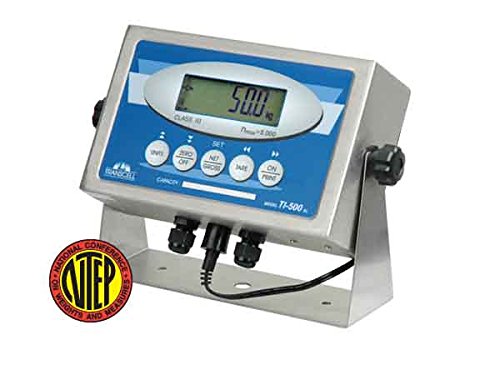
正面向きの view of the Transcell TI-500 SL Weighing Indicator. The device features a stainless steel enclosure with a blue and white control panel. A large digital LCD screen displays '50.0 kg'. Below the screen are several circular buttons for functions like 'UNITS', 'ZERO OFF', 'SET', 'NET GROSS', 'TARE', and 'ON PRINT'. A black cable extends from the bottom of the unit, and an NTEP certification seal is visible in the lower left corner.
2. 安全情報
Please read all safety instructions carefully before operating the TI-500 SL indicator. Failure to comply with these instructions may result in injury or damage to the device.
一般的な安全性
- Operate the device only in environments suitable for its NEMA 4X / IP65 rating.
- Do not attempt to open or repair the indicator yourself. Refer all servicing to qualified personnel.
- デバイスを過度の熱、湿気、腐食性物質から遠ざけてください。
電気安全
- Use only the provided AC adapter for power and battery charging.
- 電源コンセントが適切に接地されていることを確認してください。
- 清掃やメンテナンスを行う前に電源を切ってください。
3. パッケージ内容
パッケージにすべてのアイテムが揃っていることを確認します。
- Transcell TI-500 SL Weighing Indicator
- Stainless Steel Swivel Stand (pre-attached or separate)
- AC電源アダプター
- ユーザーマニュアル(このドキュメント)
4. セットアップ
物理的なインストール
- Place the TI-500 SL indicator on a stable, level surface. The integrated stainless steel swivel stand allows for adjustable view角度を変える。
- ユニットの周囲に十分な換気を確保してください。
電源接続
- Connect the AC power adapter to the power input port on the indicator.
- Plug the AC adapter into a suitable power outlet. The internal rechargeable lead-acid battery will begin charging automatically.
ロードセル接続
The TI-500 SL is designed to drive up to four 350 Ohm load cells.
- Locate the load cell input terminals on the indicator. These are typically sealed connections to maintain the NEMA 4X rating.
- Carefully connect the load cell cables to the corresponding terminals, ensuring correct polarity and wiring as per the load cell manufacturer's instructions.
- Secure all connections to maintain the enclosure's integrity.
初期電源オン
を押す オン/オフ button to power on the indicator. The display will perform a self-test and then show the current weight reading.
5. 操作手順
The TI-500 SL features a user-friendly front panel with dedicated function keys.
基本的な計量
Once powered on, the indicator will display the weight detected by the connected load cells. Ensure the scale platform is clear before taking a measurement.
Zeroing the Display
To set the display to zero when there is no load on the platform:
- を押す ZERO OFF ボタンを押します。表示が0.00にリセットされます。
Taring (Net/Gross Weight)
To measure the net weight of an item by subtracting the weight of a container:
- Place the empty container on the scale platform.
- を押す 風袋 button. The display will show 0.00 and the 'NET' indicator will illuminate.
- Add the item to be weighed into the container. The display will now show the net weight of the item.
- To return to gross weight, press the 純利益 ボタン。
単位変換
To switch between available weighing units (e.g., kg, lb):
- を押す ユニット button. The display will cycle through the configured units.
Printing Weight Data
If connected to a compatible printer via the RS-232 port:
- を押す ON PRINT button to send the current weight reading to the connected device.
較正
Calibration procedures are typically performed by qualified technicians. Refer to the detailed technical manual or contact Transcell Technology support for calibration instructions. All setup parameters can be entered via the front panel keys during calibration mode.
6. メンテナンス
クリーニング
The NEMA 4X stainless steel enclosure allows for easy cleaning.
- 清掃する前に電源アダプターを外してください。
- Wipe the indicator with a damp 布と中性洗剤を使用してください。
- Do not use abrasive cleaners or solvents that could damage the display or enclosure.
- Ensure all connections are sealed after cleaning.
バッテリーケア
The TI-500 SL is equipped with a rechargeable lead-acid battery.
- 初めて使用する前にバッテリーを完全に充電してください。
- Recharge the battery when the low battery indicator appears or when the display dims.
- For long-term storage, ensure the battery is fully charged and store the unit in a cool, dry place. Recharge periodically if stored for extended periods.
7。 トラブルシューティング
This section addresses common issues you might encounter with your TI-500 SL indicator.
| 問題 | 考えられる原因 | 解決 |
|---|---|---|
| インジケータが電源オンになりません。 | No power from AC adapter; discharged battery; faulty power button. | Check AC adapter connection and power outlet. Charge battery for several hours. If problem persists, contact support. |
| Display shows 'OVERLOAD' or '-----'. | Load cell overload; faulty load cell connection. | Remove excess weight from the scale. Check load cell wiring and connections. |
| 不正確な体重測定。 | Scale not level; calibration required; damaged load cell. | Ensure scale is on a level surface. Perform calibration (if qualified) or contact service. Inspect load cells for damage. |
| RS-232 通信障害です。 | Incorrect cable; wrong baud rate/settings; faulty port. | Verify cable type and connection. Check communication settings on both indicator and connected device. |
For issues not listed here or if solutions do not resolve the problem, please contact Transcell Technology customer support.
8. 仕様
| 特徴 | 説明 |
|---|---|
| モデル | TI-500 SL |
| 工事 | Stainless Steel NEMA 4X / IP65 |
| 画面 | 0.8 inch, 6 Digit LCD with LED backlight |
| ロードセル | Drives up to four 350 Ohm Load Cells |
| シリアルポート | 全二重 RS-232C |
| 力 | AC Adapter or Rechargeable Lead Acid Battery |
| 特集 | Backlit Display, High Weight Capacity (up to 50,000 display divisions), Large Display |
| 色 | 銀 |
| 製品寸法 | 2.9 x 5.5 x 8.9インチ |
| 重さ | 3 ポンド |
9. 保証情報
Transcell Technology products are manufactured to high quality standards. For specific warranty terms and conditions, please refer to the warranty card included with your product or visit the official Transcell Technology webサイトでご確認ください。保証請求の際は購入証明として領収書を保管してください。
10. サポート情報
For technical assistance, troubleshooting beyond this manual, or service inquiries, please contact Transcell Technology customer support. Contact details can typically be found on the manufacturer's official webサイトまたは製品パッケージに記載されています。
Manufacturer: Transcell Technology