
1. はじめに
The Vonyx VMM-F701 is a versatile 7-channel mixer designed for various audio applications, including live performances and studio recording. It features multiple input options, an integrated effect processor, USB playback, and +48V phantom power for condenser microphones. This manual provides essential information for the safe and effective use of your VMM-F701 mixer.
2. 安全に関する注意事項
- Always read these instructions carefully before using the device. Keep this manual for future reference.
- 電源がボリュームと一致していることを確認してくださいtageデバイスに表示されます。
- デバイスを雨や湿気にさらさないでください。
- 雷雨のときや長期間使用しない場合は、電源コードを抜いてください。
- To reduce the risk of electric shock, do not remove the cover. There are no user-serviceable parts inside. Refer all servicing to qualified service personnel.
3.製品オーバーview
The Vonyx VMM-F701 mixer offers a comprehensive set of features for audio mixing. It includes 5 mono microphone/line inputs (XLR/6.3mm Jack combo), 1 stereo line input (6.3mm Jack), and an integrated USB player. Each channel provides Hi, Mid, and Low equalization controls, along with FX, Pan, and AUX adjustments. The mixer also features a built-in effect processor with delay and repeat functions, +48V phantom power for condenser microphones, a balanced stereo main output, and a headphone output.
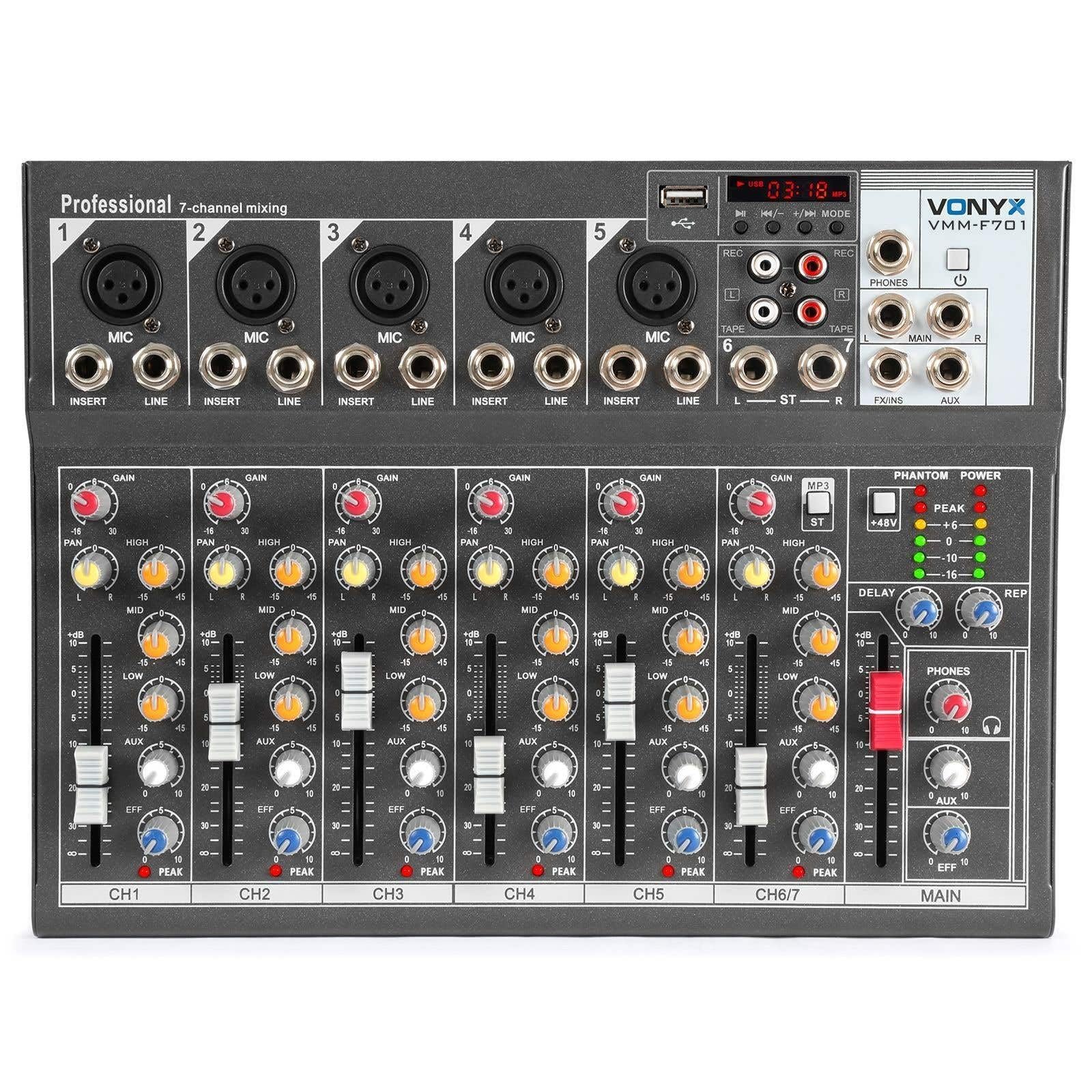
全体 view of the Vonyx VMM-F701 7-channel mixer, showcasinコンパクトなデザインとコントロールレイアウトが特徴です。

トップダウン view of the Vonyx VMM-F701 mixer, highlighting the input channels, faders, and equalization knobs.

Close-up of the USB input and media player controls on the Vonyx VMM-F701 mixer, with a USB drive inserted.

Rear panel of the Vonyx VMM-F701 mixer, showing the power input and USB port for external power.
4. セットアップ
- 電源接続: Connect the mixer to a 230Vac/50Hz power source using the provided power cable. The mixer can also be powered via USB (5V/1A) for certain functions.
- 入力接続:
- For microphones, use XLR or 6.3mm jack cables to connect to channels 1-5. Activate +48V phantom power for condenser microphones.
- For line-level instruments or devices, use 6.3mm jack cables to connect to channels 1-5 (line inputs) or the stereo line input (channels 6/7).
- 出力接続: メインスピーカーを接続するか、 amplifier to the balanced stereo main output (6.3mm Jack).
- ヘッドフォン: Connect headphones to the dedicated headphone output for monitoring.

詳細 view of the mains power input and a wiring diagram for microphone/line inputs on the Vonyx VMM-F701 mixer.
5. 操作手順
- ゲインコントロール: Adjust the input sensitivity for each channel using the GAIN knob.
- イコライゼーション (EQ): Use the HI, MID, and LOW knobs to adjust the treble, midrange, and bass frequencies for each channel.
- パンコントロール: Adjust the stereo positioning of each channel using the PAN knob.
- FX送信: Use the FX knob to send a portion of the channel's signal to the internal effect processor.
- AUX送信: Use the AUX knob to send a portion of the channel's signal to an external effect unit or monitor mix (via FX Send/Return).
- チャンネルフェーダー: 各チャンネルの音量レベルを個別に調整します。
- Main Fader: ミキサーの全体的な出力音量を制御します。
- Effect Processor: Adjust the DELAY and REP (Repeat) knobs to control the characteristics of the built-in delay effect.
- USBプレーヤー: USBドライブをUSBポートに挿入してオーディオを再生します files. Use the media player controls (play/pause, skip, mode) to navigate and control playback.
- ファントムパワー: Press the +48V PHANTOM POWER button to supply power to condenser microphones. Ensure microphones are connected before activating.
6. メンテナンス
- クリーニング: ミキサーの表面を拭く際は、柔らかく乾いた布をご使用ください。液体洗剤や溶剤は使用しないでください。
- ストレージ: ミキサーは直射日光や極端な温度を避け、涼しく乾燥した場所に保管してください。
- 換気: 過熱を防ぐために、ミキサーの周囲に適切な換気を確保してください。
7。 トラブルシューティング
| 問題 | 考えられる原因 | 解決 |
|---|---|---|
| 音声出力なし | Power off; cables disconnected; faders down; incorrect input selection. | Check power connection; ensure all cables are securely connected; raise channel and main faders; verify correct input source. |
| 歪んだ音 | 入力ゲインが高すぎる、出力レベルが高すぎる、ケーブルに障害がある。 | Reduce GAIN knob; lower main fader; try a different cable. |
| マイクが機能しない | Phantom power off (for condenser mics); mic not connected; faulty mic. | Activate +48V PHANTOM POWER; check mic connection; test with another microphone. |
| USB player not working | USBドライブが認識されません。サポートされていません file 形式。 | Ensure USB drive is properly inserted; try a different USB drive; check file formats (e.g., MP3). |
8. 仕様
| 特徴 | 仕様 |
|---|---|
| モデル番号 | VMM-F701 |
| チャンネル数 | 7 |
| 周波数範囲 | 20 Hz - 20 kHz |
| THD(全高調波歪み) | <0.01% |
| 信号対ノイズ比 | >110デシベル |
| 出力レベル | ±1V |
| ライン入力感度 | ±150mV |
| マイク入力感度 | ±1.5mV |
| コネクションVol。tage | 230Vac / 50Hz (USB 5V/1A) |
| 寸法(長さ×幅×高さ) | 230 x 312 x 45 mm (9.06 x 12.28 x 1.77 インチ) |
| 重さ | 2.25 kg (4.96 ポンド) |
| 接続技術 | USB |
| オーディオ入力 | XLR, 1/4 inch (6.3 mm) jack |
| 出力コネクタタイプ | TRS 1/4" (balanced) |
9. 保証とサポート
保証: This product comes with a 2-year warranty on spare parts. For warranty claims, please retain your proof of purchase.
サポート: For technical assistance, troubleshooting, or service inquiries, please contact your local Vonyx dealer or visit the official Vonyx webサポート リソースのサイト。