
導入
This manual provides essential instructions for the Jam Audio Out There Active Noise Cancelling On-Ear Bluetooth Headphones. Please read this guide thoroughly to ensure proper use, maintenance, and to maximize your listening experience. These headphones offer active noise cancellation, Bluetooth connectivity, hands-free calling, and a comfortable on-ear design.
箱の中身
パッケージ内のすべてのアイテムが揃っていることを確認します。
- Out There Headphones
- AUXケーブル(3.5mm)
- USB充電ケーブル
- クイックスタートガイド(詳細な手順についてはこのマニュアルを参照してください)

Image: Contents of the Jam Audio Out There headphone package, including the headphones, AUX cable, and USB charging cable.
製品終了view およびコントロール
Familiarize yourself with the headphone's layout and controls for optimal use.
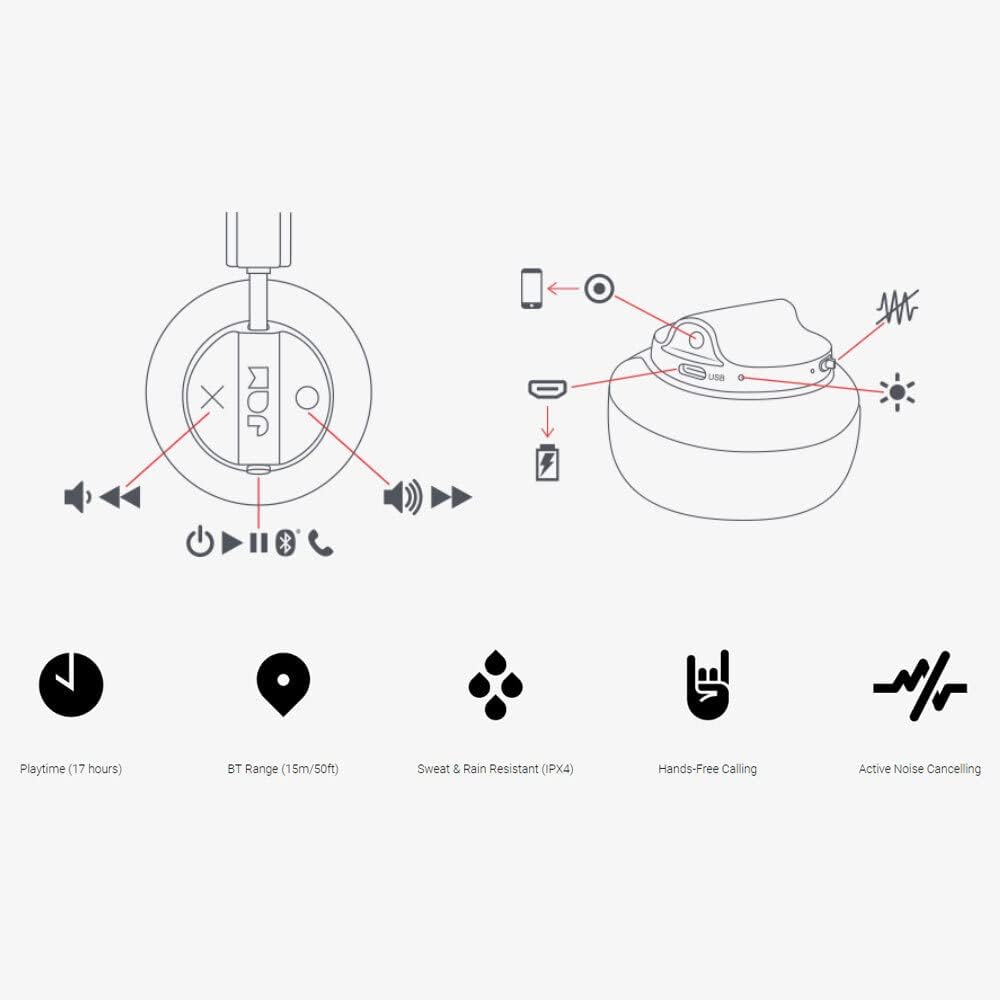
Image: Detailed diagram illustrating the control buttons and ports on the Jam Audio Out There headphones, including power, volume, track navigation, call management, and the charging port.
- 電源ボタン: 押し続けると電源がオン/オフになります。
- ボリュームアップ/次のトラック: 短く押すと音量が上がり、長く押すと次のトラックに進みます。
- 音量ダウン/前のトラック: 短く押すと音量が下がり、長く押すと前のトラックに戻ります。
- 再生/一時停止/通話応答: 1 回押すと、音楽の再生/一時停止、または通話の応答/終了ができます。
- Active Noise Cancelling (ANC) Switch: Toggle to activate or deactivate noise cancellation.
- 充電ポート: 充電用のマイクロUSBポート。
- AUX入力ポート: 有線オーディオ接続用の 3.5mm ジャック。
設定
1. ヘッドフォンを充電する
Before first use, fully charge your headphones. Connect the provided USB charging cable to the charging port on the headphones and the other end to a USB power source. The LED indicator will show charging status and turn off when fully charged. A full charge takes approximately 2 hours and provides up to 17 hours of playtime.

Image: The Jam Audio Out There headphones provide up to 17 hours of playtime on a single charge.
2.電源のオン/オフ
- To power on: Press and hold the Power button for 3 seconds. The LED indicator will flash.
- 電源を切るには:電源ボタンを3秒間押し続けます。LEDインジケーターが消灯します。
3.Bluetoothペアリング
- ヘッドフォンの電源がオフになっていることを確認してください。
- LED インジケーターが赤と青に点滅してペアリング モードになるまで、電源ボタンを 5 秒間押し続けます。
- デバイス(スマートフォン、タブレット、コンピューター)で Bluetooth を有効にし、利用可能なデバイスを検索します。
- Select "JAM Out There" from the list of devices.
- Once paired, the LED indicator on the headphones will turn solid blue.
- The headphones have a Bluetooth range of up to 15 meters (50 feet).

Image: The Jam Audio Out There headphones offer Bluetooth compatibility, allowing a range of up to 15 meters or 50 feet from your connected device.
操作手順
音楽再生に
- 再生/一時停止: 再生/一時停止ボタンを 1 回押します。
- 次のトラック: 音量アップボタンを長押しします。
- 前のトラック: 音量ダウンボタンを長押しします。
- 音量調整: 音量アップボタンまたは音量ダウンボタンを短く押します。
ハンズフリー通話
- 通話の応答/終了: 再生/一時停止ボタンを 1 回押します。
- 通話を拒否: 再生/一時停止ボタンを 2 秒間押し続けます。
- 電話を掛ける: Initiate the call from your connected device. The audio will automatically transfer to the headphones.
- Music will automatically pause during a call and resume after the call ends.
アクティブノイズキャンセリング(ANC)
- To activate ANC: Slide the ANC switch to the ON position. The ANC indicator light will illuminate.
- To deactivate ANC: Slide the ANC switch to the OFF position. The ANC indicator light will turn off.
- Using ANC can reduce ambient noise, enhancing your listening experience. Note that ANC can be used independently or with Bluetooth audio.
Wired Connection (AUX-in)
For a wired connection, use the provided 3.5mm AUX cable. Plug one end into the headphone's AUX-in port and the other into your audio device. This allows you to continue listening even if the headphone battery is depleted or if Bluetooth is not available.
メンテナンス
- クリーニング: ヘッドホンは柔らかく乾いた布で拭いてください。刺激の強い化学薬品や研磨剤は使用しないでください。
- ストレージ: ヘッドフォンは、極端な温度を避け、涼しく乾燥した場所に保管してください。
- 耐水性: These headphones are IPX4 rated, meaning they are resistant to sweat and light splashes of water. Do not submerge them in water or expose them to heavy rain. Ensure the charging port cover is securely closed when not charging to maintain water resistance.
- バッテリーのケア: バッテリー寿命を延ばすには、ヘッドフォンを頻繁に完全に放電させないでください。長期間使用しない場合でも、定期的に充電してください。
トラブルシューティング
| 問題 | 解決 |
|---|---|
| ヘッドホンの電源が入らない | ヘッドホンが充電されていることを確認してください。USBケーブルを使って電源に接続してください。 |
| Bluetoothでペアリングできない |
|
| 音が出ない、または音量が小さい |
|
| アクティブノイズキャンセリングが機能しない | Ensure the ANC switch is in the ON position and the ANC indicator light is illuminated. |
| Headphones falling apart or breaking | While the product is designed for durability, excessive force or improper handling can cause damage. Handle with care. If issues persist, refer to warranty information. |
仕様
- モデル名: 外の世界
- モデル番号: HX-HP303BK
- 接続性: Bluetooth, 3.5 mm Jack (AUX-in)
- 無線範囲: 最大15メートル(50フィート)
- バッテリー寿命: 最大17時間
- 騒音制御: アクティブノイズキャンセリング
- 耐水性: IPX4 Rated (Sweat and Rain Resistant)
- 耳の配置: 耳に
- 材料: ゴム、シリコン
- 商品の重量: 5.1オンス(0.32ポンド)
- 製品寸法: 8.58 x 3.19 x 8.66インチ
- 含まれるコンポーネント: Headphones, Charging Cord, AUX Cable
製品ビデオ終了view
ビジュアルについては、この公式製品ビデオをご覧ください。view of the Jam Audio product line, including the Out There headphones.
Video: An official Jam Audio sizzle video showcasing various products, including the Out There headphones, highlighting their design and features.
保証とサポート
For warranty information, product registration, or technical support, please refer to the official Jam Audio web購入サイトをご覧いただくか、カスタマーサービスまでお問い合わせください。保証請求のために購入証明書を保管してください。