
1. はじめに
Thank you for choosing the Eaton 187083 USB 3.0 Flush-Mount Receptacle. This product is designed to provide a convenient and integrated USB 3.0 port for various applications, featuring a flat front and a 30 cm cable for front mounting. This manual provides essential information for the safe and effective installation, operation, and maintenance of your device.
2. 安全情報
デバイスの設置または操作を行う前に、すべての安全に関する指示をよくお読みください。指示に従わない場合、怪我をしたり、製品が損傷したりする可能性があります。
- Ensure power is disconnected before installation to prevent electrical shock.
- 電気配線について不明な点がある場合は、資格のある人が設置を行う必要があります。
- デバイスを湿気や極端な温度にさらさないでください。
- Use only with compatible USB 3.0 devices and cables.
3. パッケージ内容
開梱時にすべてのアイテムが揃っていることを確認します。
- 1 x Eaton 187083 USB 3.0 Flush-Mount Receptacle with 30 cm cable
4. Installation (Front Mounting)
The Eaton 187083 is designed for front mounting, providing a clean, integrated look. Follow these steps for proper installation:
- 取り付け面を準備します。 Identify a suitable location for the receptacle. Ensure there is enough space behind the mounting surface for the 30 cm cable and its connection.
- Create the Opening: Cut an appropriate-sized opening in the mounting panel. Refer to the product dimensions for precise measurements (e.g., 70 x 46 mm for the front face, though the cutout size will be slightly smaller).
- Insert the Receptacle: Carefully insert the front of the USB receptacle into the prepared opening from the front of the panel. The flat front design should sit flush with the surface.
- Secure the Receptacle: Use appropriate fasteners (not included, typically screws or clips depending on the panel design) to secure the receptacle firmly in place from the front or rear, ensuring it does not move.
- ケーブルを接続します。 Route the integrated 30 cm USB 3.0 cable to your host device (e.g., computer, hub, or other USB 3.0 compatible equipment). Ensure the connection is secure.
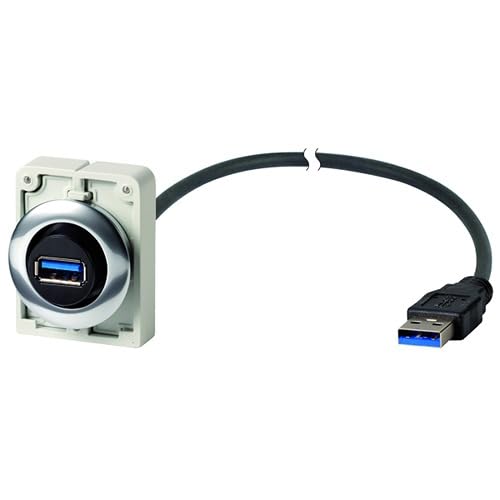
Figure 1: Eaton 187083 USB 3.0 flush-mount receptacle. This image shows the flat front design and the integrated 30 cm cable for connection.
5. 操作
Operating the Eaton 187083 USB 3.0 Flush-Mount Receptacle is straightforward:
- Ensure the receptacle is correctly installed and its 30 cm cable is connected to a powered USB 3.0 host port.
- Plug your USB 3.0 compatible device (e.g., flash drive, external hard drive, camera) into the front-facing USB port of the Eaton 187083 receptacle.
- The connected device should be recognized by your host system. Data transfer will occur at USB 3.0 speeds, provided both the host and the connected device support USB 3.0.
6. メンテナンス
The Eaton 187083 requires minimal maintenance:
- クリーニング: Use a soft, dry cloth to wipe the surface of the receptacle. Do not use abrasive cleaners or solvents.
- 検査: Periodically check the connections and the receptacle for any signs of damage or wear.
- 環境条件: Ensure the operating environment remains within specified temperature and humidity ranges to prolong the life of the device.
7。 トラブルシューティング
If you encounter issues with your Eaton 187083, refer to the following common solutions:
- デバイスが認識されません:
- Ensure the 30 cm cable is securely connected to a functional USB 3.0 port on your host device.
- Try connecting the USB device directly to the host port to rule out issues with the device itself.
- ホストシステムを再起動します。
- データ転送が遅い:
- Verify that both your host port and the connected device are USB 3.0 compatible. If either is USB 2.0, speeds will be limited to USB 2.0.
- Ensure the cable connection is secure.
8. 仕様
| メーカー | イートン |
| モデル番号 | 187083 |
| 製品寸法(長さ x 幅 x 高さ) | 70 x 46 x 160 cm (overall); 80 grams |
| ケーブル長さ | 30センチ |
| USBの標準 | USB3.0 について |
| 取り付けタイプ | Front Mount, Flush Front |
| パッケージ内のアイテム数 | 1 |
| ASIN | B0797PYMNT |
| 初回利用可能日 | 10年2018月XNUMX日 |
9. 保証とサポート
Worldwide Eaton Warranty: This product is covered by a worldwide Eaton warranty. For specific terms and conditions, please refer to the official Eaton warranty documentation or contact Eaton customer service.
カスタマーサポート: For technical assistance, troubleshooting beyond this manual, or warranty claims, please visit the official Eaton website or contact their customer support department. You can find contact information on the Eaton webサイト: イートン