
1. はじめに
This manual provides detailed instructions for the installation, operation, and maintenance of the Novastar MCTRL300 Synchronous LED Sender Box. Please read this manual thoroughly before using the device to ensure proper functionality and to prevent damage.
The Novastar MCTRL300 is a high-performance LED display controller designed for full-color LED screens, offering reliable and stable operation for various indoor and outdoor applications.
2.製品オーバーview および機能
The Novastar MCTRL300 is a full-color sending card and LED display accessory. It is engineered to manage LED displays with high efficiency and precision.
主な特徴:
- DVI入力: One (1) DVI input for video signal connection.
- オーディオ入力: Supports external audio input.
- データ出力: Two (2) RJ45 ports for data output, supporting hot backup functionality for enhanced reliability.
- 制御インターフェース: USB control interface, allowing for cascading multiple units.
- ピクセル容量: 最大1.3万画素をサポートします。
- サポートされている解像度: Includes 1280×1024, 1024×1200, 1600×848, 1920×712, 2048×668, and custom resolutions.
- 光センサーインターフェース: One (1) interface for automatic brightness adjustment based on ambient light conditions.
- 応用: Suitable for both indoor and outdoor full-color RGB LED display control.
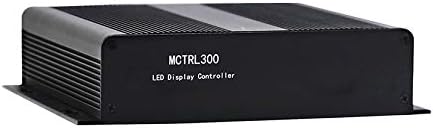
図2.1: 前面 view of the Novastar MCTRL300 LED Sender Box, showing the model name.
3. セットアップと接続
This section details the physical connections required to set up your Novastar MCTRL300 LED Sender Box.
3.1リアパネルオーバーview

Figure 3.1: Rear panel of the MCTRL300, illustrating power input, DVI, USB, audio, UART, and RJ45 data output ports.
- Power Input (AC 100-240V ~ 50/60Hz): Connect the provided power cable to this port and to a suitable power outlet. The power switch is located next to this port.
- DVI入力: Connect your video source (e.g., PC graphics card) to this port using a DVI cable.
- USBポート: Connect a USB cable from your control PC to this port for device configuration and control.
- オーディオ入力: Connect an external audio source if audio transmission is required.
- RJ45 Data Output (OUT1, OUT2): Connect standard Ethernet cables from these ports to the receiving cards of your LED display. OUT1 and OUT2 support hot backup.
- UART IN/OUT: Used for cascading multiple sender boxes or for specific control scenarios.
- 光センサー: Connect an external light sensor for automatic brightness adjustment.
3.2接続図
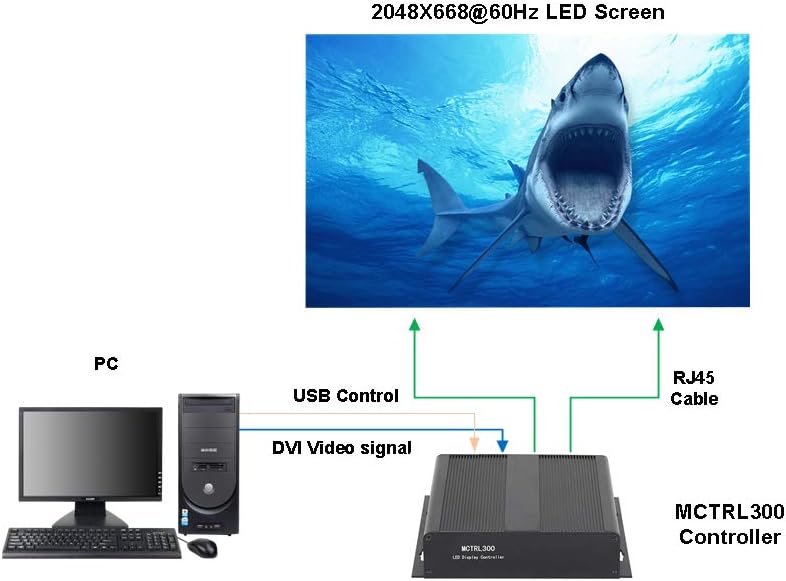
Figure 3.2: Typical connection setup for the MCTRL300, illustrating DVI video signal, USB control, and RJ45 data output to an LED screen.
- Connect the DVI output from your PC's graphics card to the DVI input port on the MCTRL300.
- Connect a USB cable from your PC to the USB port on the MCTRL300. This enables software control and configuration.
- Connect one or more RJ45 Ethernet cables from the MCTRL300's OUT1/OUT2 ports to the input ports of the first receiving card in your LED display panel chain. Ensure proper cabling for the entire LED screen.
- Connect the power cable to the MCTRL300 and a power source.
- Turn on the power switch on the rear panel of the MCTRL300. The "RUN" and "STATUS" indicators will illuminate.
4. 操作手順
After completing the physical connections, the MCTRL300 is ready for operation. Configuration and content management are typically performed using dedicated software on the connected PC.
- 電源オン: Ensure all connections are secure, then switch on the power to the MCTRL300 using the rear panel switch.
- ソフトウェア構成: Use the Novastar control software on your PC to detect the MCTRL300. Configure the LED display parameters, including resolution, screen mapping, and brightness settings. Refer to the software's user guide for detailed instructions.
- コンテンツの再生: Once configured, the MCTRL300 will transmit the video signal from your PC to the LED display. Ensure your PC's display settings match the configured resolution for optimal output.
- 明るさ調整: If a light sensor is connected, the display brightness can be automatically adjusted. Manual adjustment is also possible via the control software.
5. メンテナンス
Proper maintenance ensures the longevity and reliable performance of your MCTRL300 LED Sender Box.
- クリーニング: デバイスの外装は、柔らかく乾いた布で定期的に清掃してください。液体洗剤や溶剤の使用は避けてください。通気口に埃やゴミが詰まっていないことを確認してください。
- 環境条件: Operate the device within its specified temperature and humidity ranges. Avoid exposure to extreme temperatures, direct sunlight, or high moisture environments.
- ケーブル管理 すべてのケーブルがしっかりと接続され、張力がかかっていないことを確認してください。ケーブルに摩耗や損傷の兆候がないか定期的に確認してください。
- ソフトウェアアップデート: Keep the Novastar control software and device firmware updated to the latest versions for optimal performance and compatibility.
6。 トラブルシューティング
This section provides solutions to common issues you might encounter with the MCTRL300.
| 問題 | 考えられる原因 | 解決 |
|---|---|---|
| No display on LED screen. |
|
|
| "RUN" or "STATUS" indicator not lit. |
|
|
| Display shows abnormal colors or flickering. |
|
|
If the problem persists after attempting these solutions, please contact Novastar technical support.
7. 仕様
Technical specifications for the Novastar MCTRL300 LED Sender Box.
| 特徴 | 詳細 |
|---|---|
| ブランド | ノヴァスター |
| モデル | MCTRL300 について |
| 入力インタフェース | 1 x DVI, External Audio |
| 出力インターフェース | 2 x RJ45 (Data Output, Hot Backup), UART OUT |
| 制御インターフェース | 1 x USB, UART IN |
| ピクセル容量 | 1.3万画素 |
| サポートされている解像度 | 1280×1024, 1024×1200, 1600×848, 1920×712, 2048×668, or custom |
| 特集 | Light Sensor Interface for auto brightness adjustment, Cascading support via USB |
| 電源 | AC 100-240V〜50 / 60Hz |
| アイテム重量 | 3.88ポンド(約1.76kg) |
| パッケージ寸法 | 11.1 x 8.54 x 4.57インチ(約28.2 x 21.7 x 11.6 cm) |

Figure 7.1: MCTRL300 package contents, including the sender box and necessary cables.
8. サポート
For further assistance, technical support, or warranty inquiries, please refer to the official Novastar webサイトをご覧いただくか、正規販売店にお問い合わせください。
Always ensure you have your product model number (MCTRL300) and purchase details available when contacting support.