
1. はじめに
ご購入ありがとうございますasing the Capello Play it All Bluetooth Wireless Home Stereo Speaker CI302. This device offers versatile audio playback options including Bluetooth wireless streaming, CD player functionality, and FM digital radio. This manual provides detailed instructions for setup, operation, maintenance, and troubleshooting to ensure optimal performance and longevity of your speaker system.
2. 重要な安全情報
- デバイスを操作する前に、すべての指示をお読みください。
- このマニュアルは将来の参照用に保管してください。
- 火災や感電の危険を防ぐため、ユニットを雨や湿気にさらさないでください。
- 適切な換気を確保し、換気口を塞がないようにしてください。
- ユニットを安定した平らな面に置きます。
- メーカー指定のアタッチメント/アクセサリのみを使用してください。
- 雷雨のときや長期間使用しない場合は、ユニットのプラグを抜いてください。
- すべてのメンテナンスは資格のあるサービス担当者に依頼してください。
3. パッケージ内容
すべての項目が揃っていることを確認してください:
- Capello Play it All Bluetooth Wireless Home Stereo Speaker CI302
- リモートコントロール
- AC電源アダプター
- ユーザーマニュアル(このドキュメント)
4.製品オーバーview
Familiarize yourself with the main components and controls of your Capello Play it All speaker.
フロント View

図4.1: フロント view of the Capello Play it All speaker, showing the speaker grille, digital clock display, and subtle branding.
トップパネルコントロール

図4.2: Top panel of the Capello Play it All speaker, illustrating the CD compartment, 'capello' logo, and various control buttons including PRESET, MODE, PAIRING, PROGRAM/CLOCK SET, SKIP, PLAY/PAUSE, STOP, REPEAT, and VOLUME.
- プリセット +/-: Navigate through saved FM radio stations.
- モード: Switch between Bluetooth, CD, FM Radio, and Line-In modes.
- ペアリング: Bluetoothペアリングモードを開始します。
- PROGRAM/CLOCK SET: Program CD tracks or set the clock.
- SKIP ◀◀ / ▶▶: Skip tracks on CD or adjust FM frequency.
- PLAY/PAUSE ▶▶: CD の再生を再生または一時停止します。
- STOP ■: Stop CD playback.
- 繰り返す: Repeat current track or all tracks on CD.
- VOL +/-: 音量レベルを調整します。
- 開閉: CD コンパートメントを開閉します。
- 待機する: ユニットの電源をオン/オフにします。
Rear Panel (Typical)
The rear panel typically includes the AC power input, FM antenna connection, and Line-In jack.
5. セットアップ
5.1電源接続
- Connect the AC power adapter to the DC IN jack on the rear of the speaker.
- アダプタのもう一方の端を標準の壁のコンセントに差し込みます。
- The unit will enter standby mode, and the digital clock display will illuminate.
5.2 FMアンテナのセットアップ
For optimal FM radio reception, extend the FM wire antenna fully and position it for the best signal. Avoid placing it near other electronic devices that may cause interference.
5.3時計の設定
- スタンバイモードでは、 PROGRAM/CLOCK SET ボタン。
- The hour digits will begin to flash. Use the SKIP ◀◀ / ▶▶ 時間を調整するボタン。
- プレス PROGRAM/CLOCK SET もう一度押して時間を確認します。
- 「分」の数字が点滅します。 SKIP ◀◀ / ▶▶ 分を調整するためのボタン。
- プレス PROGRAM/CLOCK SET one last time to save the setting.
6. 操作手順
6.1 電源のオン/オフとモードの選択
- を押す STANDBY button on the unit or the remote control to turn the speaker on or off.
- を押す モード button repeatedly to cycle through available modes: Bluetooth, CD, FM Radio, and Line-In.
6.2 Bluetoothワイヤレスストリーミング
- スピーカーの電源をオンにし、 モード ボタンを押します。ディスプレイに「BT」と表示され点滅し、ペアリングモードになっていることを示します。
- Bluetooth 対応デバイス (スマートフォン、タブレット、コンピューター) で Bluetooth を有効にし、利用可能なデバイスを検索します。
- Select 'Capello CI302' (or similar) from the list of devices.
- Once paired, the speaker will emit a confirmation tone, and 'BT' on the display will stop flashing.
- You can now play audio from your device through the speaker. Use your device or the speaker's controls for volume and track navigation.
6.3 CD再生
- を押す 開く/閉じる CDコンパートメントを開くボタン。
- Carefully place an audio CD (CD, CD-R/-RW) with the label side facing up into the compartment.
- CDコンパートメントを閉じてください。ユニットがディスクを読み取ります。
- If not already in CD mode, press the モード ボタンをクリックしてCDモードを選択します。
- を押す 再生/一時停止 ボタンをクリックして再生を開始します。
- 使用 SKIP ◀◀ / ▶▶ to skip tracks, STOP■ 停止し、 繰り返す to cycle through repeat options.
6.4 FMデジタルラジオ
- を押す モード button to select FM radio mode. The current frequency will be displayed.
- 自動スキャン: を押し続けます 再生/一時停止 ボタンを押すと、利用可能な FM 局が自動的にスキャンされ、プリセットとして保存されます。
- 手動チューニング: プレス SKIP ◀◀ / ▶▶ briefly to fine-tune the frequency. Press and hold to scan for the next strong station.
- プリセットへのアクセス: 使用 プリセット +/- 保存したステーション間を循環するボタン。
6.5 Line-In Operation
- Connect an audio cable (not included) from the headphone jack or line-out of an external audio device to the ラインイン jack on the speaker.
- を押す モード button to select Line-In mode.
- Play audio from your connected device. Volume can be controlled via the speaker or the external device.
6.6USB充電
The speaker features a USB port for charging compatible devices (e.g., smartphones, tablets). Connect your device's USB charging cable (not included) to the USB port on the speaker. The speaker does not need to be in a specific mode for USB charging to function.
6.7 リモートコントロールの使用
The included remote control provides convenient access to all functions. Ensure the remote has working batteries and is pointed towards the front of the speaker.
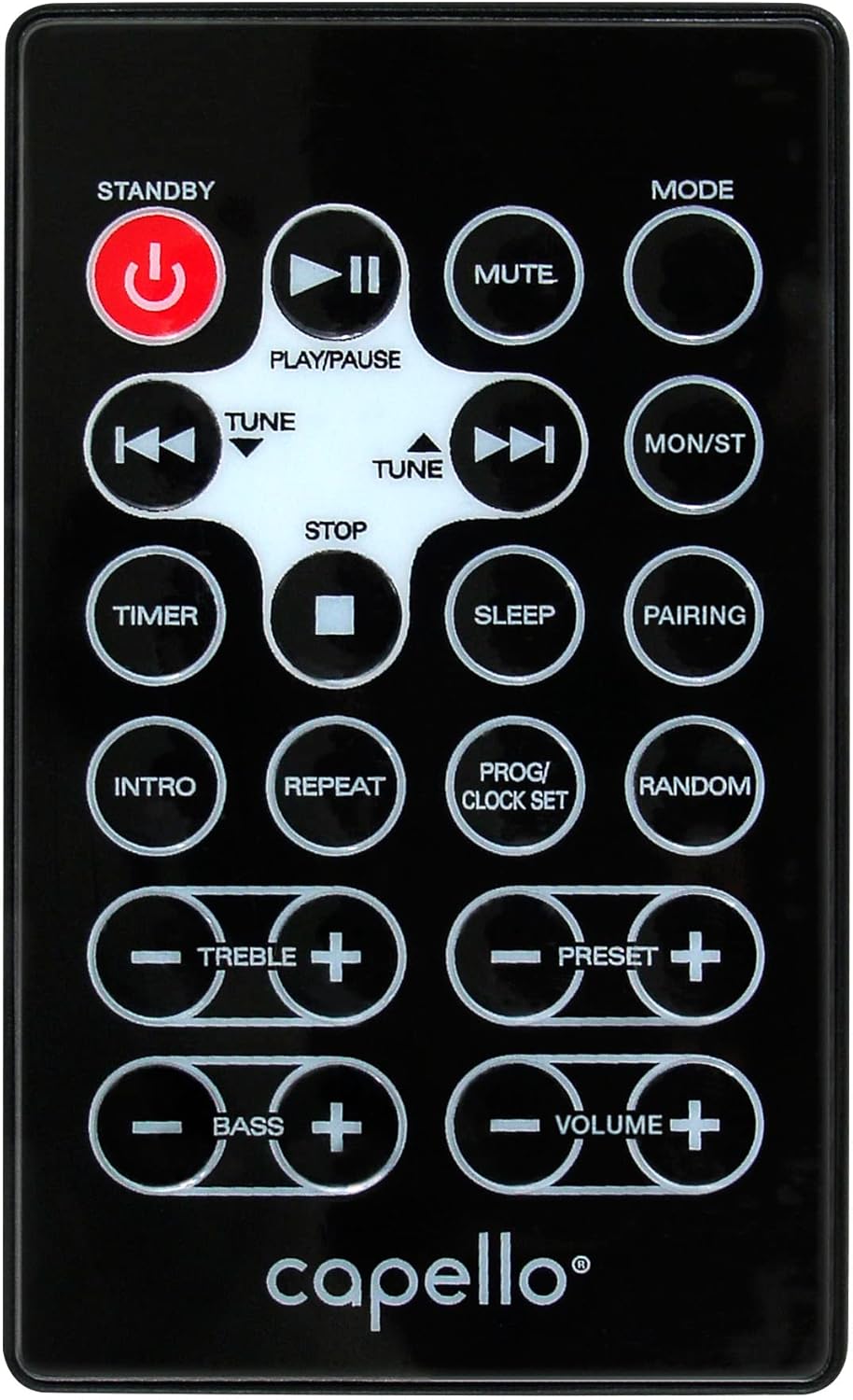
図6.1: Layout of the remote control for the Capello Play it All speaker, showing buttons for Standby, Play/Pause, Mute, Mode, Skip/Tune, Stop, Timer, Sleep, Pairing, Intro, Repeat, Program/Clock Set, Random, Treble, Bass, and Volume controls.
- 待機する: 電源のオン/オフ。
- 再生/一時停止: オーディオを再生または一時停止します。
- ミュート: オーディオをミュートまたはミュート解除します。
- モード: 入力モードを切り替えます。
- SKIP/TUNE ◀◀ / ▶▶: Skip tracks or tune radio frequency.
- 停止: 再生を停止します。
- タイマー: スリープタイマーを設定します。
- 寝る: Activate sleep function.
- ペアリング: Bluetoothのペアリングを開始します。
- はじめに: Play the first few seconds of each CD track.
- 繰り返す: Repeat current track or all tracks.
- PROG/CLOCK SET: Program CD tracks or set clock.
- ランダム: CD トラックをランダムな順序で再生します。
- TREBLE +/-: 高音レベルを調整します。
- 低音 +/-: 低音レベルを調整します。
- ボリューム+/-: 全体の音量を調整します。
7. メンテナンス
7.1 クリーニング
- 清掃する前に、必ず電源コンセントからユニットのプラグを抜いてください。
- 外側の表面を拭くときは、柔らかく乾いた布を使用してください。
- 仕上げを傷める恐れがあるため、研磨剤入りの洗剤、ワックス、溶剤は使用しないでください。
- CD レンズには専用の CD レンズクリーナー ディスクを使用してください。
7.2 ストレージ
ユニットを長期間保管する場合は、電源プラグを抜き、直射日光や極端な温度を避けて、涼しく乾燥した場所に保管してください。
8。 トラブルシューティング
| 問題 | 考えられる原因 | 解決 |
|---|---|---|
| 電源なし | 電源コードが接続されていません。コンセントがアクティブではありません。 | 電源コードがしっかりと差し込まれていることを確認し、別のコンセントを試してください。 |
| 音が出ない | Volume too low; incorrect mode selected; external device muted. | Increase volume; select correct input mode; check external device volume/mute. |
| CDがスキップしたり再生されない | Dirty or scratched CD; CD inserted incorrectly; dirty CD lens. | Clean or replace CD; insert CD label-side up; use a CD lens cleaner. |
| Bluetoothペアリングが失敗する | Device too far; Bluetooth not enabled on device; speaker not in pairing mode. | Move device closer; enable Bluetooth; ensure speaker is in BT pairing mode. |
| FM受信状態が悪い | アンテナが伸びていない、干渉がある。 | Fully extend and reposition FM antenna; move away from other electronics. |
| リモコンが動作しない | Batteries depleted; obstruction; not pointed at sensor. | Replace batteries; remove obstructions; point remote directly at the unit. |
9. 仕様
| 特徴 | 仕様 |
|---|---|
| ブランド | カペッロ |
| モデル番号 | CI302 |
| 接続技術 | ブルートゥース |
| スピーカータイプ | ステレオ |
| オーディオ出力モード | ステレオ |
| サポートされているオーディオ形式 | CD、MP3 |
| スピーカー公称出力 | 10ワット |
| スピーカーの最大出力パワー | 10ワット |
| スピーカーサラウンドサウンドチャンネル構成 | 2.0 |
| 電源タイプ | コード式電気 |
| 対応デバイス | ノートパソコン、スマートフォン、タブレット |
| 特集 | Digital Display, Portable, USB Port |
| 材質タイプ | プラスチック |
| 取り付けタイプ | テーブルトップ |
| アイテム重量 | 2.57キログラム |
| パッケージ寸法 | 38.3 x 24.2 x 18.5 cm |
| 電池付属 | いいえ |
| 電池が必要 | いいえ |
10. 保証とサポート
This product is covered by a limited warranty. Please refer to the warranty card included in your package for specific terms and conditions. For technical support or customer service inquiries, please contact Capello customer support through their official webサイトまたは購入書類に記載されている連絡先情報をご覧ください。