
1. はじめに
Thank you for choosing the ELECDER i37 Kids On-Ear Headphones. These headphones are designed for children and teens, offering a comfortable and adjustable listening experience. They feature a foldable design for portability and connect via a standard 3.5mm audio jack, compatible with a wide range of devices.

Image: Child wearing ELECDER i37 headphones.
2. 安全情報
- 聴覚保護: 聴覚障害を防ぐため、長時間にわたって大音量で聴くことは避けてください。
- 環境への意識: 運転中、自転車に乗っているとき、または交通量の多い場所で歩いているときなど、周囲の音が聞こえないと危険になる可能性がある状況では、ヘッドホンを使用しないでください。
- コードの安全性: Keep the headphone cable away from sharp objects or moving parts to prevent damage. Ensure the cable does not pose a tripping hazard.
- No Volume Control: Please note that these headphones do not feature an integrated volume control. Adjust the volume directly on the connected audio device.
- 窒息の危険: This product contains small parts and a cable which could pose a choking or strangulation hazard for very young children. Adult supervision is recommended.
3. パッケージ内容
パッケージにすべてのアイテムが含まれていることを確認します。
- ELECDER i37 Kids On-Ear Headphones
- ユーザーマニュアル(このドキュメント)
4.製品オーバーview
The ELECDER i37 headphones are designed for ease of use and comfort. Key features include:
- 調節可能なヘッドバンド: Allows for a secure and comfortable fit for various head sizes.
- ソフトイヤークッション: 長時間のリスニングでも快適に過ごせるよう設計されています。
- 折りたたみ式デザイン: Enables compact storage and easy portability.
- 絡まりにくいケーブル: The durable cloth-covered cable resists tangling.
- 3.5mmオーディオジャック: Standard connector for broad compatibility.

Ultra Soft Ear Cushions

調整可能なスライダー

絡まりにくいコード

主な特徴
5. セットアップ
- ヘッドホンを広げる: Gently unfold the earcups from their collapsed position until the headband forms a complete arc.
- ヘッドバンドを調整します。 Extend or retract the adjustable sliders on each side of the headband to fit your head comfortably. The earcups should rest fully over your ears.
- オーディオデバイスに接続します: Insert the 3.5mm audio jack firmly into the headphone port of your smartphone, computer, laptop, MP3/4 player, Kindle, or tablet.
Note on Device Compatibility: For devices like iPhone 7 and newer, or iPad Pro 11 and newer, a separate Lightning to 3.5mm jack adapter (not included) is required.

Image: 3.5mm jack compatibility with various devices.
6. 操作手順
Once connected, you can begin using your ELECDER i37 headphones:
- オーディオを再生: 接続されたデバイスからオーディオの再生を開始します。
- 音量を調整: Control the listening volume directly from your audio source device. These headphones do not have built-in volume controls.
- Comfortable Listening: Ensure the earcups are positioned comfortably over your ears for optimal sound and noise isolation.
Video: Demonstration of ELECDER i37 headphones in use, highlighting their features and comfort.

Enjoying audio

デバイスに接続

旅行に最適
7. メンテナンス
- クリーニング: ヘッドホンを拭く際は、柔らかく乾いた布をご使用ください。液体クリーナーや溶剤は使用しないでください。
- ストレージ: When not in use, fold the headphones to their compact size and store them in a clean, dry place away from extreme temperatures.
- ケーブルのお手入れ: 内部の損傷を防ぐため、ケーブルを急激に曲げたり引っ張ったりしないでください。
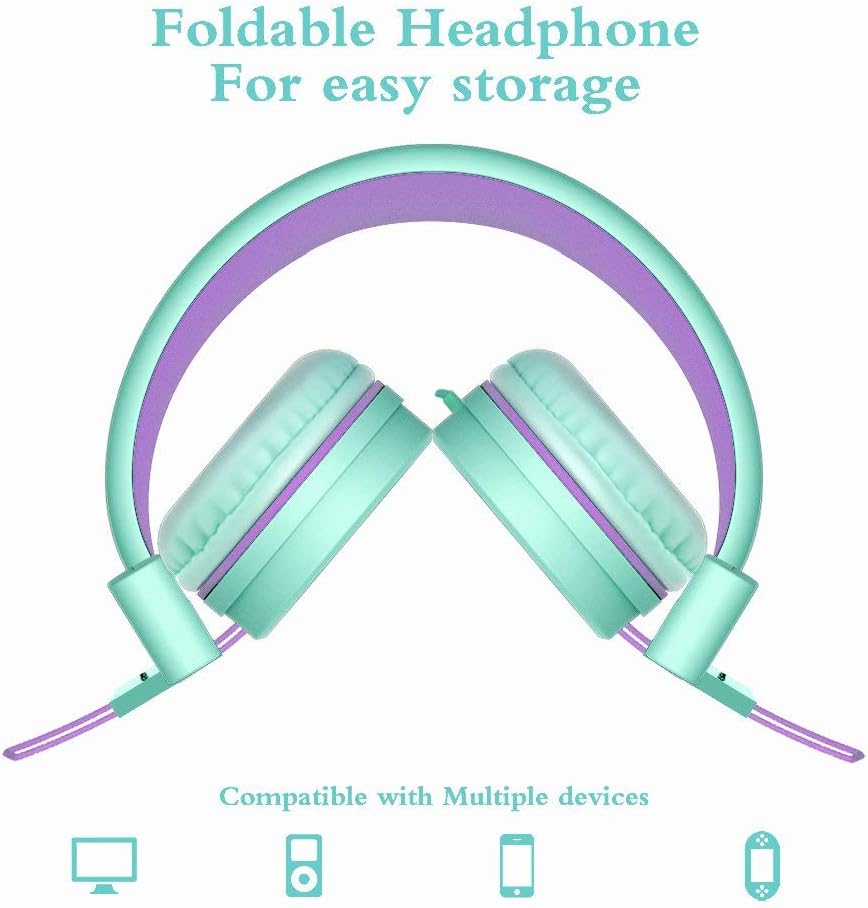
画像: 折りたたみ式デザインで収納も簡単。
8。 トラブルシューティング
| 問題 | 考えられる原因 | 解決 |
|---|---|---|
| 音が出ない | 1. Headphone jack not fully inserted. 2. Device volume is too low or muted. 3. デバイスで間違ったオーディオ出力が選択されています。 | 1. Ensure the 3.5mm jack is fully inserted into the device. 2. Increase the volume on your audio device and check for mute settings. 3. Verify that the correct audio output (e.g., "Headphones") is selected in your device's sound settings. |
| 歪んだ音 | 1. Volume too high on device. 2. Audio source quality is poor. 3. ケーブルまたはコネクタが破損している。 | 1. Lower the volume on your audio device. 2. Try a different audio source or file. 3. Inspect the cable and jack for visible damage. If damaged, contact support. |
| ヘッドホンが不快 | ヘッドバンドの調整が不適切です。 | Adjust the headband sliders to find a comfortable and secure fit. Ensure earcups are centered over the ears. |
9. 仕様
| 特徴 | 詳細 |
|---|---|
| モデル名 | 37 円 |
| 接続技術 | 有線(3.5 mmジャック) |
| 騒音制御 | 遮音性 |
| オーディオドライバーのサイズ | 40ミリメートル |
| インピーダンス | 32オーム |
| ケーブル機能 | Tangle Free (Cloth) |
| 特集 | Foldable, Lightweight, Adjustable |
| 材料 | プラスチック、布 |
| アイテム重量 | 5.6オンス(158.7グラム) |
| 製品寸法 | 8.9 x 2.8 x 6.1インチ |
| 年齢範囲(説明) | Kid Teen |
10. 保証とサポート
ELECDER provides a 1-Year Hassle-Free Protection for your i37 headphones. This warranty covers manufacturing defects and ensures customer satisfaction.
For any questions, concerns, or support needs regarding your ELECDER i37 headphones, please contact us:
- Amazon経由: Use the Amazon messaging system to reach our customer service team.
- 連絡先: Refer to the contact details provided on the product packaging or included instruction leaflet for direct support options.
Our customer service team is committed to providing a quick response to assist you.